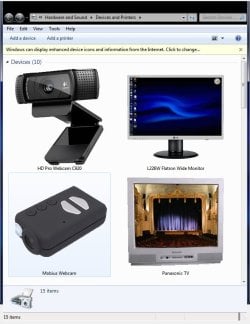
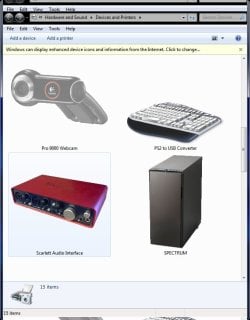
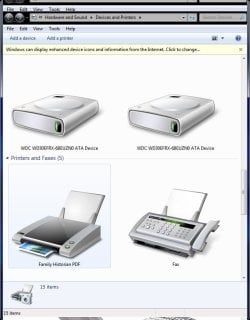
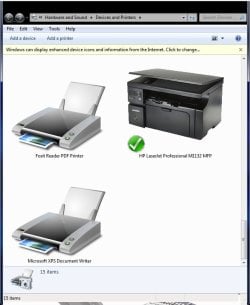
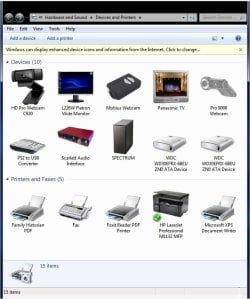
Yellow reminder-bar in Devices window about Enhanced (hi-res) Icons

thepcguy

New member
Member
Local time
6:53 AM
Messages
20
I found an old thread about this but can't find a solution so I'm hoping someone will have found out how to do it.

I set W7 to display enhanced icons for the longest time but it only ever showed my old webcam. Then I used the System File Checker and W7 managed to replace this icon with a generic. I tried every-which-way to get the system to pick up the enhanced icons but it didn't - so please let's not go into that :)
As far as I'm concerned W7's whole metadata package thing is well dodgy!

My question...
After spending a good few hrs trying to make this feature work I made my own icons and metadata packages for all my devices. It's a pretty picture now.

However... now that I've done that and told W7 not to bother looking for icons I get a yellow pop-down reminder bar whenever I open the Device Window. There doesn't seem to be any way to disable it and I feel this is really adding insult to injury. I've had to do M$'s job for them and now they want to mess up my window every time it's opened!

Does anyone have a fix for stopping this reminder bar appearing?
Thanks.

[Please don't give me info about how to turn on the feature in the Advanced Hardware box which (should the feature ever decide to start working) will destroy all my hard work and please DON'T tell me about adjusting Windows Update to make the feature work (which it doesn't) OR reg hacks OR anything else to try to convince me to use this built in automatic feature which is simply NOT FIT FOR PURPOSE. I've tried it all and now I've walked away from it determined never to go back!
I've taken photos of all my devices, edited them into transparent GIFS in PS, created muti-layerd icons and used the Metadata Package Creator to add the icons and other info about my devices. They look fabulous and there's no turning back now.]
 

My Computer My Computer

At a glance

Windows 7
OS
Windows 7
Would you mind posting a screenshot of your icons? I can't help you with your problem but I'd be interested to see them.
 

My Computer My Computer

At a glance

W7 Pro x64 SP1 | W10 Pro IP x64 | W8.1 Pro x6...i7-4790k @ 4GHz (4.4GHz Boost)16GB DDR3 Kingston HyperX Fury @ 1600MHz CL 9...EVGA GTX 980 Classified
Computer type
PC/Desktop
Computer Manufacturer/Model Number
Custom Build
OS
W7 Pro x64 SP1 | W10 Pro IP x64 | W8.1 Pro x64 VM | Linux Mint VM
CPU
i7-4790k @ 4GHz (4.4GHz Boost)
Motherboard
ASUS Sabertooth Z87 (BIOS Rev 2004)
Memory
16GB DDR3 Kingston HyperX Fury @ 1600MHz CL 9-9-9-27
Graphics Card(s)
EVGA GTX 980 Classified
Sound Card
Realtek Onboard
Monitor(s) Displays
Samsung S27D390
Screen Resolution
1920 x 1080
Hard Drives
240GB Intel 520 Series SSD |
Samsung 850 EVO 120GB SSD |
2TB WD Caviar Black |
2TB WD Caviar Green
PSU
Corsair HX850-80 Gold Modular
Case
Cooler Master Silencio 650
Cooling
Corsair H80i w/2 x Corsair SP120 | 2 x 120mm Noctua NF-S12B
Keyboard
Microsoft Sidewinder X4
Mouse
Gigabyte M6900 optical
Internet Speed
152mb
Antivirus
F-Secure
Browser
Firefox 38.0
Other Info
Backup Rig: Win 7 Pro 64-bit | AMD A10-5800k | ASUS F2A85-V Pro | 8GB Samsung DDR3 @1600MHz | 120GB Toshiba SDD | 2TB Seagate HDD | Cooler Master Silencio 550
You have a lot of stuff you don't want to be told about. :confused:
You might start by telling us, what yellow bar are you talking about, I've never had one. The snip asked for would help, if you don't mind me telling you that.

This is the preferred, best way to upload an image or a file to a post.

http://www.sevenforums.com/tutorials/9733-screenshots-files-upload-post-seven-forums.html#post93869

Press the ALT and PrntScrn keys at the same time, this will capture only the active window to use in Paint or your preferred graphics editor.


You may also upload a photo or image you already have on your PC, as you would a file, without using the Snipping tool.
 

My Computer My Computer

At a glance

Windows 7 Ultimate X64 SP1Intel i5-2550K, Differing ~4.4-4.8GHz No buil...16GB G.Skill Sniper 1866MHz @ 2133MHz 2x8GBASUS GTX650TIB-DC2OC-2GD5, (650TI Boost)
Computer type
PC/Desktop
Computer Manufacturer/Model Number
Home Built Desktop By DataTech
OS
Windows 7 Ultimate X64 SP1
CPU
Intel i5-2550K, Differing ~4.4-4.8GHz No built in GPU
Motherboard
ASUS P8Z68-V PRO/GEN3
Memory
16GB G.Skill Sniper 1866MHz @ 2133MHz 2x8GB
Graphics Card(s)
ASUS GTX650TIB-DC2OC-2GD5, (650TI Boost)
Sound Card
Onboard Realtek 5-1
Monitor(s) Displays
Samsung P2570HD
Screen Resolution
1920x1080
Hard Drives
Samsung 840 Pro 256GB SSD for OS, 500GB Seagate Constellation (Enterprise drive) for Data
PSU
Corsair HX650W
Case
Inwin Dragon Rider
Cooling
Hyper 212 EVO w/two Noctua fans, push-pull, @1300 RPM
Keyboard
E-Z Eyes, bright yellow keys with large characters
Mouse
steelseries SENSEI Laser Pro Gaming
Internet Speed
48-51Mbs Mbs down, 11 Mbs up Xfinity Cable
Antivirus
Norton Internet Security 2013
Browser
IE 10, Opera, Pale Moon if needed
Other Info
4 case fans, LG BluRay-RE, ASUS DVD-RW, Mr. Fusion power supply, 1.21 gigawatts.
Hi Boozad...
Like the avatar. Br-Ba is the best TV series ever made!

Not very exciting devices I'm afraid.
The first four pics are XL and the last is all of them at L size.

I know it may seem a bit odd using an actioncam (Mobius) as a webcam but (for those who haven't discovered it yet) the Mobius is an amazingly versatile bit of kit. It does 1080p at 60fps all for about £40 and the quality is every bit as good as the GoPro White. I've got a few of these. No viewfinder but about the size of a box of matches and easy to switch on quickly in the pocket then hold covertly in the hand. You just point it towards what you want to film and with the 80 degree lens it's easy to get everything in shot. It also does stills. I've fitted the one I use as a webcam with an 8" lens extension and installed it behind a bookshelf. That way the only visible part of it, the lens, is the size of a shirt button and the cam itself is completely hidden behind books. I have a couple more that I take out and about. They record to a 32Gb micro SD card and the rechargeable battery will give you about 80 minutes of video. When used as a webcam they need no battery or card of course. The manufacturer sells them from China on eBay - just look for Mobius - others are starting to sell them now but they are much cheaper direct from the makers.

I use the Mobius in conjunction with the Logitech 9000 Pro (my old cam) that I disassembled. The lens of this one is mounted on a very small circuit board and this is covered with black electrical tape. It's hidden in a cardboard box at the other end of the room. Both these cams supply feeds to iSpy on motion detect. It's a security system that uploads live feeds from both the cams that can send alerts and be seen on a browser anywhere if alerted. I'd like to say it's to catch thieves but if the truth be known I look after my very elderly mother who's a bit of a nutter and goes through my stuff when I'm out. I just like to keep an eye on her!

I use the Logitech HD Pro 920 as an ordinary webcam for Skype.

I have my own small IT business but I'm a singer/songwriter in my spare time and use the Scarlet 2i4 USB as an Audio Interface with which to record guitar and vocals to Cakewalk Sonar X3.

Inside the Fractal Design R5 case is my main DAW PC. Gigabyte Z77X-UD5H Mobo with i7-3770 CPU, 32Gb DRAM, 64-bit W7P and an ASUS Xonar Essence STX Sound Card. The video capabilities are lacking compared to gamers' rigs - a Gigabyte GeForce GT610 (fanless) but it has two headers for extended monitor, the Panasonic TV which I use with VLC to play video on. Before the signal gets to the TV it can be switched to an InFocus X1 Projector which sits on top of a cupboard and throws a nice large picture onto the wall on the other side of the room - great for those old 1940s & 1950s B&W Noir films. I don't need 3D graphics or anything complicated. Mostly it functions as a quiet PC for recording sound.

Here are the grabs. You can see the yellow pop-down in all of them and I'd really like to stop it doing that so if you get any ideas... much obliged. Also the two drives are internal but I ran out of SATA connections from the main chipset and when I used two of the secondary connections that run from another chip they show up as removable devices. If anyone can tell me how to remove them from the list of devices and also from the systray add/remove I'd be grateful. Not much point in them being there.

Devices01.jpg

Devices02.jpg

Devices03.jpg

Devices04.jpg

Devices05.jpg
 

My Computer My Computer

At a glance

Windows 7
OS
Windows 7
Stupid question probably, but have you tried clicking the X at the end of the yellow bar?
 

My Computer My Computer

At a glance

W7 Pro x64 SP1 | W10 Pro IP x64 | W8.1 Pro x6...i7-4790k @ 4GHz (4.4GHz Boost)16GB DDR3 Kingston HyperX Fury @ 1600MHz CL 9...EVGA GTX 980 Classified
Computer type
PC/Desktop
Computer Manufacturer/Model Number
Custom Build
OS
W7 Pro x64 SP1 | W10 Pro IP x64 | W8.1 Pro x64 VM | Linux Mint VM
CPU
i7-4790k @ 4GHz (4.4GHz Boost)
Motherboard
ASUS Sabertooth Z87 (BIOS Rev 2004)
Memory
16GB DDR3 Kingston HyperX Fury @ 1600MHz CL 9-9-9-27
Graphics Card(s)
EVGA GTX 980 Classified
Sound Card
Realtek Onboard
Monitor(s) Displays
Samsung S27D390
Screen Resolution
1920 x 1080
Hard Drives
240GB Intel 520 Series SSD |
Samsung 850 EVO 120GB SSD |
2TB WD Caviar Black |
2TB WD Caviar Green
PSU
Corsair HX850-80 Gold Modular
Case
Cooler Master Silencio 650
Cooling
Corsair H80i w/2 x Corsair SP120 | 2 x 120mm Noctua NF-S12B
Keyboard
Microsoft Sidewinder X4
Mouse
Gigabyte M6900 optical
Internet Speed
152mb
Antivirus
F-Secure
Browser
Firefox 38.0
Other Info
Backup Rig: Win 7 Pro 64-bit | AMD A10-5800k | ASUS F2A85-V Pro | 8GB Samsung DDR3 @1600MHz | 120GB Toshiba SDD | 2TB Seagate HDD | Cooler Master Silencio 550
No... not a stupid question. One would have thought that doing that would put it "to sleep" for at least a while but then I found that EVERY time the devices is opened it pops that up... even if the cross on the bar is clicked on then Devices closed and opened only a few seconds later. It's even more anoying than the resurrection of Bing as an update when it's been hidden.
 

My Computer My Computer

At a glance

Windows 7
OS
Windows 7
Sorry I couldn't be more help, I've no idea how to get rid of that. I've always thought of making my own icons too, it's a great idea and I do like yours. Personally I'd just live with that bar but I understand it's annoying and that's not the answer you're looking for. Nice work there.

And yeah BB is probably the greatest TV show ever made, it's at least on a par with The Shield.
 

My Computer My Computer

At a glance

W7 Pro x64 SP1 | W10 Pro IP x64 | W8.1 Pro x6...i7-4790k @ 4GHz (4.4GHz Boost)16GB DDR3 Kingston HyperX Fury @ 1600MHz CL 9...EVGA GTX 980 Classified
Computer type
PC/Desktop
Computer Manufacturer/Model Number
Custom Build
OS
W7 Pro x64 SP1 | W10 Pro IP x64 | W8.1 Pro x64 VM | Linux Mint VM
CPU
i7-4790k @ 4GHz (4.4GHz Boost)
Motherboard
ASUS Sabertooth Z87 (BIOS Rev 2004)
Memory
16GB DDR3 Kingston HyperX Fury @ 1600MHz CL 9-9-9-27
Graphics Card(s)
EVGA GTX 980 Classified
Sound Card
Realtek Onboard
Monitor(s) Displays
Samsung S27D390
Screen Resolution
1920 x 1080
Hard Drives
240GB Intel 520 Series SSD |
Samsung 850 EVO 120GB SSD |
2TB WD Caviar Black |
2TB WD Caviar Green
PSU
Corsair HX850-80 Gold Modular
Case
Cooler Master Silencio 650
Cooling
Corsair H80i w/2 x Corsair SP120 | 2 x 120mm Noctua NF-S12B
Keyboard
Microsoft Sidewinder X4
Mouse
Gigabyte M6900 optical
Internet Speed
152mb
Antivirus
F-Secure
Browser
Firefox 38.0
Other Info
Backup Rig: Win 7 Pro 64-bit | AMD A10-5800k | ASUS F2A85-V Pro | 8GB Samsung DDR3 @1600MHz | 120GB Toshiba SDD | 2TB Seagate HDD | Cooler Master Silencio 550
Which version of Windows 7 do you have? If you have Professional, Ultimate, or Enterprise, you have Group Policy

Q. How can I disable the information bar shown in Drives and Printers that prompts to use enhanced device icons and information? | Systems Management content from Windows IT Pro

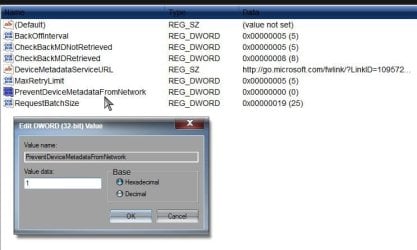
Beyond that, a registry change would likely be required. The change done by group policy can be done manually in the registry.

Group Policy Search

How to control the Devices and Printers pop-up | MSitPros Blog

Changing the value of PreventDeviceMetadataFromNetwork to 1 to prevent this

1.jpg

I broke your rule if you consider this a "Reg hack" :)

A Guy
 

My Computer My Computer

At a glance

Windows 10 Home x64INTEL Core i5-750 Quad-Core 3.37GHzHyperX Fury Black Series 8GB (2 x 4GB) 1866MhzEVGA GeForce GTX 750 Superclocked 1GB 128-Bit...
Computer type
PC/Desktop
OS
Windows 10 Home x64
CPU
INTEL Core i5-750 Quad-Core 3.37GHz
Motherboard
ASUS P7P55D
Memory
HyperX Fury Black Series 8GB (2 x 4GB) 1866Mhz
Graphics Card(s)
EVGA GeForce GTX 750 Superclocked 1GB 128-Bit GDDR5
Monitor(s) Displays
LG 32MA68HY 32" IPS
Screen Resolution
1920 x 1080
Hard Drives
Samsung 840 Evo 120GB, SEAGATE 500GB Barracuda® 7200.12, SATA 3 Gb/s, 7200 RPM, 16MB cache
PSU
ANTEC TruePower New TP-550, 80 PLUS, 550W
Case
ANTEC Three Hundred Illusion
Cooling
COOLER MASTER Hyper 212 Plus, 4 x 120mm 1 x 140mm Noctua's
Internet Speed
85 + Mbps
Antivirus
Avast
Browser
Vivaldi
Thanks A Guy...
but this reg ed is just another way to enforce GP for something I don't want to do. It's easy enough to do the same thing in ASS. System>Properties>Advanced Systems Settings>Hardware>Device Installation Settings. It can also be done directly (and faster) from the Devices Window... Rt-click on Computer then "Device Installation Settings".

I'm certainly not averse to making reg changes and I've tried to look for one for what I need by searching the HD for the exact phrase in the yellow bar (with the intent to backtrack to the reg initiation from there) but I can't find that string anywhere so I figure it's stored in a protected CAB somewhere.

Never mind. I can only hope. Thanks anyway.
 

My Computer My Computer

At a glance

Windows 7
OS
Windows 7
Back
Top