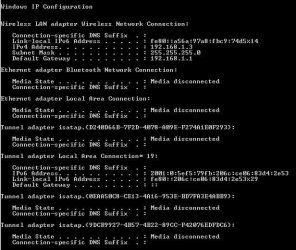
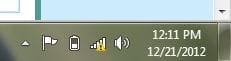
Yellow triangle in taskbar network icon

dilshanth10

New member
Local time
4:48 AM
Messages
11
Location
Batticaloa
i have 2 computers, one runs with xp and another runs with windows 7, the windows 7 is in my laptop and xp is in my desktop computer, i have adsl broadband connection, when i connect internet through wifi in my laptop the red triangle always shows, i don't really know how to remove that triangle,
but internet works perfect..
i changed ip address and dns in these two computers, it didn't work..
what am i going to do to remove this...
 

Attachments
  • 111.JPG
    111.JPG
    10.5 KB · Views: 320
  • 222.JPG
    222.JPG
    54.9 KB · Views: 22

My Computer

OS
Windows 7 Professional x64
Well it could be a number of things did you try to trouble shoot your problem?
 

My Computer

Computer type
PC/Desktop
Computer Manufacturer/Model Number
Dell / Lenovo g550
OS
Windows 7 Ultimate 64-bit
CPU
Intel Core 2 Duo E6550 @2.33GHz
Motherboard
foxconn g33m02
Memory
4GB DDR"
Graphics Card(s)
NVIDIA GeForce 8600 GS
Hard Drives
HDD 1 = 150GB
HDD 2 = 1.5TB
PSU
450W
Cooling
Stock fan
Internet Speed
12Mb
Antivirus
AVG Internet Security
yes, i troubleshooted but didn't see any changes...
sry for late reply...
had some work...
is there any ip address configuration needed or not for two or more computer networking...
 

My Computer

OS
Windows 7 Professional x64
Check in System that both machines are assigned the same workgroup name, XP default is MSHOME, 7,8 is Workgroup, change them both to something the same, then set network as Home or Private.
 

My Computer

Computer type
Laptop
Computer Manufacturer/Model Number
HP 17-ak0xx, dv7 3173nr
OS
Win7 Home Premium x64 W10Pro&Home
CPU
A12 9720p 4+8 TurionII M520
Motherboard
HP 3839
Memory
6GB 8GB
Graphics Card(s)
R7
Monitor(s) Displays
24" sa550
Screen Resolution
1600x900 1920x1080
Mouse
Logitechx2
Internet Speed
120Mb/s down 12up
i already changed that name as workgroup in both computers and all network sharing is perfectly working... my only problem is yellow triangle in that network icon...
how can i remove it...???
 

My Computer

OS
Windows 7 Professional x64
i already changed that name as workgroup in both computers and all network sharing is perfectly working... my only problem is yellow triangle in that network icon...
how can i remove it...???

It may help to change from a public network to a work or home network, the link below shows you how.
http://www.sevenforums.com/tutorials/43629-network-location-set-home-work-public-network.html

Also if you have an Ethernet cable plugged into the laptop it may help to unplug it.
 

My Computer

Computer type
PC/Desktop
Computer Manufacturer/Model Number
Home built
OS
Windows 7 Ult, Windows 8.1 Pro,
CPU
Q9650-4.275GHz, E8600 4.5GHz, E6750-3.8GHz
Motherboard
Evga 780i FTW
Memory
G.Skill PC2 9600 1200Mhz 5 5 5 15 2T
Graphics Card(s)
GTX480
Sound Card
Asus Xonar D2
Monitor(s) Displays
HannsG
Screen Resolution
1680X1050
Hard Drives
GSkill Phoenix Pro 120GB SSD
PSU
ThermalTake Toughpower 1000Watt modular
Case
ThermalTake XaserV
Cooling
Xigmatek S1283
Keyboard
Logitech G15
Mouse
Logitech G9
Internet Speed
T1
Thats not solve this problem... i using lap only wifi connection, not to plug any ethernet cable in that... but my another desktop computer using ethernet cable to connect network...

any other better idea...
 

My Computer

OS
Windows 7 Professional x64
Thats not solve this problem... i using lap only wifi connection, not to plug any ethernet cable in that... but my another desktop computer using ethernet cable to connect network...

any other better idea...

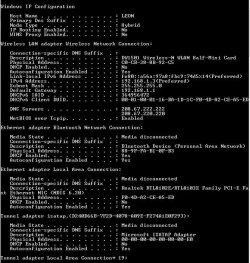
It may help if you can post a screen shot of the ipconfig/all, not just the ipconfig. Something installed on your system is causing this problem.

It's not a typical Windows problem at all.
 

My Computer

Computer type
PC/Desktop
Computer Manufacturer/Model Number
Home built
OS
Windows 7 Ult, Windows 8.1 Pro,
CPU
Q9650-4.275GHz, E8600 4.5GHz, E6750-3.8GHz
Motherboard
Evga 780i FTW
Memory
G.Skill PC2 9600 1200Mhz 5 5 5 15 2T
Graphics Card(s)
GTX480
Sound Card
Asus Xonar D2
Monitor(s) Displays
HannsG
Screen Resolution
1680X1050
Hard Drives
GSkill Phoenix Pro 120GB SSD
PSU
ThermalTake Toughpower 1000Watt modular
Case
ThermalTake XaserV
Cooling
Xigmatek S1283
Keyboard
Logitech G15
Mouse
Logitech G9
Internet Speed
T1
here it is.. all ip configuration...
 

Attachments

  • 444.JPG
    444.JPG
    112.8 KB · Views: 23
  • 555.JPG
    555.JPG
    85.5 KB · Views: 17

My Computer

OS
Windows 7 Professional x64
No problems showing there. No extra adaptors or VPN's that might cause this problem.

It's very strange to have a connection when it appears to be not working with the red X.

We can try flushing out and resetting everything related to the network. Which anti virus software are you running?

Unzip and run the file below, it will reboot your machine when it's done.
 

Attachments

My Computer

Computer type
PC/Desktop
Computer Manufacturer/Model Number
Home built
OS
Windows 7 Ult, Windows 8.1 Pro,
CPU
Q9650-4.275GHz, E8600 4.5GHz, E6750-3.8GHz
Motherboard
Evga 780i FTW
Memory
G.Skill PC2 9600 1200Mhz 5 5 5 15 2T
Graphics Card(s)
GTX480
Sound Card
Asus Xonar D2
Monitor(s) Displays
HannsG
Screen Resolution
1680X1050
Hard Drives
GSkill Phoenix Pro 120GB SSD
PSU
ThermalTake Toughpower 1000Watt modular
Case
ThermalTake XaserV
Cooling
Xigmatek S1283
Keyboard
Logitech G15
Mouse
Logitech G9
Internet Speed
T1
okkkkk... thats also not working... nothing changed at all..
i open your zip file, then lap rebooted and then my internet access did not work..
then i checked my wifi properties and change the ip address automattically and now internet is working, but my problem not solve yet....

i use microsoft security essential for my antivirus

any better idea.....
 

My Computer

OS
Windows 7 Professional x64
okkkkk... thats also not working... nothing changed at all..
i open your zip file, then lap rebooted and then my internet access did not work..
then i checked my wifi properties and change the ip address automattically and now internet is working, but my problem not solve yet....

i use microsoft security essential for my antivirus

any better idea.....

The fact that the IP reset caused you to check the WiFi properties indicates a problem with the WiFi driver which should be updated.

After updating or reinstalling the WiFi driver you should try going into Network and Sharing center, to the left side you will see Manage Wireless Connections, open that up and remove the current connection profile then create a new one.
 

My Computer

Computer type
PC/Desktop
Computer Manufacturer/Model Number
Home built
OS
Windows 7 Ult, Windows 8.1 Pro,
CPU
Q9650-4.275GHz, E8600 4.5GHz, E6750-3.8GHz
Motherboard
Evga 780i FTW
Memory
G.Skill PC2 9600 1200Mhz 5 5 5 15 2T
Graphics Card(s)
GTX480
Sound Card
Asus Xonar D2
Monitor(s) Displays
HannsG
Screen Resolution
1680X1050
Hard Drives
GSkill Phoenix Pro 120GB SSD
PSU
ThermalTake Toughpower 1000Watt modular
Case
ThermalTake XaserV
Cooling
Xigmatek S1283
Keyboard
Logitech G15
Mouse
Logitech G9
Internet Speed
T1
i also tried that already... not working...


in my openion, this problem occured because of these two computers ip address automatic calculation problem, i changed that ipv4 in internet properties, but it didnt work.. do you have any other better way to change these two computers ip address... also i think some problem with that router ip suplying system... am i want to change any router configuration or not...
 

My Computer

OS
Windows 7 Professional x64
in my openion, this problem ocuured because of these two computers ip address automatic calculation problem, i changed that ipv4 in internet properties, but it didnt work.. do you have any other better way to change these two computers ip address... also i think some problem with that router ip suplying system... am i want to change any router configuration or not...

One thing for certain is that this is not a Windows problem, it's not a computer problem.

The IP supplying system is called "DHCP" Dynamic Host Configuration Protocol and that would be enabled by default in your routers settings.

If you need to use static IP's there are endless tutorials for that on the internet but if you needed to use static IP's that would indicate there is a problem with your router.

It's very likely this problem has to do with a mistake in your network configuration like plugging a router into a modem/router which won't work unless both routers are configured correctly.

I'm sure this problem would jump out if I could see what configuration you are using.
 

My Computer

Computer type
PC/Desktop
Computer Manufacturer/Model Number
Home built
OS
Windows 7 Ult, Windows 8.1 Pro,
CPU
Q9650-4.275GHz, E8600 4.5GHz, E6750-3.8GHz
Motherboard
Evga 780i FTW
Memory
G.Skill PC2 9600 1200Mhz 5 5 5 15 2T
Graphics Card(s)
GTX480
Sound Card
Asus Xonar D2
Monitor(s) Displays
HannsG
Screen Resolution
1680X1050
Hard Drives
GSkill Phoenix Pro 120GB SSD
PSU
ThermalTake Toughpower 1000Watt modular
Case
ThermalTake XaserV
Cooling
Xigmatek S1283
Keyboard
Logitech G15
Mouse
Logitech G9
Internet Speed
T1
Ok...I have the fix....I hope...

go to START and type MSCONFIG in the box on the lower left corner and hit ENTER. Click on the SERVICES tab and Tick "HIDE ALL MICROSOFT SERVICES" Next Untick the one that has #### in it, APPLY and then RESTART and you should be good to go...I had this happen to me awhile back and this did the trick. It has to do with something from APPLE Bonjour or something.. But it worked for me..
 

My Computer

Computer type
PC/Desktop
Computer Manufacturer/Model Number
ASUS-Self Built
OS
Windows 10 Anniversary, Linux & still Windows 7 Professional x64
CPU
Intel i7-920 2.67 GHz
Motherboard
ASUS-Rampage II Extreme Mobo
Memory
12 GB
Graphics Card(s)
EVGA Nvidia 970 GTX
Sound Card
Supreme FX X-fi-Audigy
Monitor(s) Displays
BenQ XL2730Z,Samsung SyncMaster PX2370 LED,Samsung 226BW LCD
Screen Resolution
2560 x 1440, LED-1920x1080, LCD-1680x1050
Hard Drives
4 internal :
1x TB SSD Samsung Evo
1x 1 TB
1x 3 TB
1x 4 TB
3 TB External
PSU
Coolermaster 750 watt PSU
Case
Thermaltake-Spedo case
Cooling
8 Cooling Fans on case and inside case
Keyboard
Logitech G-15 and G-13
Mouse
Logitech G-9 Optical and Logitech Mx-Revolutiom
Internet Speed
DSL
Ok...I have the fix....I hope...

go to START and type MSCONFIG in the box on the lower left corner and hit ENTER. Click on the SERVICES tab and Tick "HIDE ALL MICROSOFT SERVICES" Next Untick the one that has #### in it, APPLY and then RESTART and you should be good to go...I had this happen to me awhile back and this did the trick. It has to do with something from APPLE Bonjour or something.. But it worked for me..

The Bonjour problem is different in that it normally shows up as unidentified network with no working connection.

This one seems to be Public network showing no connection but the connection still works for some reason.

The Bonjour service usually shows up as ID Store followed by a bunch of numbers, or it shows up as Bonjour somewhere in Windows services.

If the user has iTunes or Adobe CS3 or Photoshop then he might also have the Bonjour service installed.

Type services.msc into the run box to get to Windows services.
 

My Computer

Computer type
PC/Desktop
Computer Manufacturer/Model Number
Home built
OS
Windows 7 Ult, Windows 8.1 Pro,
CPU
Q9650-4.275GHz, E8600 4.5GHz, E6750-3.8GHz
Motherboard
Evga 780i FTW
Memory
G.Skill PC2 9600 1200Mhz 5 5 5 15 2T
Graphics Card(s)
GTX480
Sound Card
Asus Xonar D2
Monitor(s) Displays
HannsG
Screen Resolution
1680X1050
Hard Drives
GSkill Phoenix Pro 120GB SSD
PSU
ThermalTake Toughpower 1000Watt modular
Case
ThermalTake XaserV
Cooling
Xigmatek S1283
Keyboard
Logitech G15
Mouse
Logitech G9
Internet Speed
T1
i did that msconfig, but that didnt work... yellow triangle still in it and network shows undefined...
and i didnt understand what am i going to do with that services.msc....

i think the problem must be in my router configuration, i use zte wifi router.... do you have any idea to configure that router configuration....
 

My Computer

OS
Windows 7 Professional x64
i did that msconfig, but that didnt work... yellow triangle still in it and network shows undefined...
and i didnt understand what am i going to do with that services.msc....

i think the problem must be in my router configuration, i use zte wifi router.... do you have any idea to configure that router configuration....

Have you tried to unplug the Router and or Modem completely and let it sit for 1 minute and re-hook everything back up? This includes Power and cables....Hook cables back up then Power cords....

Also, look at your Drivers...Does everything look ok there? Right Click on MY COMPUTER, Left Click on PROPERTIES, and then go to DEVICE MANAGER. maybe try updating the Network adapters. You can try to use Windows update, or go to your Motherboard website and use them.
 

My Computer

Computer type
PC/Desktop
Computer Manufacturer/Model Number
ASUS-Self Built
OS
Windows 10 Anniversary, Linux & still Windows 7 Professional x64
CPU
Intel i7-920 2.67 GHz
Motherboard
ASUS-Rampage II Extreme Mobo
Memory
12 GB
Graphics Card(s)
EVGA Nvidia 970 GTX
Sound Card
Supreme FX X-fi-Audigy
Monitor(s) Displays
BenQ XL2730Z,Samsung SyncMaster PX2370 LED,Samsung 226BW LCD
Screen Resolution
2560 x 1440, LED-1920x1080, LCD-1680x1050
Hard Drives
4 internal :
1x TB SSD Samsung Evo
1x 1 TB
1x 3 TB
1x 4 TB
3 TB External
PSU
Coolermaster 750 watt PSU
Case
Thermaltake-Spedo case
Cooling
8 Cooling Fans on case and inside case
Keyboard
Logitech G-15 and G-13
Mouse
Logitech G-9 Optical and Logitech Mx-Revolutiom
Internet Speed
DSL
i do that everyday when i go to sleep, i switch off router when i go to sleep and switch on it when i wake up, simply more than six ours my network disconnect everyday, and device manager is perfactly fine, this is not only for my laptop problem, because i connected my friends laptop through wifi, the yellow triangle appeared his laptop also, not only his laptop, every computer connect through my network shows yellow triangle which computers have windows seven os, thats why i considered about ip addressing and router configuration problem, my computer works great and no problem in my laptop...

any better idea friend....
 

My Computer

OS
Windows 7 Professional x64
Back
Top