Yellow Triangle, No internet access - Tried everything

Tjoner

New member
Local time
11:33 PM
Messages
2
Hello all,

I've come here to hopefully get some assistance with my internet issue rather lack of internet issue.

I have an Acer Aspire S3 and am unable to connect to home network using Wifi connection. I have tried almost everything and nothing has worked thus far. My laptop does not have an Ethernet port so I have been unable to test if it works through a wired connection.

My laptop is working fine as I have tried other wifi networks and there has been no issue. The modem/ router is brand new and works fine with the other devices in the house (2 other laptops and iphones).

I have spent hours on the phone with time warner and with Acer and both are blaming each other.

It's been like this since we have moved into the apartment (2 weeks ago) and I have been unable to connect on my laptop the entire time. However, i have taken it to other places and it works perfectly fine.

In summary, I have done the following-

- Reset the router etc. - didn't work
- un-installed the network adapters - didn't work.
- Restored the laptop to factory setting - didn't work

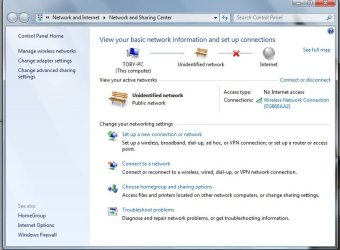
The network and sharing info. says that it is connected yet it is labelled as an unidentified network and there is no internet access. There are full bars on the screen and I signal is excellent. The other devices do not struggle at all ( one Toshiba satellite Pro and one Macbook).

I am now desperate and would love some help as both Time Warner and Acer have been mostly useless up to this point.

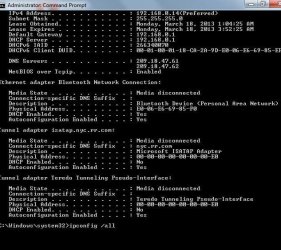
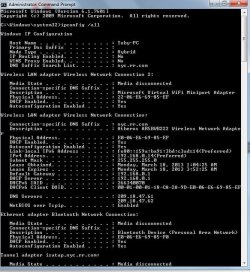
I've attached some images of ipconfig and also of the screen I get in the network and sharing centre.


Any help would be amazing! Thanks so much in advance,

Tjoner
 

Attachments
  • Capture.JPG
    Capture.JPG
    88.3 KB · Views: 22
  • Capture2.JPG
    Capture2.JPG
    71.3 KB · Views: 54
  • Capture3.JPG
    Capture3.JPG
    64.6 KB · Views: 16

My Computer My Computer

Computer type
Laptop
Computer Manufacturer/Model Number
Acer Aspire S3 -391
OS
64
CPU
1.50GHz
Memory
4GB
Hello and welcome TJ just had a look at the specs and I can't believe it doesn't have a cable port.

But down in the system tray at bottom right is there an icon with the connection indicator?

In the Device Manager see what the adaptor setting is like - see my pic.

Then you could try the little flag bottom right near the audio control click on it and it will or may show you if something needs fixing - mine shows those USB ports need attention.

If this cannot be fixed easy - return it to the dealer mate if it is still in warranty - that is a lot of money for a laptop especially one that size.
 

Attachments

  • TRAY.PNG
    TRAY.PNG
    12.6 KB · Views: 54

My Computer My Computer

Computer type
PC/Desktop
Computer Manufacturer/Model Number
Own build (new) Desk1 / Asus ROG Win 7 / Desk2 1st build
OS
Desk1 7 Home Prem / Desk2 10 Pro / Main lap Asus ROG 10 Pro 2 laptop Toshiba 7 Pro Asus P2520 7 & 10
CPU
Desk1 i5 3750K / Laptop i7 GTX 860M / Desk2 i5 2500
Motherboard
Desk1 Asus P877-V / Desk2 Gigabyte H67 UD3H / Laptop ?
Memory
Desk1 8GB (1866) / Desk2 16GB (1333) / Laptop 8Gb DDR3
Graphics Card(s)
Desk 1& 2NVidia GTX 650 & Laptops on board Intel
Sound Card
Desk 1 & 2 -XONAR DG Realtek High Def audio Laptop
Monitor(s) Displays
Desk 1 Benq HD 2450 / Desk2 Philips 24" / Laptop 17.5"
Screen Resolution
1920x1080 D1 & D2 & Laptop 1
Hard Drives
Desk1 Samsung 120GB 830 SSD
Asus ROG 256GB 850 Pro SSD
Desk2 Samsung 840 256 SSD
Toshiba 120GB EVO
PSU
Desk 1 Corsair HX 1050/ Laptop ? / Desk 2 Corsair HX 650
Case
Desk 1 Cooler HAF XM ? Toshiba laptop / Desk2 Coolermaster
Cooling
Fans on all Desk1 -2 Desk2 - all Coolermasters 5 Laptop ?
Keyboard
Desk 1 MS Sidewinder X6 Desk 2 MS Sidewinder X 4
Mouse
Desk 1&2 - Gigabyte MS 900 gamer - laptop - Logitec wireless
Internet Speed
ADSL2+
Other Info
One other Desktop (tester) and spare Toshba laptop both with SSD's
Running Kaspersky 2016 ISS on all machines config'd identically
Logitec audio stereo systems on each machine (x3)
Canon MG5250MFC
Router/modem TP-Link running WPA2SK
Hello all,

I've come here to hopefully get some assistance with my internet issue rather lack of internet issue.

I have an Acer Aspire S3 and am unable to connect to home network using Wifi connection. I have tried almost everything and nothing has worked thus far. My laptop does not have an Ethernet port so I have been unable to test if it works through a wired connection.

My laptop is working fine as I have tried other wifi networks and there has been no issue. The modem/ router is brand new and works fine with the other devices in the house (2 other laptops and iphones).

I have spent hours on the phone with time warner and with Acer and both are blaming each other.

It's been like this since we have moved into the apartment (2 weeks ago) and I have been unable to connect on my laptop the entire time. However, i have taken it to other places and it works perfectly fine.

In summary, I have done the following-

- Reset the router etc. - didn't work
- un-installed the network adapters - didn't work.
- Restored the laptop to factory setting - didn't work

The network and sharing info. says that it is connected yet it is labelled as an unidentified network and there is no internet access. There are full bars on the screen and I signal is excellent. The other devices do not struggle at all ( one Toshiba satellite Pro and one Macbook).

I am now desperate and would love some help as both Time Warner and Acer have been mostly useless up to this point.

I've attached some images of ipconfig and also of the screen I get in the network and sharing centre.


Any help would be amazing! Thanks so much in advance,

Tjoner

There are many reasons for this problem to occur. The one I see most often is a default gateway with a value of 0.0.0.0, the fix for this is mentioned in the link below. There are many other solutions talked about at the bottom of the page in the link. :)

If you have iTunes installed you will want to disable the Bonjour Service as this service is famous for causing this problem.

Windows 7 Unidentified Network, Limited Access, No Internet Connection Problem Resolved
 

My Computer My Computer

Computer type
PC/Desktop
Computer Manufacturer/Model Number
Home built
OS
Windows 7 Ult, Windows 8.1 Pro,
CPU
Q9650-4.275GHz, E8600 4.5GHz, E6750-3.8GHz
Motherboard
Evga 780i FTW
Memory
G.Skill PC2 9600 1200Mhz 5 5 5 15 2T
Graphics Card(s)
GTX480
Sound Card
Asus Xonar D2
Monitor(s) Displays
HannsG
Screen Resolution
1680X1050
Hard Drives
GSkill Phoenix Pro 120GB SSD
PSU
ThermalTake Toughpower 1000Watt modular
Case
ThermalTake XaserV
Cooling
Xigmatek S1283
Keyboard
Logitech G15
Mouse
Logitech G9
Internet Speed
T1
Thanks got your prompt replies.

In response

@chev65, I have tried everything and as you can see from the screen capture the default gateway value is not 0.0.0.0, I can use it on other wireless networks, just not at home. I don't have iTunes installed as i did a system restore and returned it to factory settings, so there is no additional software installed.

@Icit2lol
I'm not sure if I can buy uSb adapter that I can use for a Ethernet cable. I will look into it. The USB ports ate working fine. Also, the wifi is working fine on other networks. Just not at home- despite other devices working fine. I have spent hours on the phone with Acer and they say everything is fine from everything I've told them.

Anyone else have any suggestions?

Thanks in advance
 

My Computer My Computer

Computer type
Laptop
Computer Manufacturer/Model Number
Acer Aspire S3 -391
OS
64
CPU
1.50GHz
Memory
4GB
Hi Tjoner

On the image you posted . On the devices with the :warn: icon on them can you right-click on the device choose Properties . Once the properties window comes up click on the Details tab inside on the drown down under property chose hardware Ids and take an image of that and post here . I will assist you and getting that fixed for you .
 

My Computer My Computer

Computer Manufacturer/Model Number
Custom Built
OS
Windows 7 Ultimate 32-Bit & Windows 7 Ultimate 64-Bit
CPU
Intel Core i7 CPU 950 @ 3.07GHz
Motherboard
ASUS P6T DELUXE V2
Memory
OCZ 6GB (3 x 2GB) 240-Pin DDR3 SDRAM DDR3 1600 OCZ3X1600R2
Graphics Card(s)
ATI Radeon HD 5700 Series
Sound Card
OnBoard
Hard Drives
WD6400AACS-00M3B0 (640GB SATA )
PSU
CORSAIR 850w
Case
NZXT LEXA
Cooling
Intel Stock Heatsink Fan
Keyboard
Microsoft Wireless Laser Keyboard 7000
Mouse
Microsoft Wireless Laser Mouse 7000
Thanks got your prompt replies.

In response

@chev65, I have tried everything and as you can see from the screen capture the default gateway value is not 0.0.0.0, I can use it on other wireless networks, just not at home. I don't have iTunes installed as i did a system restore and returned it to factory settings, so there is no additional software installed.

@Icit2lol
I'm not sure if I can buy uSb adapter that I can use for a Ethernet cable. I will look into it. The USB ports ate working fine. Also, the wifi is working fine on other networks. Just not at home- despite other devices working fine. I have spent hours on the phone with Acer and they say everything is fine from everything I've told them.

Anyone else have any suggestions?

Thanks in advance
No sorry mate I should have been a bit more explicit I meant one of those dongle that plug straight into the USB port. I know this is not going to solve the problem but would probably get you out of trouble.
The drawback is that they can work out quite expensive.
Telstra do some and I keep the dongle and the wireless adaptor for my laptops and emergencies.
See https://www.telstra.com.au/online-s...297423275_telstra prepaid internet_p#/prepaid
I use the MF60 3G wireless adaptor (it's quick enough for what I do) the most but for you it is pretty useless I guess but worth keeping in mind for travelling. If you go that route but the adaptor and get the $150 (12month) plan it works out the cheapest in the long run. The dongles well depends how much you want to put on them, and with this mob at least you get the coverage.

Having said that I would still be getting something done under warranty as I said before that is a ot of money for a laptop of that size.
 

My Computer My Computer

Computer type
PC/Desktop
Computer Manufacturer/Model Number
Own build (new) Desk1 / Asus ROG Win 7 / Desk2 1st build
OS
Desk1 7 Home Prem / Desk2 10 Pro / Main lap Asus ROG 10 Pro 2 laptop Toshiba 7 Pro Asus P2520 7 & 10
CPU
Desk1 i5 3750K / Laptop i7 GTX 860M / Desk2 i5 2500
Motherboard
Desk1 Asus P877-V / Desk2 Gigabyte H67 UD3H / Laptop ?
Memory
Desk1 8GB (1866) / Desk2 16GB (1333) / Laptop 8Gb DDR3
Graphics Card(s)
Desk 1& 2NVidia GTX 650 & Laptops on board Intel
Sound Card
Desk 1 & 2 -XONAR DG Realtek High Def audio Laptop
Monitor(s) Displays
Desk 1 Benq HD 2450 / Desk2 Philips 24" / Laptop 17.5"
Screen Resolution
1920x1080 D1 & D2 & Laptop 1
Hard Drives
Desk1 Samsung 120GB 830 SSD
Asus ROG 256GB 850 Pro SSD
Desk2 Samsung 840 256 SSD
Toshiba 120GB EVO
PSU
Desk 1 Corsair HX 1050/ Laptop ? / Desk 2 Corsair HX 650
Case
Desk 1 Cooler HAF XM ? Toshiba laptop / Desk2 Coolermaster
Cooling
Fans on all Desk1 -2 Desk2 - all Coolermasters 5 Laptop ?
Keyboard
Desk 1 MS Sidewinder X6 Desk 2 MS Sidewinder X 4
Mouse
Desk 1&2 - Gigabyte MS 900 gamer - laptop - Logitec wireless
Internet Speed
ADSL2+
Other Info
One other Desktop (tester) and spare Toshba laptop both with SSD's
Running Kaspersky 2016 ISS on all machines config'd identically
Logitec audio stereo systems on each machine (x3)
Canon MG5250MFC
Router/modem TP-Link running WPA2SK
Thanks got your prompt replies.

In response

@chev65, I have tried everything and as you can see from the screen capture the default gateway value is not 0.0.0.0, I can use it on other wireless networks, just not at home. I don't have iTunes installed as i did a system restore and returned it to factory settings, so there is no additional software installed.

@Icit2lol
I'm not sure if I can buy uSb adapter that I can use for a Ethernet cable. I will look into it. The USB ports ate working fine. Also, the wifi is working fine on other networks. Just not at home- despite other devices working fine. I have spent hours on the phone with Acer and they say everything is fine from everything I've told them.

Anyone else have any suggestions?

Thanks in advance

That's good, yes I have some suggestions.

Have you been to the Acer support site to download the latest drivers for the Atheros NIC?

http://us.acer.com/ac/en/US/content/drivers

Have you tried going to Windows update Center or the Acer support site using a wired connection in order to obtain the latest updates for your system?

The first two steps are very important but assuming you have the most recent drivers for your system please read on. :)

Please run the IPReset file below, it should reboot the machine for you after it resets winsock, TCP/IP stack, flushes the DNS and resets the IP.

After that, please open the Device Manager, click the view tab then the "show hidden devices" tab, go down the Network Adaptors and disable the Msoft Virtual WiFi miniport adaptor and also the Bluetooth adaptor.

Please post the ipconfig/all again after that. :)
 

Attachments

My Computer My Computer

Computer type
PC/Desktop
Computer Manufacturer/Model Number
Home built
OS
Windows 7 Ult, Windows 8.1 Pro,
CPU
Q9650-4.275GHz, E8600 4.5GHz, E6750-3.8GHz
Motherboard
Evga 780i FTW
Memory
G.Skill PC2 9600 1200Mhz 5 5 5 15 2T
Graphics Card(s)
GTX480
Sound Card
Asus Xonar D2
Monitor(s) Displays
HannsG
Screen Resolution
1680X1050
Hard Drives
GSkill Phoenix Pro 120GB SSD
PSU
ThermalTake Toughpower 1000Watt modular
Case
ThermalTake XaserV
Cooling
Xigmatek S1283
Keyboard
Logitech G15
Mouse
Logitech G9
Internet Speed
T1
Is it possible for testing purposes for you to assign your pc a static ip address for your wi-fi card, its possible that you have a DNS issue

ie.
ip= 192.168.0.100
subnet = 255.255.255.0
gateway = 192.168.0.1
DNS = 192.168.0.1
 

My Computer My Computer

Computer type
PC/Desktop
Computer Manufacturer/Model Number
Self Built
OS
Windows 7 Ultimate 64bit
CPU
AMD Phenom Quad core 9950 black edition
Motherboard
Gigabyte
Memory
16Gb
Graphics Card(s)
2x XFX Radeon 5850
Sound Card
PCI Express X-Fi Titanium / Logitech G35
Monitor(s) Displays
2x HP 2410i
Screen Resolution
1920x1080
Hard Drives
2x 500Gb Seagate
1x 300Gb Seagate
1x 1Tb Seagate
2x 1Tb Hitatchi
PSU
Jean Tech Storm 700W
Case
Cooler Master COSMOS S
Cooling
Akasa Evo Blue Pro
Keyboard
Logitech G15
Mouse
Mad Catz M.M.O. 7
Internet Speed
12mb
Back
Top