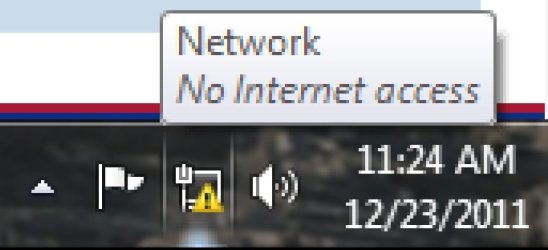
Yellow Triangle on network icon

hjbedoya

New member
Local time
12:01 AM
Messages
9
hi

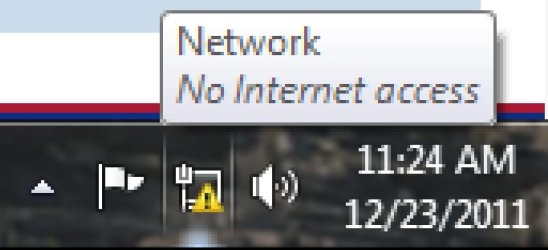
I have a yellow triangle on the network icon that say No internet access, but i have. I tried updating the network adapter, reseting the router, update the router firmware but nothing happend. I dont know where the problem is from the network adapter or the router. My laptop too have a yellow triangle on the wireless icon

Thnks
 

Attachments

  • access.jpg
    access.jpg
    32.4 KB · Views: 64

My Computer

Computer Manufacturer/Model Number
HP A6620F
OS
Windows 7 ultimate x64
CPU
AMD Athlon II X2 250
Motherboard
Gigabyte 880GM-UD2H
Memory
G-skill DDR3 PC310600 2Gb x2
Graphics Card(s)
Ati radeon HD 5570
Sound Card
Creative SB X-FI
Monitor(s) Displays
L1752T 17"
Screen Resolution
1280 x 1024
Hard Drives
SAMSUNG HD501LJ [Hard drive] (500.11 GB)
SAMSUNG SP1213C [Hard drive] (120.06 GB)
ST31000528AS [Hard drive] (1000.20 GB
Case
HP piano black

My Computer

Computer Manufacturer/Model Number
Lenovo Desktop/Samsung Laptop
OS
Win7 & Win8 64bit
CPU
Intel i5
Internet Speed
Charter-20 Mbps
Antivirus
Avast
Browser
FF, IE9 and Chrome
IpConfig

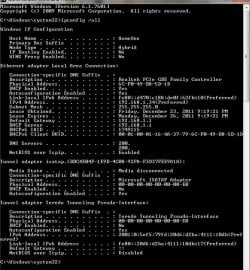
Done ipconfig/ all
 

Attachments

  • Ipconfig.jpg
    Ipconfig.jpg
    80.2 KB · Views: 480

My Computer

Computer Manufacturer/Model Number
HP A6620F
OS
Windows 7 ultimate x64
CPU
AMD Athlon II X2 250
Motherboard
Gigabyte 880GM-UD2H
Memory
G-skill DDR3 PC310600 2Gb x2
Graphics Card(s)
Ati radeon HD 5570
Sound Card
Creative SB X-FI
Monitor(s) Displays
L1752T 17"
Screen Resolution
1280 x 1024
Hard Drives
SAMSUNG HD501LJ [Hard drive] (500.11 GB)
SAMSUNG SP1213C [Hard drive] (120.06 GB)
ST31000528AS [Hard drive] (1000.20 GB
Case
HP piano black

My Computer

Computer Manufacturer/Model Number
Lenovo Desktop/Samsung Laptop
OS
Win7 & Win8 64bit
CPU
Intel i5
Internet Speed
Charter-20 Mbps
Antivirus
Avast
Browser
FF, IE9 and Chrome
I have internet access. I just erase a few numbers of my ip address.
I just want to get rid of the yellow triangle.

So far the only app that dont work is Origin that says that i must be online to log in

Thnks
 

Attachments

  • Untitled.jpg
    Untitled.jpg
    102.9 KB · Views: 130
  • access.jpg
    access.jpg
    32.4 KB · Views: 35

My Computer

Computer Manufacturer/Model Number
HP A6620F
OS
Windows 7 ultimate x64
CPU
AMD Athlon II X2 250
Motherboard
Gigabyte 880GM-UD2H
Memory
G-skill DDR3 PC310600 2Gb x2
Graphics Card(s)
Ati radeon HD 5570
Sound Card
Creative SB X-FI
Monitor(s) Displays
L1752T 17"
Screen Resolution
1280 x 1024
Hard Drives
SAMSUNG HD501LJ [Hard drive] (500.11 GB)
SAMSUNG SP1213C [Hard drive] (120.06 GB)
ST31000528AS [Hard drive] (1000.20 GB
Case
HP piano black
Oh...I see, thanks for the clarification.

Try to disable then enable both Network Adapters from your Device Manager. See if it makes a difference.

Click on the Windows Orb and type devmgmt.msc then press enter.
Locate Network Adapters, expand it and right click each adapter choose Disable then Enable.
 
Last edited:

My Computer

Computer Manufacturer/Model Number
Lenovo Desktop/Samsung Laptop
OS
Win7 & Win8 64bit
CPU
Intel i5
Internet Speed
Charter-20 Mbps
Antivirus
Avast
Browser
FF, IE9 and Chrome
After i enable it back the yellow triangle appear again

Merry Christmas
 
Last edited:

My Computer

Computer Manufacturer/Model Number
HP A6620F
OS
Windows 7 ultimate x64
CPU
AMD Athlon II X2 250
Motherboard
Gigabyte 880GM-UD2H
Memory
G-skill DDR3 PC310600 2Gb x2
Graphics Card(s)
Ati radeon HD 5570
Sound Card
Creative SB X-FI
Monitor(s) Displays
L1752T 17"
Screen Resolution
1280 x 1024
Hard Drives
SAMSUNG HD501LJ [Hard drive] (500.11 GB)
SAMSUNG SP1213C [Hard drive] (120.06 GB)
ST31000528AS [Hard drive] (1000.20 GB
Case
HP piano black
Merry Christmas to you too! :)

If your computer has both wired and wireless network adapters and that one is not being used, you might see this triangle sign. You may disable the adapter that's not being used if it bothers you.
 

My Computer

Computer Manufacturer/Model Number
Lenovo Desktop/Samsung Laptop
OS
Win7 & Win8 64bit
CPU
Intel i5
Internet Speed
Charter-20 Mbps
Antivirus
Avast
Browser
FF, IE9 and Chrome
I have 2 computers a desktop and a Laptop. in both i got that yellow triangle. in my laptop the wireless network icon got the triangle.
 

My Computer

Computer Manufacturer/Model Number
HP A6620F
OS
Windows 7 ultimate x64
CPU
AMD Athlon II X2 250
Motherboard
Gigabyte 880GM-UD2H
Memory
G-skill DDR3 PC310600 2Gb x2
Graphics Card(s)
Ati radeon HD 5570
Sound Card
Creative SB X-FI
Monitor(s) Displays
L1752T 17"
Screen Resolution
1280 x 1024
Hard Drives
SAMSUNG HD501LJ [Hard drive] (500.11 GB)
SAMSUNG SP1213C [Hard drive] (120.06 GB)
ST31000528AS [Hard drive] (1000.20 GB
Case
HP piano black
On my laptop, when I don't have internet access (via wireless), I get a series of vertical bars with a symbol on them.

In my experience, when you get no internet access on ALL your PCs, and you're at home, this means your ISP has stopped providing you access. Your ISP should assign you an IP address on its network -- which it is not as evident in the screenshot you provided.

When ISPs first set up a customer account, they connect across the network -- and usually stay with you until internet access is confirmed. Problem is that access is then only provided by the hardware that was in place when they first set it up. So, if you went through a router, and later changed it, or went directly from your desktop, and later added a router, or switched to a laptop, the MAC address that your ISP is now seeing is NOT the one they registered for your account. In many cases, this will result in you NOW being denied access to their network.

You need to contact your ISP to find out what is wrong.
 

My Computer

Computer type
PC/Desktop
Computer Manufacturer/Model Number
Custom
OS
Win7 Pro 32-bit, Win8 Pro 32-bit
CPU
AMD Phenom II X6 1090T
Motherboard
Gigabyte
Memory
4GB ddr3 1300
Graphics Card(s)
AMD HD 4290 onboard
Sound Card
Builtin Realtek HD Audio
Monitor(s) Displays
Samsung 24" widescreen, LG 23" widescreen
Screen Resolution
1920x1200/1920x1080
Hard Drives
Kingston 256GB SSD
Keyboard
Logitech Illuminated Keyboard
Mouse
Logitech M705 wireless mouse
Antivirus
Norton Av 2013
Browser
IE v10
I do have internet access, the ip is assigned by the server it always been like that. I have this ISP for like 5 years now and i have this problem since 6 month ago.
 

My Computer

Computer Manufacturer/Model Number
HP A6620F
OS
Windows 7 ultimate x64
CPU
AMD Athlon II X2 250
Motherboard
Gigabyte 880GM-UD2H
Memory
G-skill DDR3 PC310600 2Gb x2
Graphics Card(s)
Ati radeon HD 5570
Sound Card
Creative SB X-FI
Monitor(s) Displays
L1752T 17"
Screen Resolution
1280 x 1024
Hard Drives
SAMSUNG HD501LJ [Hard drive] (500.11 GB)
SAMSUNG SP1213C [Hard drive] (120.06 GB)
ST31000528AS [Hard drive] (1000.20 GB
Case
HP piano black
Please read Post# 8 again. :D
I have 2 computers a desktop and a Laptop. in both i got that yellow triangle. in my laptop the wireless network icon got the triangle.
 

My Computer

Computer Manufacturer/Model Number
Lenovo Desktop/Samsung Laptop
OS
Win7 & Win8 64bit
CPU
Intel i5
Internet Speed
Charter-20 Mbps
Antivirus
Avast
Browser
FF, IE9 and Chrome
Hi

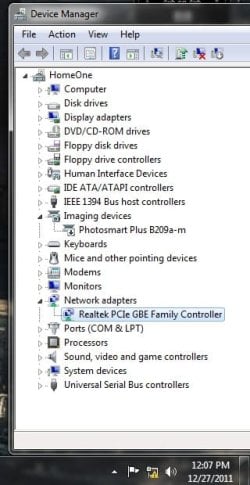
I have ONE network adapter on my PC. I disable it an after a few minutes i enable it back but the same problem.
 

Attachments

  • network.jpg
    network.jpg
    34.1 KB · Views: 41

My Computer

Computer Manufacturer/Model Number
HP A6620F
OS
Windows 7 ultimate x64
CPU
AMD Athlon II X2 250
Motherboard
Gigabyte 880GM-UD2H
Memory
G-skill DDR3 PC310600 2Gb x2
Graphics Card(s)
Ati radeon HD 5570
Sound Card
Creative SB X-FI
Monitor(s) Displays
L1752T 17"
Screen Resolution
1280 x 1024
Hard Drives
SAMSUNG HD501LJ [Hard drive] (500.11 GB)
SAMSUNG SP1213C [Hard drive] (120.06 GB)
ST31000528AS [Hard drive] (1000.20 GB
Case
HP piano black
Ah, I see...
Have you tried logging on as a different User? Create one if needed, see if issue persist.

You also have mentioned this:
I tried updating the network adapter

Have you tried to uninstall the device then re-install the new driver?

You may also try to uninstall your AV or Security Software, then reinstall it back if you have not done this yet.
 

My Computer

Computer Manufacturer/Model Number
Lenovo Desktop/Samsung Laptop
OS
Win7 & Win8 64bit
CPU
Intel i5
Internet Speed
Charter-20 Mbps
Antivirus
Avast
Browser
FF, IE9 and Chrome
  • In both users the yellow triangle is display even in my 2nd computer
  • Updated the network adapter nothing change
  • Uninstalled the device restarted the pc no change
  • I had my pc formated and installed all back but the same problem.
 

My Computer

Computer Manufacturer/Model Number
HP A6620F
OS
Windows 7 ultimate x64
CPU
AMD Athlon II X2 250
Motherboard
Gigabyte 880GM-UD2H
Memory
G-skill DDR3 PC310600 2Gb x2
Graphics Card(s)
Ati radeon HD 5570
Sound Card
Creative SB X-FI
Monitor(s) Displays
L1752T 17"
Screen Resolution
1280 x 1024
Hard Drives
SAMSUNG HD501LJ [Hard drive] (500.11 GB)
SAMSUNG SP1213C [Hard drive] (120.06 GB)
ST31000528AS [Hard drive] (1000.20 GB
Case
HP piano black
That seems to be a common issue in Windows 7.

I wonder if it acts the same if you are plugged in to a different router or a different broadband.

You may try assigning Static IP on both computers.

If it bothers you much, you may hide it from your Systray, it's up to you.

How about this?
You may also try to uninstall your AV or Security Software, then reinstall it back if you have not done this yet.
 

My Computer

Computer Manufacturer/Model Number
Lenovo Desktop/Samsung Laptop
OS
Win7 & Win8 64bit
CPU
Intel i5
Internet Speed
Charter-20 Mbps
Antivirus
Avast
Browser
FF, IE9 and Chrome
Thanks for your help
I was wondering the same, planned to buy a new network adapter ( mine is part of my mainboard ) and a router
 

My Computer

Computer Manufacturer/Model Number
HP A6620F
OS
Windows 7 ultimate x64
CPU
AMD Athlon II X2 250
Motherboard
Gigabyte 880GM-UD2H
Memory
G-skill DDR3 PC310600 2Gb x2
Graphics Card(s)
Ati radeon HD 5570
Sound Card
Creative SB X-FI
Monitor(s) Displays
L1752T 17"
Screen Resolution
1280 x 1024
Hard Drives
SAMSUNG HD501LJ [Hard drive] (500.11 GB)
SAMSUNG SP1213C [Hard drive] (120.06 GB)
ST31000528AS [Hard drive] (1000.20 GB
Case
HP piano black
No worries.... at my home network, we have 5 computers with Windows 7 and we don't have that issue. We use Linksys Router, Charter is the Cable/ISP Provider.

It can be the router, or network card. Give it a shot, Network cards are very reasonable anyway.

You're Welcome.
 

My Computer

Computer Manufacturer/Model Number
Lenovo Desktop/Samsung Laptop
OS
Win7 & Win8 64bit
CPU
Intel i5
Internet Speed
Charter-20 Mbps
Antivirus
Avast
Browser
FF, IE9 and Chrome
hi

I have a yellow triangle on the network icon that say No internet access, but i have. I tried updating the network adapter, reseting the router, update the router firmware but nothing happend. I dont know where the problem is from the network adapter or the router. My laptop too have a yellow triangle on the wireless icon

Thnks
i have read all this thread. i have executed all tasks and have had no joy. .....then, wait for it, i did two things at once, stupid, because now i will never know which solved the issue. anyway, i was connected, but triangle was visible both wifi and lan cable. just this router was the problem, but other computers using it without issue. it is a satellite with a nordnet router. i unplugged the whole lot and re set everything, but also, i stupidly disabled kaspersky. so my guess is it is kaspersky, as i still had the triangle when i re connected and just got fed up and turned kaspersky orf. this is just a pain and many people have the same issue? it should be solved by now, but there are so many variables i suppose. anyway, i hope this reply helps one person, then at least my button wear will not have been in vain. i had heard that disabling kaspersky was the solution albeit temporary, but i have re enabled it and it still is ok, time will tell, but one thing is for sure. nothing else removed the darn triangle yet, and for just five minutes of normality i can now sleep a little better
 

My Computer

OS
windows 7 64 bit
yellow triangle icon wifi and lan....yet connection works

i posted here as i thought i had solved this. but alas it returned..but hey, it has actually solved this issue for me after all. this will not help everyone, but those with win 7 64 bit running Kaspersky rejoice, because this works well. i wish it will help one person at least as then i can justify time spent typing this thread.
before this i should mention i travel and connect to about 50 different routers, in many different countries. this problem is only with the NordNet 26CC. it happens wireless or ethernet connection. i get internet but it says not connected. i have re installed windows/created new user profile/uninstalled re installed drivers and adapters. i have un installed software and i have executed all the suggestions on this and microsofts general site, nothing even touched the problem. here is my fix below, hope it helps.....someone

kaspersky/settings/firewall/the connection you are currently using and having problems with/double click/select trusted network/OK/apply re start computer.
when you restart and re connect i found that the activation key was not registered and kaspersky was disabled. click update and wait. once updated it re syncs with the activation code, it then becomes enabled and the triangle went away and has yet to return.
patience when re starting second time. the triangle will return, but should go away after a short period of time, a minute or five so once connected or less depending on the computer speed.
update:
i have re started multiple times now and the average time for the triangle to go is around four and a half minutes.
update and final post>>
sometimes the triangle goes instantly, sometimes five minutes, after start up, but the problem for me is to a degree solved. maybe Kaspersky will write some code to combat this some day, or in the 2013 update. anyway, i am not changing my av to another just yet, but if i had to i would plump for microsoft security essentials, for none other than compatibility in matters like this.
update, i know i said final post but something else happened>>>>
triangle re appeared this morning. i noticed that it would not go away no matter what i did....until....wait for it.....kaspersky updated its database, then viola it went away. so i will monitor this as ongoing but it seems all along that it may have been the updating element and not the public/trusted network part, time will tell, i will post if i find anything concrete out, either that or i will mix up some concrete and throw the laptop in
very last post here>>>>>>>>
i have re started about 50 times and have found i can remove the triangle 100% of the time as follows
start as normal/pause kaspersky for 1 minute/disconnect internet connection/wait 10 seconds more or less/reconnect internet/resume kaspersky. so it is definitely a kaspersky issue with the router set up, which i cannot understand as it is in Danish. sorry to make so many posts to get to this conclusion, but i hope it saves some poor soul uninstalling/re installing everything but the kitchen cupboards and blaming windows, just because it doesn't answer back

 
Last edited:

My Computer

OS
windows 7 64 bit
Back
Top