Yesterday I did a fresh window 7 re-install and ran into a new issue

OK well in that case Lenovo Power Mgmt is the only bloatware I allow back into my PC after a Clean Reinstall, mainly so I can set battery to Long Life and use Fan Reverse. I would still use the Win7 Default Balanced or High Performance settings though.

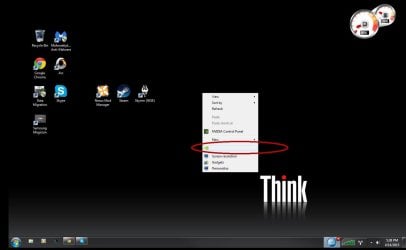
thank you for the tip greg. umm got a question what is that thing in the circle that i drew. why is that empty
 

Attachments

  • help.jpg
    help.jpg
    45.2 KB · Views: 4

My Computer My Computer

At a glance

Microsoft Windows 7 Professional 64-bit 7601 ...Intel(R) Core(TM)2 Duo CPU T9600 @ 2.80GHz8.00 GBNVIDIA Quadro FX 2700M
Computer type
Laptop
Computer Manufacturer/Model Number
Lenovo
OS
Microsoft Windows 7 Professional 64-bit 7601 Multiprocessor Free Service Pack 1
CPU
Intel(R) Core(TM)2 Duo CPU T9600 @ 2.80GHz
Motherboard
LENOVO 2757CTO
Memory
8.00 GB
Graphics Card(s)
NVIDIA Quadro FX 2700M
Sound Card
Conexant 20561 SmartAudio HD
Hard Drives
(1) Samsung SSD 850 EVO 1TB (2) IMD-0 (3) WD My Passport 0740 USB Device
Antivirus
None
Browser
Chrome
Hmmm. That looks like something buggy from Nvidia. That's why I wanted you to do the reinstall because I think you might have some corruption related to Nividia drivers or their Bloatware. If you uninstall the latest driver and software in Control Panel and Device Manager, does that go away after reboots? If not you may need to run a Driver Sweeper and if that doesn't work see if you can get before it with System Restore, or take my advice and do a parallel reinstall to test the difference with only the steps in Clean Reinstall Windows 7 which helps us help you much better since we know that over a million who have followed those steps only have not had problems. So something is creeping in.
 
Hmmm. That looks like something buggy from Nvidia. That's why I wanted you to do the reinstall because I think you might have some corruption related to Nividia drivers or their Bloatware. If you uninstall the latest driver and software in Control Panel and Device Manager, does that go away after reboots? If not you may need to run a Driver Sweeper and if that doesn't work see if you can get before it with System Restore, or take my advice and do a parallel reinstall to test the difference with only the steps in Clean Reinstall Windows 7 which helps us help you much better since we know that over a million who have followed those steps only have not had problems. So something is creeping in.

yeah like i said i did do a fresh install of windows from the system restore before, drivers were running ok only reason i did a reinstall was cause my laptop wouldnt stop freezing and the reinstall fixed that completly but my only problem is my display driver keeps unresponding when ever i do anything 3d wise. STo does it but then it runs ok with limited issues. neverwinter runs ok. strangly enough >.> DC Universe is some what playable >.> so i really dont know what the deal is. BUT no matter what i do my screen goes black.
 

My Computer My Computer

At a glance

Microsoft Windows 7 Professional 64-bit 7601 ...Intel(R) Core(TM)2 Duo CPU T9600 @ 2.80GHz8.00 GBNVIDIA Quadro FX 2700M
Computer type
Laptop
Computer Manufacturer/Model Number
Lenovo
OS
Microsoft Windows 7 Professional 64-bit 7601 Multiprocessor Free Service Pack 1
CPU
Intel(R) Core(TM)2 Duo CPU T9600 @ 2.80GHz
Motherboard
LENOVO 2757CTO
Memory
8.00 GB
Graphics Card(s)
NVIDIA Quadro FX 2700M
Sound Card
Conexant 20561 SmartAudio HD
Hard Drives
(1) Samsung SSD 850 EVO 1TB (2) IMD-0 (3) WD My Passport 0740 USB Device
Antivirus
None
Browser
Chrome
You have yet to state that you have installed an Anti virus program and the reason for not doing so. Are you 100% positive that the bloatware you are installing doesn't contain something malicious? PLEASE install a reputable AV program such as Panda or Security Essentials for your own safety. With these you can pre-screen the installer package before actually insalling the program. Unlikely, but possible, your problem could be with a trojan/virus.
 

My Computer My Computer

At a glance

Windows 7 Home Premium x64AMD A6-6400K APU8.0GB DDR3-1600Radeon Onboard Graphics
Computer type
PC/Desktop
Computer Manufacturer/Model Number
Custom
OS
Windows 7 Home Premium x64
CPU
AMD A6-6400K APU
Motherboard
Gigabyte F2A88XM-D3H
Memory
8.0GB DDR3-1600
Graphics Card(s)
Radeon Onboard Graphics
Sound Card
Realtek High Def
Monitor(s) Displays
Acer K242HQL
Screen Resolution
1920x1080
Hard Drives
Samsung 850 EVO SSD 250GB
PSU
Corsair 430W
Case
Silverstone PS-08
Cooling
Enermax fans (120mm-intake, 80mm-exhaust)
Keyboard
Logitech K360
Mouse
Logitech M305 Cordless Optical
Internet Speed
Download 60.19Mbps Upload 6.71Mbps
Antivirus
AVG
Browser
Iron Version 51.0.2700.0 (64-bit)
Greg you always beat me to the great question.
I also don't understand this.

From post # 63

yeah like i said i did do a fresh install of windows from the system restore before
 

My Computer My Computer

At a glance

Windows 10 Pro. 64/ version 1709 Windows 7 Pr...Intel i7-6800K @ 4.3Corsair Platinum 16 gig @2400EVGA GTX 1070 OC
Computer type
PC/Desktop
Computer Manufacturer/Model Number
Home made Desktop
OS
Windows 10 Pro. 64/ version 1709 Windows 7 Pro/64
CPU
Intel i7-6800K @ 4.3
Motherboard
ASUS X-99 Deluxe II
Memory
Corsair Platinum 16 gig @2400
Graphics Card(s)
EVGA GTX 1070 OC
Monitor(s) Displays
Asus 27" LED LCD/VE278Q
Screen Resolution
1920-1080 or 1280-720 HDMI
Hard Drives
INTEL SSD 730-240 Gb Sata 3.0/
PSU
EVGA Platium 1200W
Case
Phanteks Luxe Tempered Glass 8 fans/ one radiator
Cooling
XSPC/ Water Cooled CPU
Keyboard
Das 4 Professional
Mouse
Logitech M705/MX Anywhere 2-S
Internet Speed
100 mbits
Antivirus
Microsoft Security Essentials/ Malwarebytes Premium 3.0/ SAS
Browser
I.E. 11 default/Firefox/ ISP Time Warner Cable/Spectrum
Other Info
LG BluRay Burner/
Sound system-KLipsch-THX/
Icy Dock ssd Hot Swap bays.
Greg you always beat me to the great question.
I also don't understand this.

From post # 63

yeah like i said i did do a fresh install of windows from the system restore before

basically lenovo kept a back up of windows that in-case of software problems. instead of having to re-load windows from a CD , u just reload it from recovery system built in. what i did. OH this erases EVERYTHING! so i know i don't have any viruses on here. as for AV , we haven't found a free one that didn't charge for a subscription to use it

and the latest windows update came with a virus scanner/screener to check for problems. nothing was found. it was a one time use. my system is clean.
 

My Computer My Computer

At a glance

Microsoft Windows 7 Professional 64-bit 7601 ...Intel(R) Core(TM)2 Duo CPU T9600 @ 2.80GHz8.00 GBNVIDIA Quadro FX 2700M
Computer type
Laptop
Computer Manufacturer/Model Number
Lenovo
OS
Microsoft Windows 7 Professional 64-bit 7601 Multiprocessor Free Service Pack 1
CPU
Intel(R) Core(TM)2 Duo CPU T9600 @ 2.80GHz
Motherboard
LENOVO 2757CTO
Memory
8.00 GB
Graphics Card(s)
NVIDIA Quadro FX 2700M
Sound Card
Conexant 20561 SmartAudio HD
Hard Drives
(1) Samsung SSD 850 EVO 1TB (2) IMD-0 (3) WD My Passport 0740 USB Device
Antivirus
None
Browser
Chrome
My post # 6 & # 9 gave you the answer on which anti virus to use.

Try to help some one that will not install security programs in my opinion is a waste of my time.
You will just get infected and all the good work other members have done will be wasted.

Have a nice day.
 

My Computer My Computer

At a glance

Windows 10 Pro. 64/ version 1709 Windows 7 Pr...Intel i7-6800K @ 4.3Corsair Platinum 16 gig @2400EVGA GTX 1070 OC
Computer type
PC/Desktop
Computer Manufacturer/Model Number
Home made Desktop
OS
Windows 10 Pro. 64/ version 1709 Windows 7 Pro/64
CPU
Intel i7-6800K @ 4.3
Motherboard
ASUS X-99 Deluxe II
Memory
Corsair Platinum 16 gig @2400
Graphics Card(s)
EVGA GTX 1070 OC
Monitor(s) Displays
Asus 27" LED LCD/VE278Q
Screen Resolution
1920-1080 or 1280-720 HDMI
Hard Drives
INTEL SSD 730-240 Gb Sata 3.0/
PSU
EVGA Platium 1200W
Case
Phanteks Luxe Tempered Glass 8 fans/ one radiator
Cooling
XSPC/ Water Cooled CPU
Keyboard
Das 4 Professional
Mouse
Logitech M705/MX Anywhere 2-S
Internet Speed
100 mbits
Antivirus
Microsoft Security Essentials/ Malwarebytes Premium 3.0/ SAS
Browser
I.E. 11 default/Firefox/ ISP Time Warner Cable/Spectrum
Other Info
LG BluRay Burner/
Sound system-KLipsch-THX/
Icy Dock ssd Hot Swap bays.
My post # 6 & # 9 gave you the answer on which anti virus to use.

Try to help some one that will not install security programs in my opinion is a waste of my time.
You will just get infected and all the good work other members have done will be wasted.

Have a nice day.

umm... i dont see any point in an AV right this moment if my screen turns black just from watching videos on you-tube. how will that help exactly?
 

My Computer My Computer

At a glance

Microsoft Windows 7 Professional 64-bit 7601 ...Intel(R) Core(TM)2 Duo CPU T9600 @ 2.80GHz8.00 GBNVIDIA Quadro FX 2700M
Computer type
Laptop
Computer Manufacturer/Model Number
Lenovo
OS
Microsoft Windows 7 Professional 64-bit 7601 Multiprocessor Free Service Pack 1
CPU
Intel(R) Core(TM)2 Duo CPU T9600 @ 2.80GHz
Motherboard
LENOVO 2757CTO
Memory
8.00 GB
Graphics Card(s)
NVIDIA Quadro FX 2700M
Sound Card
Conexant 20561 SmartAudio HD
Hard Drives
(1) Samsung SSD 850 EVO 1TB (2) IMD-0 (3) WD My Passport 0740 USB Device
Antivirus
None
Browser
Chrome
There are totally free AV's discussed in Clean Reinstall Windows 7 which you would have discovered had you read or used it, but in spite of repeated claims that you "already did a Clean Install" you did not do anything of the sort but instead ran Factory Recovery which is the worst install of Win7 one can have.

However we will be glad to help you achieve a perfect Clean Reinstall Windows 7 here as we have 1.3+ million others who now have perfect installs of Windows 7 without a single complaint. But you need to read the tutorial so you know what's involved, and not just falsely claim you've already done it.

Install MSE or Panda free now and run a full scan so you now you're not infected. Since you've not had any protection, I'd also install, decline trial version, and run a full scan with the free scanners Malwarebytes and SUPERAntiSpyware - Downloads since it appears your OS has become corrupted when it can't download and install a driver.
 
Last edited:
There are totally free AV's discussed in Clean Reinstall Windows 7 which you would have discovered had you read or used it, but in spite of repeated claims that you "already did a Clean Install" you did not do anything of the sort but instead ran Factory Recovery which is the worst install of Win7 one can have.

However we will be glad to help you achieve a perfect Clean Reinstall Windows 7 here as we have 1.3+ million others who now have perfect installs of Windows 7 without a single complaint. But you need to read the tutorial so you know what's involved, and not just falsely claim you've already done it.

I've never seen Factory Recovery not provide a video driver. Did it have one besides Standard VGA after you ran Recovery? How long did it take for the trouble to begin.

Install MSE or Panda free now and run a full scan so you now you're not infected. Since you've not had any protection, I'd also install, decline trial version, and run a full scan with the free scanners Malwarebytes and SUPERAntiSpyware - Downloads since it appears your OS has become corrupted when it can't download and install a driver.

yes it did have a driver sides standard VGA after I ran recovery, as it installed everything. as laptops do not come with install cds (well mine didn't) what i can install is from the recovery only, it resets it to factory settings. i already have malwarebytes free version. not the trial. AND superantispyware cause me a lot of serious problems in the past why i refuse to use it. trouble started right when i tried to play my 3D games. neverwinter is running ok greg but the screen goes black every 5 minutes, but does not CTD and the game runs again with no problem for around ten minutes before screen turning black and going back to normal.
 

My Computer My Computer

At a glance

Microsoft Windows 7 Professional 64-bit 7601 ...Intel(R) Core(TM)2 Duo CPU T9600 @ 2.80GHz8.00 GBNVIDIA Quadro FX 2700M
Computer type
Laptop
Computer Manufacturer/Model Number
Lenovo
OS
Microsoft Windows 7 Professional 64-bit 7601 Multiprocessor Free Service Pack 1
CPU
Intel(R) Core(TM)2 Duo CPU T9600 @ 2.80GHz
Motherboard
LENOVO 2757CTO
Memory
8.00 GB
Graphics Card(s)
NVIDIA Quadro FX 2700M
Sound Card
Conexant 20561 SmartAudio HD
Hard Drives
(1) Samsung SSD 850 EVO 1TB (2) IMD-0 (3) WD My Passport 0740 USB Device
Antivirus
None
Browser
Chrome
How old is this laptop?

You might need to RMA it since this sounds like your board is shutting down due to excessive heat.
Rather than a virus.

Windows will put itself into powersave mode to reduce the amount of heat being generated.

Lenovo support should be able to help you out getting the RMA sheet filled out.


By the way, I had this exact issue 6 months ago with a clients laptop, the GPU had overheated and fried the solder around it. Only way to fix was a replacement board from HP, this took a week.
 
Last edited:

My Computer My Computer

At a glance

Windows 8.1Intel i5 3750k OC'd 4.0Ghz16GB Vengence CorsairGTX 770 OC 2GB Windforce
Computer type
PC/Desktop
Computer Manufacturer/Model Number
Custom Build
OS
Windows 8.1
CPU
Intel i5 3750k OC'd 4.0Ghz
Motherboard
P8Z77-V LX3
Memory
16GB Vengence Corsair
Graphics Card(s)
GTX 770 OC 2GB Windforce
Sound Card
C-Media 7.1 Surround Card
Monitor(s) Displays
Asus 3D 23" & BenQ 24" & LG 19"
Screen Resolution
1920*1080, 1920*1080, 1440*900
Hard Drives
Crucial 512GB SSD
WD 1.5 TB
WD 500Gb
PSU
850MW Silverstone
Case
inWin DragonRider
Cooling
4 * 140mm LED Akasa, One 140mm Fan Akasa
Keyboard
Corsair k95
Mouse
R.A.T 7 Contagion
Internet Speed
152 Mb Fiber Optic
Antivirus
ESET Nod32
Browser
Waterfox x64 / Chrome x64
Other Info
Freenas / Plex Media server
Q6600
6Gb DDR3
6TB ZFS Raid
500W PSu
2 x Intel NIC's
How old is this laptop?

You might need to RMA it since this sounds like your board is shutting down due to excessive heat.
Rather than a virus.

Windows will put itself into powersave mode to reduce the amount of heat being generated.

Lenovo support should be able to help you out getting the RMA sheet filled out.


By the way, I had this exact issue 6 months ago with a clients laptop, the GPU had overheated and fried the solder around it. Only way to fix was a replacement board from HP, this took a week.

(All of the help in this thread is software related, I am ashamed of you guys :o)

my laptop is around 4 years old and thank you so much for replying and helping me out :o

my laptops a lenovo w700 They dont make parts for it anymore :p
 

My Computer My Computer

At a glance

Microsoft Windows 7 Professional 64-bit 7601 ...Intel(R) Core(TM)2 Duo CPU T9600 @ 2.80GHz8.00 GBNVIDIA Quadro FX 2700M
Computer type
Laptop
Computer Manufacturer/Model Number
Lenovo
OS
Microsoft Windows 7 Professional 64-bit 7601 Multiprocessor Free Service Pack 1
CPU
Intel(R) Core(TM)2 Duo CPU T9600 @ 2.80GHz
Motherboard
LENOVO 2757CTO
Memory
8.00 GB
Graphics Card(s)
NVIDIA Quadro FX 2700M
Sound Card
Conexant 20561 SmartAudio HD
Hard Drives
(1) Samsung SSD 850 EVO 1TB (2) IMD-0 (3) WD My Passport 0740 USB Device
Antivirus
None
Browser
Chrome
The very first reply in the thread refers to the possibility of overheating.

The first five steps in Troubleshooting Steps for Windows 7 test the hardware and it was one of the first links I provided to complete. So it cannot truthfully be said that all the help so far has been software. One should not criticize others help attempts when offering your own.

Step 4 deals with overheating:

4. Check temps for overheating by installing Core Temp which will allow monitoring temps from System Tray. If running hot blow dust out of the case using canned air or clean out laptop dust, check all connections carefully avoiding static discharge to components by touching case first, upgrade or reseat RAM checking for debris in slot.
Akura, please confirm you have completed this step, and report back temp readings and what was found in following the cleaning link.

Repeatedly I have asked that all steps be confirmed completed after there was no reply to quite a few.

Shouldn't we test the temperatures at idle and under load and clean out the dust before RMA'ing the laptop? :rolleyes:
 
The very first reply in the thread refers to the possibility of overheating.

The first five steps in Troubleshooting Steps for Windows 7 test the hardware and it was one of the first links I provided to complete. So it cannot truthfully be said that all the help so far has been software. One should not criticize others help attempts when offering your own.

Step 4 deals with overheating:

4. Check temps for overheating by installing Core Temp which will allow monitoring temps from System Tray. If running hot blow dust out of the case using canned air or clean out laptop dust, check all connections carefully avoiding static discharge to components by touching case first, upgrade or reseat RAM checking for debris in slot.
Akura, please confirm you have completed this step, and report back temp readings and what was found in following the cleaning link.

Repeatedly I have asked that all steps be confirmed completed after there was no reply to quite a few.

Shouldn't we test the temperatures at idle and under load and clean out the dust before RMA'ing the laptop? :rolleyes:

If the laptop is crashing itself whilst the display drivers are being used, it can happen randomly from startup to playing games.

I'm not saying that the heat is the problem now, what I am suggesting is that the heat was the problem in the past, which could have potentially burnt the motherboard out.

Therefore, actually proving the heat problem wouldn't work anyway because it is already broken and has the possibility of not showing the correct information on the motherboard heat monitor.

The fact that it is 4 years old, and being used to play games, would indicate that it is experienced with high temperatures considering Laptops don't have a decent way to exhaust it.

So certainly, ensure that it is free of dust bunnies, but the fact that it continuously and randomly kills the display is a hardware indication, not an indication that steam is out of date.

Akura, do me a favour. Install HWiNFO64 and post screenshots of the temps whilst idle, opening a program and possibly running a benchmark.

If it crashes during any of these times, try to remember the temperature. Also feel the actual laptop itself, and let me know specifically where the heat is emanating from.

 

My Computer My Computer

At a glance

Windows 8.1Intel i5 3750k OC'd 4.0Ghz16GB Vengence CorsairGTX 770 OC 2GB Windforce
Computer type
PC/Desktop
Computer Manufacturer/Model Number
Custom Build
OS
Windows 8.1
CPU
Intel i5 3750k OC'd 4.0Ghz
Motherboard
P8Z77-V LX3
Memory
16GB Vengence Corsair
Graphics Card(s)
GTX 770 OC 2GB Windforce
Sound Card
C-Media 7.1 Surround Card
Monitor(s) Displays
Asus 3D 23" & BenQ 24" & LG 19"
Screen Resolution
1920*1080, 1920*1080, 1440*900
Hard Drives
Crucial 512GB SSD
WD 1.5 TB
WD 500Gb
PSU
850MW Silverstone
Case
inWin DragonRider
Cooling
4 * 140mm LED Akasa, One 140mm Fan Akasa
Keyboard
Corsair k95
Mouse
R.A.T 7 Contagion
Internet Speed
152 Mb Fiber Optic
Antivirus
ESET Nod32
Browser
Waterfox x64 / Chrome x64
Other Info
Freenas / Plex Media server
Q6600
6Gb DDR3
6TB ZFS Raid
500W PSu
2 x Intel NIC's
The very first reply in the thread refers to the possibility of overheating.

The first five steps in Troubleshooting Steps for Windows 7 test the hardware and it was one of the first links I provided to complete. So it cannot truthfully be said that all the help so far has been software. One should not criticize others help attempts when offering your own.

Step 4 deals with overheating:

4. Check temps for overheating by installing Core Temp which will allow monitoring temps from System Tray. If running hot blow dust out of the case using canned air or clean out laptop dust, check all connections carefully avoiding static discharge to components by touching case first, upgrade or reseat RAM checking for debris in slot.
Akura, please confirm you have completed this step, and report back temp readings and what was found in following the cleaning link.

Repeatedly I have asked that all steps be confirmed completed after there was no reply to quite a few.

Shouldn't we test the temperatures at idle and under load and clean out the dust before RMA'ing the laptop? :rolleyes:

If the laptop is crashing itself whilst the display drivers are being used, it can happen randomly from startup to playing games.

I'm not saying that the heat is the problem now, what I am suggesting is that the heat was the problem in the past, which could have potentially burnt the motherboard out.

Therefore, actually proving the heat problem wouldn't work anyway because it is already broken and has the possibility of not showing the correct information on the motherboard heat monitor.

The fact that it is 4 years old, and being used to play games, would indicate that it is experienced with high temperatures considering Laptops don't have a decent way to exhaust it.

So certainly, ensure that it is free of dust bunnies, but the fact that it continuously and randomly kills the display is a hardware indication, not an indication that steam is out of date.

Akura, do me a favour. Install HWiNFO64 and post screenshots of the temps whilst idle, opening a program and possibly running a benchmark.

If it crashes during any of these times, try to remember the temperature. Also feel the actual laptop itself, and let me know specifically where the heat is emanating from.

it did over heat in the past. and for the time being. its cold to the touch even when the screen goes black.

im running the program now Sniper. the heat is top right section of the laptop by the CD drive

i made a log before my game CTD here what it says. hope this helps as i cant understand any of it LOL

the screen had turned black sometimes randomly when not playing games.

greg i have ran the hardware tests. even the stress test. nothing showed up. no errors
 

Attachments

Last edited:

My Computer My Computer

At a glance

Microsoft Windows 7 Professional 64-bit 7601 ...Intel(R) Core(TM)2 Duo CPU T9600 @ 2.80GHz8.00 GBNVIDIA Quadro FX 2700M
Computer type
Laptop
Computer Manufacturer/Model Number
Lenovo
OS
Microsoft Windows 7 Professional 64-bit 7601 Multiprocessor Free Service Pack 1
CPU
Intel(R) Core(TM)2 Duo CPU T9600 @ 2.80GHz
Motherboard
LENOVO 2757CTO
Memory
8.00 GB
Graphics Card(s)
NVIDIA Quadro FX 2700M
Sound Card
Conexant 20561 SmartAudio HD
Hard Drives
(1) Samsung SSD 850 EVO 1TB (2) IMD-0 (3) WD My Passport 0740 USB Device
Antivirus
None
Browser
Chrome
Does the screen still turn off even when the external Monitor is disconnected?

What Display Driver is currently installed in Device Manager?
 
Does the screen still turn off even when the external Monitor is disconnected?

What Display Driver is currently installed in Device Manager?

yes it does. nvidea quadro 2700m only display driver installed
 

My Computer My Computer

At a glance

Microsoft Windows 7 Professional 64-bit 7601 ...Intel(R) Core(TM)2 Duo CPU T9600 @ 2.80GHz8.00 GBNVIDIA Quadro FX 2700M
Computer type
Laptop
Computer Manufacturer/Model Number
Lenovo
OS
Microsoft Windows 7 Professional 64-bit 7601 Multiprocessor Free Service Pack 1
CPU
Intel(R) Core(TM)2 Duo CPU T9600 @ 2.80GHz
Motherboard
LENOVO 2757CTO
Memory
8.00 GB
Graphics Card(s)
NVIDIA Quadro FX 2700M
Sound Card
Conexant 20561 SmartAudio HD
Hard Drives
(1) Samsung SSD 850 EVO 1TB (2) IMD-0 (3) WD My Passport 0740 USB Device
Antivirus
None
Browser
Chrome
Fill in your full Lenovo model in System Specs.

Have you enabled hardware auto-updating via Windows Update (Steps 3 and 6) then run all Important and Optional Windows Updates to see if Win7 wants another driver, or there are any patches needed to make the system including hardware run better? I would install all except Bing.

Next did you compare the display driver provided by either the Factory Recovery or Windows Update with the latest on the Lenovo Support Downloads webpage for your model? What version is installed? What version is latest on downloads page?

Please confirm that you are not interested in doing a Clean Reinstall Windows 7 even though you stated throughout the thread you had done one but it was actual Factory Recovery, a crap install.
 
Fill in your full Lenovo model in System Specs.

Have you enabled hardware auto-updating via Windows Update (Steps 3 and 6) then run all Important and Optional Windows Updates to see if Win7 wants another driver, or there are any patches needed to make the system including hardware run better? I would install all except Bing.
98
Next did you compare the display driver provided by either the Factory Recovery or Windows Update with the latest on the Lenovo Support Downloads webpage for your model? What version is installed? What version is latest on downloads page?

Please confirm that you are not interested in doing a Clean Reinstall Windows 7 even though you stated throughout the thread you had done one but it was actual Factory Recovery, a crap install.

i confirm , im not interested in doing a reinstall factory for windows 7 as that would be impossible. my laptop didnt come with any install desks. what i got is what i got. (my dad actually tried that. and the laptop did not come with any CD's with it or we would have done that already, infact it was a total ... just getting the laptop just to make back up, we ended up having to wripe everything!. )

the versions match. i cant upgrade it further and i have all the updates. i got version Kb981351 64 bit

today i ran more updates and so far didnt help in fixin gmy issue. no driver updates side nvedia i already upgraded fully.
 

My Computer My Computer

At a glance

Microsoft Windows 7 Professional 64-bit 7601 ...Intel(R) Core(TM)2 Duo CPU T9600 @ 2.80GHz8.00 GBNVIDIA Quadro FX 2700M
Computer type
Laptop
Computer Manufacturer/Model Number
Lenovo
OS
Microsoft Windows 7 Professional 64-bit 7601 Multiprocessor Free Service Pack 1
CPU
Intel(R) Core(TM)2 Duo CPU T9600 @ 2.80GHz
Motherboard
LENOVO 2757CTO
Memory
8.00 GB
Graphics Card(s)
NVIDIA Quadro FX 2700M
Sound Card
Conexant 20561 SmartAudio HD
Hard Drives
(1) Samsung SSD 850 EVO 1TB (2) IMD-0 (3) WD My Passport 0740 USB Device
Antivirus
None
Browser
Chrome
Back
Top