yet another "doesn't' have a valid ip configuration"

hatingwin7

New member
Local time
12:30 PM
Messages
5
Hello,

I like seemingly thousands of others have been recieving "doesn't' have a valid ip configuration"/unidentified network running win7 ultimate on my desktop and it's excrutiatingly frustrating.

  • I was running fine until about 3 weeks ago when the error first surfaced
  • I do not have the bonjour service
  • I did a clean install of win7 again hoping that would roll it back, no luck
  • updated nic driver
  • latest firmware on my router.
any ideas on where to go from here would be immensley appreciated.
 

My Computer

OS
7 ultimate
I'm guessing there isn't a fix for this then. :confused:
 

My Computer

OS
7 ultimate
hello hatingwin, from your information, your problem about ip conflic? or can you explain specs your problem?
 

My Computer

Computer Manufacturer/Model Number
built up
OS
windows 7
CPU
Phenom II AMD Dragon 3.5Ghz
Memory
DDR3 4GB
Graphics Card(s)
ATI Radeon 512Mb
Monitor(s) Displays
HP L1506
Screen Resolution
1152 x 864
Hard Drives
WDC 1 TB SATA-II Green Power
Keyboard
HP wireless keyboard
Mouse
HP Optic
Internet Speed
1GB
Hello All,

Not sure if this would help. I have Windows 7 Professional (which doesn't have that Bonjour service) on an ASUS UL30Vt-A1 laptop using an Intel X25-M SSD. Originally my laptop came with Windows 7 Home Premium but unfortunately I couldn't port over the contents from the original HDD to the SSD. Anyway, after installing Win7Pro, I too ran into the infamous "Unidentified Network" problem via wired network.

Cause: network cable
Solution: use pre-made network cables (the ones that you would find at a typical brick-mortal retail outlet)

From my experience, I notice that there were some cables that would only have a partial contact with the pins inside the network port; enough to let the computer know that there is a connection. I know it's strange but it occurs quite often for me in the past. Keep this in mind especially for those that make your own network cables.


Another problem that I ran into was with my wireless connection, where my Atheros AR8131 NIC would see the wireless router (DLink DI-624) but would not connect.

Cause: old firmware on router
Solution: updated firmware

After updating my router's firmware, I had no problems connecting via wireless.

Anyway, I hope this helps for those searching for a solution.
 

My Computer

Computer Manufacturer/Model Number
ASUS UL30VT-A1
OS
Windows 7 Professional
CPU
Intel® Core 2 Duo SU7300 1.30 GHz, 800MHz, 3MB Cache
Memory
4GB
Graphics Card(s)
Embedded Intel® GMA X4500MHD & NVIDIA® GeForce® G 210M
Sound Card
4GB DDR3 1066 MHz SDRAM
Monitor(s) Displays
13.3" HD (1366x768) Color-Shine (Glare-type)
Screen Resolution
1366x768
Hard Drives
Intel X25-M Mainstream 34nm 2.5in SATA II Solid State Drive,80GB
500GB 5400rpm
Internet Speed
Cable
Hi there,

I've swapped my network cables to be sure as a troubleshooting step already without success.

@ Ryo, if you let me know how/where to look for the info you asked about, I'd be happy to do so.
 

My Computer

OS
7 ultimate

My Computer

Computer type
PC/Desktop
Computer Manufacturer/Model Number
Home built
OS
Windows 7 Ult, Windows 8.1 Pro,
CPU
Q9650-4.275GHz, E8600 4.5GHz, E6750-3.8GHz
Motherboard
Evga 780i FTW
Memory
G.Skill PC2 9600 1200Mhz 5 5 5 15 2T
Graphics Card(s)
GTX480
Sound Card
Asus Xonar D2
Monitor(s) Displays
HannsG
Screen Resolution
1680X1050
Hard Drives
GSkill Phoenix Pro 120GB SSD
PSU
ThermalTake Toughpower 1000Watt modular
Case
ThermalTake XaserV
Cooling
Xigmatek S1283
Keyboard
Logitech G15
Mouse
Logitech G9
Internet Speed
T1
thanks, I'll try the steps in the link provided and post back on progress (or lack of) ;)
 

My Computer

OS
7 ultimate
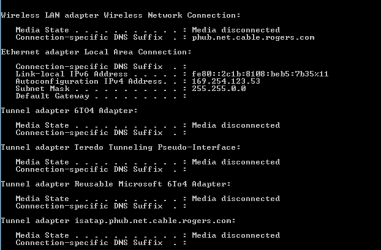
sad to say, it didn't work. I should add though that it's blank next to "default gateway"
 

Attachments

  • ipconfig.PNG
    ipconfig.PNG
    3.5 KB · Views: 25

My Computer

OS
7 ultimate
can you check the bios to enable it?? i guess some of your lan setting disable.
 

My Computer

Computer Manufacturer/Model Number
built up
OS
windows 7
CPU
Phenom II AMD Dragon 3.5Ghz
Memory
DDR3 4GB
Graphics Card(s)
ATI Radeon 512Mb
Monitor(s) Displays
HP L1506
Screen Resolution
1152 x 864
Hard Drives
WDC 1 TB SATA-II Green Power
Keyboard
HP wireless keyboard
Mouse
HP Optic
Internet Speed
1GB
Back
Top