
Yet another startup issue after OS migration

toy264

New member
Local time
12:27 PM
Messages
9
[FONT=&quot]Like a number of people, I used the Samsung data migration tool to transfer my Win7 operating system from one SSD to a larger one, and afterwords discovered that Windows would not start unless both drives were plugged in. I have spent the better part of 6 days trying every "Try this and see if it works!" solution I can find on the net, and none of them have worked for me. The original drive is an 840 EVO, the new one a 512 GB Samsung 951 NVME.[/FONT]
[FONT=&quot]A boot with only the 951 connected fails with a winload.exe missing error, and then booting from the install CD into Windows "Repair my Computer" results in the notice that Windows can't automatically fix the issue, and manual Startup Repair produces a no hard drive found message. From the command prompt, only the "Data" partition is recognized on the drive by Diskpart, which makes me think that the partition table on drive C may [FONT=&quot]an issue[/FONT].[/FONT]
[FONT=&quot]When booting with both drives attached, the Starting Windows screen appears for about 90 seconds before the log on screen comes up. The system behaves normally from that point on, with the exception that the restore function is inoperative –from both a backup file or a rescue disk. Obviously, the startup process spans both the original and the new drive, but I cannot sort things out so that the operating system [FONT=&quot]starts [/FONT]from the new 950 drive independently. After a week of frustration, I really, really hope [FONT=&quot]someone[/FONT] here can[FONT=&quot] diagnose[/FONT] what's [/FONT][FONT=&quot][FONT=&quot][/FONT][/FONT][FONT=&quot] going [FONT=&quot]wrong [/FONT]in the startup process and 2 explain how [FONT=&quot]to[/FONT] fix it.[/FONT]
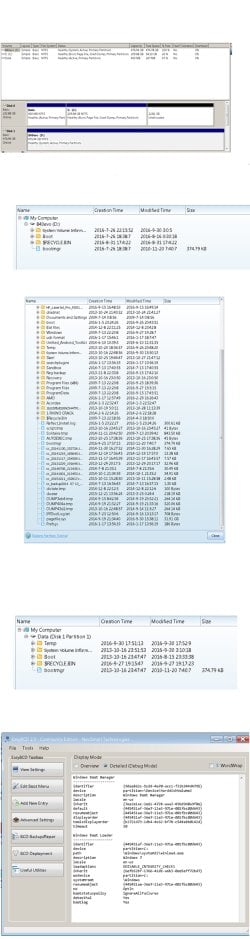
[FONT=&quot]The first image below is the disk management panel, and the second is the File Explorer view of the 840 (original) drive files.[/FONT][FONT=&quot] The third image is the Explorer view of the C partition on the C: drive, and the last is a shot of the contents of the "Data" partition on that drive.
a boot problem.jpg
[/FONT]
 

My Computer

Computer type
PC/Desktop
Computer Manufacturer/Model Number
Scratch built
OS
Win7 Pro 64 bit
CPU
i7 5930K
Motherboard
Asus X99-E WS/USB 3.1
Memory
32 GB Crucial Ballistic DDR4
Graphics Card(s)
EVGA GTX 980 ti
Sound Card
Xonar Essense STX
Hard Drives
Samsung 950 Pro 512 GB, Samsung 840 EVO 250 GB, WD 1001FALS 1TB
PSU
Corsair RM1000
Case
Fractal Define R5
Cooling
Corsair Hydro H100i
Internet Speed
75 Mbps down / 6 up
Antivirus
MS
Browser
Firefox
!1) Mark your C partition active. Then open an elevated cmd prompt and type bcdboot c:\windows /s c:

2) If you can't see the samsung drive properly from winre, that may due to a missing driver in winpe.

[Note: After completing 1) above -If you want to keep the evo drive plugged in, either mark D inactive, or ensure the samsung is first in bios boot order.]
 
Last edited:

My Computers

System One System Two

  • Computer type
    PC/Desktop
    OS
    7 X64
    CPU
    i5 8400
    Motherboard
    gigabyte b365m ds3h
    Memory
    2x8gb 3200mhz
    Hard Drives
    various
    PSU
    pure power 11 400w cm
    Case
    Coolermaster
    Cooling
    cryorig m9i
  • Computer type
    PC/Desktop
    OS
    7x64
    CPU
    g5400
    Motherboard
    ga b365m ds3h
    Memory
    8gb ddr4 2400
    PSU
    xfx pro 450w
Siw is right. You need a driver for 951 NVME.
You should insert the driver into your Win 7 Installation disk to be able to do a clean install and maintenance. Read my tutorial. Create a Windows 7 USB flash installation with new drives for new MB's

I've had installed a SM951 AHCI PCIe SSD drive. It gave me so many issues (without any real speed gain) that I've replaced it with a 850 PRO SSD SATA disk. Sata=RAID and PCIe M.2 drive problems

I'm interest on your opinion about the SM 951 as soon you get it running.
 

Attachments

My Computers

System One System Two

  • Computer type
    PC/Desktop
    Computer Manufacturer/Model Number
    custom build
    OS
    Windows 7 HP 64
    CPU
    i5 6600K - 800MHz to 4200MHz
    Motherboard
    GA-Z170-HD3P
    Memory
    4+4G GSkill DDR4 3000
    Graphics Card(s)
    IG - Intel 530
    Monitor(s) Displays
    Samsung 226BW
    Screen Resolution
    1680x1050
    Hard Drives
    (1) -1 SM951 – 128GB M.2 AHCI PCIe SSD drive for Windows 7 and Lubuntu
    (2) -1 WD SATA 3 - 1T for Data
    (3) -1 WD SATA 3 - 1T for backup
    PSU
    Thermaltake 450W TR2 gold
    Keyboard
    Old and good Chicony mechanical keyboard
    Mouse
    Logitech mX performance - 9 buttons (had to disable some)
    Internet Speed
    500Mb/s
    Browser
    Firefox 64
    Other Info
    TinyWall firewall
  • Computer type
    Laptop
    System Manufacturer/Model Number
    Asus Q550LF
    OS
    Windows 7 Pro
    CPU
    i7-4500U 800MHz to 3.0GHz
    Motherboard
    Asus Q550LF
    Memory
    (4+4)G DDR3 1600
    Graphics Card(s)
    IG intel 4400 + NVIDIA GeForce GT 745M
    Sound Card
    Realtek
    Monitor(s) Displays
    LG Display LP156WF4-SPH1
    Screen Resolution
    1920 x 1080
    Hard Drives
    BX500 120G SSD for Windows and programs +
    1T HDD for data
    Internet Speed
    500 Mb/s
    Browser
    Firefox
    Other Info
    TinyWall firewall
I've followed all the advice, including reinstalling the nvme driver.
I'm an ex usaf pilot and while I respect the knowledge of the board members, and appreciate any help, I am not comfortable with the "try this and see if it works " approach to solving problems. In my experience, it's better to diagnose a problem and correct the specific cause, rather than trying the most probable solutions one after the other, hoping to make things better before you screw them up beyond repair.
My windows system files are on a different drive than the boot partition, and I suspect the mbr is the root of the issue, not the nvme drive per se, but if I fix it before I give up and do a clean install, I'll post the cause(s).
Again, I mean no disrespect to anyone, and appreciate any suggestions.
 

My Computer

Computer type
PC/Desktop
Computer Manufacturer/Model Number
Scratch built
OS
Win7 Pro 64 bit
CPU
i7 5930K
Motherboard
Asus X99-E WS/USB 3.1
Memory
32 GB Crucial Ballistic DDR4
Graphics Card(s)
EVGA GTX 980 ti
Sound Card
Xonar Essense STX
Hard Drives
Samsung 950 Pro 512 GB, Samsung 840 EVO 250 GB, WD 1001FALS 1TB
PSU
Corsair RM1000
Case
Fractal Define R5
Cooling
Corsair Hydro H100i
Internet Speed
75 Mbps down / 6 up
Antivirus
MS
Browser
Firefox
Looking at your Disk Management screen print in post #1,
Your Disk 1 D partition is the System, Active partition, so that's where the bootloader was used to start Windows.
Your Disk 0 Data (no letter) partition is Active, but it is not the System partition, so the bootloader there is not used now.

I understand your concern about not wanting to try things and make matters worse, that's good.

All of the folks here trying to help you are giving the best advice they can.
All of us have made mistakes and hopefully figured out how to fix them, and learned from our mistakes.

If you are going to try and fix issues yourself, learn to use System Image backups, so you can recover.
I use Macrium Reflect free, and recommend it.

I think you need to somehow move the bootmgr from Disk 1 D to Disk 0 Data (no drive letter) partition.
Here is a tutorial, you can look at it and see if you want to try this:
Bootmgr - Move to C:\ with EasyBCD

Your situation is different than the tutorial, so you need to take your time to read and understand this.
You might need to (temporarily) add a drive letter to the Data partition to move the bootmgr.

You used the Samsung data migration tool, can you ask Samsung support to explain this ?
 

My Computer

Computer type
PC/Desktop
Computer Manufacturer/Model Number
home built
OS
Multi-Boot W7_Pro_x64 W8.1_Pro_x64 W10_Pro_x64 +Linux_VMs +Chromium_VM
CPU
AMD Athlon II x4 620
Motherboard
Gigabyte GA-MA785G-UD3H
Memory
6GB GSkill DDR2 800
Graphics Card(s)
AMD 4670 GPU + AMD 4200 IGP
Sound Card
on board Realtek ALC889A
Monitor(s) Displays
RCA 40" LCD TV, Insignia 32" LCD TV, HP 15" LCD monitor
Screen Resolution
1680 x 1050
Hard Drives
OCZ Vertex 3 120GB,
Samsung F3 1TB (3),
Several others - WD, Seagate, Hitachi, ...
PSU
Corsair 500 W
Case
Rosewill mid tower
Cooling
CM 90mm rifle
Keyboard
Gyration wireless, Logitech wireless, Dell USB wired
Mouse
Gyration wireless, Logitech wireless, V7 USB wired
Internet Speed
Spectrum - 100Mbps D / 10Mbps U
Antivirus
Avast, MBAM3, EMET, WinPatrol
Browser
Pale Moon, Firefox, IE
Other Info
2 multi-boot PC's
Mainly HTPC/Office/Gen purpose (no gaming).
Trendnet USB KVM.
LG DVD burner/Blue Ray Player.
Tray system for removable SATA backup drives.

Not currently OCd, under-volted.
I use Hybrid sleep, rarely re-boot or shutdown.

Hauppauge HD-PVR, Avermedia PCIe TV Tuner, Hauppauge PCI TV Tuner.
My windows system files are on a different drive than the boot partition

1) That is why I suggested you switch active flag and recreate the boot critical files.


booting from the install CD into Windows "Repair my Computer" ...Startup Repair produces a no hard drive found message

2) Have you installed the nvme driver in winpe?
 

My Computers

System One System Two

  • Computer type
    PC/Desktop
    OS
    7 X64
    CPU
    i5 8400
    Motherboard
    gigabyte b365m ds3h
    Memory
    2x8gb 3200mhz
    Hard Drives
    various
    PSU
    pure power 11 400w cm
    Case
    Coolermaster
    Cooling
    cryorig m9i
  • Computer type
    PC/Desktop
    OS
    7x64
    CPU
    g5400
    Motherboard
    ga b365m ds3h
    Memory
    8gb ddr4 2400
    PSU
    xfx pro 450w
There are some information you gave that doesn't match the images you posted.
- Is Disk 0 the Sm951? You mentioned it's a 512 G but I can see 232 G on the image.
- Disk 1 label 840 is empty. Did you formatted it?

I've also notice that your drives are Legacy - MBR and some folders are from 2009 and it suggests that you have cloned your drive more than once.
Your actual system must have a lot of trash all over.
I'll suggest you to do a clean install.
You have a very good system and it will work much faster and safer with a clean install.

- Make a backup of all your data (on the 840 Evo or on another drive)
- Follow my tutorial and make a Win 7 installation disk with the SM951 and USB3 drivers.
- Detach all other drives from the MB (very important).
- Set your BIOS:
-Fast boot = Disabled
-CSM = Enabled
-Boot device control = UEFI and Legacy
-Boot from storage devices = UEFI driver fist
-Secure boot = Other.
- Boot from the modified Win 7 installation disk on UEFI mode. Go to install - custom - advanced - delete all partitions on the SM951 - create new. It will be created 3 partitions (100M FAT32 for UEFI, 120M RAW MS reserved, and remain disk as NTFS). If you wish you can make other partitions or do it later from Disk Management.
- Once win 7 has been installed, check Device Manager and install all drivers.
- Set Windows update to manual and install the so called SP2 - MS releases SP2 for Windows 7
- Set Set Windows update to auto and search for new updates.
- Attach other drives.
- Recover your data from the backup.
 
Last edited:

My Computers

System One System Two

  • Computer type
    PC/Desktop
    Computer Manufacturer/Model Number
    custom build
    OS
    Windows 7 HP 64
    CPU
    i5 6600K - 800MHz to 4200MHz
    Motherboard
    GA-Z170-HD3P
    Memory
    4+4G GSkill DDR4 3000
    Graphics Card(s)
    IG - Intel 530
    Monitor(s) Displays
    Samsung 226BW
    Screen Resolution
    1680x1050
    Hard Drives
    (1) -1 SM951 – 128GB M.2 AHCI PCIe SSD drive for Windows 7 and Lubuntu
    (2) -1 WD SATA 3 - 1T for Data
    (3) -1 WD SATA 3 - 1T for backup
    PSU
    Thermaltake 450W TR2 gold
    Keyboard
    Old and good Chicony mechanical keyboard
    Mouse
    Logitech mX performance - 9 buttons (had to disable some)
    Internet Speed
    500Mb/s
    Browser
    Firefox 64
    Other Info
    TinyWall firewall
  • Computer type
    Laptop
    System Manufacturer/Model Number
    Asus Q550LF
    OS
    Windows 7 Pro
    CPU
    i7-4500U 800MHz to 3.0GHz
    Motherboard
    Asus Q550LF
    Memory
    (4+4)G DDR3 1600
    Graphics Card(s)
    IG intel 4400 + NVIDIA GeForce GT 745M
    Sound Card
    Realtek
    Monitor(s) Displays
    LG Display LP156WF4-SPH1
    Screen Resolution
    1920 x 1080
    Hard Drives
    BX500 120G SSD for Windows and programs +
    1T HDD for data
    Internet Speed
    500 Mb/s
    Browser
    Firefox
    Other Info
    TinyWall firewall
Thank you all for your advice. You are correct, two or three years ago I cloned an original Windows 7 installation from a hard drive onto the Samsung 840. and it would have saved me an enormous amount of time if I had simply done a clean install on the 951 – I just didn't want to go through reinstalling all my applications again. At this point, it's almost a matter of pride not to give up making this work. And even if it doesn't, I've learned a hell of a lot about the boot process that I wouldn't otherwise have delved into. Nearly as fun as EMM386 and HIMEM.sys, so thank you.
I've spent most of today reading up on the MBR, bootmgr, and winload, and it's going to take me a while to digest everything that's been provided here since my last post. I think I've gained a certain appreciation into how the MacBook Pro managed to gain a foothold.
 

My Computer

Computer type
PC/Desktop
Computer Manufacturer/Model Number
Scratch built
OS
Win7 Pro 64 bit
CPU
i7 5930K
Motherboard
Asus X99-E WS/USB 3.1
Memory
32 GB Crucial Ballistic DDR4
Graphics Card(s)
EVGA GTX 980 ti
Sound Card
Xonar Essense STX
Hard Drives
Samsung 950 Pro 512 GB, Samsung 840 EVO 250 GB, WD 1001FALS 1TB
PSU
Corsair RM1000
Case
Fractal Define R5
Cooling
Corsair Hydro H100i
Internet Speed
75 Mbps down / 6 up
Antivirus
MS
Browser
Firefox
Couldn't face the stress & delay of figuring this out on yet another machine.

Followed DavidE advice, bought EasyRE.

Booted ISO, it started it's Linux recovery environment, did lots of stuff, problem fixed, machine now boots. :)

It appears to check for many permutations and combinations of messed up settings & drivers, then automagic fixes them.

Great, now I don't have to understand all that arcane windows trickery & cludginess.
 

My Computer

Computer type
PC/Desktop
Computer Manufacturer/Model Number
Asus
OS
64 Pro
CPU
i7-6700
Motherboard
H170I-Pro
Memory
32Gb
Graphics Card(s)
Onboard
Hard Drives
Samsung 950Pro SSD
Antivirus
Kaspersky
Browser
Firefox
Back
Top