Solved "You are about to be logged off" "Windows will shut down in 1 minute"

Tomha

New member
Member
VIP
Local time
4:51 PM
Messages
391
Location
Auckland, New Zealand
"You are about to be logged off" "Windows will shut down in 1 minute"

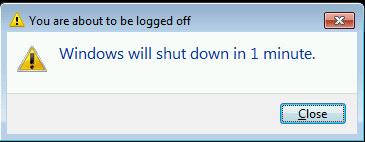
I am ashamed to say I seem to have obtained some sort of malware, virus, or perhaps some some "funny" fella using a .bat or .vbs file. At seemingly random times a window will pop up:
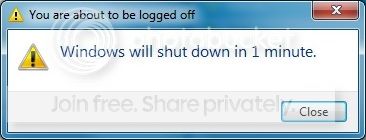
Untitled-5_zpsef92dd8e.jpg


I highly doubt this is anything to do with legitimate windows functions.

I have searched the running processes, and nothing seems fishy there. I ran a full scan with malware bytes, nothing came up, and I have run a full scan on my primary drive with microsoft security essentials, and I am currently running one on my secondary drives, also nothing. I also ran a quick search for .vbs and .bat files on my primary drive where I install all programs except games (its an SSD), and saw nothing out of the ordinary.

Before the conversation arouses, I am not interested in having new antivirus software sold to me, I don't stand for any antivirus I have to pay for, nor "lite" or trial versions of software. I don't want something like avast about which almost every forum thread complaining about networking issues for things like games, seems to complain about. So unless you have something free, proven very effective, light weight that isn't going to treat me like a baby, asking if im sure I want to delete every file and telling me when my cpu is actually being used by a program like norton does >.<, I politely ask that you leave it out of this thread. I have run microsoft security essentials for a couple of years now and never had an issue, it is perfectly sufficient for me, in my opinion.

Little bit of background. I actively run Microsoft Security Essentials, and due to this issue, currently have malware bytes running. More often than not I have my firewall disabled, I know to some this is heresy, however on an almost daily basis I run all sorts of lan and internet servers for people I play with, and frankly, creating exceptions to every program which wants to communicate over the internet is a huge pain in the ass, and doesn't even work half the time. The first event occurred about 8 hours ago, since then the window has popped up 3 times. I cannot recall downloading anything which could be host to such a function in the past few days. I downloaded a few videos, some images, a couple of scripts for servers. I also downloaded updates for skype, steam, and google earth. Odly enough, it occurs to me that the first event was mere minutes after applying the skype update...but for that to be the cause seems very unlikely to me.

If anyone has suggestions it would be greatly appreciated,
Thanks,
Tom
 

My Computer My Computer

At a glance

Windows 7 Professional 64bitIntel i7 3770k 3.5ghzCorsair Vengeance 16gb (4x4gb)Gigabyte G1 Gaming GTX970
Computer type
PC/Desktop
Computer Manufacturer/Model Number
Custom Build
OS
Windows 7 Professional 64bit
CPU
Intel i7 3770k 3.5ghz
Motherboard
Asus P8Z77-V Deluxe
Memory
Corsair Vengeance 16gb (4x4gb)
Graphics Card(s)
Gigabyte G1 Gaming GTX970
Sound Card
None
Monitor(s) Displays
3x AOC 12367fh 23"
Screen Resolution
1920x1080
Hard Drives
Western Digital Caviar Black 1TB - 64mb cache
Western Digital Caviar Green 1TB - 32mb cache
Samsung 830 SSD 128Gb Boot Drive
PSU
Corsair AX-860W ATX
Case
Corsair 500R black
Cooling
Corsair 500r Stock cooling (3x120mm, 1x200mm) & Corsair H100
Keyboard
Logitech G110 gaming keyboard
Mouse
Logitech G500s
Other Info
Corsair Hydro 100 CPU Cooler
Actually, if I'm not mistaken that looks very much like the shutdown command run from Windows cmd.

I know you said you haven't found any .bat files, but just to be sure, you aren't using your own .bat files for anything are you? Have a look in the server script you downloaded.

Code:
C:\Windows\system32>shutdown
Usage: shutdown [/i | /l | /s | /r | /g | /a | /p | /h | /e] [/f]
    [/m \\computer][/t xxx][/d [p|u:]xx:yy [/c "comment"]]

    No args    Display help. This is the same as typing /?.
    /?         Display help. This is the same as not typing any options.
    /i         Display the graphical user interface (GUI).
               This must be the first option.
    /l         Log off. This cannot be used with /m or /d options.
    /s         Shutdown the computer.
    /r         Shutdown and restart the computer.
    /g         Shutdown and restart the computer. After the system is
               rebooted, restart any registered applications.
    /a         Abort a system shutdown.
               This can only be used during the time-out period.
    /p         Turn off the local computer with no time-out or warning.
               Can be used with /d and /f options.
    /h         Hibernate the local computer.
               Can be used with the /f option.
    /e         Document the reason for an unexpected shutdown of a computer.
    /m \\computer Specify the target computer.
    /t xxx     Set the time-out period before shutdown to xxx seconds.
               The valid range is 0-315360000 (10 years), with a default of 30.
               If the timeout period is greater than 0, the /f parameter is
               implied.
    /c "comment" Comment on the reason for the restart or shutdown.
               Maximum of 512 characters allowed.
    /f         Force running applications to close without forewarning users.
               The /f parameter is implied when a value greater than 0 is
               specified for the /t parameter.
    /d [p|u:]xx:yy  Provide the reason for the restart or shutdown.
               p indicates that the restart or shutdown is planned.
               u indicates that the reason is user defined.
               If neither p nor u is specified the restart or shutdown is
               unplanned.
               xx is the major reason number (positive integer less than 256).
               yy is the minor reason number (positive integer less than 65536).


Reasons on this computer:
(E = Expected U = Unexpected P = planned, C = customer defined)
Type    Major   Minor   Title

 U      0       0       Other (Unplanned)
E       0       0       Other (Unplanned)
E P     0       0       Other (Planned)
 U      0       5       Other Failure: System Unresponsive
E       1       1       Hardware: Maintenance (Unplanned)
E P     1       1       Hardware: Maintenance (Planned)
E       1       2       Hardware: Installation (Unplanned)
E P     1       2       Hardware: Installation (Planned)
E       2       2       Operating System: Recovery (Planned)
E P     2       2       Operating System: Recovery (Planned)
  P     2       3       Operating System: Upgrade (Planned)
E       2       4       Operating System: Reconfiguration (Unplanned)
E P     2       4       Operating System: Reconfiguration (Planned)
  P     2       16      Operating System: Service pack (Planned)
        2       17      Operating System: Hot fix (Unplanned)
  P     2       17      Operating System: Hot fix (Planned)
        2       18      Operating System: Security fix (Unplanned)
  P     2       18      Operating System: Security fix (Planned)
E       4       1       Application: Maintenance (Unplanned)
E P     4       1       Application: Maintenance (Planned)
E P     4       2       Application: Installation (Planned)
E       4       5       Application: Unresponsive
E       4       6       Application: Unstable
 U      5       15      System Failure: Stop error
 U      5       19      Security issue
E       5       19      Security issue
E P     5       19      Security issue
E       5       20      Loss of network connectivity (Unplanned)
 U      6       11      Power Failure: Cord Unplugged
 U      6       12      Power Failure: Environment
  P     7       0       Legacy API shutdown

C:\Windows\system32>

Failing that, I would guess the fact that you don't run a firewall will have opened you up to some form of penetration.....
 

My Computer My Computer

At a glance

Windows 10 Pro x64 ; Xubuntu x64Intel i7 860 @ 2.80 GHz O/C'ed to 4.0GHz16GB Corsair Vengance DDR3 @ 661 MHz Dual Cha...EVGA NVidia GTX 560 1024MB
Computer type
PC/Desktop
Computer Manufacturer/Model Number
Golden Mk. I.4
OS
Windows 10 Pro x64 ; Xubuntu x64
CPU
Intel i7 860 @ 2.80 GHz O/C'ed to 4.0GHz
Motherboard
Gigabyte P55A-UD3R Rev.1. Award BIOS F13
Memory
16GB Corsair Vengance DDR3 @ 661 MHz Dual Channel (9-9-9-24)
Graphics Card(s)
EVGA NVidia GTX 560 1024MB
Sound Card
Realtek Integrated
Monitor(s) Displays
Dual Samsung SyncMaster 2494HS
Screen Resolution
1920*1080 and 1920*1080
Hard Drives
1*Samsung 840 EVO 120GB SSD;
1*OCZ Vertex 2 60GB SSD;
2*Samsung F3 SpinPoint 1TB in RAID0;
1*Samsung F1 SpinPoint 1TB;
2*Western Digital 1TB External USB 3.0
1*Western Digital 500GB External USB 3.0
1*Seagate 500GB External USB 2.0
PSU
Thermaltake ToughPower QFan 750W
Case
Thermaltake Element S VK60001W2Z
Cooling
Corsair H60 Water Cooling, 2*230mm and 2*80mm case fans
Keyboard
Logitech G110
Mouse
Logitech MX518
I don't doubt the fact I had no firewall is quite likely to have played a part here. Call me stubborn, but in almost 2 years of minimum firewall usage, this is the only issue I have had, and the amount of times re-enabling it has only caused issues networking with other people I know and trust, which exceptions don't seem to solve, is just annoying. I do not regret using no firewall, and while I genuinely appreciate the advice, I am already aware of this, and mentioning it does not solve my issue (In the short term :p).

And in answer to your first question, I don't use .bat files. However I do recognize how similar this is to that command, which is why I wonder if this isn't the result of some script kiddie.
 

My Computer My Computer

At a glance

Windows 7 Professional 64bitIntel i7 3770k 3.5ghzCorsair Vengeance 16gb (4x4gb)Gigabyte G1 Gaming GTX970
Computer type
PC/Desktop
Computer Manufacturer/Model Number
Custom Build
OS
Windows 7 Professional 64bit
CPU
Intel i7 3770k 3.5ghz
Motherboard
Asus P8Z77-V Deluxe
Memory
Corsair Vengeance 16gb (4x4gb)
Graphics Card(s)
Gigabyte G1 Gaming GTX970
Sound Card
None
Monitor(s) Displays
3x AOC 12367fh 23"
Screen Resolution
1920x1080
Hard Drives
Western Digital Caviar Black 1TB - 64mb cache
Western Digital Caviar Green 1TB - 32mb cache
Samsung 830 SSD 128Gb Boot Drive
PSU
Corsair AX-860W ATX
Case
Corsair 500R black
Cooling
Corsair 500r Stock cooling (3x120mm, 1x200mm) & Corsair H100
Keyboard
Logitech G110 gaming keyboard
Mouse
Logitech G500s
Other Info
Corsair Hydro 100 CPU Cooler
However I do recognize how similar this is to that command, which is why I wonder if this isn't the result of some script kiddie.

Very likely, check your server scripts - especially those uploaded to you server.
 

My Computer My Computer

At a glance

Windows 10 Pro x64 ; Xubuntu x64Intel i7 860 @ 2.80 GHz O/C'ed to 4.0GHz16GB Corsair Vengance DDR3 @ 661 MHz Dual Cha...EVGA NVidia GTX 560 1024MB
Computer type
PC/Desktop
Computer Manufacturer/Model Number
Golden Mk. I.4
OS
Windows 10 Pro x64 ; Xubuntu x64
CPU
Intel i7 860 @ 2.80 GHz O/C'ed to 4.0GHz
Motherboard
Gigabyte P55A-UD3R Rev.1. Award BIOS F13
Memory
16GB Corsair Vengance DDR3 @ 661 MHz Dual Channel (9-9-9-24)
Graphics Card(s)
EVGA NVidia GTX 560 1024MB
Sound Card
Realtek Integrated
Monitor(s) Displays
Dual Samsung SyncMaster 2494HS
Screen Resolution
1920*1080 and 1920*1080
Hard Drives
1*Samsung 840 EVO 120GB SSD;
1*OCZ Vertex 2 60GB SSD;
2*Samsung F3 SpinPoint 1TB in RAID0;
1*Samsung F1 SpinPoint 1TB;
2*Western Digital 1TB External USB 3.0
1*Western Digital 500GB External USB 3.0
1*Seagate 500GB External USB 2.0
PSU
Thermaltake ToughPower QFan 750W
Case
Thermaltake Element S VK60001W2Z
Cooling
Corsair H60 Water Cooling, 2*230mm and 2*80mm case fans
Keyboard
Logitech G110
Mouse
Logitech MX518
Had a look, but they are all quite simple scripts, most of which don't actually interact directly with windows, but rather which are loaded into/through the server programs. None of them appear to be of any interest though..
 

My Computer My Computer

At a glance

Windows 7 Professional 64bitIntel i7 3770k 3.5ghzCorsair Vengeance 16gb (4x4gb)Gigabyte G1 Gaming GTX970
Computer type
PC/Desktop
Computer Manufacturer/Model Number
Custom Build
OS
Windows 7 Professional 64bit
CPU
Intel i7 3770k 3.5ghz
Motherboard
Asus P8Z77-V Deluxe
Memory
Corsair Vengeance 16gb (4x4gb)
Graphics Card(s)
Gigabyte G1 Gaming GTX970
Sound Card
None
Monitor(s) Displays
3x AOC 12367fh 23"
Screen Resolution
1920x1080
Hard Drives
Western Digital Caviar Black 1TB - 64mb cache
Western Digital Caviar Green 1TB - 32mb cache
Samsung 830 SSD 128Gb Boot Drive
PSU
Corsair AX-860W ATX
Case
Corsair 500R black
Cooling
Corsair 500r Stock cooling (3x120mm, 1x200mm) & Corsair H100
Keyboard
Logitech G110 gaming keyboard
Mouse
Logitech G500s
Other Info
Corsair Hydro 100 CPU Cooler
Sorry, I'm sure what else to suggest.....something appears to be running the shutdown command. You'll have to try and track it down.
 

My Computer My Computer

At a glance

Windows 10 Pro x64 ; Xubuntu x64Intel i7 860 @ 2.80 GHz O/C'ed to 4.0GHz16GB Corsair Vengance DDR3 @ 661 MHz Dual Cha...EVGA NVidia GTX 560 1024MB
Computer type
PC/Desktop
Computer Manufacturer/Model Number
Golden Mk. I.4
OS
Windows 10 Pro x64 ; Xubuntu x64
CPU
Intel i7 860 @ 2.80 GHz O/C'ed to 4.0GHz
Motherboard
Gigabyte P55A-UD3R Rev.1. Award BIOS F13
Memory
16GB Corsair Vengance DDR3 @ 661 MHz Dual Channel (9-9-9-24)
Graphics Card(s)
EVGA NVidia GTX 560 1024MB
Sound Card
Realtek Integrated
Monitor(s) Displays
Dual Samsung SyncMaster 2494HS
Screen Resolution
1920*1080 and 1920*1080
Hard Drives
1*Samsung 840 EVO 120GB SSD;
1*OCZ Vertex 2 60GB SSD;
2*Samsung F3 SpinPoint 1TB in RAID0;
1*Samsung F1 SpinPoint 1TB;
2*Western Digital 1TB External USB 3.0
1*Western Digital 500GB External USB 3.0
1*Seagate 500GB External USB 2.0
PSU
Thermaltake ToughPower QFan 750W
Case
Thermaltake Element S VK60001W2Z
Cooling
Corsair H60 Water Cooling, 2*230mm and 2*80mm case fans
Keyboard
Logitech G110
Mouse
Logitech MX518
The Shutdown message you get is a normal one Windows shows when a scheduled shutdown is going to happen.

A short explanation:
I give my Windows 7 PC a command to shutdown in 1000 seconds by giving this command in Command Prompt:
Code:
shutdown -s -t 1000
  • -s = shutdown, other options for instance -r to reboot or -h to hibernate
  • -t XXXX = shutdown delay where XXXX is time in seconds, if -t switch is not used the default delay is 30 seconds

After giving this command Windows pops up a balloon tip near notification are telling about the delayed action:

Shutdown_1.png

(1000 seconds used in my example = 16 minutes)

When there is about one minute to go I will get this:

Shutdown_3.png

(Notice, it's not always quite exact, this message will be shown when there's something between one and two minutes to go to delayed shutdown.)

It is like a last warning, giving me enough time to launch Command Prompt to abort delayed shutdown process with this command:
Code:
shutdown -a
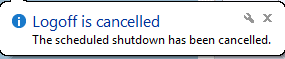
When aborted, Windows shows a balloon tip near notification area telling about this:

Shutdown_2.png

To put this short: I do not believe you have got an infection. You could try to find the culprit by searching the whole computer for files that contain word shutdown to see if there's a batch file on your computer which will be launched when you do a certain task.

Type this to Search field when in Explorer > Computer to get a list of all files containing word shutdown:
Code:
content:shutdown

You could also check the Task Scheduler to see if there's a for you unknown task that launches a delayed, scheduled shutdown.

Kari
 

My Computer My Computer

At a glance

Windows 10 Pro x64 EN-GB1.6 GHz Intel Core i7-720QM Processor6 GBATI Mobility Radeon HD 5850 Graphics
Computer type
Laptop
Computer Manufacturer/Model Number
HP ENVY 17-1150eg
OS
Windows 10 Pro x64 EN-GB
CPU
1.6 GHz Intel Core i7-720QM Processor
Memory
6 GB
Graphics Card(s)
ATI Mobility Radeon HD 5850 Graphics
Sound Card
Beats sound system with integrated subwoofer
Monitor(s) Displays
17" laptop display, 22" LED and 32" Full HD TV through HDMI
Screen Resolution
1600*900 (1), 1920*1080 (2&3)
Hard Drives
Internal: 2 x 500 GB SATA Hard Disk Drive 7200 rpm
External: 2TB for backups, 3TB USB3 network drive for media
Cooling
As Envy runs a bit warm, I have it on a Cooler Master pad
Keyboard
Logitech diNovo Media Desktop Laser (bluetooth)
Mouse
Logitech Performance Mouse MX
Internet Speed
50/10 Mbps VDSL
Antivirus
Windows Defender 4.3.9431.0
Browser
Maxthon 3.5.2., IE11
Thanks Kari, the Task Scheduler didn't have any scheduled shutdowns, and the search is running now.
 

My Computer My Computer

At a glance

Windows 7 Professional 64bitIntel i7 3770k 3.5ghzCorsair Vengeance 16gb (4x4gb)Gigabyte G1 Gaming GTX970
Computer type
PC/Desktop
Computer Manufacturer/Model Number
Custom Build
OS
Windows 7 Professional 64bit
CPU
Intel i7 3770k 3.5ghz
Motherboard
Asus P8Z77-V Deluxe
Memory
Corsair Vengeance 16gb (4x4gb)
Graphics Card(s)
Gigabyte G1 Gaming GTX970
Sound Card
None
Monitor(s) Displays
3x AOC 12367fh 23"
Screen Resolution
1920x1080
Hard Drives
Western Digital Caviar Black 1TB - 64mb cache
Western Digital Caviar Green 1TB - 32mb cache
Samsung 830 SSD 128Gb Boot Drive
PSU
Corsair AX-860W ATX
Case
Corsair 500R black
Cooling
Corsair 500r Stock cooling (3x120mm, 1x200mm) & Corsair H100
Keyboard
Logitech G110 gaming keyboard
Mouse
Logitech G500s
Other Info
Corsair Hydro 100 CPU Cooler
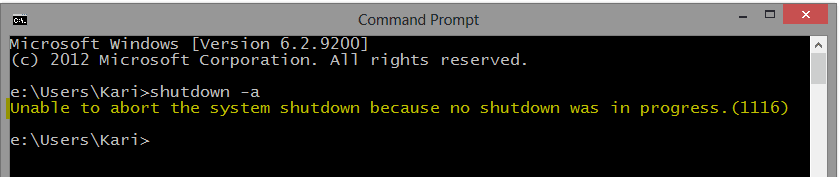
In any case you can test if this really is a scheduled delayed shutdown process or something else. If / when you get the message again, open Command Prompt (could be a good idea to pin it to Taskbar?) and abort shutdown.

As aborting shutdown only works if there really exists a scheduled shutdown, Windows tells you there are no scheduled shutdowns if this message of yours is something else:

Shutdown_4.png

Kari
 

My Computer My Computer

At a glance

Windows 10 Pro x64 EN-GB1.6 GHz Intel Core i7-720QM Processor6 GBATI Mobility Radeon HD 5850 Graphics
Computer type
Laptop
Computer Manufacturer/Model Number
HP ENVY 17-1150eg
OS
Windows 10 Pro x64 EN-GB
CPU
1.6 GHz Intel Core i7-720QM Processor
Memory
6 GB
Graphics Card(s)
ATI Mobility Radeon HD 5850 Graphics
Sound Card
Beats sound system with integrated subwoofer
Monitor(s) Displays
17" laptop display, 22" LED and 32" Full HD TV through HDMI
Screen Resolution
1600*900 (1), 1920*1080 (2&3)
Hard Drives
Internal: 2 x 500 GB SATA Hard Disk Drive 7200 rpm
External: 2TB for backups, 3TB USB3 network drive for media
Cooling
As Envy runs a bit warm, I have it on a Cooler Master pad
Keyboard
Logitech diNovo Media Desktop Laser (bluetooth)
Mouse
Logitech Performance Mouse MX
Internet Speed
50/10 Mbps VDSL
Antivirus
Windows Defender 4.3.9431.0
Browser
Maxthon 3.5.2., IE11
The searches didn't find anything. I have the command prompt on the task bar, and next time it pops up, ill try stop the shutdown and report back then. Thanks for the suggestions :)
 

My Computer My Computer

At a glance

Windows 7 Professional 64bitIntel i7 3770k 3.5ghzCorsair Vengeance 16gb (4x4gb)Gigabyte G1 Gaming GTX970
Computer type
PC/Desktop
Computer Manufacturer/Model Number
Custom Build
OS
Windows 7 Professional 64bit
CPU
Intel i7 3770k 3.5ghz
Motherboard
Asus P8Z77-V Deluxe
Memory
Corsair Vengeance 16gb (4x4gb)
Graphics Card(s)
Gigabyte G1 Gaming GTX970
Sound Card
None
Monitor(s) Displays
3x AOC 12367fh 23"
Screen Resolution
1920x1080
Hard Drives
Western Digital Caviar Black 1TB - 64mb cache
Western Digital Caviar Green 1TB - 32mb cache
Samsung 830 SSD 128Gb Boot Drive
PSU
Corsair AX-860W ATX
Case
Corsair 500R black
Cooling
Corsair 500r Stock cooling (3x120mm, 1x200mm) & Corsair H100
Keyboard
Logitech G110 gaming keyboard
Mouse
Logitech G500s
Other Info
Corsair Hydro 100 CPU Cooler
Finally (?) got the popup again, used the "shutdown -a" command, and it did work. So now I have to figure out where the scheduled shutdown is originating from.
 

My Computer My Computer

At a glance

Windows 7 Professional 64bitIntel i7 3770k 3.5ghzCorsair Vengeance 16gb (4x4gb)Gigabyte G1 Gaming GTX970
Computer type
PC/Desktop
Computer Manufacturer/Model Number
Custom Build
OS
Windows 7 Professional 64bit
CPU
Intel i7 3770k 3.5ghz
Motherboard
Asus P8Z77-V Deluxe
Memory
Corsair Vengeance 16gb (4x4gb)
Graphics Card(s)
Gigabyte G1 Gaming GTX970
Sound Card
None
Monitor(s) Displays
3x AOC 12367fh 23"
Screen Resolution
1920x1080
Hard Drives
Western Digital Caviar Black 1TB - 64mb cache
Western Digital Caviar Green 1TB - 32mb cache
Samsung 830 SSD 128Gb Boot Drive
PSU
Corsair AX-860W ATX
Case
Corsair 500R black
Cooling
Corsair 500r Stock cooling (3x120mm, 1x200mm) & Corsair H100
Keyboard
Logitech G110 gaming keyboard
Mouse
Logitech G500s
Other Info
Corsair Hydro 100 CPU Cooler
Yes. For it means there really was a scheduled shutdown.

What is difficult for me to understand is why now, after a few days? Task Scheduler has nothing? Or Event Viewer? Any other computers on same network (you can use shutdown /m \\PC_Name to shut down another PC on network, or even easier to launch shutdown GUI with shutdown /i. In fact it is so easy a noob can do it. Someone joking with you?
 

My Computer My Computer

At a glance

Windows 10 Pro x64 EN-GB1.6 GHz Intel Core i7-720QM Processor6 GBATI Mobility Radeon HD 5850 Graphics
Computer type
Laptop
Computer Manufacturer/Model Number
HP ENVY 17-1150eg
OS
Windows 10 Pro x64 EN-GB
CPU
1.6 GHz Intel Core i7-720QM Processor
Memory
6 GB
Graphics Card(s)
ATI Mobility Radeon HD 5850 Graphics
Sound Card
Beats sound system with integrated subwoofer
Monitor(s) Displays
17" laptop display, 22" LED and 32" Full HD TV through HDMI
Screen Resolution
1600*900 (1), 1920*1080 (2&3)
Hard Drives
Internal: 2 x 500 GB SATA Hard Disk Drive 7200 rpm
External: 2TB for backups, 3TB USB3 network drive for media
Cooling
As Envy runs a bit warm, I have it on a Cooler Master pad
Keyboard
Logitech diNovo Media Desktop Laser (bluetooth)
Mouse
Logitech Performance Mouse MX
Internet Speed
50/10 Mbps VDSL
Antivirus
Windows Defender 4.3.9431.0
Browser
Maxthon 3.5.2., IE11
Unless my brother has suddenly become computer savy, its no one on the network. I checked the task scheduler, and there was nothing out of the ordinary, the google update tool had activated pretty close to when the popup occured, but that event has run a couple of times again since, and I haven't got the popup.
 

My Computer My Computer

At a glance

Windows 7 Professional 64bitIntel i7 3770k 3.5ghzCorsair Vengeance 16gb (4x4gb)Gigabyte G1 Gaming GTX970
Computer type
PC/Desktop
Computer Manufacturer/Model Number
Custom Build
OS
Windows 7 Professional 64bit
CPU
Intel i7 3770k 3.5ghz
Motherboard
Asus P8Z77-V Deluxe
Memory
Corsair Vengeance 16gb (4x4gb)
Graphics Card(s)
Gigabyte G1 Gaming GTX970
Sound Card
None
Monitor(s) Displays
3x AOC 12367fh 23"
Screen Resolution
1920x1080
Hard Drives
Western Digital Caviar Black 1TB - 64mb cache
Western Digital Caviar Green 1TB - 32mb cache
Samsung 830 SSD 128Gb Boot Drive
PSU
Corsair AX-860W ATX
Case
Corsair 500R black
Cooling
Corsair 500r Stock cooling (3x120mm, 1x200mm) & Corsair H100
Keyboard
Logitech G110 gaming keyboard
Mouse
Logitech G500s
Other Info
Corsair Hydro 100 CPU Cooler
I will try to think something. Not now, though, it's 2 AM and my old ailing body is protesting...
 

My Computer My Computer

At a glance

Windows 10 Pro x64 EN-GB1.6 GHz Intel Core i7-720QM Processor6 GBATI Mobility Radeon HD 5850 Graphics
Computer type
Laptop
Computer Manufacturer/Model Number
HP ENVY 17-1150eg
OS
Windows 10 Pro x64 EN-GB
CPU
1.6 GHz Intel Core i7-720QM Processor
Memory
6 GB
Graphics Card(s)
ATI Mobility Radeon HD 5850 Graphics
Sound Card
Beats sound system with integrated subwoofer
Monitor(s) Displays
17" laptop display, 22" LED and 32" Full HD TV through HDMI
Screen Resolution
1600*900 (1), 1920*1080 (2&3)
Hard Drives
Internal: 2 x 500 GB SATA Hard Disk Drive 7200 rpm
External: 2TB for backups, 3TB USB3 network drive for media
Cooling
As Envy runs a bit warm, I have it on a Cooler Master pad
Keyboard
Logitech diNovo Media Desktop Laser (bluetooth)
Mouse
Logitech Performance Mouse MX
Internet Speed
50/10 Mbps VDSL
Antivirus
Windows Defender 4.3.9431.0
Browser
Maxthon 3.5.2., IE11
Tomha,

The Event Viewer tool VEW by Vino Rosso is free and can help look at system event logs for error messages and other information that may be pertinent.
 
VEW download:
http://images.malwareremoval.com/vino/VEW.exe
Save to the Desktop

Right-click the icon on the Desktop (VEW.exe), and select: Run as Administrator
Click Allow at the User Account Control (UAC) prompt.

At the VEW program console:

In the Select log to query section, check:
Application
System

In the Select type to list section, check:
Critical (not XP)
Error
Warning

In the Number or date of events section, check:
Number of events
Type 20 in the 1 -20 box

Now, press the Run button.

A Notepad report opens on the Desktop when the program is done.

You may want to post it here for other eyes to look at.
 

My Computer My Computer

At a glance

Windows 7 Home Premium
Computer type
PC/Desktop
Computer Manufacturer/Model Number
An ol' eMachines
OS
Windows 7 Home Premium
Internet Speed
Fine for me...I'm retired!
is it posible you have a software running,scanning ,backing up with a box checked "shutdown when scan finishes"
or similar.
maybe a back up schedule.
is there a regularity to the time you see these messages
if not that will eliminate a scheduled scan time.
i dont suppose you use bitorrent and have shutdown when downloads complete checked?
 

My Computer My Computer

At a glance

Microsoft Windows 7 Home Premium 64-bit 7600IIx4 amd athelon 635 processor2x2gbati radeon HD 5450
Computer Manufacturer/Model Number
Hewlett packard/p6512uk
OS
Microsoft Windows 7 Home Premium 64-bit 7600
CPU
IIx4 amd athelon 635 processor
Motherboard
FOXCONN 2AA9
Memory
2x2gb
Graphics Card(s)
ati radeon HD 5450
Sound Card
(1) Realtek High Definition Audio (2) AMD High Definition
Monitor(s) Displays
samsung lcd tv 32"
Screen Resolution
1360x 768
Hard Drives
(1) WDC WD10 01FAES-60Z2A0 SATA Disk Device (2) Maxtor OneTouch USB Device (3) ST310003 33AS USB Device (4) WD My Book 1111 USB Device
PSU
?
Cooling
air!
Keyboard
wireless hp
Mouse
wireless Hp,optical
Internet Speed
1.10mb/s
Antivirus
MSE
Browser
Firefox
Interesting idea, Boohbah, indeed a good tip.

Now when you mentioned it, I remember seeing this option in some Backup and also in some AV programs. "Full Scan and shutdown PC when done" or "Shutdown PC when finished backup".

Something worth to check.

Kari
 

My Computer My Computer

At a glance

Windows 10 Pro x64 EN-GB1.6 GHz Intel Core i7-720QM Processor6 GBATI Mobility Radeon HD 5850 Graphics
Computer type
Laptop
Computer Manufacturer/Model Number
HP ENVY 17-1150eg
OS
Windows 10 Pro x64 EN-GB
CPU
1.6 GHz Intel Core i7-720QM Processor
Memory
6 GB
Graphics Card(s)
ATI Mobility Radeon HD 5850 Graphics
Sound Card
Beats sound system with integrated subwoofer
Monitor(s) Displays
17" laptop display, 22" LED and 32" Full HD TV through HDMI
Screen Resolution
1600*900 (1), 1920*1080 (2&3)
Hard Drives
Internal: 2 x 500 GB SATA Hard Disk Drive 7200 rpm
External: 2TB for backups, 3TB USB3 network drive for media
Cooling
As Envy runs a bit warm, I have it on a Cooler Master pad
Keyboard
Logitech diNovo Media Desktop Laser (bluetooth)
Mouse
Logitech Performance Mouse MX
Internet Speed
50/10 Mbps VDSL
Antivirus
Windows Defender 4.3.9431.0
Browser
Maxthon 3.5.2., IE11
In fact it is so easy a noob can do it. Someone joking with you?

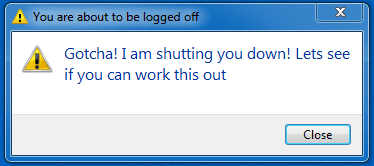
I've been thinking a bit more about this - if it was a joke, that person knows what they are doing and they could easily have specified the message as:

Code:
shutdown -s -t 180 -c "Gotcha! I am shutting you down! Lets see if you can work this out"

1.png

This makes me think the shutdown is being invoked legitimately.
 

My Computer My Computer

At a glance

Windows 10 Pro x64 ; Xubuntu x64Intel i7 860 @ 2.80 GHz O/C'ed to 4.0GHz16GB Corsair Vengance DDR3 @ 661 MHz Dual Cha...EVGA NVidia GTX 560 1024MB
Computer type
PC/Desktop
Computer Manufacturer/Model Number
Golden Mk. I.4
OS
Windows 10 Pro x64 ; Xubuntu x64
CPU
Intel i7 860 @ 2.80 GHz O/C'ed to 4.0GHz
Motherboard
Gigabyte P55A-UD3R Rev.1. Award BIOS F13
Memory
16GB Corsair Vengance DDR3 @ 661 MHz Dual Channel (9-9-9-24)
Graphics Card(s)
EVGA NVidia GTX 560 1024MB
Sound Card
Realtek Integrated
Monitor(s) Displays
Dual Samsung SyncMaster 2494HS
Screen Resolution
1920*1080 and 1920*1080
Hard Drives
1*Samsung 840 EVO 120GB SSD;
1*OCZ Vertex 2 60GB SSD;
2*Samsung F3 SpinPoint 1TB in RAID0;
1*Samsung F1 SpinPoint 1TB;
2*Western Digital 1TB External USB 3.0
1*Western Digital 500GB External USB 3.0
1*Seagate 500GB External USB 2.0
PSU
Thermaltake ToughPower QFan 750W
Case
Thermaltake Element S VK60001W2Z
Cooling
Corsair H60 Water Cooling, 2*230mm and 2*80mm case fans
Keyboard
Logitech G110
Mouse
Logitech MX518
Good point, Golden.
 

My Computer My Computer

At a glance

Windows 10 Pro x64 EN-GB1.6 GHz Intel Core i7-720QM Processor6 GBATI Mobility Radeon HD 5850 Graphics
Computer type
Laptop
Computer Manufacturer/Model Number
HP ENVY 17-1150eg
OS
Windows 10 Pro x64 EN-GB
CPU
1.6 GHz Intel Core i7-720QM Processor
Memory
6 GB
Graphics Card(s)
ATI Mobility Radeon HD 5850 Graphics
Sound Card
Beats sound system with integrated subwoofer
Monitor(s) Displays
17" laptop display, 22" LED and 32" Full HD TV through HDMI
Screen Resolution
1600*900 (1), 1920*1080 (2&3)
Hard Drives
Internal: 2 x 500 GB SATA Hard Disk Drive 7200 rpm
External: 2TB for backups, 3TB USB3 network drive for media
Cooling
As Envy runs a bit warm, I have it on a Cooler Master pad
Keyboard
Logitech diNovo Media Desktop Laser (bluetooth)
Mouse
Logitech Performance Mouse MX
Internet Speed
50/10 Mbps VDSL
Antivirus
Windows Defender 4.3.9431.0
Browser
Maxthon 3.5.2., IE11

My Computer My Computer

At a glance

Windows 7 Home Premium 64 BitCore I7 1155 3.4GHZ8GB DDR 1600
Computer Manufacturer/Model Number
Cooler Master
OS
Windows 7 Home Premium 64 Bit
CPU
Core I7 1155 3.4GHZ
Memory
8GB DDR 1600
Hard Drives
64 GB SSD - OS
1TB - DATA
PSU
340 Watt Corsair
Case
Cooler Master
Cooling
Cooler Master
Back
Top