
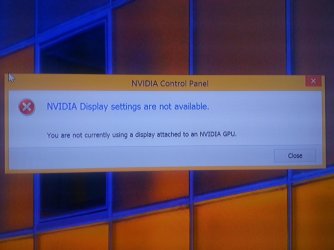
"You are not currently using a display attached to an NVIDIA GPU"...
I just bought a new C.P.U yesterday for gaming.This is an essembled PC that i got.It's specs are briefly as follows ,
I7 Processor
16 GB RAM
Nvidia GTX 960 2GB Graphics Card
When the shop guy showed me the system and asked me to checked the system by using Windows 8.1 after the essembling was done,everything looked fine...
When i brought home the system.Attached it to my 32 INCH Led T.V through HDMI.After the Windows 8.1 Start up,i right clicked on the desktop to check out " Nvidia Control Panel " & i recieved this message,
"You are not currently using a display attached to an NVIDIA GPU"
However,under the " Display Adapters " dorp down list in " Device Manager " , i can see my two graphics cards, i.e 1:Intel (R) HD Graphics 4600 & 2:NVIDIA GeForce GTX 960
What do i do ?
I just bought a new C.P.U yesterday for gaming.This is an essembled PC that i got.It's specs are briefly as follows ,
I7 Processor
16 GB RAM
Nvidia GTX 960 2GB Graphics Card
When the shop guy showed me the system and asked me to checked the system by using Windows 8.1 after the essembling was done,everything looked fine...
When i brought home the system.Attached it to my 32 INCH Led T.V through HDMI.After the Windows 8.1 Start up,i right clicked on the desktop to check out " Nvidia Control Panel " & i recieved this message,
"You are not currently using a display attached to an NVIDIA GPU"
However,under the " Display Adapters " dorp down list in " Device Manager " , i can see my two graphics cards, i.e 1:Intel (R) HD Graphics 4600 & 2:NVIDIA GeForce GTX 960
What do i do ?
Attachments
My Computer
At a glance
Windows 7 Home Premium 64 biti716 GBNvidia GFORCE GTX 960 2 GB
- Computer type
- PC/Desktop
- Computer Manufacturer/Model Number
- Asus
- OS
- Windows 7 Home Premium 64 bit
- CPU
- i7
- Motherboard
- Gigabyte H97-D3H
- Memory
- 16 GB
- Graphics Card(s)
- Nvidia GFORCE GTX 960 2 GB
- Screen Resolution
- 1280*720
- Cooling
- CORSAIR Liquid Fan + One Built in FAN
- Antivirus
- Avast Free Anti Virus 2015
- Browser
- Google Chrome

