
You are using an out of date browser. It may not display this or other websites correctly.
You should upgrade or use an alternative browser.
You should upgrade or use an alternative browser.
You deleted the post I needed, taskbar always ontop win7
- Thread starter Nekrosyx
- Start date

- Local time
- 7:53 PM
- Messages
- 474
Hi Nekrosyx, Welcome to 7 forums. The tutorial below by Brink is to move the taskbar to the top.
Taskbar - Move Location on Desktop Screen - Windows 7 Help ..
Taskbar - Move Location on Desktop Screen - Windows 7 Help ..
My Computer
At a glance
Windows 10 Pro 64 bitAMD A4-5300 APU with Radeon(tm) HD Graphics8.00 GBAMD Radeon HD 7480D
- Computer type
- PC/Desktop
- Computer Manufacturer/Model Number
- ASUS A85XM-A custom build
- OS
- Windows 10 Pro 64 bit
- CPU
- AMD A4-5300 APU with Radeon(tm) HD Graphics
- Motherboard
- ASUSTeK COMPUTER INC. A85XM-A
- Memory
- 8.00 GB
- Graphics Card(s)
- AMD Radeon HD 7480D
- Sound Card
- (1) High Definition Audio Device (2) Realtek High Definiti
- Monitor(s) Displays
- HP W2072a 20 inch Led Backlit Monitor
- Screen Resolution
- 1600 x 900 x 32 bits (4294967296 colors) @ 60 Hz
- Hard Drives
- TOSHIBA DT01ACA100 SATA Disk Device
- Keyboard
- Acer
- Mouse
- Acer
- Internet Speed
- varies
- Antivirus
- Windows Defender Antivirus
- Browser
- Waterfox, Edge

- Local time
- 8:53 PM
- Messages
- 5,599
Hi ethel,
I believe Nekrosyx was looking for a tutorial that sounds similar to what you pointed to but there once was a way to force the taskbar to always remain visible even in fullscreen. Unfortunately for what ever reason the windows developers deemed it necessary to remove that function. Please read on.
~~~ ~~~~ ~~~~ ~~~
Hi Nekrosyx, welcome to 7F!
This post was created on 24 Apr 2009 at 07:54 you can click on the small orange dot next to Brink's name in the quote to go directly to the post within the thread:
And was probably the reason you ran into the frustration of seeing this. My name is there because I found several threads pointing to the tutorial you were looking for:
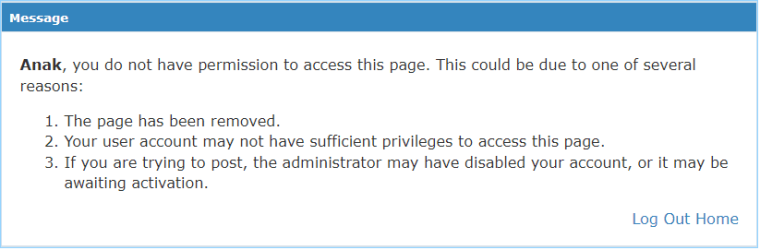
Because microsoft removed that functionality @Brink had no choice but to remove the tutorial and I may be wrong but I do believe the SevenForums Administration can not directly remove the link you used from google searches, they may be able to contact google and request that any references / links to the tutorial be removed, but the 7F Admins can not do it on their own.
There was no need for the shouting or animosity you directed to the Forum.
Since I'm in a fairly good mood I'm going to direct you to a utility that may help you out.
Remember that little orange dot I mentioned earlier? Click on it and scroll to post#14, there you'll see a post by futureairways and in his/her post you'll see a link: rammichael.com/7-taskbar-tweaker , copy/paste that into your search bar, you shouldn't miss the result because the page you need will be the first link, click on that and it'll take you to rammicheal's blog and the utility, d/l'd it and see if it does what you want.
As I said it may because I didn't take the time to see if it will keep the taskbar always on top but there is a testimonial at post #19 by
You're welcome.
I believe Nekrosyx was looking for a tutorial that sounds similar to what you pointed to but there once was a way to force the taskbar to always remain visible even in fullscreen. Unfortunately for what ever reason the windows developers deemed it necessary to remove that function. Please read on.
~~~ ~~~~ ~~~~ ~~~
Hi Nekrosyx, welcome to 7F!
This post was created on 24 Apr 2009 at 07:54 you can click on the small orange dot next to Brink's name in the quote to go directly to the post within the thread:
It seems that Microsoft has removed the Taskbar Always on Top option in the newer builds of Windows 7. The only workaround that I know of is Auto hide for now.
And was probably the reason you ran into the frustration of seeing this. My name is there because I found several threads pointing to the tutorial you were looking for:
Because microsoft removed that functionality @Brink had no choice but to remove the tutorial and I may be wrong but I do believe the SevenForums Administration can not directly remove the link you used from google searches, they may be able to contact google and request that any references / links to the tutorial be removed, but the 7F Admins can not do it on their own.
There was no need for the shouting or animosity you directed to the Forum.
Since I'm in a fairly good mood I'm going to direct you to a utility that may help you out.
Remember that little orange dot I mentioned earlier? Click on it and scroll to post#14, there you'll see a post by futureairways and in his/her post you'll see a link: rammichael.com/7-taskbar-tweaker , copy/paste that into your search bar, you shouldn't miss the result because the page you need will be the first link, click on that and it'll take you to rammicheal's blog and the utility, d/l'd it and see if it does what you want.
Note
If you do use the tweaker you use it at your own risk, I take no responsibility if it crashes your machine.
As I said it may because I didn't take the time to see if it will keep the taskbar always on top but there is a testimonial at post #19 by
THANK YOU !!!!!!!!
I was losing hope to find a solution for this!!
IT WORKS ON WINDOWS 10 64 as of December 2017
You're welcome.
Last edited:
My Computer
At a glance
Originally Win 7 Hm Prem x64 Ver 6.1.7600 Bui...Intel i3 530 2.93GHz, 2933MHz 2 Cores 4 Logic...6GB of 1,333MHz DDR3 SDRAM32MB Intel Graphics Media Accelerator HD IGChip
- Computer type
- PC/Desktop
- Computer Manufacturer/Model Number
- Gateway DX4831-01e (Mid-Tower Desktop)
- OS
- Originally Win 7 Hm Prem x64 Ver 6.1.7600 Build 7601-SP1 | Upgraded to Windows 10 December 14, 2019
- CPU
- Intel i3 530 2.93GHz, 2933MHz 2 Cores 4 Logical Processors
- Motherboard
- Gateway H57M01 133 megahertz
- Memory
- 6GB of 1,333MHz DDR3 SDRAM
- Graphics Card(s)
- 32MB Intel Graphics Media Accelerator HD IGChip
- Sound Card
- Realtek High Definition Audio
- Monitor(s) Displays
- Gateway HX2000 20inch TFT active matrix TN
- Screen Resolution
- 1600 x 900 x 59 hertz
- Hard Drives
- WDC WD10EADS-00M2B0 [HDD] (1000.20 GB) -- drive 0,
HL-DT-ST DVDRAM GH41N [CD-ROM dr]
Four card readers, and Four USB 2.0
- PSU
- 300watts.
- Case
- Mid-Tower Desktop
- Cooling
- Stock from Gateway
- Keyboard
- Natural Ergonomic Keyboard 4000, see Other Info
- Mouse
- Orig. Gateway wore out now using Insignia USB wired optical
- Internet Speed
- Vz FIOS 10ms png 57.64Mbps down 65.53Mbps up Speedtest.org
- Antivirus
- Zamana Anti-logger with Anti-malware, MSE, Windows Firewall,
- Browser
- IE11.0.9600.19399-Upd ver11.0.135, Firefox 68.0.1 x64
- Other Info
- System Specs by Belarc.
BIOS: American Megatrends Inc. P01-A0 11/17/2009
Replaced the MS 'Natural' Standard PS/2 Enhanced 101-102 Keyboard with a new Natural Ergonomic Keyboard 4000 on August 1st 2014.
Canon Pixma MG3222 Printer.
Updated to IE11 on 12102015 | Fios Quantum Router g1100
Additional AV: SpywareBlaster, manual Mbam, SAS

I'm not sure how SevenForums is responsible for Google's incompetence. 
When using Google search, I often find that the search summary descriptions, do not exist on the page that the search link takes you to.
When using Google search, I often find that the search summary descriptions, do not exist on the page that the search link takes you to.
My Computer
At a glance
W7 Ultimate SP1, LM19.2 MATE, W10 Home 1703, ...AMD Phenom II x6 1100T, 3.3 GHz12GB DDR3 1333 G-Skill (4GB x 2), G-Skill (2G...NVIDIA GeForce GTX 660
- Computer type
- PC/Desktop
- Computer Manufacturer/Model Number
- n/a
- OS
- W7 Ultimate SP1, LM19.2 MATE, W10 Home 1703, W10 Pro 1703 VM, #All 64 bit
- CPU
- AMD Phenom II x6 1100T, 3.3 GHz
- Motherboard
- ASUS M4A88T-M/USB3 (AM3)
- Memory
- 12GB DDR3 1333 G-Skill (4GB x 2), G-Skill (2GB x 2)
- Graphics Card(s)
- NVIDIA GeForce GTX 660
- Sound Card
- Realtek?
- Monitor(s) Displays
- Samsung S23B350
- Screen Resolution
- 1920x1080
- Hard Drives
- WD Green 2TB (SATA), WD Green 3TB (SATA), WD Blue 4TB (SATA), WD Blue 6TB (SATA)
- PSU
- Cooler Master
- Case
- Antec GX300 Tower
- Cooling
- 3x Antec TRICOOL 120mm Fans
- Mouse
- Wired Optical
- Internet Speed
- DSL
- Antivirus
- Avast
- Browser
- Pale Moon (64 bit)
- Other Info
- 2018-12-27 Upgraded HDDs
2015-12-10 Upgraded case, graphics card, storage
2015-08-15 Upgraded motherboard & RAM
2015-07-15 Upgraded LM17.1 to LM17.2