Solved you don't currently have permission to access this folder

Applets

New member
Local time
1:38 PM
Messages
8
Hello,

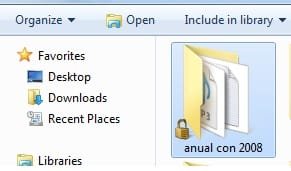
I am on my Laptop, i have 3.5 IDE Hard Disk which is quiet few years old, my some Pictures and data is stored on it, now i am looking for few pictures of mine, and few notepads, i try to connect it on my laptop by using 3.5 hard drive ide enclosure caddy. problem is i keep getting ''you don't currently have permission to access this folder'' on few folders but not all of them, can anyone solve this issue?

Regards
 

My Computer My Computer

At a glance

Limburg
Computer type
PC/Desktop
OS
Limburg

Attachments

  • locked.jpg
    locked.jpg
    8.6 KB · Views: 27

My Computer My Computer

At a glance

Limburg
Computer type
PC/Desktop
OS
Limburg
Are you able to access the files now?

The lock only means the file is not shared.
 
Try Take Ownership Shortcut on the folders or drive.

Can you plug in the drive internally?

You can always Copy & Paste - in Windows Recovery Console or use Paragon Rescue Kit Free Edition 11.0 Free CD to another HD which require no permissions.

Hello,

I used '' Take Ownership'' from this website
Easy way to take ownership of system files in Windows 7, 8 and Vista - Windows 7 - WinMatrix

and it work good, but for one folder it does not, check attachment. there is lock Photo on it
 

Attachments

  • locked.jpg
    locked.jpg
    8.6 KB · Views: 27

My Computer My Computer

At a glance

Limburg
Computer type
PC/Desktop
OS
Limburg

My Computer My Computer

At a glance

Limburg
Computer type
PC/Desktop
OS
Limburg
Taking ownership only changes the "owner" of the file or folder to be your user account. It does not change the permission level of the file.

After you have taking ownership of the item, you may still need to Allow your user account Full Control of the item before you will have full permission to access it, to be able to modify, or delete it.

Try this link again:

http://www.sevenforums.com/tutorials/1911-take-ownership-shortcut.html
 

My Computer My Computer

At a glance

Windows 10 ProAMD Ryzen 5 2400G Processor with Radeon RX Ve...G.SKILL Ripjaws V Series 16GB (2 x 8GB) 288-P...2047MB NVIDIA GeForce GTX 1060 6GB (EVGA)
Computer type
PC/Desktop
Computer Manufacturer/Model Number
Custom Built
OS
Windows 10 Pro
CPU
AMD Ryzen 5 2400G Processor with Radeon RX Vega 11 Graphics
Motherboard
ASRock X470 Master SLI/AC AM4 AMD Promontory X470 SATA 6Gb/s
Memory
G.SKILL Ripjaws V Series 16GB (2 x 8GB) 288-Pin DDR4 SDRAM D
Graphics Card(s)
2047MB NVIDIA GeForce GTX 1060 6GB (EVGA)
Sound Card
Motherboard Built in
Monitor(s) Displays
Acer R240HY bidx 23.8-Inch IPS HDMI DVI VGA (1920 x 1080) Wi
Screen Resolution
1920 x 1080
Hard Drives
1TB Sandisk SSD PLUS (Main drive)
500 GB Seagate 7200 RPM (Games)
500 GB Western Digital 7200 RPM (Virtual Machines)
PSU
CORSAIR TX Series TX650M 650W 80+ Gold Modular Power Supply
Case
CORSAIR CARBIDE SPEC-02 Mid-Tower Gaming Case, Red LED Fan
Cooling
220mm, two 120mm, and four 60mm fans
Keyboard
Wired Dell keyboard
Mouse
Wireless Logitech mouse
Internet Speed
250mb down, 30mb up
Antivirus
Panda Cloud Antivirus
Browser
Chrome-ish x64
Other Info
Your awesome for reading this.
As I stated above, the lock only means its not shared.

Why would an owner of the folder not have permission?
 
its not working HELP ME PLEASE :(
 

My Computer My Computer

At a glance

Limburg
Computer type
PC/Desktop
OS
Limburg
Not always in my experience.

As I stated above, the lock only means its not shared.

Why would an owner of the folder not have permission?

I could be totally wrong here. (Please let me know) But I know personally there has been times where I had a hard drive crash and I had to put in another hard drive. I reinstalled windows and attached the old hard drive. My files now have a lock on them when they didn't before. I am thinking this is because the files were attached to my user account, as they were not copied, they are directly on my hard drive. I then had to take ownership in order to make myself the owner, so this new user account was allowed to open them.

*Again please let me know if I am wrong, but this is my understanding.*

The reason locks appear on your files in the first place is the original windows account that has those files "attached to it" so to speak. When you install windows again, windows sees these files as attached to a different user account. It does this for security to protect your files from being accessed by someone else. The locks appear as the account associated with the files is no more on that system, so the account is not linked. When the new account goes to access them, (even if you name it the same) windows knows this is not the account the files were previously linked to. This is why you sometimes need to take ownership of your files in the first place sometimes making you the new owner of them.
This does not happen when you copy files to external storage because they were copied. Releasing that link for the copied files.


****I currently use Windows 7 Professional and the Lock Icon appears on some files when I move them around from Desktop to folders on my C Drive (such as C:\Media). Essentially what I found is that the files are not shared outside of the Administrator access (you) so if anyone else logs into the computer and tries to access those files (with the lock icon) they will be prompted by UAC for credentials to continue. This is a general security measure and I'm not entirely sure if it is due to BitLocker or if it is built into Windows 7 (though I am leaning toward the latter).

What does this mean for you? Well if you are an administrator on your computer (as the main account often is) then nothing is different for you. You can access those files and move them around however you want. For anyone else who attempts to use your computer without being under your login credentials, they will be prompted to input your credentials before they have access to those files****
I copied the ****** paragraph from Darian Knight statement in the page below.

Source

Hopefully this is not seen as plagiarism as I gave the link to source....

I could be totally off please let me know. But I have experienced it before.

 

My Computer My Computer

At a glance

Windows 10 ProAMD Ryzen 5 2400G Processor with Radeon RX Ve...G.SKILL Ripjaws V Series 16GB (2 x 8GB) 288-P...2047MB NVIDIA GeForce GTX 1060 6GB (EVGA)
Computer type
PC/Desktop
Computer Manufacturer/Model Number
Custom Built
OS
Windows 10 Pro
CPU
AMD Ryzen 5 2400G Processor with Radeon RX Vega 11 Graphics
Motherboard
ASRock X470 Master SLI/AC AM4 AMD Promontory X470 SATA 6Gb/s
Memory
G.SKILL Ripjaws V Series 16GB (2 x 8GB) 288-Pin DDR4 SDRAM D
Graphics Card(s)
2047MB NVIDIA GeForce GTX 1060 6GB (EVGA)
Sound Card
Motherboard Built in
Monitor(s) Displays
Acer R240HY bidx 23.8-Inch IPS HDMI DVI VGA (1920 x 1080) Wi
Screen Resolution
1920 x 1080
Hard Drives
1TB Sandisk SSD PLUS (Main drive)
500 GB Seagate 7200 RPM (Games)
500 GB Western Digital 7200 RPM (Virtual Machines)
PSU
CORSAIR TX Series TX650M 650W 80+ Gold Modular Power Supply
Case
CORSAIR CARBIDE SPEC-02 Mid-Tower Gaming Case, Red LED Fan
Cooling
220mm, two 120mm, and four 60mm fans
Keyboard
Wired Dell keyboard
Mouse
Wireless Logitech mouse
Internet Speed
250mb down, 30mb up
Antivirus
Panda Cloud Antivirus
Browser
Chrome-ish x64
Other Info
Your awesome for reading this.
Hello,

Thank you all, i figured it out, the Golden lock was removed by Right click, Share With, HomeGroup (Read/Write)

Topic solved Regards
 

My Computer My Computer

At a glance

Limburg
Computer type
PC/Desktop
OS
Limburg
Glad to hear it, Applets. You can mark it Solved at the top of the thread.

I already answered your question twice above, Andrew. The lock only means the file is not fully Shared with the Homegroup yet.

Take Ownership also grants full permissions.
 
:):):) Thank you x 2 = gregrocker
 

My Computer My Computer

At a glance

Limburg
Computer type
PC/Desktop
OS
Limburg
Glad to hear it, Applets. You can mark it Solved at the top of the thread.

I already answered your question twice above, Andrew. The lock only means the file is not fully Shared with the Homegroup yet.

Take Ownership also grants full permissions.

Sorry. I don't have a home group at all though and I have seen those before. So why is that? Why are they on some files and not others?

With this being the case wouldn't I have locks on all my files?

It doesn't make any sense.
 

My Computer My Computer

At a glance

Windows 10 ProAMD Ryzen 5 2400G Processor with Radeon RX Ve...G.SKILL Ripjaws V Series 16GB (2 x 8GB) 288-P...2047MB NVIDIA GeForce GTX 1060 6GB (EVGA)
Computer type
PC/Desktop
Computer Manufacturer/Model Number
Custom Built
OS
Windows 10 Pro
CPU
AMD Ryzen 5 2400G Processor with Radeon RX Vega 11 Graphics
Motherboard
ASRock X470 Master SLI/AC AM4 AMD Promontory X470 SATA 6Gb/s
Memory
G.SKILL Ripjaws V Series 16GB (2 x 8GB) 288-Pin DDR4 SDRAM D
Graphics Card(s)
2047MB NVIDIA GeForce GTX 1060 6GB (EVGA)
Sound Card
Motherboard Built in
Monitor(s) Displays
Acer R240HY bidx 23.8-Inch IPS HDMI DVI VGA (1920 x 1080) Wi
Screen Resolution
1920 x 1080
Hard Drives
1TB Sandisk SSD PLUS (Main drive)
500 GB Seagate 7200 RPM (Games)
500 GB Western Digital 7200 RPM (Virtual Machines)
PSU
CORSAIR TX Series TX650M 650W 80+ Gold Modular Power Supply
Case
CORSAIR CARBIDE SPEC-02 Mid-Tower Gaming Case, Red LED Fan
Cooling
220mm, two 120mm, and four 60mm fans
Keyboard
Wired Dell keyboard
Mouse
Wireless Logitech mouse
Internet Speed
250mb down, 30mb up
Antivirus
Panda Cloud Antivirus
Browser
Chrome-ish x64
Other Info
Your awesome for reading this.
Glad to hear it, Applets. You can mark it Solved at the top of the thread.

I already answered your question twice above, Andrew. The lock only means the file is not fully Shared with the Homegroup yet.

Take Ownership also grants full permissions.

Sorry. I don't have a home group at all though and I have seen those before. So why is that? Why are they on some files and not others?

With this being the case wouldn't I have locks on all my files?

It doesn't make any sense.


First right click on folder and go to Share with and select Homegroup (Read/Write), and then go in folder and select all files and again do the same process
 

My Computer My Computer

At a glance

Limburg
Computer type
PC/Desktop
OS
Limburg
Back
Top