You have files waiting to be burned to disc - Stop Message

How to Stop "You have files waiting to be burned to disc" Message in Windows

   Information
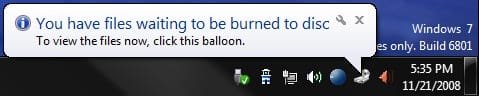
If you have the You have files waiting to be burned to disc Notification Area balloon message at every startup or log on of Windows, or just want to stop files waiting to be burned to disc, then this will show you how to stop this by clearing the Temporary Burn Cache folder.
   Note
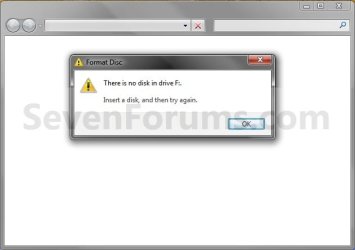
You usually will also have a blank window when you click on the To view the files now, click this balloon link.


EXAMPLE: You have files waiting to be burned to disc Notification Area balloon messageNotification.jpg EXAMPLE: To view the files now, click this balloon - Blank Window Blank_window.jpg


OPTION ONE

From Computer or This PC Window

1. Open your Computer (Windows 7/8) or This PC (Windows 8.1) window.

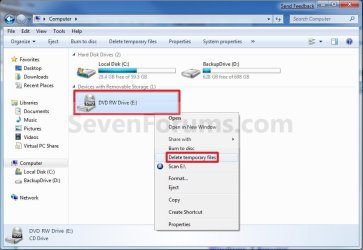
2. Right click or swipe down on the CD or DVD drive with this issue, and click/tap on Delete temporary files. (see screenshot below)Computer.jpg
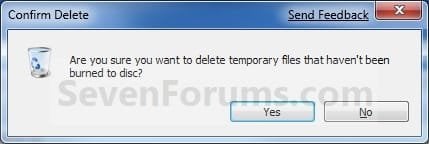
3. Click/tap on Yes to confirm deletion. (see screenshot below)Confirm.jpg


OPTION TWO

From the Temporary Burn Folder

1. Do step 2, 3, or 4 below for how you would like to open the Temporary Burn Folder.

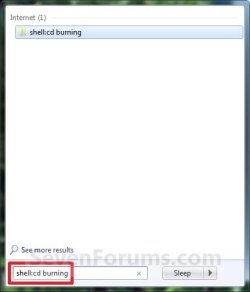
2. Press the Windows + R keys to open the Run dialog, type shell:cd burning, click/tap on OK, and go to step 5 below.

3. Open Windows Explorer (Windows 7) or File Explorer (Windows 8), copy and paste the location below into the address bar, press Enter, and go to step 5 below.

%userprofile%\AppData\Local\Microsoft\Windows\Burn\Temporary Burn Folder

4. Open Folder Options, and select (dot) Show hidden files, folders, and drives.A) Open Windows Explorer and navigate to the location below, and go to step 5 below (see screenshot below)
NOTE: You will have a Temporary Burn Folder for each optical drive that you have installed in your system. Connecting a U3 USB drive may add another burning folder, as well as virtual CD-Rom Emulators.

Code:
C:\Users\(user-name)\AppData\Local\Microsoft\Windows\Burn\Temporary Burn Folder
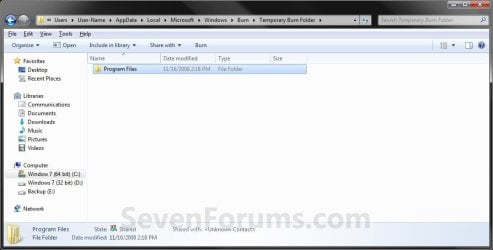
5. Delete only all contents in the Temporary Burn Folder for the optical drive and not the folder itself. (see screenshot below)
NOTE: Everything in this folder is waiting to be burned to disc for that optical drive. In this example, I have the entire contents of the Program Files folder waiting to be burned to disc that needs to be deleted to stop that pesky You have files waiting to be burned to disc message.Folder2.jpg
6. If you did step 4, then in Folder Options, select (dot) Don't Show hidden files, folders, and drives.

7. Close the Temporary Burn Folder window.
That's it,
Shawn


Attachments
  • Start_Menu_Shell.jpg
    Start_Menu_Shell.jpg
    12.9 KB · Views: 3,956
Last edited:
i have an issue with "you have files waiting to be burned" but it not only comes up when i boot up windows, but I can turn on/off my printer and it will come up as well. I have tried everything posted above and nothing helps. The one weird thing tho is it keeps telling me to put in a disk into my E drive which is a dvd-rom not a dvdrw! My dvdrw is my D drive. I looked in the burn folder there is nothing there. I even told the folder to show hidden items and nothing there. I am at a loss to what else to check. Any help would be most helpful. Tx
 

My Computer My Computer

At a glance

Windows 7 ultimate x64Intel I7 950Corsair DDR3 1333 PC310666X2 Nvidia GTX285
OS
Windows 7 ultimate x64
CPU
Intel I7 950
Motherboard
Asus p6t pro
Memory
Corsair DDR3 1333 PC310666
Graphics Card(s)
X2 Nvidia GTX285
Monitor(s) Displays
Samsung SyncMaster 2232 gw
Hard Drives
HITACHI Deskstar P7K500 HDP725050GLA360 (0A35415) 500GB 7200 RPM SATA 3.0Gb/s 3.5" Internal Hard Drive -Bare Drive
PSU
COOLER MASTER Real Power Pro1000 RS-A00-EMBA 1000W
Case
Cooler Master CM690
Cooling
Zalman
Hi Shawn (Brink),

I've come across your posts in the past when trouble-shooting problems with my computer and they have been very helpful. I was wondering if you've seen this problem before and maybe you could post a solution.

Running Windows 7x64 Ultimate, and I noticed my Windows log-in was kind of slow. Started running diagnostics, etc. and then finally my Blu-Ray RW drive stopped working, so I knew there was a real problem. Now Windows loaded quickly, and the BIOS took forever instead, while the Blu-Ray had no power coming to it. So I opened my tower, pushed the SATA connection in a little tighter, and voila, Windows and BIOS are both loading quickly again and Blu-Ray is fully functional.

Now the problem: While the Blu-Ray wasn't working, windows took it's drive extension and assigned my external eSATA hard-drive to it. It must have created one of those hidden 'recycle bin' caches, because now I get the stupid pop-up about hidden recycle bin folder waiting to be burned to disc. I deleted the files from the CD explorer window, from the temporary cache I targeted in properties, etc. - and for some reason, it just keeps regenerating itself. Any ideas on how to kill it for good?

In the meantime, I disabled explorer burn options in the Local Group Policy Editor. This is something I intended to do anyway because I use Nero and DVDFab, and from my experience on three different computers, although no one else will confirm this for me, Nero and DVDFab combination (one or the other or both) breaks or disables the IMAPI service somehow and Explorer won't successfully burn media once Nero and DVDFab are installed and all burning tasks must be done through third party software, henceforth. Is that standard behavior that other people who use Nero and/or DVDFab have reported experiencing?

So I ask my original question just for my own information - because I will probably keep Explorer burning disabled. I don't even use Nero to burn really, I just use it to master and transcode projects, I use DVDFab to rip DVD images, and then I always burn with ImgBurn. But should I decide to uninstall Nero and DVDFab, I'd like to know that my Explorer burning is bugless.

Thanks
 
Last edited:

My Computer My Computer

At a glance

Windows 7 Ultimate x64Intel i7 @ 267 gHz6 GBRadeon HD 5770 PCIe
Computer Manufacturer/Model Number
Alienware Aurora
OS
Windows 7 Ultimate x64
CPU
Intel i7 @ 267 gHz
Memory
6 GB
Graphics Card(s)
Radeon HD 5770 PCIe
Sound Card
Creative X-Fi Titanium PCIe
Monitor(s) Displays
Dell U2410
Hard Drives
Seagate Barracuda 1TB
Cooling
Liquid Cooling
Hello SpewHole, and welcome to Seven Forums.

You might see if changing the drive letters for your optical drives back to what they were originally to see if thay may help do this tutorial to hopefully get rid of the waiting to be burned message. You would need to change one to another letter before being ablt to change the other drive back to the original one since the first one is currently using it.

I do not know anything about the Nero and/ot DVDFab issue with Explorer though.

Hope this helps some,
Shawn
 

My Computer My Computer

At a glance

64-bit Windows 11 Pro for WorkstationsIntel i7-8700K OC'd to 5 GHz64 GB (4x16GB) G.SKILL TridentZ RGB DDR4 3600...ASUS ROG-STRIX-GTX1080TI-O11G-GAMING
Computer type
PC/Desktop
Computer Manufacturer/Model Number
Self built custom
OS
64-bit Windows 11 Pro for Workstations
CPU
Intel i7-8700K OC'd to 5 GHz
Motherboard
ASUS ROG Maximus XI Formula Z390
Memory
64 GB (4x16GB) G.SKILL TridentZ RGB DDR4 3600 MHz
Graphics Card(s)
ASUS ROG-STRIX-GTX1080TI-O11G-GAMING
Sound Card
Integrated
Monitor(s) Displays
2 x Samsung Odyssey G7 27"
Screen Resolution
2560x1440
Hard Drives
1TB Samsung 990 PRO M.2,
4TB Samsung 990 PRO PRO M.2,
TerraMaster F8 SSD Plus NAS
PSU
Seasonic Prime Titanium 850W
Case
Thermaltake Core P3
Cooling
Corsair Hydro H115i
Keyboard
Logitech wireless K800
Mouse
Logitech MX Master 4
Internet Speed
2 Gb/s Download and 100 Mb/s Upload
Antivirus
Malwarebyte Anti-Malware Premium
Browser
Google Chrome
Other Info
Logitech Z625 speaker system,
Logitech BRIO 4K Pro webcam,
HP Color LaserJet Pro MFP M477fdn,
APC SMART-UPS RT 1000 XL - SURT1000XLI,
Galaxy S23 Plus phone
Just to reflect on my older post, this problem is no longer existent on my computer - but I did a factory reset to resolve that and many other issues from being powered down improperly over and over when the techs were "fixing" it.

Just in case anyone googled here because of my comment about burning programs, I did learn, interestingly, that ImgBurn, DVDFab, and Nero can be installed without breaking Explorer IMAPI function. The trick is the order of installation. No matter what, Nero must always be installed last - after the other burning programs.

Thanks for your help last year.
 

My Computer My Computer

At a glance

Windows 7 Ultimate x64Intel i7 @ 267 gHz6 GBRadeon HD 5770 PCIe
Computer Manufacturer/Model Number
Alienware Aurora
OS
Windows 7 Ultimate x64
CPU
Intel i7 @ 267 gHz
Memory
6 GB
Graphics Card(s)
Radeon HD 5770 PCIe
Sound Card
Creative X-Fi Titanium PCIe
Monitor(s) Displays
Dell U2410
Hard Drives
Seagate Barracuda 1TB
Cooling
Liquid Cooling
Hello SpewHole,

Thank you for posting back with your results and solution. :)
 

My Computer My Computer

At a glance

64-bit Windows 11 Pro for WorkstationsIntel i7-8700K OC'd to 5 GHz64 GB (4x16GB) G.SKILL TridentZ RGB DDR4 3600...ASUS ROG-STRIX-GTX1080TI-O11G-GAMING
Computer type
PC/Desktop
Computer Manufacturer/Model Number
Self built custom
OS
64-bit Windows 11 Pro for Workstations
CPU
Intel i7-8700K OC'd to 5 GHz
Motherboard
ASUS ROG Maximus XI Formula Z390
Memory
64 GB (4x16GB) G.SKILL TridentZ RGB DDR4 3600 MHz
Graphics Card(s)
ASUS ROG-STRIX-GTX1080TI-O11G-GAMING
Sound Card
Integrated
Monitor(s) Displays
2 x Samsung Odyssey G7 27"
Screen Resolution
2560x1440
Hard Drives
1TB Samsung 990 PRO M.2,
4TB Samsung 990 PRO PRO M.2,
TerraMaster F8 SSD Plus NAS
PSU
Seasonic Prime Titanium 850W
Case
Thermaltake Core P3
Cooling
Corsair Hydro H115i
Keyboard
Logitech wireless K800
Mouse
Logitech MX Master 4
Internet Speed
2 Gb/s Download and 100 Mb/s Upload
Antivirus
Malwarebyte Anti-Malware Premium
Browser
Google Chrome
Other Info
Logitech Z625 speaker system,
Logitech BRIO 4K Pro webcam,
HP Color LaserJet Pro MFP M477fdn,
APC SMART-UPS RT 1000 XL - SURT1000XLI,
Galaxy S23 Plus phone
Thanks for that... got rid of the messages... i hope ;)
 

My Computer My Computer

At a glance

win 7Athlon 64 3700+ 2.21ghz2gbNvidia GForce 6500
Computer Manufacturer/Model Number
beige box,
OS
win 7
CPU
Athlon 64 3700+ 2.21ghz
Motherboard
Asus
Memory
2gb
Graphics Card(s)
Nvidia GForce 6500
Hard Drives
3x SATA
You're most welcome Fred. I'm glad that it could help. :)
 

My Computer My Computer

At a glance

64-bit Windows 11 Pro for WorkstationsIntel i7-8700K OC'd to 5 GHz64 GB (4x16GB) G.SKILL TridentZ RGB DDR4 3600...ASUS ROG-STRIX-GTX1080TI-O11G-GAMING
Computer type
PC/Desktop
Computer Manufacturer/Model Number
Self built custom
OS
64-bit Windows 11 Pro for Workstations
CPU
Intel i7-8700K OC'd to 5 GHz
Motherboard
ASUS ROG Maximus XI Formula Z390
Memory
64 GB (4x16GB) G.SKILL TridentZ RGB DDR4 3600 MHz
Graphics Card(s)
ASUS ROG-STRIX-GTX1080TI-O11G-GAMING
Sound Card
Integrated
Monitor(s) Displays
2 x Samsung Odyssey G7 27"
Screen Resolution
2560x1440
Hard Drives
1TB Samsung 990 PRO M.2,
4TB Samsung 990 PRO PRO M.2,
TerraMaster F8 SSD Plus NAS
PSU
Seasonic Prime Titanium 850W
Case
Thermaltake Core P3
Cooling
Corsair Hydro H115i
Keyboard
Logitech wireless K800
Mouse
Logitech MX Master 4
Internet Speed
2 Gb/s Download and 100 Mb/s Upload
Antivirus
Malwarebyte Anti-Malware Premium
Browser
Google Chrome
Other Info
Logitech Z625 speaker system,
Logitech BRIO 4K Pro webcam,
HP Color LaserJet Pro MFP M477fdn,
APC SMART-UPS RT 1000 XL - SURT1000XLI,
Galaxy S23 Plus phone
Hey Shawn what a great little tutorial and so many good idea she? I have this happen tome and while it never bothers me much it is a pest.:)
 

My Computer My Computer

At a glance

Desk1 7 Home Prem / Desk2 10 Pro / Main lap A...Desk1 i5 3750K / Laptop i7 GTX 860M / Desk2 i...Desk1 8GB (1866) / Desk2 16GB (1333) / Laptop...Desk 1& 2NVidia GTX 650 & Laptops on board Intel
Computer type
PC/Desktop
Computer Manufacturer/Model Number
Own build (new) Desk1 / Asus ROG Win 7 / Desk2 1st build
OS
Desk1 7 Home Prem / Desk2 10 Pro / Main lap Asus ROG 10 Pro 2 laptop Toshiba 7 Pro Asus P2520 7 & 10
CPU
Desk1 i5 3750K / Laptop i7 GTX 860M / Desk2 i5 2500
Motherboard
Desk1 Asus P877-V / Desk2 Gigabyte H67 UD3H / Laptop ?
Memory
Desk1 8GB (1866) / Desk2 16GB (1333) / Laptop 8Gb DDR3
Graphics Card(s)
Desk 1& 2NVidia GTX 650 & Laptops on board Intel
Sound Card
Desk 1 & 2 -XONAR DG Realtek High Def audio Laptop
Monitor(s) Displays
Desk 1 Benq HD 2450 / Desk2 Philips 24" / Laptop 17.5"
Screen Resolution
1920x1080 D1 & D2 & Laptop 1
Hard Drives
Desk1 Samsung 120GB 830 SSD
Asus ROG 256GB 850 Pro SSD
Desk2 Samsung 840 256 SSD
Toshiba 120GB EVO
PSU
Desk 1 Corsair HX 1050/ Laptop ? / Desk 2 Corsair HX 650
Case
Desk 1 Cooler HAF XM ? Toshiba laptop / Desk2 Coolermaster
Cooling
Fans on all Desk1 -2 Desk2 - all Coolermasters 5 Laptop ?
Keyboard
Desk 1 MS Sidewinder X6 Desk 2 MS Sidewinder X 4
Mouse
Desk 1&2 - Gigabyte MS 900 gamer - laptop - Logitec wireless
Internet Speed
ADSL2+
Other Info
One other Desktop (tester) and spare Toshba laptop both with SSD's
Running Kaspersky 2016 ISS on all machines config'd identically
Logitec audio stereo systems on each machine (x3)
Canon MG5250MFC
Router/modem TP-Link running WPA2SK
Message: You have files waiting to be burned to disc
I have seen a lot of issues about the temporary burn folder being renamed on different folders. The issue is it is my user folder. I now have the path C:\users\temporary burn folder\etc. I tried to change the folder back to my user name. No luck. I really don’t want to change over to a new account or redo my computer because of all the settings etc. How can I fix this?
 

My Computer My Computer

At a glance

Windows 7 Home Premium
Computer type
PC/Desktop
Computer Manufacturer/Model Number
HP
OS
Windows 7 Home Premium
Hello Silverwater, and welcome to Seven Forums.

What did you do to move it?

You might see if doing a system restore using a restore point before it moved may be able to restore it.

Hope this helps for now, :)
Shawn
 

My Computer My Computer

At a glance

64-bit Windows 11 Pro for WorkstationsIntel i7-8700K OC'd to 5 GHz64 GB (4x16GB) G.SKILL TridentZ RGB DDR4 3600...ASUS ROG-STRIX-GTX1080TI-O11G-GAMING
Computer type
PC/Desktop
Computer Manufacturer/Model Number
Self built custom
OS
64-bit Windows 11 Pro for Workstations
CPU
Intel i7-8700K OC'd to 5 GHz
Motherboard
ASUS ROG Maximus XI Formula Z390
Memory
64 GB (4x16GB) G.SKILL TridentZ RGB DDR4 3600 MHz
Graphics Card(s)
ASUS ROG-STRIX-GTX1080TI-O11G-GAMING
Sound Card
Integrated
Monitor(s) Displays
2 x Samsung Odyssey G7 27"
Screen Resolution
2560x1440
Hard Drives
1TB Samsung 990 PRO M.2,
4TB Samsung 990 PRO PRO M.2,
TerraMaster F8 SSD Plus NAS
PSU
Seasonic Prime Titanium 850W
Case
Thermaltake Core P3
Cooling
Corsair Hydro H115i
Keyboard
Logitech wireless K800
Mouse
Logitech MX Master 4
Internet Speed
2 Gb/s Download and 100 Mb/s Upload
Antivirus
Malwarebyte Anti-Malware Premium
Browser
Google Chrome
Other Info
Logitech Z625 speaker system,
Logitech BRIO 4K Pro webcam,
HP Color LaserJet Pro MFP M477fdn,
APC SMART-UPS RT 1000 XL - SURT1000XLI,
Galaxy S23 Plus phone
I do not have a remove temp files when I right click on the drive. When I run shell:cd burning it says folder is empty (Yes, my settings are set to show hidden and folders. When I go to '%userprofile%\AppData\Local\Microsoft\Windows\Burn\Temporary Burn Folder' it says it is empty. Then it says Windows can not find 'C:\Users\(user-name)\AppData\Local\Microsoft\Windows\Burn\Temporary Burn Folder'.

I also tried to run 'gpedit.msc ' it is not found.

I have them all with the disk in and the disk out. The file in question is 'desktop.ini'.

I am running win 7 home premium with service pack 1 64 bit, and it is registered and activated, and all available updates have been installed. My computer is a HP Pavilion dv6, Intel coreI/7. 2.2 Ghz, 8M ram, 90% of hard drive free.

Any other thoughts?
 

My Computer My Computer

At a glance

windows 7 64 bitIntel core I7/ 2.2ghz8M
Computer type
Laptop
Computer Manufacturer/Model Number
HP
OS
windows 7 64 bit
CPU
Intel core I7/ 2.2ghz
Memory
8M
Hard Drives
683 G 629G free
Antivirus
Win Sec Essential
Hello Pipestr, and welcome to Seven Forums. :)

Are you getting the "You have files waiting to be burned to disc" message?

If so, then double check in the Burn folder below to see if you may have more then one "Temporary Burn Folder" folder. If you do, then delete all contents in each one.

%userprofile%\AppData\Local\Microsoft\Windows\Burn
 

My Computer My Computer

At a glance

64-bit Windows 11 Pro for WorkstationsIntel i7-8700K OC'd to 5 GHz64 GB (4x16GB) G.SKILL TridentZ RGB DDR4 3600...ASUS ROG-STRIX-GTX1080TI-O11G-GAMING
Computer type
PC/Desktop
Computer Manufacturer/Model Number
Self built custom
OS
64-bit Windows 11 Pro for Workstations
CPU
Intel i7-8700K OC'd to 5 GHz
Motherboard
ASUS ROG Maximus XI Formula Z390
Memory
64 GB (4x16GB) G.SKILL TridentZ RGB DDR4 3600 MHz
Graphics Card(s)
ASUS ROG-STRIX-GTX1080TI-O11G-GAMING
Sound Card
Integrated
Monitor(s) Displays
2 x Samsung Odyssey G7 27"
Screen Resolution
2560x1440
Hard Drives
1TB Samsung 990 PRO M.2,
4TB Samsung 990 PRO PRO M.2,
TerraMaster F8 SSD Plus NAS
PSU
Seasonic Prime Titanium 850W
Case
Thermaltake Core P3
Cooling
Corsair Hydro H115i
Keyboard
Logitech wireless K800
Mouse
Logitech MX Master 4
Internet Speed
2 Gb/s Download and 100 Mb/s Upload
Antivirus
Malwarebyte Anti-Malware Premium
Browser
Google Chrome
Other Info
Logitech Z625 speaker system,
Logitech BRIO 4K Pro webcam,
HP Color LaserJet Pro MFP M477fdn,
APC SMART-UPS RT 1000 XL - SURT1000XLI,
Galaxy S23 Plus phone
I have also tried that, and it shows the folder as empty.
 

My Computer My Computer

At a glance

windows 7 64 bitIntel core I7/ 2.2ghz8M
Computer type
Laptop
Computer Manufacturer/Model Number
HP
OS
windows 7 64 bit
CPU
Intel core I7/ 2.2ghz
Memory
8M
Hard Drives
683 G 629G free
Antivirus
Win Sec Essential
In that case, you could try doing a system restore using a restore point dated before this happened to undo it.
 

My Computer My Computer

At a glance

64-bit Windows 11 Pro for WorkstationsIntel i7-8700K OC'd to 5 GHz64 GB (4x16GB) G.SKILL TridentZ RGB DDR4 3600...ASUS ROG-STRIX-GTX1080TI-O11G-GAMING
Computer type
PC/Desktop
Computer Manufacturer/Model Number
Self built custom
OS
64-bit Windows 11 Pro for Workstations
CPU
Intel i7-8700K OC'd to 5 GHz
Motherboard
ASUS ROG Maximus XI Formula Z390
Memory
64 GB (4x16GB) G.SKILL TridentZ RGB DDR4 3600 MHz
Graphics Card(s)
ASUS ROG-STRIX-GTX1080TI-O11G-GAMING
Sound Card
Integrated
Monitor(s) Displays
2 x Samsung Odyssey G7 27"
Screen Resolution
2560x1440
Hard Drives
1TB Samsung 990 PRO M.2,
4TB Samsung 990 PRO PRO M.2,
TerraMaster F8 SSD Plus NAS
PSU
Seasonic Prime Titanium 850W
Case
Thermaltake Core P3
Cooling
Corsair Hydro H115i
Keyboard
Logitech wireless K800
Mouse
Logitech MX Master 4
Internet Speed
2 Gb/s Download and 100 Mb/s Upload
Antivirus
Malwarebyte Anti-Malware Premium
Browser
Google Chrome
Other Info
Logitech Z625 speaker system,
Logitech BRIO 4K Pro webcam,
HP Color LaserJet Pro MFP M477fdn,
APC SMART-UPS RT 1000 XL - SURT1000XLI,
Galaxy S23 Plus phone
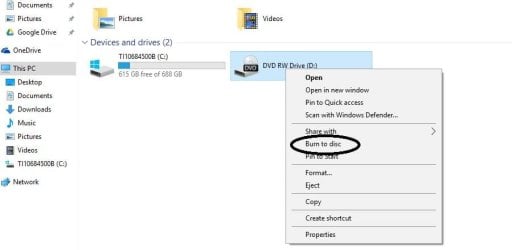
Hey gang, I'm running Windows 10 but I'm also experience the "files waiting to be burned" issue and having trouble finding it in the 10 forum. I do not believe my older DVD-R's will run on this Toshiba's optical drive so I never actually burned anything. I didn't actually need to burn a disc but now I am unable to get Command and Conquer to play. It says to load the CD, which I did, but it doesn't see it and autoplay isn't doing anything either. In File Explorer, the optical drive is stuck on wanting to burn a disc. I initially right clicked and cleared the files out from File Explorer, then through these forums, went into the Temporary Burn folder and made sure it was empty. I rebooted multiple times and even added files to the folder then deleted to see if that would help. GodMode doesn't seem to offer an option and Windows is stuck on wanting to burn files that do not exist. I'm not sure what steps to take next other than restore factory settings or roll back to Windows 8 and do a fresh install of 10. I have a laptop so physically unplugging the drive then replugging is not an ideal option. I'm hoping there is another option to tell Windows to purge that task entirely?

Jim
 

My Computer My Computer

At a glance

Windows 10 64 bit2.0 ghz AMD A6-5200 with Radeon graphics4.0 GBRadeon
Computer type
Laptop
Computer Manufacturer/Model Number
Toshiba Satellite c55
OS
Windows 10 64 bit
CPU
2.0 ghz AMD A6-5200 with Radeon graphics
Motherboard
unknown
Memory
4.0 GB
Graphics Card(s)
Radeon
Hard Drives
Toshiba 750GB
Antivirus
AGP
Browser
Chrome
Hello Jim, and welcome to Seven Forums. :)

Set Windows to show you hidden items, then open the folder below to see if you may have more than one Temporary Burn Folder folder. If you do, make sure that each one is empty to see if that may help.

%userprofile%\AppData\Local\Microsoft\Windows\Burn
 

My Computer My Computer

At a glance

64-bit Windows 11 Pro for WorkstationsIntel i7-8700K OC'd to 5 GHz64 GB (4x16GB) G.SKILL TridentZ RGB DDR4 3600...ASUS ROG-STRIX-GTX1080TI-O11G-GAMING
Computer type
PC/Desktop
Computer Manufacturer/Model Number
Self built custom
OS
64-bit Windows 11 Pro for Workstations
CPU
Intel i7-8700K OC'd to 5 GHz
Motherboard
ASUS ROG Maximus XI Formula Z390
Memory
64 GB (4x16GB) G.SKILL TridentZ RGB DDR4 3600 MHz
Graphics Card(s)
ASUS ROG-STRIX-GTX1080TI-O11G-GAMING
Sound Card
Integrated
Monitor(s) Displays
2 x Samsung Odyssey G7 27"
Screen Resolution
2560x1440
Hard Drives
1TB Samsung 990 PRO M.2,
4TB Samsung 990 PRO PRO M.2,
TerraMaster F8 SSD Plus NAS
PSU
Seasonic Prime Titanium 850W
Case
Thermaltake Core P3
Cooling
Corsair Hydro H115i
Keyboard
Logitech wireless K800
Mouse
Logitech MX Master 4
Internet Speed
2 Gb/s Download and 100 Mb/s Upload
Antivirus
Malwarebyte Anti-Malware Premium
Browser
Google Chrome
Other Info
Logitech Z625 speaker system,
Logitech BRIO 4K Pro webcam,
HP Color LaserJet Pro MFP M477fdn,
APC SMART-UPS RT 1000 XL - SURT1000XLI,
Galaxy S23 Plus phone
Hello Jim, and welcome to Seven Forums. :)

Set Windows to show you hidden items, then open the folder below to see if you may have more than one Temporary Burn Folder folder. If you do, make sure that each one is empty to see if that may help.

%userprofile%\AppData\Local\Microsoft\Windows\Burn


Thank you, Brink. I should have noted that I also set hidden folders to be viewable, found two of the Temporary Burn folders and deleted both. Still having the issue.

Jim
 

My Computer My Computer

At a glance

Windows 10 64 bit2.0 ghz AMD A6-5200 with Radeon graphics4.0 GBRadeon
Computer type
Laptop
Computer Manufacturer/Model Number
Toshiba Satellite c55
OS
Windows 10 64 bit
CPU
2.0 ghz AMD A6-5200 with Radeon graphics
Motherboard
unknown
Memory
4.0 GB
Graphics Card(s)
Radeon
Hard Drives
Toshiba 750GB
Antivirus
AGP
Browser
Chrome
You would have wanted to empty the folders instead of deleting them. Oops.

That should have cleared it though. Just to double check, open shell:cd burning in Run to see if it may open another one.
 

My Computer My Computer

At a glance

64-bit Windows 11 Pro for WorkstationsIntel i7-8700K OC'd to 5 GHz64 GB (4x16GB) G.SKILL TridentZ RGB DDR4 3600...ASUS ROG-STRIX-GTX1080TI-O11G-GAMING
Computer type
PC/Desktop
Computer Manufacturer/Model Number
Self built custom
OS
64-bit Windows 11 Pro for Workstations
CPU
Intel i7-8700K OC'd to 5 GHz
Motherboard
ASUS ROG Maximus XI Formula Z390
Memory
64 GB (4x16GB) G.SKILL TridentZ RGB DDR4 3600 MHz
Graphics Card(s)
ASUS ROG-STRIX-GTX1080TI-O11G-GAMING
Sound Card
Integrated
Monitor(s) Displays
2 x Samsung Odyssey G7 27"
Screen Resolution
2560x1440
Hard Drives
1TB Samsung 990 PRO M.2,
4TB Samsung 990 PRO PRO M.2,
TerraMaster F8 SSD Plus NAS
PSU
Seasonic Prime Titanium 850W
Case
Thermaltake Core P3
Cooling
Corsair Hydro H115i
Keyboard
Logitech wireless K800
Mouse
Logitech MX Master 4
Internet Speed
2 Gb/s Download and 100 Mb/s Upload
Antivirus
Malwarebyte Anti-Malware Premium
Browser
Google Chrome
Other Info
Logitech Z625 speaker system,
Logitech BRIO 4K Pro webcam,
HP Color LaserJet Pro MFP M477fdn,
APC SMART-UPS RT 1000 XL - SURT1000XLI,
Galaxy S23 Plus phone
I did that as well, here's a screen shot. It's empty. I just tried Task Manager too just to see if something was running, found where File Explorer wanted to burn something, ended that task and still no help.

Capture.JPG

Capture2.JPG
 
Last edited by a moderator:

My Computer My Computer

At a glance

Windows 10 64 bit2.0 ghz AMD A6-5200 with Radeon graphics4.0 GBRadeon
Computer type
Laptop
Computer Manufacturer/Model Number
Toshiba Satellite c55
OS
Windows 10 64 bit
CPU
2.0 ghz AMD A6-5200 with Radeon graphics
Motherboard
unknown
Memory
4.0 GB
Graphics Card(s)
Radeon
Hard Drives
Toshiba 750GB
Antivirus
AGP
Browser
Chrome
Odd. See if toggling to disable and enable the DVD drive in Device Manager may be able to clear this.
 

My Computer My Computer

At a glance

64-bit Windows 11 Pro for WorkstationsIntel i7-8700K OC'd to 5 GHz64 GB (4x16GB) G.SKILL TridentZ RGB DDR4 3600...ASUS ROG-STRIX-GTX1080TI-O11G-GAMING
Computer type
PC/Desktop
Computer Manufacturer/Model Number
Self built custom
OS
64-bit Windows 11 Pro for Workstations
CPU
Intel i7-8700K OC'd to 5 GHz
Motherboard
ASUS ROG Maximus XI Formula Z390
Memory
64 GB (4x16GB) G.SKILL TridentZ RGB DDR4 3600 MHz
Graphics Card(s)
ASUS ROG-STRIX-GTX1080TI-O11G-GAMING
Sound Card
Integrated
Monitor(s) Displays
2 x Samsung Odyssey G7 27"
Screen Resolution
2560x1440
Hard Drives
1TB Samsung 990 PRO M.2,
4TB Samsung 990 PRO PRO M.2,
TerraMaster F8 SSD Plus NAS
PSU
Seasonic Prime Titanium 850W
Case
Thermaltake Core P3
Cooling
Corsair Hydro H115i
Keyboard
Logitech wireless K800
Mouse
Logitech MX Master 4
Internet Speed
2 Gb/s Download and 100 Mb/s Upload
Antivirus
Malwarebyte Anti-Malware Premium
Browser
Google Chrome
Other Info
Logitech Z625 speaker system,
Logitech BRIO 4K Pro webcam,
HP Color LaserJet Pro MFP M477fdn,
APC SMART-UPS RT 1000 XL - SURT1000XLI,
Galaxy S23 Plus phone
Back
Top