You have files waiting to be burned to disc - Stop Message

How to Stop "You have files waiting to be burned to disc" Message in Windows

   Information
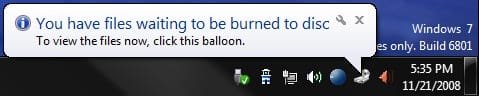
If you have the You have files waiting to be burned to disc Notification Area balloon message at every startup or log on of Windows, or just want to stop files waiting to be burned to disc, then this will show you how to stop this by clearing the Temporary Burn Cache folder.
   Note
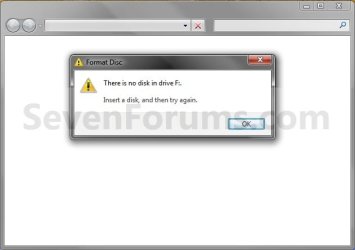
You usually will also have a blank window when you click on the To view the files now, click this balloon link.


EXAMPLE: You have files waiting to be burned to disc Notification Area balloon messageNotification.jpg EXAMPLE: To view the files now, click this balloon - Blank Window Blank_window.jpg


OPTION ONE

From Computer or This PC Window

1. Open your Computer (Windows 7/8) or This PC (Windows 8.1) window.

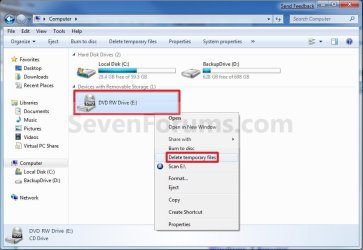
2. Right click or swipe down on the CD or DVD drive with this issue, and click/tap on Delete temporary files. (see screenshot below)Computer.jpg
3. Click/tap on Yes to confirm deletion. (see screenshot below)Confirm.jpg


OPTION TWO

From the Temporary Burn Folder

1. Do step 2, 3, or 4 below for how you would like to open the Temporary Burn Folder.

2. Press the Windows + R keys to open the Run dialog, type shell:cd burning, click/tap on OK, and go to step 5 below.

3. Open Windows Explorer (Windows 7) or File Explorer (Windows 8), copy and paste the location below into the address bar, press Enter, and go to step 5 below.

%userprofile%\AppData\Local\Microsoft\Windows\Burn\Temporary Burn Folder

4. Open Folder Options, and select (dot) Show hidden files, folders, and drives.A) Open Windows Explorer and navigate to the location below, and go to step 5 below (see screenshot below)
NOTE: You will have a Temporary Burn Folder for each optical drive that you have installed in your system. Connecting a U3 USB drive may add another burning folder, as well as virtual CD-Rom Emulators.

Code:
C:\Users\(user-name)\AppData\Local\Microsoft\Windows\Burn\Temporary Burn Folder
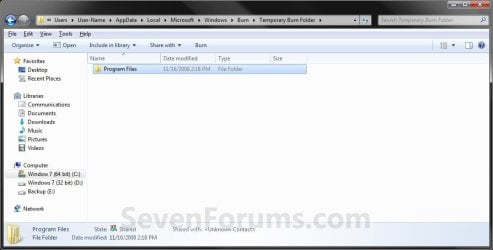
5. Delete only all contents in the Temporary Burn Folder for the optical drive and not the folder itself. (see screenshot below)
NOTE: Everything in this folder is waiting to be burned to disc for that optical drive. In this example, I have the entire contents of the Program Files folder waiting to be burned to disc that needs to be deleted to stop that pesky You have files waiting to be burned to disc message.Folder2.jpg
6. If you did step 4, then in Folder Options, select (dot) Don't Show hidden files, folders, and drives.

7. Close the Temporary Burn Folder window.
That's it,
Shawn


Attachments
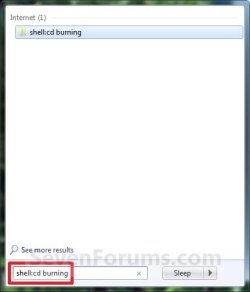
  • Start_Menu_Shell.jpg
    Start_Menu_Shell.jpg
    12.9 KB · Views: 3,956
Last edited:
Odd. See if toggling to disable and enable the DVD drive in Device Manager may be able to clear this.


Ok so tried that, rebooted and didn't work. I also tried disabling it, rebooted, enabled and rebooted again. Several times and still nothing. Also made sure it's driver was update to date too. It's just stuck in wanting to burn to a disc, it seems? I'm about ready to just reinstall Windows and cross my fingers.
 

My Computer My Computer

At a glance

Windows 10 64 bit2.0 ghz AMD A6-5200 with Radeon graphics4.0 GBRadeon
Computer type
Laptop
Computer Manufacturer/Model Number
Toshiba Satellite c55
OS
Windows 10 64 bit
CPU
2.0 ghz AMD A6-5200 with Radeon graphics
Motherboard
unknown
Memory
4.0 GB
Graphics Card(s)
Radeon
Hard Drives
Toshiba 750GB
Antivirus
AGP
Browser
Chrome
Another option to try to avoid reinstalling Windows is to do a system restore using a restore point dated before this happened.
 

My Computer My Computer

At a glance

64-bit Windows 11 Pro for WorkstationsIntel i7-8700K OC'd to 5 GHz64 GB (4x16GB) G.SKILL TridentZ RGB DDR4 3600...ASUS ROG-STRIX-GTX1080TI-O11G-GAMING
Computer type
PC/Desktop
Computer Manufacturer/Model Number
Self built custom
OS
64-bit Windows 11 Pro for Workstations
CPU
Intel i7-8700K OC'd to 5 GHz
Motherboard
ASUS ROG Maximus XI Formula Z390
Memory
64 GB (4x16GB) G.SKILL TridentZ RGB DDR4 3600 MHz
Graphics Card(s)
ASUS ROG-STRIX-GTX1080TI-O11G-GAMING
Sound Card
Integrated
Monitor(s) Displays
2 x Samsung Odyssey G7 27"
Screen Resolution
2560x1440
Hard Drives
1TB Samsung 990 PRO M.2,
4TB Samsung 990 PRO PRO M.2,
TerraMaster F8 SSD Plus NAS
PSU
Seasonic Prime Titanium 850W
Case
Thermaltake Core P3
Cooling
Corsair Hydro H115i
Keyboard
Logitech wireless K800
Mouse
Logitech MX Master 4
Internet Speed
2 Gb/s Download and 100 Mb/s Upload
Antivirus
Malwarebyte Anti-Malware Premium
Browser
Google Chrome
Other Info
Logitech Z625 speaker system,
Logitech BRIO 4K Pro webcam,
HP Color LaserJet Pro MFP M477fdn,
APC SMART-UPS RT 1000 XL - SURT1000XLI,
Galaxy S23 Plus phone
A fix that should work for everyone

After years of seeing this message under my CDR in the Computer window I decided to try to fix it. this is what i found works

1. Folder Options: enable view hidden files, disable hide system files.
2. look at your desktop after doing this. I had 3 desktop.ini files there, one from 2013, one from 2019 and one from just a few days before.
3. delete these files.
4. restart your machine.
After 5 restarts the file does not reappear.

desktop.ini files are not needed by the system and can be remade at any time by the system. I have not seen any consequence to deleting these files so far...
Hope this helps someone!
 

My Computers My Computers

  • At a glance

    win 7 64 professional
    OS
    win 7 64 professional
  • Computer type
    PC/Desktop
Back
Top