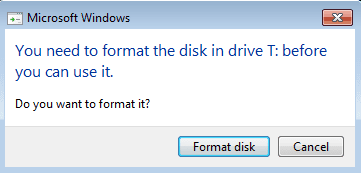
"You need to format the Disk" popup

Ghostowl1

New member
Local time
12:15 PM
Messages
3
Recently starting getting this popup on my Seagate 5TB external drive when plugged in to my laptop via USB 3.0. The drive itself seems OK and after a lengthy test using Sea Tools no problems were found.

So why do I keep getting this error? It usually appears in threes in quick succession.

Is the drive bad?
 

Attachments
  • image1.png
    image1.png
    3.9 KB · Views: 48
  • image2.png
    image2.png
    17.4 KB · Views: 1

My Computer My Computer

Computer type
PC/Desktop
OS
Windows 7
Welcome too the forum. can you post a screen shot from disk manger showing the drive details it sounds like it may have gone raw loosing it parition.
 

My Computer My Computer

Computer type
PC/Desktop
OS
win 8 32 bit
Don't try to fix it. You will get specialized help.
As Samuria suggested, post a screen shot from disk manger (expand the columns so we can read them).
 

My Computers My Computers

System One System Two

  • Computer type
    PC/Desktop
    Computer Manufacturer/Model Number
    custom build
    OS
    Windows 7 HP 64
    CPU
    i5 6600K - 800MHz to 4200MHz
    Motherboard
    GA-Z170-HD3P
    Memory
    4+4G GSkill DDR4 3000
    Graphics Card(s)
    IG - Intel 530
    Monitor(s) Displays
    Samsung 226BW
    Screen Resolution
    1680x1050
    Hard Drives
    (1) -1 SM951 – 128GB M.2 AHCI PCIe SSD drive for Windows 7 and Lubuntu
    (2) -1 WD SATA 3 - 1T for Data
    (3) -1 WD SATA 3 - 1T for backup
    PSU
    Thermaltake 450W TR2 gold
    Keyboard
    Old and good Chicony mechanical keyboard
    Mouse
    Logitech mX performance - 9 buttons (had to disable some)
    Internet Speed
    500Mb/s
    Browser
    Firefox 64
    Other Info
    TinyWall firewall
  • Computer type
    Laptop
    System Manufacturer/Model Number
    Asus Q550LF
    OS
    Windows 7 Pro
    CPU
    i7-4500U 800MHz to 3.0GHz
    Motherboard
    Asus Q550LF
    Memory
    (4+4)G DDR3 1600
    Graphics Card(s)
    IG intel 4400 + NVIDIA GeForce GT 745M
    Sound Card
    Realtek
    Monitor(s) Displays
    LG Display LP156WF4-SPH1
    Screen Resolution
    1920 x 1080
    Hard Drives
    BX500 120G SSD for Windows and programs +
    1T HDD for data
    Internet Speed
    500 Mb/s
    Browser
    Firefox
    Other Info
    TinyWall firewall
Hi Ghostowl1,

Welcome to Seven Forums.

Post the following screenshots with only your faulty drive plugged in ( Please remove all other external HDDs /Flash drives)

1. Windows Disk Management: Disk Management - Post a Screen Capture Image - Windows 7 Help Forums

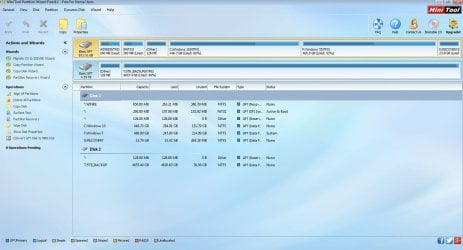
2. Download, install and run version 9.1 from MiniTool Partition Wizard Free 10.2.2 Download for Windows / Old Versions / FileHorse.com (Yes, only version 9.1 and not 10.x.x) Post a screenshot of how your drive looks like in it. ( The very first screen after you launch it)

Upload Screenshots: Screenshots and Files - Upload and Post in Seven Forums - Windows 7 Help Forums

How old is your Seagate 5TB external drive? Model Number/Name? Portable or Desktop? How many partitions were there? Do you know whether it came as an MBR drive or GPT drive? ( Older ones can be MBR and newer ones GPT)
 
Last edited:

My Computer My Computer

OS
Windows 7 Home Premium 32 bit
Thanks for the help so far.

Drive is called an expansion desktop drive, it must be about 3 years old now at least. I tried connecting the drive up again today and whilst I haven't noticed the popup in question so far, I've lost faith in the drives reliability and already started backing up the most important data to cloud storage.

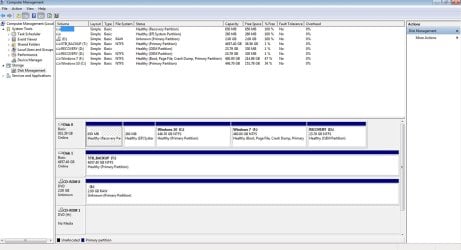
Screen shots as requested.

Thanks in advance.

diskm.jpg
minitool.jpg
 

My Computer My Computer

Computer type
PC/Desktop
OS
Windows 7
How come the CD ROM 0 is showing a 2G raw disk? Is it a Linux disk?
 

My Computers My Computers

System One System Two

  • Computer type
    PC/Desktop
    Computer Manufacturer/Model Number
    custom build
    OS
    Windows 7 HP 64
    CPU
    i5 6600K - 800MHz to 4200MHz
    Motherboard
    GA-Z170-HD3P
    Memory
    4+4G GSkill DDR4 3000
    Graphics Card(s)
    IG - Intel 530
    Monitor(s) Displays
    Samsung 226BW
    Screen Resolution
    1680x1050
    Hard Drives
    (1) -1 SM951 – 128GB M.2 AHCI PCIe SSD drive for Windows 7 and Lubuntu
    (2) -1 WD SATA 3 - 1T for Data
    (3) -1 WD SATA 3 - 1T for backup
    PSU
    Thermaltake 450W TR2 gold
    Keyboard
    Old and good Chicony mechanical keyboard
    Mouse
    Logitech mX performance - 9 buttons (had to disable some)
    Internet Speed
    500Mb/s
    Browser
    Firefox 64
    Other Info
    TinyWall firewall
  • Computer type
    Laptop
    System Manufacturer/Model Number
    Asus Q550LF
    OS
    Windows 7 Pro
    CPU
    i7-4500U 800MHz to 3.0GHz
    Motherboard
    Asus Q550LF
    Memory
    (4+4)G DDR3 1600
    Graphics Card(s)
    IG intel 4400 + NVIDIA GeForce GT 745M
    Sound Card
    Realtek
    Monitor(s) Displays
    LG Display LP156WF4-SPH1
    Screen Resolution
    1920 x 1080
    Hard Drives
    BX500 120G SSD for Windows and programs +
    1T HDD for data
    Internet Speed
    500 Mb/s
    Browser
    Firefox
    Other Info
    TinyWall firewall
Is it a Linux disk?

No... that's a failed burn of a data disc (a separate problem for another time...)

My drive is still giving me the Format popup again today. Disconnecting the drive and plugging it into another USB port temporarily solves the problem.

Would the problem be because the drive is down to 1% capacity? It also takes a long time to display items in a folder (detail view), the green progress bar taking ages to complete. It's impossible to stream from the drive.
 

My Computer My Computer

Computer type
PC/Desktop
OS
Windows 7
Back
Top