Your connection is not Secure

flashh4

New member
Member
Local time
8:59 PM
Messages
22
Hi guys, my granddaughter has this popping up everywhere she try's to go outside of Firefox ! It will open FF and IE fine but if she try's to go to any other site this message pops up !! We were trying to open Google, like i said every site gives this message. We checked the clock & date, they are correct !! Now i am lost, any ideas of what to try would be appreciated very much ! She doesn't use her computer much so it may be awhile before i get back with an answer for you !!
Thanks

Your connection is not secure

The owner of Google has configured their website improperly. To protect your information from being stolen, Firefox has not connected to this website.

This site uses HTTP Strict Transport Security (HSTS) to specify that Firefox only connect to it securely. As a result, it is not possible to add an exception for this certificate.


Forgot to mention that everything works fine in "Safe Mode with networking"
 

My Computer

OS
Windows 7 Home Premium 64 bit.
Hi,
It sounds more likely a third party security suite producing the message :/
What is being used for security on this machine ?
 

My Computer

Computer type
PC/Desktop
Computer Manufacturer/Model Number
Custom assembled by me :}
OS
Win-7-Pro64bit 7-H-Prem-64bit
CPU
i7-5930K 2nd i9-9940x both water blocked VRM's too
Motherboard
ASUS SABERTOOTH X99 2nd ASUS x299 Apex
Memory
Trident-z 3200C14 2nd Trident-z 3600C16
Graphics Card(s)
EVGA 1080ti ftw3 2nd Titan Xp both water blocked
Sound Card
Built-in Realtek
Monitor(s) Displays
1-AOC G2460PG 24"G-Sync 144Hz/ 2nd 1-ASUS VG248QE 24" 144Hz
Screen Resolution
1920 x 1080 144Hz
Hard Drives
2-Samsung M.2 Evo & Evo Plus
2-Samsung 850 EVO 500GB SSD's/ 3-2.5 W.D. Black 1tb-&3-1tb/3-3.5 WD Black 1tb hdd's
PSU
EVGA SuperNOVA 1000-P2 2nd 1200-P2
Case
2-Corsair Obsidian Series 450D Black ATX Mid Tower
Cooling
Custom water loops
Keyboard
Logitech G710+/ 2nd Logitech G910
Mouse
2-RedDragon M901 Perdition 16400 dpi Gaming mouse = wired
Internet Speed
Comcast Ping 19ms 89.31mbps download speed 6.12mbps upload
Antivirus
Malwarebytes Pro/ Superantispyware Pro
Browser
FireFox & Pale moon
Other Info
2nd ASUS X299 Apex/Intel i9-9940x with Custom water loop/7H-Prem-x64/Corsair 450D case/Ram Trident-z 3600C16 4x8gb / Samsung970Evo plus 500gb SSD/Dual ssd EZ swap evo/PSU EVGA SuperNova 1200w-P2 80+Platinum/GPU Titan Xp /8-ML-140 on push-pull on 2-280GTX rads
It has Avg. which is turned off !!
 

My Computer

OS
Windows 7 Home Premium 64 bit.
Turning off an antivirus program usually does no good,
If you don't want it uninstall it and use another
Most have their own dedicated uninstallers for a reason they do not usually uninstall well either
Download tools and utilities | AVG Worldwide

I don't use Firefox so I don't know if it has added stuff like that in the new version
ie11 might give you a Only secure content is displayed popup but that's about all I've seen in it for the limited use I now use ie11.

Getting a popup (security certificate has expired) on every website suggests the clock and date are off as you have already confirmed that is not the case
I don't believe the popup you state insecure connection applies to the time but does to the home network it's on so it might be a Pubic network instead of a home network meaning there is no password to enter the network.
Is it connecting wireless or wired ?
 

My Computer

Computer type
PC/Desktop
Computer Manufacturer/Model Number
Custom assembled by me :}
OS
Win-7-Pro64bit 7-H-Prem-64bit
CPU
i7-5930K 2nd i9-9940x both water blocked VRM's too
Motherboard
ASUS SABERTOOTH X99 2nd ASUS x299 Apex
Memory
Trident-z 3200C14 2nd Trident-z 3600C16
Graphics Card(s)
EVGA 1080ti ftw3 2nd Titan Xp both water blocked
Sound Card
Built-in Realtek
Monitor(s) Displays
1-AOC G2460PG 24"G-Sync 144Hz/ 2nd 1-ASUS VG248QE 24" 144Hz
Screen Resolution
1920 x 1080 144Hz
Hard Drives
2-Samsung M.2 Evo & Evo Plus
2-Samsung 850 EVO 500GB SSD's/ 3-2.5 W.D. Black 1tb-&3-1tb/3-3.5 WD Black 1tb hdd's
PSU
EVGA SuperNOVA 1000-P2 2nd 1200-P2
Case
2-Corsair Obsidian Series 450D Black ATX Mid Tower
Cooling
Custom water loops
Keyboard
Logitech G710+/ 2nd Logitech G910
Mouse
2-RedDragon M901 Perdition 16400 dpi Gaming mouse = wired
Internet Speed
Comcast Ping 19ms 89.31mbps download speed 6.12mbps upload
Antivirus
Malwarebytes Pro/ Superantispyware Pro
Browser
FireFox & Pale moon
Other Info
2nd ASUS X299 Apex/Intel i9-9940x with Custom water loop/7H-Prem-x64/Corsair 450D case/Ram Trident-z 3600C16 4x8gb / Samsung970Evo plus 500gb SSD/Dual ssd EZ swap evo/PSU EVGA SuperNova 1200w-P2 80+Platinum/GPU Titan Xp /8-ML-140 on push-pull on 2-280GTX rads
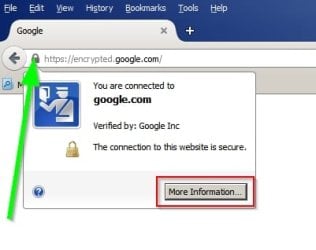
What do you see if you click the "padlock" dislpayed in the address bar? Then click "More Information"

Post a screenshot like this:

FF Connection.jpg

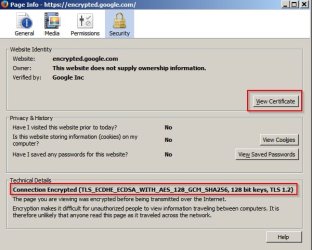
Then once you have clicked "More Information" post a screenshot of what you see:
FF Connection 2.jpg

Then click "View Certificate" and post screenshots of both tabs.

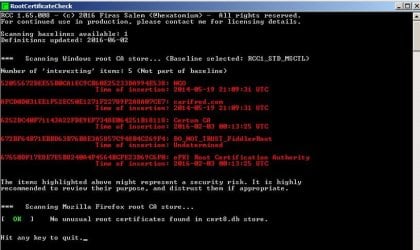
You might also want to scan your trusted root certificates store in Microsoft Windows and Mozilla Firefox.

You can download root certificate checker:

Code:
http://trax.x10.mx/dl_rcc.php?appname=RCC.exe

Download to your desktop. Right click the executable and choose "Run as administrator"

Post a screenshot of the results.
 
Last edited:

My Computer

Computer type
Laptop
Computer Manufacturer/Model Number
ASUS
OS
Microsoft Windows 7 Home Premium 64-bit 7601 Multiprocessor Free Service Pack 1
CPU
AMD C-60 APU with Radeon(tm) HD Graphics
Motherboard
ASUSTeK COMPUTER INC. X501U
Memory
4.00 GB
Graphics Card(s)
AMD Radeon HD 6290 Graphics
Sound Card
(1) AMD High Definition Audio Device (2) Realtek High Defi
Screen Resolution
1366 x 768 x 32 bits (4294967296 colors) @ 60 Hz
Hard Drives
Hitachi HTS545050A7E380 SATA Disk Device
Antivirus
Comodo CIS & FW, SecureAplus App Whitelisting, Threatfire
Browser
Cyberfox 64bit, Opera 64bit, Airfox
Other Info
Spy-The-Spy, HitmanPro.Alert, Norton Connect Safe, MJRegWatcher, BitDefender TrafficLight, Voodoo Shield, Zemana AntiMalware
rcc output

It says that signature database is out of date
 

My Computer

Computer type
PC/Desktop
OS
windows 8.1 pro 64 bit

My Computers

System One System Two

It says that signature database is out of date

Yes. More than a month after the build was released it would be out of date. The only way around that is to wait for the new version. Or don't use it. Personally I keep an eye out for new builds that are updated with the latest signatures.

Just downloaded the current build and it's up to date.

RCC.jpg

RCC 2.jpg
 

My Computer

Computer type
Laptop
Computer Manufacturer/Model Number
ASUS
OS
Microsoft Windows 7 Home Premium 64-bit 7601 Multiprocessor Free Service Pack 1
CPU
AMD C-60 APU with Radeon(tm) HD Graphics
Motherboard
ASUSTeK COMPUTER INC. X501U
Memory
4.00 GB
Graphics Card(s)
AMD Radeon HD 6290 Graphics
Sound Card
(1) AMD High Definition Audio Device (2) Realtek High Defi
Screen Resolution
1366 x 768 x 32 bits (4294967296 colors) @ 60 Hz
Hard Drives
Hitachi HTS545050A7E380 SATA Disk Device
Antivirus
Comodo CIS & FW, SecureAplus App Whitelisting, Threatfire
Browser
Cyberfox 64bit, Opera 64bit, Airfox
Other Info
Spy-The-Spy, HitmanPro.Alert, Norton Connect Safe, MJRegWatcher, BitDefender TrafficLight, Voodoo Shield, Zemana AntiMalware
Download is here:

Code:
http://trax.x10.mx/dl_rcc.php?appname=RCC.exe

Copying and pasting the link into your browser's address bar then pressing enter will initiate a download.
 

My Computer

Computer type
Laptop
Computer Manufacturer/Model Number
ASUS
OS
Microsoft Windows 7 Home Premium 64-bit 7601 Multiprocessor Free Service Pack 1
CPU
AMD C-60 APU with Radeon(tm) HD Graphics
Motherboard
ASUSTeK COMPUTER INC. X501U
Memory
4.00 GB
Graphics Card(s)
AMD Radeon HD 6290 Graphics
Sound Card
(1) AMD High Definition Audio Device (2) Realtek High Defi
Screen Resolution
1366 x 768 x 32 bits (4294967296 colors) @ 60 Hz
Hard Drives
Hitachi HTS545050A7E380 SATA Disk Device
Antivirus
Comodo CIS & FW, SecureAplus App Whitelisting, Threatfire
Browser
Cyberfox 64bit, Opera 64bit, Airfox
Other Info
Spy-The-Spy, HitmanPro.Alert, Norton Connect Safe, MJRegWatcher, BitDefender TrafficLight, Voodoo Shield, Zemana AntiMalware
I had this problem, but only with Google.co.uk
This worked for me :

Alright so I just talked to someone on the Kaspersky Live chat and found the fix for it. You need to go Tools>Options>Advanced>View Certificates and then click the authorities tab and click Import... then go to C:\ProgramData\Kaspersky Lab\AVP16.0.0\Data\Cert and open the (fake)Kaspersky Anti-Virus Personal Root Certificate.cer file and put a check mark in This certificate can identify websites and then install the certificate and restart Firefox.

Can also install certificate via :
Settings > Additional > Network > Advanced
In 2015 version

 

My Computer

Computer Manufacturer/Model Number
Acer Aspire 7540
OS
Windows 7 Home Premium x64
Memory
3GB
Back
Top