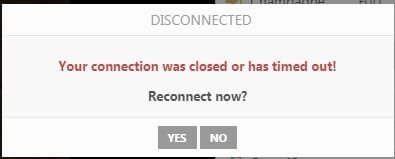
Your connection was closed or has timed out

konpjuterista

New member
Local time
3:55 PM
Messages
11
I got this message when visiting one site every 4-5 min and it is annoying
It is something with internet settings because when i use other internet provider it is OK

I tried so far to disable antivirus,firewall....trying different things with internet option Lan settings,checking and unchecking but still have a same problem

help plz
 

Attachments
  • Screenshot_1.jpg
    Screenshot_1.jpg
    5.9 KB · Views: 10

My Computer My Computer

Computer type
PC/Desktop
OS
Windows 7 Ultimate 64 bit

My Computer My Computer

Computer type
PC/Desktop
Computer Manufacturer/Model Number
HP Desktop & Compaq Laptop
OS
Win 10 x64, Linux Lite, Win 7 x64, BlackArch, & Kali
Hard Drives
Samsung 850 Pro 256Gb,
Hitachi HDD 1Tb,
Crucial MX SSD 250Gb
Segate 3Tb USB 3.0 Ext. Backup HDD
Internet Speed
150Mbps dn, 20Mbps up
Antivirus
Avast Free, Malwarebytes Anti-Exploit & Anti-Ransomware
Browser
Firefox, Chrome, Opera, & VPN
Thank you
Yes it is only one site,and sorry i cross out with red,don`t know is it allowed to show it because it is explicit content :)

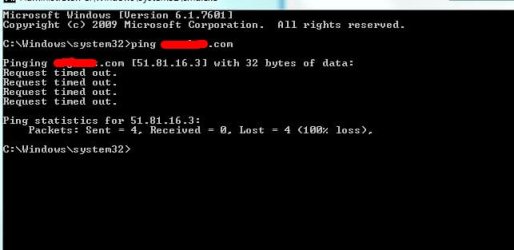
This is what i get,what to do next?

Thank you very much for helping
 

Attachments

  • Screenshot_1.jpg
    Screenshot_1.jpg
    31.8 KB · Views: 7

My Computer My Computer

Computer type
PC/Desktop
OS
Windows 7 Ultimate 64 bit
Your attached image in your last post isn't working.

Did you ping that site in CMD
&
Did you check to see if the site is up & running. Sometimes sites go down for various reasons, DDOS attacks for one.

Your Internet Service Provider (ISP) may be blocking it due to content.
 

My Computer My Computer

Computer type
PC/Desktop
Computer Manufacturer/Model Number
HP Desktop & Compaq Laptop
OS
Win 10 x64, Linux Lite, Win 7 x64, BlackArch, & Kali
Hard Drives
Samsung 850 Pro 256Gb,
Hitachi HDD 1Tb,
Crucial MX SSD 250Gb
Segate 3Tb USB 3.0 Ext. Backup HDD
Internet Speed
150Mbps dn, 20Mbps up
Antivirus
Avast Free, Malwarebytes Anti-Exploit & Anti-Ransomware
Browser
Firefox, Chrome, Opera, & VPN
Yes i did
I wrote them and they did some update on site to work better,since that time i got that error
i just connect to my neighbor net (same provider) and got the same error
is there a chance to bypass that somehow or to change provider?...it is really very important to me
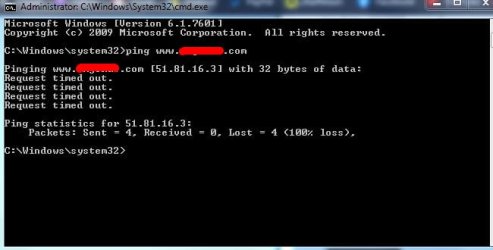
this is what i get when i run site and run CMD
 

Attachments

  • Screenshot.jpg
    Screenshot.jpg
    36.3 KB · Views: 7

My Computer My Computer

Computer type
PC/Desktop
OS
Windows 7 Ultimate 64 bit
A ping to a site isn't going to say much as you might have hoped. This is due to the fact that some if not all servers that host websites throttle or out right block ICMP echo requests to prevent something called the ping of death. So a ping to a website is really a YMMV situation.

Bypass DNS resolution once. In your URL address bar in your browser simply enter the website's IP address of, 51.81.16.3 and see if that doesn't take you right to the website or not. If not, then they have website and/or server issues on their end and there's nothing you can do about it. This doesn't appear to be an issue on your end since you indicated your neighbor has the same connection issue to this website.

For the record, Instant FREE Webcam Chat Rooms | OMGchat.com works on my end here. Try bypassing your ISP with a VPN or Tor as a test and see what happens. Or set your DNS in your Network adapter to the following IPs once and see what happens.

208.67.222.222

208.67.220.220

Now open an elevated command prompt and enter: 'ipconfig /flushdns' without the single quotes. Try the website again.

These are OpenDNS' IPs and they have it setup where if DNS fails they have a fall back mechanism to still get you to the website you requested.

Another similar website is Chatroulette. I tried it once and never again. LMAO!

PS: When in ever in doubt, try this website. Is it down? Check at Down for Everyone or Just Me
 

My Computer My Computer

Computer type
PC/Desktop
OS
Windows 7 Ultimate x64

My Computer My Computer

Computer type
PC/Desktop
OS
Windows 7 Ultimate x64
When i type their website address it says;
This site can’t be reached www.51.81.16.3’s server IP address could not be found.

Can you explain me more these plz?
'Try bypassing your ISP with a VPN or Tor as a test and see what happens. Or set your DNS in your Network adapter to the following IPs once and see what happens.'

I suck big time about PC :)

Thanks for helping me
ps.says site is OK but not for me

Same connection error in portable Google Chrome
 

My Computer My Computer

Computer type
PC/Desktop
OS
Windows 7 Ultimate 64 bit
When i type their website address it says;
This site can’t be reached 51.81.16.3’s server IP address could not be found.

Can you explain me more these plz?
'Try bypassing your ISP with a VPN or Tor as a test and see what happens. Or set your DNS in your Network adapter to the following IPs once and see what happens.'

I suck big time about PC :)

Thanks for helping me


The only web site on that IP address is Instant FREE Webcam Chat Rooms | OMGchat.com and that works fine.
 

My Computer My Computer

Computer type
PC/Desktop
OS
Windows 11
Works fine for me 5 min and then i get connection error windows,and need to reconnect
 

My Computer My Computer

Computer type
PC/Desktop
OS
Windows 7 Ultimate 64 bit
Try the Tor browser. You probably can't use a webcam in it, but if the website shows then you may have ISP filtering going on which I kinda doubt. Tor Project | Download

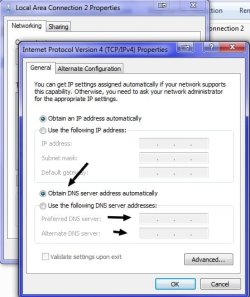
To change your DNS IPs in your network adapter, do the following.

Under the start orb in the search box begin by typing Network and Sharing Center. Open that. Now go to Change adapter settings. Right click your adapter and chose properties. Highlight the IPv4 protocol version in the list. Click the Properties button. You'll see in this box that appears at the bottom where you can enter two DNS IPs. Select the radio button, "Use the following DNS server addresses. Enter:

208.67.222.222

208.67.220.220
 

Attachments

  • gbn.jpg
    gbn.jpg
    38.5 KB · Views: 6

My Computer My Computer

Computer type
PC/Desktop
OS
Windows 7 Ultimate x64
If it's timing out in a few minutes that sounds to me like their website is having issues.
 

My Computer My Computer

Computer type
PC/Desktop
OS
Windows 7 Ultimate x64
F22 Simpilot
I changed DNS IPs ,restart and try it...same :(
 
Last edited:

My Computer My Computer

Computer type
PC/Desktop
OS
Windows 7 Ultimate 64 bit
If it's timing out in a few minutes that sounds to me like their website is having issues.


They told me it is between server and my internet....they did change something in last few days
When i connect PC with my phone net over WI FI (other provider) it works like charm...but 2 expensive
 

My Computer My Computer

Computer type
PC/Desktop
OS
Windows 7 Ultimate 64 bit
What did you get if/when you try/tried
Is it down? Check at Down for Everyone or Just Me
I clicked the link Instant FREE Webcam Chat Rooms | OMGchat.com
Connected right away and stayed connected.

FYI: All of a sudden, I had an issue about a year ago not receiving post notifications in my email.
PMed Shawn, he checked Sevenforums and that was OK
Contacted Xfinity, they said they weren't blocking it, then miraculously it started working as I hung up the phone. Yea, right, they weren't blocking it!
 

My Computer My Computer

Computer type
PC/Desktop
Computer Manufacturer/Model Number
HP Desktop & Compaq Laptop
OS
Win 10 x64, Linux Lite, Win 7 x64, BlackArch, & Kali
Hard Drives
Samsung 850 Pro 256Gb,
Hitachi HDD 1Tb,
Crucial MX SSD 250Gb
Segate 3Tb USB 3.0 Ext. Backup HDD
Internet Speed
150Mbps dn, 20Mbps up
Antivirus
Avast Free, Malwarebytes Anti-Exploit & Anti-Ransomware
Browser
Firefox, Chrome, Opera, & VPN
F22 Simpilot
I changed DNS IPs ,restart and try it...same :(


But did you flush the DNS cache as I instructed after you changed the IPs?

It probably doesn't matter. This sounds more like an ISP issue to me.
 

My Computer My Computer

Computer type
PC/Desktop
OS
Windows 7 Ultimate x64
I have tried Tor...cant log in at all
 

My Computer My Computer

Computer type
PC/Desktop
OS
Windows 7 Ultimate 64 bit
If it is IP what can be done?It is a fu..ing state-owned company that bought few small net providers,and they are only provider in town,still have almost 2 years contract with them,cant do it for free.

was thinking about to ask to change router,but then i connect to a neighbor net (same provider-different router) and i got same error
 

My Computer My Computer

Computer type
PC/Desktop
OS
Windows 7 Ultimate 64 bit
It seems to me that the root problem is unstable connection caused by a bad ISP, so my immediate though is change that to anything else.
Changing the router can help, if the problem was due to defective equipment, and generally newer routers have better stability.

Other than that, the only thing I can imagine is to tell the problem to site support, if any. They definitely won't help in avoiding disconnection, but may improve auto-reconnection and help resume broken sessions, if they happen too often. Worth a shot if you really need it.
 

My Computer My Computer

Computer type
Laptop
Computer Manufacturer/Model Number
Toshiba Sattelite A665-S6092
OS
Windows 7 Ultimate x64
CPU
Intel Core i7-740QM
Memory
8 GB DDR3
Graphics Card(s)
NVIDIA GeForce 330GT
Screen Resolution
1366x768
Hard Drives
Samsung 840 SSD 500GB
1TB USB3 external HD
Cooling
Coolermaster Notepal U3 notebook cooling pad
Internet Speed
3mbps ASDL
Antivirus
ClamWin 0.98.7
Browser
Opera 12.17 x86 (main), Firefox 38 (sec), IE11 (last resort)
Back
Top