Your thoughts: Easiest way to backup MSOffice Docs

prowler

New member
Member
Local time
2:01 AM
Messages
42
As a novice and someone not knowledgeable and/or willing enough to continue battling with Onedrive, please give some easy and convenient methods to back up my Office Documents - other than burning on a DVD. I want to know my Docs are safe and up-to-date on a weekly basis. Thanks, all.

Roger
 

My Computer My Computer

Computer type
PC/Desktop
Computer Manufacturer/Model Number
Dell
OS
Windows 7 Professional 32 bit O.S.
CPU
AMD Athlon Dual Core 5000B 2.60 Ghz
Monitor(s) Displays
Acer
The easiest way would be to get a basic Carbonite.com account and let it automatically backup your data on one of their cloud servers. Their plans start at $60/year (that is the plan I use). However, just one backup copy isn't the safest way to protect data from loss.

To be reasonably safe, your data should reside in three places: your computer, an onsite backup, and an offsite backup. Carbonite (or CrashPlan or Backblaze) can be used as an easy, fairly inexpensive way to get an offsite backup. The simplest and least expensive onsite backup would be to get an external HDD and connect it to your computer only when you update the backup (backup drives should be kept disconnected from the computer except when updating them to protect them from malware, etc.).

Keep in mind that any data that is not backed up will be subject to loss. While using a cloud backup service will backup data shortly after it is generated, it is far safer to also have an onsite backup that is updated frequently; a week is too long to go between backups. I backup my data at least once a day.
 

My Computer My Computer

Computer type
PC/Desktop
Computer Manufacturer/Model Number
Custom Build
OS
Win 7 Ultimate 64 bit
CPU
Intel i7-3930K
Motherboard
ASUS P9X79 WS
Memory
Kingston HyperX Genesis 32GB Kit (8x4GB Modules) 1600MHz DDR
Graphics Card(s)
MSI R7850 Twin Frozr 2GD5/OC Radeon HD 7850 2GB 256-bit GDDR
Sound Card
Asus Xonar Essence STX
Monitor(s) Displays
3x Asus VG248QE 24", Vizio 32" TV
Screen Resolution
1920 x 1080, ?
Hard Drives
Samsung 128GB 840 Pro SSD (1),
Samsung 4TB 850 EVO SSDs (4)
Samsung 4TB 850 EVO SSDs (16) external backup drives used in 2.5" hot swap bays in the computer.
PSU
Corsair HX750w
Case
Antec Two Hundred v2 (modified)
Cooling
Cooler Master GeminII S524 120mm (fan replaced with a 140mm)
Keyboard
Logitech G510s
Mouse
Logitech M525 (two in use)
Internet Speed
=< 32Mbps down, 8Mbps up
Antivirus
AVAST!, MBAM, SAS, Spybot S&D (all but MBAM free) Glary Util
Browser
IE11
Other Info
LSI 9211-8i HBA card (8 SATA III ports), 2.5" & 3.5" Hot Swap Bays, HooToo HT-CR001 PCI-E to USB 3.0 Internal Hub + 6 Slot Card Reader, and LG Model CH12LS28 BD-ROM Optical Drive. Also, ScanSnap S1500 ADF duplexing scanner, Canon 9000F flat bed scanner, Corsair SP2500 2.1 speakers, Samsung CLP 415nw laser color printer, Cyberpower PP2200SW UPS
Hi Jeannie, and thank you for your reply. I'll definitely check out the options you provided.
 

My Computer My Computer

Computer type
PC/Desktop
Computer Manufacturer/Model Number
Dell
OS
Windows 7 Professional 32 bit O.S.
CPU
AMD Athlon Dual Core 5000B 2.60 Ghz
Monitor(s) Displays
Acer
Hi Roger, I also had many problems with OneDrive and now only use the service as a permanent storage drive, syncing with OneDrive has proved disastrous with lost data. I now use Box.com. Create a document from Office and then immediately save to "box". in Box, it is synced, as soon as you select "save" and can be accessed/synced across different platforms. Never lost any docs or data. Also use Google Drive to sync documents in a simular method.
Also for OTG...save to SD/media card within the computer. Just a couple of extra clicks to protect your important data, spread the wealth!
 

My Computer My Computer

Computer Manufacturer/Model Number
HP elite E9240F
OS
Windows 7 Home premium 64 bit
Hi Stu -

Great ideas. I especially like the "box" concept as I'm already signed up there. That gives me an easy alternative for saving docs.

Roger
 

My Computer My Computer

Computer type
PC/Desktop
Computer Manufacturer/Model Number
Dell
OS
Windows 7 Professional 32 bit O.S.
CPU
AMD Athlon Dual Core 5000B 2.60 Ghz
Monitor(s) Displays
Acer
While Box might be a good offsite backup (I'm not familiar with Box), you still need an onsite backup of some kind, such as an external HDD, a thumb drive (if you don't have very many documents), etc. If your internet connection goes down, you wouldn't be able to access your backup until you got your connection back. It's also possible for Box to permanently lose your data (it's been known to happen with even the best cloud backup services unless you pay the bigger bucks for a business plan with georedundancy). By having more than one backup, if one should fail, you would still have the other one to fall back on.

I personally have a set of four backup HDDs for each one in my computer (I have three HDDs in my computer and a total of twelve backup HDDs). Two of each set are kept in a drawer except when updating a backup; the other two of each set are in a safe deposit box at my credit union. I swap the onsite HDDs in the drawer with the offsite HDDs in the safe deposit box no less than once a month, depending on how much data I add or change. Since any data added or changed since I put the HDDs in the safe deposit box would be lost if I lost originals and onsite backups (such as theft, fire, etc.), I also have a cloud backup service (Carbonite.com). I have enough data that, if I had to recover all of it from the cloud backup, it would take me weeks to months to recover it all. However, I can relatively quickly recover most of my data from the offsite data, then the rest from Carbonite, which will take much less time since there won't be nearly as much to download.

I could get by on just one onsite and one offsite HDD for each HDD in my computer (most people do). However if I were to lose both the original and the onsite backup HDDs, I would have to got to my credit union to get the offsite HDD. If this were to happen on, say Saturday morning of a three day holiday weekend, I would have to wait until the credit union reopened to get my data back. By having the second onsite backup HDD, I can be up and running again in as little as three hours instead three days. Any drive, including backup drives, can fail at any time, hence the added redundancy.

Most people do not go to the extreme I do (it is a bit anal) but I'm covered for just about any data loss scenario, including a meteor or asteroid strike that wipes out my home and credit union (they are only six miles apart) while I'm lucky enough to be out of State and out of range of the catastrophe (yeah, I know, I'm being silly now). All seriousness aside, I did have a situation once, on the Saturday morning of a three day weekend, where my main data drive became corrupted but still readable and, when I tried to update one of the two backup drives, the backup failed and the data on the backup drive was lost. Since I still had the second backup drive, I was able to reformat both the main data drive in my computer and the one backup drive that lost its data, then recover the data to both from the second backup drive. I knew what data had been added since I had last updated the backups so I was able to copy that data from the main data drive before I reformatted it to another HDD in my computer (I had just ripped several new CDs; fortunately, I was still able to access that data), then copy back after restoring the rest of the data. I was up and running in only three and a half hours instead three days.
 

My Computer My Computer

Computer type
PC/Desktop
Computer Manufacturer/Model Number
Custom Build
OS
Win 7 Ultimate 64 bit
CPU
Intel i7-3930K
Motherboard
ASUS P9X79 WS
Memory
Kingston HyperX Genesis 32GB Kit (8x4GB Modules) 1600MHz DDR
Graphics Card(s)
MSI R7850 Twin Frozr 2GD5/OC Radeon HD 7850 2GB 256-bit GDDR
Sound Card
Asus Xonar Essence STX
Monitor(s) Displays
3x Asus VG248QE 24", Vizio 32" TV
Screen Resolution
1920 x 1080, ?
Hard Drives
Samsung 128GB 840 Pro SSD (1),
Samsung 4TB 850 EVO SSDs (4)
Samsung 4TB 850 EVO SSDs (16) external backup drives used in 2.5" hot swap bays in the computer.
PSU
Corsair HX750w
Case
Antec Two Hundred v2 (modified)
Cooling
Cooler Master GeminII S524 120mm (fan replaced with a 140mm)
Keyboard
Logitech G510s
Mouse
Logitech M525 (two in use)
Internet Speed
=< 32Mbps down, 8Mbps up
Antivirus
AVAST!, MBAM, SAS, Spybot S&D (all but MBAM free) Glary Util
Browser
IE11
Other Info
LSI 9211-8i HBA card (8 SATA III ports), 2.5" & 3.5" Hot Swap Bays, HooToo HT-CR001 PCI-E to USB 3.0 Internal Hub + 6 Slot Card Reader, and LG Model CH12LS28 BD-ROM Optical Drive. Also, ScanSnap S1500 ADF duplexing scanner, Canon 9000F flat bed scanner, Corsair SP2500 2.1 speakers, Samsung CLP 415nw laser color printer, Cyberpower PP2200SW UPS
Wow Jeannie, that's some pretty decent back-up system you have there! I have a lot to learn from you, even though I think I'll never get to that level;-) I personally have my data in only two places: On my computer and on my external harddrive. I know that can be dangerous, so I'm also looking for an option to store my data online. Since I have my own dynamic cloud server for my company's website (by 1&1), I was thinking of storing my data there as well. Do you think that would make sense, or is it easier to just sign up for Carbonite? Thanks for the advice!

Maria

p.s.: Sorry if this question sounds stupid, you might have notived by now that I'm not an expert on computers..
 

My Computer My Computer

Computer type
PC/Desktop
OS
Windows 7 Home Premium
Wow Jeannie, that's some pretty decent back-up system you have there! I have a lot to learn from you, even though I think I'll never get to that level;-) I personally have my data in only two places: On my computer and on my external harddrive. I know that can be dangerous, so I'm also looking for an option to store my data online. Since I have my own dynamic cloud server for my company's website (by 1&1), I was thinking of storing my data there as well. Do you think that would make sense, or is it easier to just sign up for Carbonite? Thanks for the advice!

Maria

p.s.: Sorry if this question sounds stupid, you might have notived by now that I'm not an expert on computers..

Thanks, Maria! Btw, it hasn't been all that long since I didn't even know what a backup was so don't think you can't learn. The people here at Seven Forums are extremely knowledgeable and helpful; they certainly have helped me a lot.

First, Maria, your question is NOT stupid! It's a question I wish everyone would ask, even if only to themselves.

Second, I took a look at 1&1 and would definitely be much easier to use Carbonite for your offsite backup and, depending on how much data you have now and how much you generate and change in a month, may even be cheaper. I'm not sure if Carbonite will take business from the UK (I suspect it depends on if they will accept non-U.S. credit/debit cards) but you can always contact them at www.carbonite.com to find out. Although a bit more work to set up, a paid plan with www.crashplan.com is another possible option. Both Carbonite and Crashplan have software that, once installed on your computer, works in the background to continuously check to see if you have new or changed data that needs uploading, then uploads it for you automatically (or you can set it to upload only at or during certain times). Unless you are actually going to use either for a business, be sure to check out the home/personal plans. I use Carbonite's cheapest personal plan.
 

My Computer My Computer

Computer type
PC/Desktop
Computer Manufacturer/Model Number
Custom Build
OS
Win 7 Ultimate 64 bit
CPU
Intel i7-3930K
Motherboard
ASUS P9X79 WS
Memory
Kingston HyperX Genesis 32GB Kit (8x4GB Modules) 1600MHz DDR
Graphics Card(s)
MSI R7850 Twin Frozr 2GD5/OC Radeon HD 7850 2GB 256-bit GDDR
Sound Card
Asus Xonar Essence STX
Monitor(s) Displays
3x Asus VG248QE 24", Vizio 32" TV
Screen Resolution
1920 x 1080, ?
Hard Drives
Samsung 128GB 840 Pro SSD (1),
Samsung 4TB 850 EVO SSDs (4)
Samsung 4TB 850 EVO SSDs (16) external backup drives used in 2.5" hot swap bays in the computer.
PSU
Corsair HX750w
Case
Antec Two Hundred v2 (modified)
Cooling
Cooler Master GeminII S524 120mm (fan replaced with a 140mm)
Keyboard
Logitech G510s
Mouse
Logitech M525 (two in use)
Internet Speed
=< 32Mbps down, 8Mbps up
Antivirus
AVAST!, MBAM, SAS, Spybot S&D (all but MBAM free) Glary Util
Browser
IE11
Other Info
LSI 9211-8i HBA card (8 SATA III ports), 2.5" & 3.5" Hot Swap Bays, HooToo HT-CR001 PCI-E to USB 3.0 Internal Hub + 6 Slot Card Reader, and LG Model CH12LS28 BD-ROM Optical Drive. Also, ScanSnap S1500 ADF duplexing scanner, Canon 9000F flat bed scanner, Corsair SP2500 2.1 speakers, Samsung CLP 415nw laser color printer, Cyberpower PP2200SW UPS
Thanks a lot, Jeannie! I looked at the Carbonite website and they also have European version, so that should not be a problem. I think I'll go with that, then, it seems to be the easiest and cheapest option. Thank you for your understanding, too!
 

My Computer My Computer

Computer type
PC/Desktop
OS
Windows 7 Home Premium
The easiest way would be to get a basic Carbonite.com account and let it automatically backup your data on one of their cloud servers. Their plans start at $60/year (that is the plan I use). However, just one backup copy isn't the safest way to protect data from loss.

To be reasonably safe, your data should reside in three places: your computer, an onsite backup, and an offsite backup. Carbonite (or CrashPlan or Backblaze) can be used as an easy, fairly inexpensive way to get an offsite backup. ...

Am I kidding myself that using Google Drive (free) is a good idea? Every once in awhile I notice its system tray icon is "faded", meaning that it isn't running, probably because I lost the wireless signal. Other than that, I've had no surprises.

I also use external hard drive.
 

My Computer My Computer

Computer type
Laptop
Computer Manufacturer/Model Number
Dell
OS
Windows 7 SP1 64 bit Home Premium
CPU
Intel Core I5-2430 @ 2.4GHz
Memory
8GB
The easiest way would be to get a basic Carbonite.com account and let it automatically backup your data on one of their cloud servers. Their plans start at $60/year (that is the plan I use). However, just one backup copy isn't the safest way to protect data from loss.

To be reasonably safe, your data should reside in three places: your computer, an onsite backup, and an offsite backup. Carbonite (or CrashPlan or Backblaze) can be used as an easy, fairly inexpensive way to get an offsite backup. ...

Am I kidding myself that using Google Drive (free) is a good idea? Every once in awhile I notice its system tray icon is "faded", meaning that it isn't running, probably because I lost the wireless signal. Other than that, I've had no surprises.

I also use external hard drive.

Yes, you are kidding yourself. You've just had no surprises yet. The two greatest problems with using Google drive is, 1. Google is infamous snooping on its users (and Google drive isn't particularly secure), and 2. free services are notorious for disappearing with little or no warning. Google is notorious for discontinuing its own free services with little warning. A basic paid backup service is much safer, more reliable, and can cost as little as $60/year. That's only $5/month and most of us have at least one vice we would be better off without that we can steal that little money from.

Just keep in mind that no one should rely on just one backup, including cloud backups. A minimum of two backups physically separated from the computer and each other are needed to reasonably ensure the safety of your data.
 

My Computer My Computer

Computer type
PC/Desktop
Computer Manufacturer/Model Number
Custom Build
OS
Win 7 Ultimate 64 bit
CPU
Intel i7-3930K
Motherboard
ASUS P9X79 WS
Memory
Kingston HyperX Genesis 32GB Kit (8x4GB Modules) 1600MHz DDR
Graphics Card(s)
MSI R7850 Twin Frozr 2GD5/OC Radeon HD 7850 2GB 256-bit GDDR
Sound Card
Asus Xonar Essence STX
Monitor(s) Displays
3x Asus VG248QE 24", Vizio 32" TV
Screen Resolution
1920 x 1080, ?
Hard Drives
Samsung 128GB 840 Pro SSD (1),
Samsung 4TB 850 EVO SSDs (4)
Samsung 4TB 850 EVO SSDs (16) external backup drives used in 2.5" hot swap bays in the computer.
PSU
Corsair HX750w
Case
Antec Two Hundred v2 (modified)
Cooling
Cooler Master GeminII S524 120mm (fan replaced with a 140mm)
Keyboard
Logitech G510s
Mouse
Logitech M525 (two in use)
Internet Speed
=< 32Mbps down, 8Mbps up
Antivirus
AVAST!, MBAM, SAS, Spybot S&D (all but MBAM free) Glary Util
Browser
IE11
Other Info
LSI 9211-8i HBA card (8 SATA III ports), 2.5" & 3.5" Hot Swap Bays, HooToo HT-CR001 PCI-E to USB 3.0 Internal Hub + 6 Slot Card Reader, and LG Model CH12LS28 BD-ROM Optical Drive. Also, ScanSnap S1500 ADF duplexing scanner, Canon 9000F flat bed scanner, Corsair SP2500 2.1 speakers, Samsung CLP 415nw laser color printer, Cyberpower PP2200SW UPS
I want to backup all my documents, not just MS Office ones, and it is no more difficult to do that than just the Office ones.

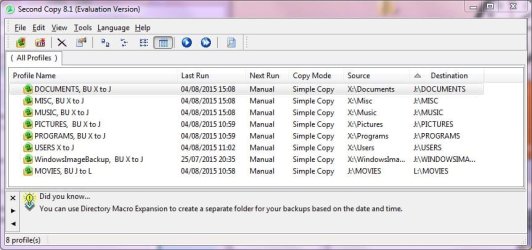
I have recently bought Second Copy after a trial. It cost about £23 only and I am very please with it. (It was recommended by two people on sevenforums. It is exceptionally easy to set up, entering info such as what disc etc. in simple dialogue boxes labelled "What", "Where", "How". It can be set up to carry out the backup(s) periodically or manually. I have two external, desktop, USB hard drives, one as a first backup and the other as a second backup. As I don't want these running continuously when the computer is on, I switch them on, select all the backups, and manually tell Second Copy to do the backups while I go on to other tasks etc. Its works a treat. Here is a clip of the my backups:

EDIT: Having seen the post immediately above, I would never rely on an external system for backups. As the poster says, the second party could go bankrupt, die, or just quit. Keep it in-house, I say. I also have set up Windows' Backup and Restore procedure to backup the C: drive at 4 pm every day, and create a restore point now and again, for example just before installing something. Its all very easy after things are set up.

 

Attachments

  • Second Copy.jpg
    Second Copy.jpg
    81.8 KB · Views: 2

My Computer My Computer

Computer type
PC/Desktop
Computer Manufacturer/Model Number
Gigabyte ATX case with 500 W power supply GZ-M1
OS
Windows 7 Home Premium 64bit
CPU
Intel Pentium Edition G3220 3.0 GHz
Motherboard
Gigabyte Socket 1150 MicroATX Mot Ultra Durable, GA-H81M-S2H
Memory
8 GB DDR3 1600 MHz DIMM
Graphics Card(s)
Not Known
Sound Card
Not known
Monitor(s) Displays
Samsung LS24D590 23.6"
Screen Resolution
1920 x 1080
Hard Drives
256 GB Solid State Drive (C: on which Windows 7 is installed)-
1 TB internal conventional HD (X:)-
Two WD "Elements" " 2TB USB drives as backups
PSU
500 W
Case
Gigabyte ATX case
Cooling
Several fans!
Keyboard
Accuratus 301 USB Compact, white.
Mouse
Microsoft Basic Optical Mouse v2.0, two-button, tethered
Internet Speed
10 to 12 Mb per second
Antivirus
Kaspersky Internet Security 2016, Malwarebytes (paid)
Browser
Firefox (ocassionally Safari)
Other Info
The 256 GB SSD (C:) also has Adobe Photoshop CS6 and InDesign CS6, MS Office, Adobe Lightroom, and other small programs.
I want to backup all my documents, not just MS Office ones, and it is no more difficult to do that than just the Office ones.

I have recently bought Second Copy after a trial. It cost about £23 only and I am very please with it. (It was recommended by two people on sevenforums. It is exceptionally easy to set up, entering info such as what disc etc. in simple dialogue boxes labelled "What", "Where", "How". It can be set up to carry out the backup(s) periodically or manually. I have two external, desktop, USB hard drives, one as a first backup and the other as a second backup. As I don't want these running continuously when the computer is on, I switch them on, select all the backups, and manually tell Second Copy to do the backups while I go on to other tasks etc. Its works a treat. Here is a clip of the my backups:

EDIT: Having seen the post immediately above, I would never rely on an external system for backups. As the poster says, the second party could go bankrupt, die, or just quit. Keep it in-house, I say. I also have set up Windows' Backup and Restore procedure to backup the C: drive at 4 pm every day, and create a restore point now and again, for example just before installing something. Its all very easy after things are set up.

Good job! You understand how backups work. The only way you could improve on what you are doing is to keep one of you backups offsite (such as a locked desk draw or locker at work, a bank safe deposit box, or at a trusted neighbor or friend's house) and switch the two backups out frequently.

I understand and agree why you wouldn't want to depend on a second party external system for backups. However, good, reliable, paid cloud backup service can be used to provide an offsite backup that is easily maintained and will be more up to date than most offsite backup solutions for a fairly low cost. This would be in addition to having a local backup(s) so, if you were to lose any one of your backups, you would still have another one to fall back on.

I use Carbonite to supplement my offsite backups. If I were to lose all my local data and backups, it would take me forever (ok, just several weeks to a couple of months) to recover all my data from Carbonite. However, if I just had my offsite backups to recover from (HDDs in a safe deposit box at my credit union), I would still lose any information I had added or changed since I put the the HDDs in the vault. However, if I should lose all my local data (such as my house burns down, taking out my computer and local backups), I could quickly recover bulk of my data from the offsite HDDs and then download the rest from my Carbonite. I would be able to fully recover with no loss of data in just a couple, three days instead of weeks or months. An added bonus I get from Carbonite (there other good paid cloud backup services, such as CrashPlan or Backblaze) is I can access that data from my notebook when I'm on the road and have a secure internet connection.
 

My Computer My Computer

Computer type
PC/Desktop
Computer Manufacturer/Model Number
Custom Build
OS
Win 7 Ultimate 64 bit
CPU
Intel i7-3930K
Motherboard
ASUS P9X79 WS
Memory
Kingston HyperX Genesis 32GB Kit (8x4GB Modules) 1600MHz DDR
Graphics Card(s)
MSI R7850 Twin Frozr 2GD5/OC Radeon HD 7850 2GB 256-bit GDDR
Sound Card
Asus Xonar Essence STX
Monitor(s) Displays
3x Asus VG248QE 24", Vizio 32" TV
Screen Resolution
1920 x 1080, ?
Hard Drives
Samsung 128GB 840 Pro SSD (1),
Samsung 4TB 850 EVO SSDs (4)
Samsung 4TB 850 EVO SSDs (16) external backup drives used in 2.5" hot swap bays in the computer.
PSU
Corsair HX750w
Case
Antec Two Hundred v2 (modified)
Cooling
Cooler Master GeminII S524 120mm (fan replaced with a 140mm)
Keyboard
Logitech G510s
Mouse
Logitech M525 (two in use)
Internet Speed
=< 32Mbps down, 8Mbps up
Antivirus
AVAST!, MBAM, SAS, Spybot S&D (all but MBAM free) Glary Util
Browser
IE11
Other Info
LSI 9211-8i HBA card (8 SATA III ports), 2.5" & 3.5" Hot Swap Bays, HooToo HT-CR001 PCI-E to USB 3.0 Internal Hub + 6 Slot Card Reader, and LG Model CH12LS28 BD-ROM Optical Drive. Also, ScanSnap S1500 ADF duplexing scanner, Canon 9000F flat bed scanner, Corsair SP2500 2.1 speakers, Samsung CLP 415nw laser color printer, Cyberpower PP2200SW UPS
I have recently bought Second Copy after a trial. It cost about £23 only and I am very please with it. (It was recommended by two people on sevenforums. It is exceptionally easy to set up, entering info such as what disc etc. in simple dialogue boxes labelled "What", "Where", "How". It can be set up to carry out the backup(s) periodically or manually.

Yeah, excellent program. I used it for 10 years.

I see you have 8 profiles set up. I originally used 5 or 6 myself, but I eventually whittled that down to I think 3 after I decided that there wasn't much point in separate profiles for most items considering my directory structure--all data on one drive.

I think I ended up with profiles named something like this. I have 3 physical drives: C, D for data, and E for backups.

All Data (this would include 100 percent of D). Destination E.

Firefox backup: backs up my Firefox browser installation and bookmarks from C. Destination E.

Thunderbird backup: backs up my Email installation found on C. Destination E.

I gave up on Second Copy only because I was eventually asked to pay again for a new version (for Win 7 I think) and I'm too cheap.
 

My Computer My Computer

Computer type
PC/Desktop
Computer Manufacturer/Model Number
Ignatz Special; 4 speed manual gearbox; factory air conditioning; one of one
OS
Windows 7 Home Premium SP1, 64-bit
CPU
Intel Skylake i5-6600K, not overclocked
Motherboard
AsRock Z170M Extreme 4, micro ATX
Memory
8 GB HyperX DDR4-2666 (2 x 4 GB)
Graphics Card(s)
none; graphics are integrated on CPU
Sound Card
onboard: Realtek ALC1150; external: USB Behringer UF0-202
Monitor(s) Displays
Dell S2340M 23 inch IPS
Screen Resolution
1600 x 900
Hard Drives
System: Crucial MX100 series SSD, 128 GB;
Data: Samsung Spinpoint 103SJ, 1 TB;
Backup: WD Caviar Green WD30EZRX-00D8PB0, 3 TB
PSU
Rosewill SilentNight 500 watt fanless, semi-modular
Case
Antec Solo II
Cooling
Noctua NH-U12S; Noctua F12 intake, Noctua S12A exhaust
Keyboard
Microsoft 200 6JH-00001 USB
Mouse
Dell or Microsoft optical wired; USB
Antivirus
Microsoft Security Essentials and Malwarebytes Premium
Browser
Pale Moon
Other Info
All fans PWM; speeds at idle: CPU circa 500 rpm; intake circa 600 rpm; exhaust circa 600 rpm; CPU temps 27 idle and 47 C load in a warm room (27 C/81 F) when running Intel Extreme Tuning Utility stress test.
Back
Top