Solved Youtube doesn't load tumbdnails, keeps loading forever

hatemf23

New member
Local time
4:41 PM
Messages
71
As the title says bringing up a YouTube page doesn't load all thumbnails including my own in the top left and users/videos ones. Page looks like this:
16a41v6.png

dn1ysy.png


This happens in Chrome and Firefox. It started about a week ago apparently when some script froze and I forced it to stop running. It's really annoying since it usually stops comments loading and videos too sometimes. I did try wiping everything and reinstalling FF if you're wondering.

Sorry if this is the wrong subforum to post in, not sure where else to post.
 

My Computer My Computer

Computer type
PC/Desktop
Computer Manufacturer/Model Number
Custom build
OS
Windows 7 Professional, 64bit
CPU
i7 920 @ 2.66
Motherboard
EX58-UD3R
Memory
6 GB DDR3
Graphics Card(s)
GALAX GTX 960
Monitor(s) Displays
ASUS MK221H 22" widescreen
PSU
Antec 650W Earthwatts
Case
Thermaltake Element T
Cooling
Zalman CNPS9900 LED
Mouse
Logitech M205 Wireless
Internet Speed
2 mb/s
Antivirus
Avast! Antivirus
bump.

I looked more into this and it doesnt seem browser related, some kind of Youtube script doesnt work, maybe flash player is bugged?
 

My Computer My Computer

Computer type
PC/Desktop
Computer Manufacturer/Model Number
Custom build
OS
Windows 7 Professional, 64bit
CPU
i7 920 @ 2.66
Motherboard
EX58-UD3R
Memory
6 GB DDR3
Graphics Card(s)
GALAX GTX 960
Monitor(s) Displays
ASUS MK221H 22" widescreen
PSU
Antec 650W Earthwatts
Case
Thermaltake Element T
Cooling
Zalman CNPS9900 LED
Mouse
Logitech M205 Wireless
Internet Speed
2 mb/s
Antivirus
Avast! Antivirus
Did you try IE, first without flash and if that doesn't work with it?

You shouldn't need flash for YouTube. Maybe for the older videos? Try disabling flash in extensions, and see how that goes.
You can also try another account.

Edit: One other thing you can try would be install Zenmate free and see if you get the same behavior when connected to a different youtube server.

Also try cleaning temp Internet files, if you haven't already.
 
Last edited:

My Computer My Computer

Computer type
PC/Desktop
Computer Manufacturer/Model Number
Custom Build
OS
Windows 7 Ultimate x64 SP1
CPU
AMD Phenom 2 1090T
Motherboard
Gigabyte GA-890FXA-UD5
Memory
2x8GB Kingston HyperX Fury Black 1600Mhz Unganged
Graphics Card(s)
MSI GTX 970 Gaming 4G
Sound Card
Realtek On-Board HD 7.1 Audio / Logitech G35
Monitor(s) Displays
3xAcer GD245HQ
Screen Resolution
1920x1080
Hard Drives
Samsung 850 Pro 512GB SSD - OS /
WD Caviar Black SATA 3 - 1 TBx2 - Dynamic RAID 0 /
WD Caviar Green SATA 2 - 640GBx2 - Dynamic RAID 0 /
WD Caviar Green SATA 2 - 640GB - Internal Backup /
Seagate Barracude SATA 3 - 3TB - External Backup/ Sync
PSU
HighPower 1000W
Case
Cooler Master HAF 932
Cooling
Noctua NH-D14
Keyboard
Logitech G19
Mouse
Logitech G500
Internet Speed
100/4 Mbit Cable (100GB quota)
Antivirus
ZoneAlarm Extreme Security / MBAM Pro / MBAE Free / SAS Free
Browser
IE 11 - Firefox - Chrome
Other Info
Logitech F710/ G27/ G940/ Z5500 // TrackIR 5 // Nvidia 3D Surround Vision
Hi,

I tried IE with and without flash and its the same thing, user thumbnails dont load, and sometimes comments dont load. Im pretty sure its the script that froze and I forced to stop a week ago, looks like it was permanent.
 

My Computer My Computer

Computer type
PC/Desktop
Computer Manufacturer/Model Number
Custom build
OS
Windows 7 Professional, 64bit
CPU
i7 920 @ 2.66
Motherboard
EX58-UD3R
Memory
6 GB DDR3
Graphics Card(s)
GALAX GTX 960
Monitor(s) Displays
ASUS MK221H 22" widescreen
PSU
Antec 650W Earthwatts
Case
Thermaltake Element T
Cooling
Zalman CNPS9900 LED
Mouse
Logitech M205 Wireless
Internet Speed
2 mb/s
Antivirus
Avast! Antivirus
How about other recommendations?
 

My Computer My Computer

Computer type
PC/Desktop
Computer Manufacturer/Model Number
Custom Build
OS
Windows 7 Ultimate x64 SP1
CPU
AMD Phenom 2 1090T
Motherboard
Gigabyte GA-890FXA-UD5
Memory
2x8GB Kingston HyperX Fury Black 1600Mhz Unganged
Graphics Card(s)
MSI GTX 970 Gaming 4G
Sound Card
Realtek On-Board HD 7.1 Audio / Logitech G35
Monitor(s) Displays
3xAcer GD245HQ
Screen Resolution
1920x1080
Hard Drives
Samsung 850 Pro 512GB SSD - OS /
WD Caviar Black SATA 3 - 1 TBx2 - Dynamic RAID 0 /
WD Caviar Green SATA 2 - 640GBx2 - Dynamic RAID 0 /
WD Caviar Green SATA 2 - 640GB - Internal Backup /
Seagate Barracude SATA 3 - 3TB - External Backup/ Sync
PSU
HighPower 1000W
Case
Cooler Master HAF 932
Cooling
Noctua NH-D14
Keyboard
Logitech G19
Mouse
Logitech G500
Internet Speed
100/4 Mbit Cable (100GB quota)
Antivirus
ZoneAlarm Extreme Security / MBAM Pro / MBAE Free / SAS Free
Browser
IE 11 - Firefox - Chrome
Other Info
Logitech F710/ G27/ G940/ Z5500 // TrackIR 5 // Nvidia 3D Surround Vision
lol, it works with Zenmate. So what does this mean?
 

My Computer My Computer

Computer type
PC/Desktop
Computer Manufacturer/Model Number
Custom build
OS
Windows 7 Professional, 64bit
CPU
i7 920 @ 2.66
Motherboard
EX58-UD3R
Memory
6 GB DDR3
Graphics Card(s)
GALAX GTX 960
Monitor(s) Displays
ASUS MK221H 22" widescreen
PSU
Antec 650W Earthwatts
Case
Thermaltake Element T
Cooling
Zalman CNPS9900 LED
Mouse
Logitech M205 Wireless
Internet Speed
2 mb/s
Antivirus
Avast! Antivirus
It means either the youtube server you are connecting to is feeding you with a corrupt script or your ISP has some form of a cache which has the corrupt script.
Does it stop wırking if you disconnect zenmate now?
 

My Computer My Computer

Computer type
PC/Desktop
Computer Manufacturer/Model Number
Custom Build
OS
Windows 7 Ultimate x64 SP1
CPU
AMD Phenom 2 1090T
Motherboard
Gigabyte GA-890FXA-UD5
Memory
2x8GB Kingston HyperX Fury Black 1600Mhz Unganged
Graphics Card(s)
MSI GTX 970 Gaming 4G
Sound Card
Realtek On-Board HD 7.1 Audio / Logitech G35
Monitor(s) Displays
3xAcer GD245HQ
Screen Resolution
1920x1080
Hard Drives
Samsung 850 Pro 512GB SSD - OS /
WD Caviar Black SATA 3 - 1 TBx2 - Dynamic RAID 0 /
WD Caviar Green SATA 2 - 640GBx2 - Dynamic RAID 0 /
WD Caviar Green SATA 2 - 640GB - Internal Backup /
Seagate Barracude SATA 3 - 3TB - External Backup/ Sync
PSU
HighPower 1000W
Case
Cooler Master HAF 932
Cooling
Noctua NH-D14
Keyboard
Logitech G19
Mouse
Logitech G500
Internet Speed
100/4 Mbit Cable (100GB quota)
Antivirus
ZoneAlarm Extreme Security / MBAM Pro / MBAE Free / SAS Free
Browser
IE 11 - Firefox - Chrome
Other Info
Logitech F710/ G27/ G940/ Z5500 // TrackIR 5 // Nvidia 3D Surround Vision
Yes it goes back not loading when I stop.
 

My Computer My Computer

Computer type
PC/Desktop
Computer Manufacturer/Model Number
Custom build
OS
Windows 7 Professional, 64bit
CPU
i7 920 @ 2.66
Motherboard
EX58-UD3R
Memory
6 GB DDR3
Graphics Card(s)
GALAX GTX 960
Monitor(s) Displays
ASUS MK221H 22" widescreen
PSU
Antec 650W Earthwatts
Case
Thermaltake Element T
Cooling
Zalman CNPS9900 LED
Mouse
Logitech M205 Wireless
Internet Speed
2 mb/s
Antivirus
Avast! Antivirus
Well, ZenMate is a workaround and not a real solution. You should email/call your ISP and ask them to investigate. If that comes up alright then email Youtube.
 

My Computer My Computer

Computer type
PC/Desktop
Computer Manufacturer/Model Number
Custom Build
OS
Windows 7 Ultimate x64 SP1
CPU
AMD Phenom 2 1090T
Motherboard
Gigabyte GA-890FXA-UD5
Memory
2x8GB Kingston HyperX Fury Black 1600Mhz Unganged
Graphics Card(s)
MSI GTX 970 Gaming 4G
Sound Card
Realtek On-Board HD 7.1 Audio / Logitech G35
Monitor(s) Displays
3xAcer GD245HQ
Screen Resolution
1920x1080
Hard Drives
Samsung 850 Pro 512GB SSD - OS /
WD Caviar Black SATA 3 - 1 TBx2 - Dynamic RAID 0 /
WD Caviar Green SATA 2 - 640GBx2 - Dynamic RAID 0 /
WD Caviar Green SATA 2 - 640GB - Internal Backup /
Seagate Barracude SATA 3 - 3TB - External Backup/ Sync
PSU
HighPower 1000W
Case
Cooler Master HAF 932
Cooling
Noctua NH-D14
Keyboard
Logitech G19
Mouse
Logitech G500
Internet Speed
100/4 Mbit Cable (100GB quota)
Antivirus
ZoneAlarm Extreme Security / MBAM Pro / MBAE Free / SAS Free
Browser
IE 11 - Firefox - Chrome
Other Info
Logitech F710/ G27/ G940/ Z5500 // TrackIR 5 // Nvidia 3D Surround Vision
Chrome uses it's own built in version of flash player. Firefox uses a different version and IE yet another version.

Suggest: Download the Flash Player Removal Tool

Close all browsers and run the tool.

Delete these folders and confirm that they have been deleted by attempting to navigate to them after deletion.

C:\Windows\system32\Macromed\Flash
C:\Windows\SysWOW64\Macromed\Flash
%appdata%\Adobe\Flash Player
%appdata%\Macromedia\Flash Player

Reboot. Run Ccleaner if you have it installed.

Download and install the versions of flash player that you need from here:

Adobe Flash Player Distribution | Adobe

That's:

Windows

Internet Explorer - Download EXE Installer
Plugin-based browsers - Download EXE Installer

Then open an Elevated Command Prompt and type:

ipconfig /flushdns

Press Enter.
 

My Computer My Computer

Computer type
Laptop
Computer Manufacturer/Model Number
ASUS
OS
Microsoft Windows 7 Home Premium 64-bit 7601 Multiprocessor Free Service Pack 1
CPU
AMD C-60 APU with Radeon(tm) HD Graphics
Motherboard
ASUSTeK COMPUTER INC. X501U
Memory
4.00 GB
Graphics Card(s)
AMD Radeon HD 6290 Graphics
Sound Card
(1) AMD High Definition Audio Device (2) Realtek High Defi
Screen Resolution
1366 x 768 x 32 bits (4294967296 colors) @ 60 Hz
Hard Drives
Hitachi HTS545050A7E380 SATA Disk Device
Antivirus
Comodo CIS & FW, SecureAplus App Whitelisting, Threatfire
Browser
Cyberfox 64bit, Opera 64bit, Airfox
Other Info
Spy-The-Spy, HitmanPro.Alert, Norton Connect Safe, MJRegWatcher, BitDefender TrafficLight, Voodoo Shield, Zemana AntiMalware
Okay so testing Zenmate:

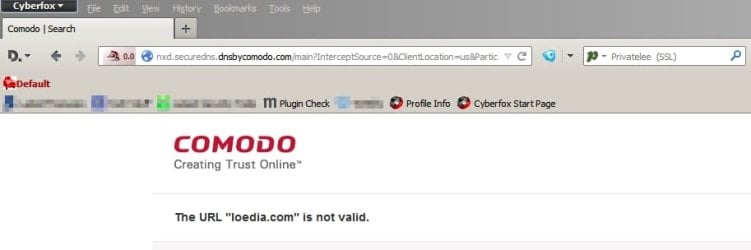
Without Zenmate installed typing a non-existent domain into the address bar gives the following screen from COMODO Secure DNS

ComodoDNS- Cyberfox.jpg

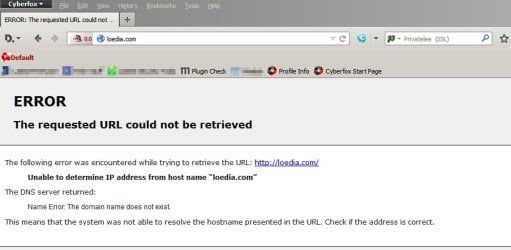
Doing the same with Zenmate gives the following screen:

Zenmate.jpg

So it's using it's own DNS Lookup regardless of the network adapter's settings.

If the flash player fix doesn't work try changing DNS Lookup Provider.

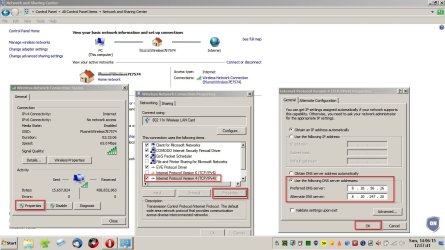
Open Network & Sharing Centre - click your network adapter and try the following settings. (Or choose your own DNS Lookup Provider - just as long as it's not the default one provided by your ISP)

DNS Lookup.jpg

For good measure - switch off your machine and reset your router.

Then see if there's any difference afterwards.
 
Last edited:

My Computer My Computer

Computer type
Laptop
Computer Manufacturer/Model Number
ASUS
OS
Microsoft Windows 7 Home Premium 64-bit 7601 Multiprocessor Free Service Pack 1
CPU
AMD C-60 APU with Radeon(tm) HD Graphics
Motherboard
ASUSTeK COMPUTER INC. X501U
Memory
4.00 GB
Graphics Card(s)
AMD Radeon HD 6290 Graphics
Sound Card
(1) AMD High Definition Audio Device (2) Realtek High Defi
Screen Resolution
1366 x 768 x 32 bits (4294967296 colors) @ 60 Hz
Hard Drives
Hitachi HTS545050A7E380 SATA Disk Device
Antivirus
Comodo CIS & FW, SecureAplus App Whitelisting, Threatfire
Browser
Cyberfox 64bit, Opera 64bit, Airfox
Other Info
Spy-The-Spy, HitmanPro.Alert, Norton Connect Safe, MJRegWatcher, BitDefender TrafficLight, Voodoo Shield, Zemana AntiMalware

My Computer My Computer

Computer type
PC/Desktop
Computer Manufacturer/Model Number
Dell Studio XPS 8500
OS
OEM Windows 7 Ult (x64) SP1
CPU
Intel Core-i7 3770 @ 3.4 GHz
Motherboard
"Dell" branded
Memory
16 GB DDR3 SDRAM @ 1333 MHz
Graphics Card(s)
NVidia GeForce GT620 1 GB
Sound Card
THX TruStudio PC
Monitor(s) Displays
Dell U2410 Full HD
Hard Drives
2.0 TB SATA2 @ 7200 RPM
PSU
350W
Keyboard
MS 4000 Ergon - Wired
Mouse
Logitech Anywhere MX
Internet Speed
Cable HSI w/Turbo (router)
Antivirus
KIS-MBAM Premium-MBAE Premium
Browser
Fx (current version); IE
Other Info
And a Win7/64 Pro laptop; And a Win10/64 Pro desktop.
This could get complicated, confusing or even contradictory?:huh:
I posted there first but then I realized its not a Firefox issue so I came here.

Any way I tried Callender's fix and it worked! It was always set to obtain DNS server automatically and never had issues with it. I guess I need to save this address for later? I have a dynamic ip from my ISP, not sure how that is related..
 

My Computer My Computer

Computer type
PC/Desktop
Computer Manufacturer/Model Number
Custom build
OS
Windows 7 Professional, 64bit
CPU
i7 920 @ 2.66
Motherboard
EX58-UD3R
Memory
6 GB DDR3
Graphics Card(s)
GALAX GTX 960
Monitor(s) Displays
ASUS MK221H 22" widescreen
PSU
Antec 650W Earthwatts
Case
Thermaltake Element T
Cooling
Zalman CNPS9900 LED
Mouse
Logitech M205 Wireless
Internet Speed
2 mb/s
Antivirus
Avast! Antivirus
Yes - not a firefox issue since it affected all browsers. Well done for fising it. You might want to mark this thread solved to help other users with the same problem.

Re: DNS Server. You don't need to keep those settings. You can go back to your ISP's settings by allowing it to autodetect. Might need a reboot though. I think the problem was DNS Cache corruption and changing provider fixes the cache.

I actually switch between several providers but prefer ones that block connection known dodgy sites that serve malware.
 

My Computer My Computer

Computer type
Laptop
Computer Manufacturer/Model Number
ASUS
OS
Microsoft Windows 7 Home Premium 64-bit 7601 Multiprocessor Free Service Pack 1
CPU
AMD C-60 APU with Radeon(tm) HD Graphics
Motherboard
ASUSTeK COMPUTER INC. X501U
Memory
4.00 GB
Graphics Card(s)
AMD Radeon HD 6290 Graphics
Sound Card
(1) AMD High Definition Audio Device (2) Realtek High Defi
Screen Resolution
1366 x 768 x 32 bits (4294967296 colors) @ 60 Hz
Hard Drives
Hitachi HTS545050A7E380 SATA Disk Device
Antivirus
Comodo CIS & FW, SecureAplus App Whitelisting, Threatfire
Browser
Cyberfox 64bit, Opera 64bit, Airfox
Other Info
Spy-The-Spy, HitmanPro.Alert, Norton Connect Safe, MJRegWatcher, BitDefender TrafficLight, Voodoo Shield, Zemana AntiMalware
Thanks for the help. Actually letting it autodetect and going back to the ISP's DNS brings back the same YT problem, its now permanent for me. 1 last question, if I call the ISP would they be able to do something about it? would they assign me to a different DNS server? for now Im using a public DNS server and its working fine. Again thanks to all who helped.
 

My Computer My Computer

Computer type
PC/Desktop
Computer Manufacturer/Model Number
Custom build
OS
Windows 7 Professional, 64bit
CPU
i7 920 @ 2.66
Motherboard
EX58-UD3R
Memory
6 GB DDR3
Graphics Card(s)
GALAX GTX 960
Monitor(s) Displays
ASUS MK221H 22" widescreen
PSU
Antec 650W Earthwatts
Case
Thermaltake Element T
Cooling
Zalman CNPS9900 LED
Mouse
Logitech M205 Wireless
Internet Speed
2 mb/s
Antivirus
Avast! Antivirus
I guess if enough people report it -they'll fix it. If everyone using the same ISP uses the same settings then things can get very slow. It's always better not to use your ISP's settings anyway.
 

My Computer My Computer

Computer type
Laptop
Computer Manufacturer/Model Number
ASUS
OS
Microsoft Windows 7 Home Premium 64-bit 7601 Multiprocessor Free Service Pack 1
CPU
AMD C-60 APU with Radeon(tm) HD Graphics
Motherboard
ASUSTeK COMPUTER INC. X501U
Memory
4.00 GB
Graphics Card(s)
AMD Radeon HD 6290 Graphics
Sound Card
(1) AMD High Definition Audio Device (2) Realtek High Defi
Screen Resolution
1366 x 768 x 32 bits (4294967296 colors) @ 60 Hz
Hard Drives
Hitachi HTS545050A7E380 SATA Disk Device
Antivirus
Comodo CIS & FW, SecureAplus App Whitelisting, Threatfire
Browser
Cyberfox 64bit, Opera 64bit, Airfox
Other Info
Spy-The-Spy, HitmanPro.Alert, Norton Connect Safe, MJRegWatcher, BitDefender TrafficLight, Voodoo Shield, Zemana AntiMalware
Back
Top