Solved Youtube keeps stoping

MRValiant

New member
Power User
VIP
Local time
4:31 PM
Messages
201
Location
Cleveland
First let me tell you what my specs are on this computer.

4 gigs of memory
500 gig hardrive
windows 7 sp1 updated

Speedtest.net - The Global Broadband Speed Test
download
31.11Mbps
upload
4.98Mbps

Speakeasy

download
32.37
upload
5.03Mbps

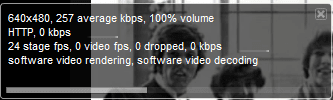
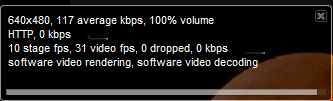
This has never happen before but when i play youtube the video stops in the middle. It goes from 32 frames per second to Zero. Then it buffers for about 5 minutes then that stops. Heres some screen shots of what it does.


I have used these softweares on it so far.

crap cleaner
malwarebytes
super-antispyware among others to clean out the temp files and cache. I tryed differant browsers and even connected directly to from the cable modem. Same thing happens. Currently im on connected to a belkin router. I have read from others with the same problem. Some say its issue with youtube on their end. Not sure what else can be done.
 

Attachments
  • Capture21.PNG
    Capture21.PNG
    3.6 KB · Views: 3
  • Capture22.PNG
    Capture22.PNG
    11.1 KB · Views: 3

My Computer

OS
Windows 8 Pro
CPU
AMD 1090 T Black 6 CORES 4.0+ overclocked
Motherboard
Asus Crosshair IV Formula
Memory
8gigs
Graphics Card(s)
HisHDx2
Monitor(s) Displays
42 inch vizio
Screen Resolution
HD
Hard Drives
4x1000mb
PSU
Corsair
Case
Coolermaster
Cooling
Corsair
Keyboard
logitech
Mouse
logitech
Internet Speed
Wideband
I want to add that music sites do the same thing lol man. Along with my computer head set that i use to make phone calls from. They all just stop working. So im not just saying its the tube. Sounds like a bug or something. IDK man. Unless the bandwith is being throttle?
 

My Computer

OS
Windows 8 Pro
CPU
AMD 1090 T Black 6 CORES 4.0+ overclocked
Motherboard
Asus Crosshair IV Formula
Memory
8gigs
Graphics Card(s)
HisHDx2
Monitor(s) Displays
42 inch vizio
Screen Resolution
HD
Hard Drives
4x1000mb
PSU
Corsair
Case
Coolermaster
Cooling
Corsair
Keyboard
logitech
Mouse
logitech
Internet Speed
Wideband

My Computer

Computer type
PC/Desktop
Computer Manufacturer/Model Number
Custom Build
OS
Windows 10 Pro x64
CPU
Intel Core i5 4440 @Stock
Motherboard
Gigabyte Z97 D3H
Memory
4 x 4GB HyperX Fury DDR3
Graphics Card(s)
Gigabyte GTX 1050Ti O4G
Sound Card
Integrated
Monitor(s) Displays
Dell P2417H
Screen Resolution
1920 x 1080
Hard Drives
Samsung EVO 850 120GB / Toshiba DT01ACA050 1TB 7200prm 32MB
PSU
Riotoro Onyx 750W
Case
NZXT H500 Black-Red
Cooling
Stock CPU + NZXT 120mm + 2x120mm red fans
Keyboard
Modecom Volcano Lanparty
Mouse
Asus ROG Gladius / DeepCool E-Pad Plus
Internet Speed
DOCSIS 50/3 Mbit
Browser
Google Chrome
Other Info
Asus K55VJ(i5 3210M, GT635M / 2GB, 8GB DDR3, 500GB HDD)
Hey StalkeR no i have not tryed that. I guess thats a good place to start.
 

My Computer

OS
Windows 8 Pro
CPU
AMD 1090 T Black 6 CORES 4.0+ overclocked
Motherboard
Asus Crosshair IV Formula
Memory
8gigs
Graphics Card(s)
HisHDx2
Monitor(s) Displays
42 inch vizio
Screen Resolution
HD
Hard Drives
4x1000mb
PSU
Corsair
Case
Coolermaster
Cooling
Corsair
Keyboard
logitech
Mouse
logitech
Internet Speed
Wideband
I just got this lap top. Which is about 20 times faster and bigger than my old XP and all videos are stopping or freezing and never had that issue with the old lap top.

Is the removal of the flash player a good idea?
 

My Computer

Computer Manufacturer/Model Number
Dell XPS
OS
Windows 7 Professional
As I said above,try to uninstall the flash player using that method,and install it again.
 

My Computer

Computer type
PC/Desktop
Computer Manufacturer/Model Number
Custom Build
OS
Windows 10 Pro x64
CPU
Intel Core i5 4440 @Stock
Motherboard
Gigabyte Z97 D3H
Memory
4 x 4GB HyperX Fury DDR3
Graphics Card(s)
Gigabyte GTX 1050Ti O4G
Sound Card
Integrated
Monitor(s) Displays
Dell P2417H
Screen Resolution
1920 x 1080
Hard Drives
Samsung EVO 850 120GB / Toshiba DT01ACA050 1TB 7200prm 32MB
PSU
Riotoro Onyx 750W
Case
NZXT H500 Black-Red
Cooling
Stock CPU + NZXT 120mm + 2x120mm red fans
Keyboard
Modecom Volcano Lanparty
Mouse
Asus ROG Gladius / DeepCool E-Pad Plus
Internet Speed
DOCSIS 50/3 Mbit
Browser
Google Chrome
Other Info
Asus K55VJ(i5 3210M, GT635M / 2GB, 8GB DDR3, 500GB HDD)
As I said above,try to uninstall the flash player using that method,and install it again.


I did that and YT still slower than a concrete fart.
 

My Computer

Computer Manufacturer/Model Number
Dell XPS
OS
Windows 7 Professional
I forgot this doesn't work in google chrome since its built in. But in firefox its ok. I will give it a go in fox and let you know if its ok.
 

My Computer

OS
Windows 8 Pro
CPU
AMD 1090 T Black 6 CORES 4.0+ overclocked
Motherboard
Asus Crosshair IV Formula
Memory
8gigs
Graphics Card(s)
HisHDx2
Monitor(s) Displays
42 inch vizio
Screen Resolution
HD
Hard Drives
4x1000mb
PSU
Corsair
Case
Coolermaster
Cooling
Corsair
Keyboard
logitech
Mouse
logitech
Internet Speed
Wideband
Thanks :geek:
 

My Computer

Computer Manufacturer/Model Number
Dell XPS
OS
Windows 7 Professional
WTAM plays then stops. It says that im not online what lol. This is sad. Im on google chrome but this stuff stops.

I have a 25 foot ethernet cable hooked up to this box. Im not sure if that would cause this.
 

My Computer

OS
Windows 8 Pro
CPU
AMD 1090 T Black 6 CORES 4.0+ overclocked
Motherboard
Asus Crosshair IV Formula
Memory
8gigs
Graphics Card(s)
HisHDx2
Monitor(s) Displays
42 inch vizio
Screen Resolution
HD
Hard Drives
4x1000mb
PSU
Corsair
Case
Coolermaster
Cooling
Corsair
Keyboard
logitech
Mouse
logitech
Internet Speed
Wideband
One thing i did learn. If tube stops. right click on it and select pop out. The original song is not working but the pop out starts where it stop in the original screen. Did that make any sense? lol.
 

My Computer

OS
Windows 8 Pro
CPU
AMD 1090 T Black 6 CORES 4.0+ overclocked
Motherboard
Asus Crosshair IV Formula
Memory
8gigs
Graphics Card(s)
HisHDx2
Monitor(s) Displays
42 inch vizio
Screen Resolution
HD
Hard Drives
4x1000mb
PSU
Corsair
Case
Coolermaster
Cooling
Corsair
Keyboard
logitech
Mouse
logitech
Internet Speed
Wideband
Video stops when red line catches up with grey one!!!!!


When I watch a video when the red line cathces up with the grey line, it stops and I see a circle going round , also having trouble with video chats, dont know if this is connected? I installed lated Adobe flash but dont think I uninstalled the other one first!!! Help Please??????


You have slow internet. That Red line that you see is how much of the video you have watched, and the grey line is how much of a video has been 'buffered' (or temporarily downloaded) to your computer. If your lines are catching up, then you're not buffering fast enough. I suggest you look at your WiFi card, if it's a laptop, or your router. If it's an older desktop, look at your RAM and video card. In any case, your computer is too outdated to buffer fast enough.


This is my problem. But i don't have a slow internet connection.
 

My Computer

OS
Windows 8 Pro
CPU
AMD 1090 T Black 6 CORES 4.0+ overclocked
Motherboard
Asus Crosshair IV Formula
Memory
8gigs
Graphics Card(s)
HisHDx2
Monitor(s) Displays
42 inch vizio
Screen Resolution
HD
Hard Drives
4x1000mb
PSU
Corsair
Case
Coolermaster
Cooling
Corsair
Keyboard
logitech
Mouse
logitech
Internet Speed
Wideband
Yes MV. You nailed it.

And even on a fast connection you can get that problem. I have comcast and my connection on a good day is over 12Mbs. But because of the way broadband internet is delivered my speed can drop very low for short periods of time. And this is because I have to share the cable bandwidth with everyone on my street. If we are all on line at once, and all downloading movies then our piece of the bandwidth can drop down to DSL speeds. So if it is a one-off deal that may explain it. If it happens a night (prime-time) but not in the morning that would ice it.

Sometimes the ISP makes system changes that require a reset to initiate. You can clear up any of these "soft" issues by resetting the modem. When you do this you should reset both the modem and the router. Disconnect the power from both, wait 30 seconds to a minute, then power on the cable modem - wait for all the connectivity lights to flash go, then plug in the router.

If it is a persistent issue then you may have a problem with your router or modem.
 

My Computer

Computer type
PC/Desktop
Computer Manufacturer/Model Number
Home Built - Jan 2013
OS
Windows 7 64 Bit Home Premium SP1
CPU
i7-3820
Motherboard
Asus P9X79-PRO - Bios 4608
Memory
GSkill F3-14900CL9Q - 16GB
Graphics Card(s)
EVGA GeForce GTX660 - Driver 352.86
Sound Card
On board Realtek ALC898
Monitor(s) Displays
Acer S271HL
Screen Resolution
1920 x 1080
Hard Drives
#1- Samsung 840 Pro Series
#2- Western Digital WD1002FAEX Sata3 Black
#3- Western Digital WD1002FAEX Sata3 Black
PSU
Corsair CMPSU-850TX-V2 - 850 watt (by Seasonic)
Case
Corsair Obsidian 550D
Cooling
Standard 3 120mm case fans, Cooler Master Hyper 212 EVO
Keyboard
MS KC-0405
Mouse
Intellimouse 5-button
Internet Speed
56 Mbits/Sec (on a good day)
Antivirus
Avast & Malwarebytes
Browser
Firefox
Other Info
Asus DVD - DRW-24B1ST 24X
Maybe it will be a good way to delete your video driver,using Driver Sweeper and install again latest drivers. :sarc:
 

My Computer

Computer type
PC/Desktop
Computer Manufacturer/Model Number
Custom Build
OS
Windows 10 Pro x64
CPU
Intel Core i5 4440 @Stock
Motherboard
Gigabyte Z97 D3H
Memory
4 x 4GB HyperX Fury DDR3
Graphics Card(s)
Gigabyte GTX 1050Ti O4G
Sound Card
Integrated
Monitor(s) Displays
Dell P2417H
Screen Resolution
1920 x 1080
Hard Drives
Samsung EVO 850 120GB / Toshiba DT01ACA050 1TB 7200prm 32MB
PSU
Riotoro Onyx 750W
Case
NZXT H500 Black-Red
Cooling
Stock CPU + NZXT 120mm + 2x120mm red fans
Keyboard
Modecom Volcano Lanparty
Mouse
Asus ROG Gladius / DeepCool E-Pad Plus
Internet Speed
DOCSIS 50/3 Mbit
Browser
Google Chrome
Other Info
Asus K55VJ(i5 3210M, GT635M / 2GB, 8GB DDR3, 500GB HDD)
Last edited:

My Computer

Computer Manufacturer/Model Number
Hopalong/ Godzilla
OS
Windows7 Pro 64bit SP-1; Windows XP Pro 32bit
CPU
Intel Core i7-870 Lynnfield 2.93GHz LGA 1156 95W Quad-Core
Motherboard
ASUS P7P55D-E PRO
Memory
8GB@1400MHz Crucial Ballistix DDR3-1600 4x2GB
Graphics Card(s)
ASUS ENGTX460 DirectCU/2DI/1GD5 1GB 256-bit GDDR5
Sound Card
VIA Onboard
Monitor(s) Displays
Asus VS248H-P 24"; Samsung SyncMaster 941BW 19"ws
Screen Resolution
1920x1080; 1440x900
Hard Drives
Samsung 830 120GB SSD
Intel 320 120GB SSD
Western Digital Caviar Black WD7501AALS 750GB 7200 RPM SATA 3.0Gb/s
Western Digital Caviar Black WD6401AALS 640GB 7200 RPM SATA 3.0Gb/s
PSU
COOLER MASTER Silent Pro RS850-AMBAJ3-US 850W Modular
Case
COOLER MASTER HAF 932 RC-932-KKN5-GP Black
Cooling
Scythe "Mugen-2 Rev.B" (2 ScytheKaze-Jyuni PWM fans)
Keyboard
Logitech K-320
Mouse
Kensington
Antivirus
Avast Inernet Suite
Browser
IE 9 ; Chrome
I forgot this doesn't work in google chrome since its built in. But in firefox its ok. I will give it a go in fox and let you know if its ok.
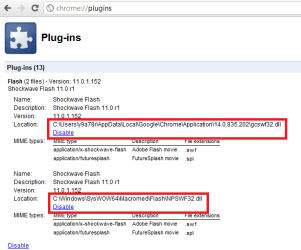
Although Flash is almost impossible to uninstall from Chrome, it can be completely disabled. Type chrome://plugins to addressbar, click Details (top right on the plugin page), and disable Flash. Remember to disable it from both places, from Chrome and Macromedia folders.

Chrome_Disable_Flash.PNG

This is very practical when you do not want to use the current default version of Flash player but instead you need / want to use a newer beta version or an older Flash Player, or when you need to reinstall Flash player to Chrome as described in Hopalong's post:

Just a thought.
You did install the proper Flash for your browser?

At this link> Adobe - Install a different version of Adobe Flash Player
Select your OS then selet "IE" or "All others".
Select one at a time if you need both.

Test Flash Player here and check that your version is up to date.> Adobe - Flash Player
You can have several Flash versions installed on Chrome and when need arises, choose which one Chrome is going to use.

Kari
 

My Computer

Computer type
Laptop
Computer Manufacturer/Model Number
HP ENVY 17-1150eg
OS
Windows 10 Pro x64 EN-GB
CPU
1.6 GHz Intel Core i7-720QM Processor
Memory
6 GB
Graphics Card(s)
ATI Mobility Radeon HD 5850 Graphics
Sound Card
Beats sound system with integrated subwoofer
Monitor(s) Displays
17" laptop display, 22" LED and 32" Full HD TV through HDMI
Screen Resolution
1600*900 (1), 1920*1080 (2&3)
Hard Drives
Internal: 2 x 500 GB SATA Hard Disk Drive 7200 rpm
External: 2TB for backups, 3TB USB3 network drive for media
Cooling
As Envy runs a bit warm, I have it on a Cooler Master pad
Keyboard
Logitech diNovo Media Desktop Laser (bluetooth)
Mouse
Logitech Performance Mouse MX
Internet Speed
50/10 Mbps VDSL
Antivirus
Windows Defender 4.3.9431.0
Browser
Maxthon 3.5.2., IE11
Yes MV. You nailed it.

And even on a fast connection you can get that problem. I have comcast and my connection on a good day is over 12Mbs. But because of the way broadband internet is delivered my speed can drop very low for short periods of time. And this is because I have to share the cable bandwidth with everyone on my street. If we are all on line at once, and all downloading movies then our piece of the bandwidth can drop down to DSL speeds. So if it is a one-off deal that may explain it. If it happens a night (prime-time) but not in the morning that would ice it.

This is definitely part of the problem and it's becoming more and more common. I've learned to do all of my movie/video downloading in the early morning, because that's when the fewest number of people are downloading theirs.
 

My Computer

Computer Manufacturer/Model Number
HP Pavillion dv5t (generation 1)
OS
Vista 64 bit and 32 bit (SP2)
CPU
Intel(R) Core(TM)2 Duo Processor T9400 (2.53 GHz
Memory
4GB DDR2 System Memory (2 Dimm)
Graphics Card(s)
512 MB NVIDIA GeForce 9600M GT
Monitor(s) Displays
15.4" diagonal WSXGA+ High-Definition HP BrightView Widescre
Screen Resolution
1680 x 1050
Hard Drives
320GB 5400RPM SATA Hard Drive with HP ProtectSmart Hard Drive Protection
Keyboard
Built-in HP
Mouse
Built in - Synaptics TouchPad V6.5 on PS/2 Port
Internet Speed
Max
Other Info
~ Intel Next-Gen Wireless-N Mini-card w/Bluetooth ~ Blu-Ray ROM DVD+/-R/RW ~ Integ. HDTV Hybrid Tuner ~ 12 Cell Battery ~ MS Office (Home Premium) 2007 ~
I just installed SPEEDbit Video Accelerator works great.:D
 

My Computer

OS
Windows 8 Pro
CPU
AMD 1090 T Black 6 CORES 4.0+ overclocked
Motherboard
Asus Crosshair IV Formula
Memory
8gigs
Graphics Card(s)
HisHDx2
Monitor(s) Displays
42 inch vizio
Screen Resolution
HD
Hard Drives
4x1000mb
PSU
Corsair
Case
Coolermaster
Cooling
Corsair
Keyboard
logitech
Mouse
logitech
Internet Speed
Wideband
Problem solved?

EDIT: Nice find MRValiant! I learned something new today!
 

My Computer

Computer type
PC/Desktop
Computer Manufacturer/Model Number
Home Built - Jan 2013
OS
Windows 7 64 Bit Home Premium SP1
CPU
i7-3820
Motherboard
Asus P9X79-PRO - Bios 4608
Memory
GSkill F3-14900CL9Q - 16GB
Graphics Card(s)
EVGA GeForce GTX660 - Driver 352.86
Sound Card
On board Realtek ALC898
Monitor(s) Displays
Acer S271HL
Screen Resolution
1920 x 1080
Hard Drives
#1- Samsung 840 Pro Series
#2- Western Digital WD1002FAEX Sata3 Black
#3- Western Digital WD1002FAEX Sata3 Black
PSU
Corsair CMPSU-850TX-V2 - 850 watt (by Seasonic)
Case
Corsair Obsidian 550D
Cooling
Standard 3 120mm case fans, Cooler Master Hyper 212 EVO
Keyboard
MS KC-0405
Mouse
Intellimouse 5-button
Internet Speed
56 Mbits/Sec (on a good day)
Antivirus
Avast & Malwarebytes
Browser
Firefox
Other Info
Asus DVD - DRW-24B1ST 24X
Yes sir
 

My Computer

OS
Windows 8 Pro
CPU
AMD 1090 T Black 6 CORES 4.0+ overclocked
Motherboard
Asus Crosshair IV Formula
Memory
8gigs
Graphics Card(s)
HisHDx2
Monitor(s) Displays
42 inch vizio
Screen Resolution
HD
Hard Drives
4x1000mb
PSU
Corsair
Case
Coolermaster
Cooling
Corsair
Keyboard
logitech
Mouse
logitech
Internet Speed
Wideband
Back
Top