Youtube Opstarten

ariespaan

New member
Member
Local time
12:41 AM
Messages
71
Hallo,
I work with Windows-7 en use Firefox (59.0) and Chrome (66.0) as Internet-Browsers
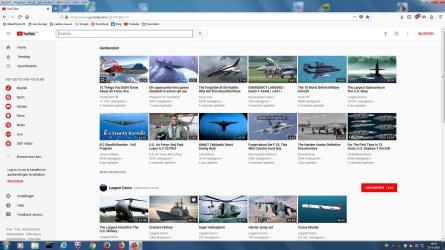
When i start with Firefox and after that i start Youtube, i expect to see an Youtube-start-screen with a number of images(Videos) on that same screen
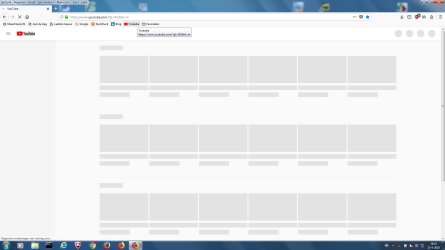
But i see for a short while a screen without these images (see attachment Fs Cap 01)
After a while Youtube displays the correct startscreen (Zie Attachment Fs Cap 02)

My question is: What could be the reason, that Youtube doesnot displays the correct screen at first time?
(Could it be that my Anti-virus software first tests these videos(Images) that should be displayed?)

I use the following URL to start Youtube: YouTube
Or is it a possiblity that i can use another URL that should start Youtube without these starting images/videos on the first screen?

Note: Both Firefox and Chrome show this strange start-screen of Youtube
 

Attachments
  • Fs Cap 01.jpg
    Fs Cap 01.jpg
    64.3 KB · Views: 0
  • Fs Cap 02.jpg
    Fs Cap 02.jpg
    229.5 KB · Views: 1

My Computer

Computer type
Laptop
Computer Manufacturer/Model Number
Sony
OS
Windows-7 64 Bits Home Premium
CPU
Intel I5
What is your internet speed? How much memory does your computer have? And how much free space is on the hard drive? Any of these items can produce the problem you have described; the most likely one, in my opinion, is your internet speed.

Another possible cause, for which you can do nothing to solve, is if you are using cable internet, and you and a lot of other people are all connecting to the internet at the same time. With cable internet, all users in the same area share the bandwidth; if a lot of them are all surfing the web at the same time, things can slow down.

Finally, if a whole lot of people are all accessing YouTube at the same time, this could cause the problem you are seeing.

Try accessing YouTube from another computer. If there is no problem with the other computer, then you know that the problem is with this computer.
 

My Computer

Computer type
PC/Desktop
Computer Manufacturer/Model Number
Dell
OS
Linux Mint 18.2 xfce 64-bit (VMWare host) / Windows 8.1 Pro 32-bit (VMWare guest)
CPU
Haswell
Memory
4 GB
Monitor(s) Displays
Acer 23"
Screen Resolution
1920 x 1080
Hard Drives
Two hard drives, 1TB each: One for Linux, one for my data.
Keyboard
IBM Model M
Antivirus
Sophos (Linux), Trend Micro (Windows)
Browser
Firefox, Opera
Other Info
I use Samba to share my data drive with the other computers at my house and with my guest session in VMWare Workstation Player.
Thanks for your reply
My computer has Intel I-5 Core, 4 Gb Memory and 500 GB HDD (free HD-space is 400 Gb)
Screen: Full HD 16-inch

Internet: speed is 25 Mb and i dont have a cable-connection but wired Lan
I tried Firefox version 43.0 with no problems, Firefox 59.0 has this problem also Chrome 66.0
(could it be that my Anti-virus software is testing these images/videos before displaying?
 

My Computer

Computer type
Laptop
Computer Manufacturer/Model Number
Sony
OS
Windows-7 64 Bits Home Premium
CPU
Intel I5
First of all, why do you think that's a problem at all? :p

What you're seeing is a very common design pattern known as "skeleton screen".
Basically, when the website can take a while to load the content, some pages often show some kind of "mockup" or "placeholder" for the real content, with the purpose of easing the waiting and give the impression that the website reacted immediately. That actually has some serious effect on people sensations, according to many studies.

In the case of YouTube, they use it for the home page videos. It could be that your connection is somewhat slow, but also it can happen due to website congestion or simply their servers can provide the info quick enough for an optimal experience. And above all, using those depends on the developer, not us as the users.
 

My Computer

Computer type
Laptop
Computer Manufacturer/Model Number
Toshiba Sattelite A665-S6092
OS
Windows 7 Ultimate x64
CPU
Intel Core i7-740QM
Memory
8 GB DDR3
Graphics Card(s)
NVIDIA GeForce 330GT
Screen Resolution
1366x768
Hard Drives
Samsung 840 SSD 500GB
1TB USB3 external HD
Cooling
Coolermaster Notepal U3 notebook cooling pad
Internet Speed
3mbps ASDL
Antivirus
ClamWin 0.98.7
Browser
Opera 12.17 x86 (main), Firefox 38 (sec), IE11 (last resort)
Alejandro85:
Thanks for your response
I know what you mean

I dont think it is my Internet-speed, because visiting all other sites does not give any of these problems
The only problem is Youtube on starting up
After that i have no further problems with Youtube, Playing directory movies (even the big ones, avi and Mp4) from youtube does nog give any delay, they play at the perfect speed.
Also downloading videos from Youtube works perfect.
 

My Computer

Computer type
Laptop
Computer Manufacturer/Model Number
Sony
OS
Windows-7 64 Bits Home Premium
CPU
Intel I5
What you've shown is not a problem at all. It's a feature of the website to ease the (potentially long) waiting time for the initial screen to load. It's completely normal and is a common thing appearing in many other places.
 

My Computer

Computer type
Laptop
Computer Manufacturer/Model Number
Toshiba Sattelite A665-S6092
OS
Windows 7 Ultimate x64
CPU
Intel Core i7-740QM
Memory
8 GB DDR3
Graphics Card(s)
NVIDIA GeForce 330GT
Screen Resolution
1366x768
Hard Drives
Samsung 840 SSD 500GB
1TB USB3 external HD
Cooling
Coolermaster Notepal U3 notebook cooling pad
Internet Speed
3mbps ASDL
Antivirus
ClamWin 0.98.7
Browser
Opera 12.17 x86 (main), Firefox 38 (sec), IE11 (last resort)
Alejandro85:

Thanks for your explanation, it is very clear to me now
Fine to know that this is not a problem, so thanks again.
 

My Computer

Computer type
Laptop
Computer Manufacturer/Model Number
Sony
OS
Windows-7 64 Bits Home Premium
CPU
Intel I5
Back
Top