

I have never tried SLI before but when I built my new computer I had two Gigabyte GTX550ti's from previous builds.
I installed them and finally got them working, not sure what I did but messed around in uefi and it worked.
Had problems with a couple of fans and ended up resetting UEFI and now I can't get them too work.
Monitor 1 is in slot 1 and is working.
Monitor 2 is in slot 2 and is not working properly.
Only one card shows in Device manager.
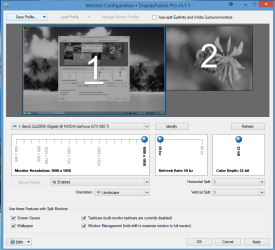
In Display fusion the monitor shows up (see attachment)but it is completely black.
I think the problem is that slot 2 is not running at X16 orX8.
I installed them and finally got them working, not sure what I did but messed around in uefi and it worked.
Had problems with a couple of fans and ended up resetting UEFI and now I can't get them too work.
Monitor 1 is in slot 1 and is working.
Monitor 2 is in slot 2 and is not working properly.
Only one card shows in Device manager.
In Display fusion the monitor shows up (see attachment)but it is completely black.
I think the problem is that slot 2 is not running at X16 orX8.
Attachments
My Computer
- Computer type
- PC/Desktop
- Computer Manufacturer/Model Number
- Self Built Custom Computer.
- OS
- Windows 10 Pro x64
- CPU
- i7-4770K
- Motherboard
- Asus Z87 Sabertooth
- Memory
- 16Gig DDR3-2400
- Graphics Card(s)
- Gigabyte GT740
- Sound Card
- Onboard
- Monitor(s) Displays
- Benq 27" - Dell 23' - Benq 22"
- Screen Resolution
- 1680x1050
- Hard Drives
- Samsung 840 Pro 128g SSD
1xWestern Digital Caviar Green 1tb
2xWestern Digital Caviar Green 2 tb
- PSU
- Seasonic 760 watt Platinum
- Case
- Coolermaster Haf - X
- Cooling
- Noctua NH-C12P CPU Cooler
- Keyboard
- Logitech illuminated keyboard
- Mouse
- Logitech Perfomance MX
- Internet Speed
- Cable = speeds to 20Mbps downsteam and 512kbps upsteam
- Antivirus
- Avast Internet Security
- Browser
- Firefox