Solved ZeroAccess! Attention: cottonball

Attachments

My Computer

Computer type
Laptop
Computer Manufacturer/Model Number
HP
OS
Windows 7 Home Premium 64bit
CPU
AMD
Drives:
[C:] \Device\HarddiskVolume2 -- 0x3 --> Restored
[D:] \Device\HarddiskVolume3 -- 0x3 --> Restored
[E:] \Device\CdRom0 -- 0x5 --> Skipped
[F:] \Device\HarddiskVolume4 -- 0x3 --> Restored
[G:] \Device\CdRom2 -- 0x5 --> Skipped
[H:] \Device\HarddiskVolume7 -- 0x2 --> Restored
[I:] \Device\HarddiskVolume8 -- 0x3 --> Restored

Is the external drive [I:]?
Does it still show a shortcut?


Please go to: Downloading ListParts (64-bit)
Save to the Desktop.

Double-click the downloaded file to run the program.

lp.gif


Click: Scan

When done, please post the Result.txt in your reply.


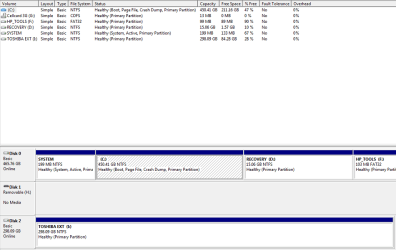
Next, please provide a screenshot of: Disk Management - Post a Screen Capture Image
 
Last edited:

My Computer

Computer type
PC/Desktop
Computer Manufacturer/Model Number
An ol' eMachines
OS
Windows 7 Home Premium
Internet Speed
Fine for me...I'm retired!
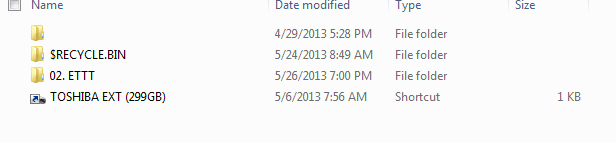
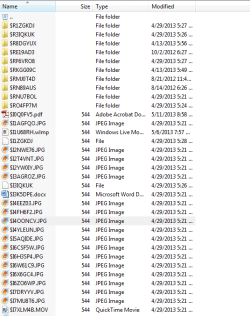
I still see the shortcut and receive the same pop-up window when I click it. But now, like the thread I first posted on, I see all my files in a new $RECYCLE.BIN folder. Good news: I can access my files! Should I worry that the the folder is titled "RECYCLE?"

external_files.PNG

On to, as Jumanji wrote, the therapy...

FARBAR scan results:

farbar_scan_report.txt

Disk Management screenshot:

diskmanagement_screenshot.PNG
 

Attachments

  • external_files.PNG
    external_files.PNG
    9.3 KB · Views: 10
  • diskmanagement_screenshot.PNG
    diskmanagement_screenshot.PNG
    132.3 KB · Views: 5
  • farbar_scan_report.txt
    farbar_scan_report.txt
    4.7 KB · Views: 4

My Computer

Computer type
Laptop
Computer Manufacturer/Model Number
HP
OS
Windows 7 Home Premium 64bit
CPU
AMD
Sorry, didn't answer the first part of your question. Yes, [I:] is the external!
 

My Computer

Computer type
Laptop
Computer Manufacturer/Model Number
HP
OS
Windows 7 Home Premium 64bit
CPU
AMD
ducat1base,

I see all my files in a new $RECYCLE.BIN folder
Are you using WinRAR to show them, or, are the files showing after using the Shortcut Fix?

Are you able to take the contents of the $RECYCLE.BIN folder where you see the files, and move them to a folder in another USB drive, or in the computer's HDD?

If you can do the above, verify that the move was successful by checking the files in the folder where you moved them to.
 

My Computer

Computer type
PC/Desktop
Computer Manufacturer/Model Number
An ol' eMachines
OS
Windows 7 Home Premium
Internet Speed
Fine for me...I'm retired!
The files are showing from the Shortcut Fix. I was able to move them to a different external and yes, all the files are opening!

Is my computer still compromised?
 

My Computer

Computer type
Laptop
Computer Manufacturer/Model Number
HP
OS
Windows 7 Home Premium 64bit
CPU
AMD
ducat1base,

Since Trojan.ZeroAccess can filter network traffic and steal personal information, it is in your best interest to go to a clean computer, and change any passwords to bank accounts,
credit card transactions, and the like. Use complex passwords to make it difficult to crack password files. This all helps to prevent or limit damage.

The results of the different scans do not show malware on the computer.

If you moved files to another USB drive, run Malwarebytes Anti-Malware once again, with the USB drive where you moved the files to plugged in. Make sure you perform
a Full Scan, and select the drives in quetion:
http://www.sevenforums.com/system-security/290053-zeroaccess-attention-cottonball-2.html#post2404322

As far as your external drive [I:] goes, plug it in also, and let MBAM scan it, and then we can do more work on it if you wish to use WinRAR or format the drive.

Other suggestions addressed by our colleague jumanji are here: http://www.sevenforums.com/hardware...-hard-drive-error-wv-fat32-2.html#post2320138
 
Last edited:

My Computer

Computer type
PC/Desktop
Computer Manufacturer/Model Number
An ol' eMachines
OS
Windows 7 Home Premium
Internet Speed
Fine for me...I'm retired!
Wait an infected svchost?When you open up task manager does it show a process by the name of "svchost 32*"?
 

My Computer

Computer type
Laptop
Computer Manufacturer/Model Number
Lenovo ThinkPad E530
OS
Windows 7 Ultimate 64 Bit and Ubuntu 13.04 64 Bit
CPU
Intel Core [email protected] (3.1 Turbo)
Motherboard
I have absolutely no idea
Memory
8GB (Used to have 16 but the it caused a bsod every 5 min)
Graphics Card(s)
Intel Graphics 4000
Screen Resolution
1366x700
Hard Drives
750GB (I think Seagate) 2TB Seagate 7200RPM External HDD 70GB Western Digital @5400RPM
Antivirus
Malwarebytes Pro, AVG 2013, Spyware Blaster and SpyBot.
Browser
Google Chrome and occasionally Firefox
Hi ducat1base,

I am limiting myself to your Toshiba External drive.

1. You have confirmed that you had moved all your data files to another media. If you had made sure all your data files are intact and nothing will be lost if you format your Toshiba external drive, then you may do so.

2. Before that, check the file location of the shortcut. Right click on the shortcut > Properties > Open file location. Let us know where that leads to and the exact file name. We shall know whether the root cause has been eliminated or still present.

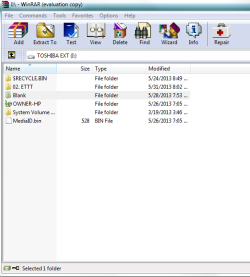
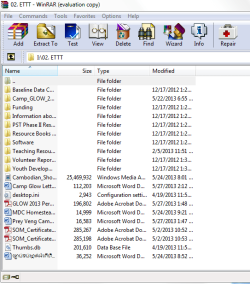
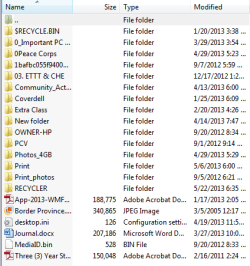
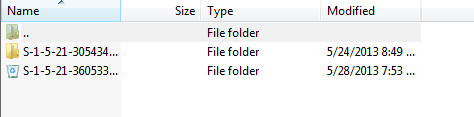
3. Just for my curiosity and better insight: You have said that $RECYCLE.BIN contains all your data files. Fine. Now run WinRAR and explore your Toshiba external drive. Open each and every other folder and let us know what the other two folders (one unnamed folder and the other 02.ETTT contain.) ( WinRAR can show even superhidden files. That is why I am asking you to open those with WinRAR.) This is only for academic purpose as I have already said. Just information gathering. You may also name any other files/folders that may be seen. Better a screen capture.

4. To format your Toshiba external drive follow this procedure - this keeps Windows out of the loop, just in case your PC is still compromised. I think cottonball has asked you to run MBAM again. Please do that.

Run MiniTools Partition Wizard Home edition. Download the bootable CD version from Free download Magic Partition Manager Software, partition magic alternative, free partition magic, partition magic Windows 7 and server partition software - Partition Wizard Online (the last one on this page)

You may either burn the ISO to a CD and boot from it or create a bootable pen drive with that ISO using Rufus Rufus - Create bootable USB drives the easy way

Note: If you had created a bootable pen drive, when booting with it you have to type linux0 against the boot prompt and press Enter for the boot process to continue. ( It is zero and not the alphabet O. You may press TAB key to see all available options linux0, linux1, local, I think.)

 
Last edited:

My Computer

OS
Windows 7 Home Premium 32 bit
Hey Cottonball, thanks for all your help! For a guy who doesn't know much about computers, thanks for making the instructions clear and simple for me to do on my own. I learned a lot! I moved my files over to a new external and all my log-ins and passwords are changed. Much appreciated!

Jumanji, below are the screen captures from WinRAR. I don't know how, but the shortcut actually disappeared when I opened it this time, so no shortcut to explore. With inimitable logic I also named the blank folder "blank" so I could save the screenshot under a name, though in hindsight I suppose I could have done without the other. Here is what I see...

[I:]

I_drive.PNG

02.ETTT folder contents

02.ETTT.PNG

Blank folder contents

blank_folder.PNG

$RECYCLE.BIN

Recycle_Bin.PNG

..its contents

RB_Contents.PNG


------------

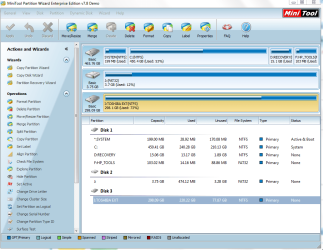
The size of MiniTools Partition Wizard Home is too big for me to download. (I'm serving with the Peace Corps in Cambodia and trying to do this from my village with a VPN. I can barely handle e-mail tasks and small file uploads!) I went ahead and downloaded the 11MB Enterprise version. Is it the same thing? This is what I see when I open it:

minitool_partition_screen.PNG

How can I format my drive from here?
 

My Computer

Computer type
Laptop
Computer Manufacturer/Model Number
HP
OS
Windows 7 Home Premium 64bit
CPU
AMD
ducat1base,

Glad to help. :D

You probably will not trade your experience in Cambodia for anything.


Now, it is time for both of us to watch jumanji's magic!!
 

My Computer

Computer type
PC/Desktop
Computer Manufacturer/Model Number
An ol' eMachines
OS
Windows 7 Home Premium
Internet Speed
Fine for me...I'm retired!
jumanji does not have a magic wand.:)

ducat1base, good that you did not find the shortcut this time. So cottonball magic has worked.

The 02ETTT and the blank folder do seem to contain a lot of files. Are these different from what you have recovered from the Recycle bin? If so, were you not interested in those files?

The one thing that surprises me now is how your data files got into the recycle bin.

Anyway, coming to formatting your Toshiba External drive, I am not sure about the demo version of the enterprise edition and the feature limitations in that.

So I would rather recommend that you format your Toshiba external drive with HP USB Disk Storage Format Tool. HP USB Disk Storage Format Tool Free Download It is only a 96KB download and so you can manage easily.

Remove all other external drives except the drive you want to format so that you cannot make any mistake of formatting a wrong drive.

Once you download it, just right click on the .exe file and Run it as administrator. Check that the right drive is selected and format it.

I am off from SevenForums till 11th inst.
 

My Computer

OS
Windows 7 Home Premium 32 bit
@jumanji...

I am off from SevenForums till 11th inst.
:D

Haven't heard that said for at least 50 years, or even longer.


Exemplative of manners, custom, etc.:

inst. (instante mense): this month
prox. (proximo mense): next month
ult. (ultimo mense): last month
 

My Computer

Computer type
PC/Desktop
Computer Manufacturer/Model Number
An ol' eMachines
OS
Windows 7 Home Premium
Internet Speed
Fine for me...I'm retired!
I didn't know about prox. and ult. Should start using it henceforth.:D

Merci beaucoup.:)
 

My Computer

OS
Windows 7 Home Premium 32 bit
The disk is formatted. I'm cured! Thanks, cottonball and jumanji. It only took two weeks and four pages to get it all cleaned out ;-)

Thanks for the concise instruction. I was worried everything would be over my head but you both brought it down to my level and I learned quite a lot along the way.

I wish you both the best solving other users' problems!
 

My Computer

Computer type
Laptop
Computer Manufacturer/Model Number
HP
OS
Windows 7 Home Premium 64bit
CPU
AMD
@jumanji,

Avec plaisir!


@ducat1base,

Glad you got the issue sorted out.

We used several programs that you do not need to keep. Some of them change very often, and an older version would not do much good. You can remove the following programs and their reports from the Desktop:

RogueKiller
TDSSKiller
Malwarebytes' Anti-Rootkit
Farbar Recovery Scan Tool
ListParts

Last, press the Windows key and the R key, simultaneously.
Copy/paste the text inside the quote box into the Open field of the Run prompt.

Code:
Combofix /Uninstall

Click: OK

As far as Malwarebytes' Anti-Malware is concerned, you may want to keep it.


Good luck!!!
 

My Computer

Computer type
PC/Desktop
Computer Manufacturer/Model Number
An ol' eMachines
OS
Windows 7 Home Premium
Internet Speed
Fine for me...I'm retired!
Back
Top