Solved Zoom/Skype Not hearing the person who is connected

MauiBear2291

New member
Local time
5:21 PM
Messages
11
I have been testing both the internal and webcam to attempt to solve an audio issues. When I join a meeting or call someone on Zoom or Skype, they can hear me, however, I can not hear them. I go to the Sound area in Control Panel and switch between the internal mic to the external mic. No help. I can open the audio section on the camera and move between the internal mic and webcam mic. No help. The test sounds are not heard when I'm on the audio section of webcam or switch to internal video and test audio. The audio does work when I load a YouTube video, the audio works fine. Any suggestions are appreciated.
 

My Computer My Computer

At a glance

Windows 7 ProfessionalIntel 5
Computer type
PC/Desktop
Computer Manufacturer/Model Number
HP
OS
Windows 7 Professional
CPU
Intel 5
Motherboard
ASUS
Antivirus
AVG
Browser
Chrome
This is not a microphone issue, this is an audio out problem. I'm thinking the programs are muted or the sound is low.

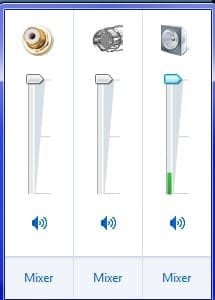
Left mouse click once on the speaker icon and look to see if those two programs are listed. See if they're muted. See my screenshot on what it kinda looks like.

If that doesn't fix it, it may be the setting in Zoom and Skype were they need to play out through your selected audio card. So go into their settings and find that option.

Again, this is not a microphone issue, this is a sound output issue. If you keep messing with the microphone then they won't hear you.
 

Attachments

  • gyhhjnfrygtj.jpg
    gyhhjnfrygtj.jpg
    8 KB · Views: 4

My Computer My Computer

At a glance

Windows 7 Ultimate x64
Computer type
PC/Desktop
OS
Windows 7 Ultimate x64
Actually, see the speaker icon there? Click Mixer and make sure they're not muted. But still check the audio options for the selected audio output for the sound card in Zoom and Skype.
 

My Computer My Computer

At a glance

Windows 7 Ultimate x64
Computer type
PC/Desktop
OS
Windows 7 Ultimate x64
Thanks for the reply, I'll recheck the speakers. I don't believe it's a output since the people on the other end can hear me. I can not hear them. I did check the audio settings for zoom and Skype.
 

My Computer My Computer

At a glance

Windows 7 ProfessionalIntel 5
Computer type
PC/Desktop
Computer Manufacturer/Model Number
HP
OS
Windows 7 Professional
CPU
Intel 5
Motherboard
ASUS
Antivirus
AVG
Browser
Chrome
I don't believe it's a output since the people on the other end can hear me.

Think for once. Why can they hear you? It's due to your microphone. That is an input. You issue is an output, an audio output where you can't hear them.

Do exactly as I instructed. Check your audio settings as I have indicated with the Mixer, and check the audio settings in both Skype and Zoom. You're looking for the default sound card device for audio out in the program settings. They would call it the speaker.


How do I change audio and video settings in Skype on desktop? | Skype Support

Select Windows, scroll down to audio. Changing settings in the desktop client or mobile app – Zoom Help Center
 

My Computer My Computer

At a glance

Windows 7 Ultimate x64
Computer type
PC/Desktop
OS
Windows 7 Ultimate x64
Well, sometimes I have to admit that I must have dyslexia. Recognizing the differences you point out gives me little confidence in my ability to fix anything. You were absolutely correct. Once I understood what you were saying, the fix was obvious and worked. Right clicking on the speaker produced the issue, I had one speaker muted on the far right side that I didn't see until I moved the slider at the bottom. It was the Windows Control Icon. Thanks for sticking with me.
 

My Computer My Computer

At a glance

Windows 7 ProfessionalIntel 5
Computer type
PC/Desktop
Computer Manufacturer/Model Number
HP
OS
Windows 7 Professional
CPU
Intel 5
Motherboard
ASUS
Antivirus
AVG
Browser
Chrome
Glad you figured it out and happy to help.
 

My Computer My Computer

At a glance

Windows 7 Ultimate x64
Computer type
PC/Desktop
OS
Windows 7 Ultimate x64
Back
Top