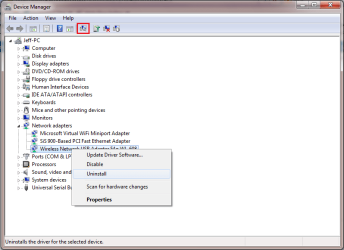
Zoostorm FreedomXL 10.2" NetBook

Orbital Shark

New member
Guru
Gold Member
VIP
Local time
4:07 AM
Messages
6,298
Location
Milton Keynes, United Kingdom
Zoostorm FreedomXL 10.2" NetBook WiFi issue
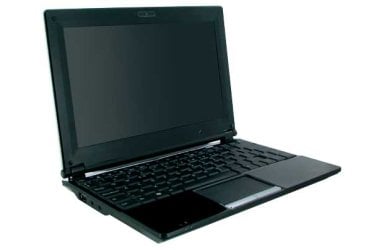
383-5083053MSA73UC645800X.jpg

Argos have been offering this NetBookpre-loaded with Windows 7 starter for £199.99 , which isn't bad considering the hardware.

More info Here

There is, however, a rather silly fault with the WiFi on this particular machine. Pressing FN+F2 will/should activate the WiFi but as i've witnessed this weekend, it doesn't. Most/all forums that have information on this also mention the BIOS, it's not the BIOS at fault and there's NO way to switch it on in there.

This fault is due to the wrong default driver being pre-loaded before shipping and is easily fixed.

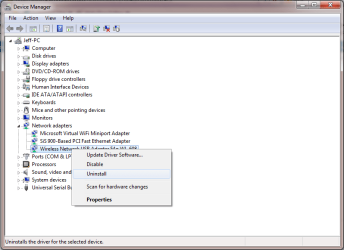
Step 1:
Capture1.PNG
Uninstall the driver from Device Manager
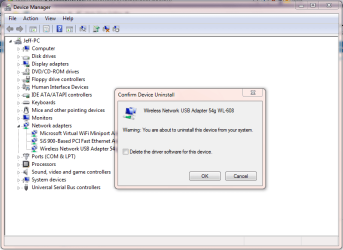
Capture2.PNG
   Note
Make sure that the 'Delete the driver software for this device" is NOT checked.


Step 2:
Capture3.PNG
Click the 'Scan for hardware changes' button

That's it.

This will cause Windows to reinstall the WiFi drivers, this time using the correct software.

This has worked in all cases so far.
 
Last edited:

My Computer My Computer

Computer Manufacturer/Model Number
Compaq Desktop
OS
Windows 7 Ultimate x64
CPU
AMD Sempron Dual Core
Memory
3GB
Graphics Card(s)
NVIDIA GeForce 6150SE nForce 430
Screen Resolution
1024x768
Hard Drives
150GB Sata
I wonder why it is not checked before shipping?
 

My Computer My Computer

Computer Manufacturer/Model Number
Advent
OS
Dual-boot: Windows 7 HP 32-bit SP1 & Windows XP Pro 32-bit SP2.
CPU
AMD Phenom X4 9550 2.8Ghz
Motherboard
FOXCONN A6VMX (Socket 940)
Memory
4.0GB RAM
Graphics Card(s)
256MB On-board ATI Radeon X1200 Series
Sound Card
UnKnown
Monitor(s) Displays
19" TFT Mointor
Screen Resolution
1400 by 900
Hard Drives
500GB Western Digital WDC
Keyboard
HP Keyboard
Internet Speed
Dial-up via Mobile phone (Three)
Other Info
80GB External Hard-drive.

Also I have an old Windows XP Laptop for backup/occasional use etc.
No idea, it's 1 of the most bizzar faults/errors i've heard of LOL
 

My Computer My Computer

Computer Manufacturer/Model Number
Compaq Desktop
OS
Windows 7 Ultimate x64
CPU
AMD Sempron Dual Core
Memory
3GB
Graphics Card(s)
NVIDIA GeForce 6150SE nForce 430
Screen Resolution
1024x768
Hard Drives
150GB Sata
Hi, just joined the forum to thank you for that little gem.

Found it yesterday whilst researching the new Zoostorm Netbook, bought one today and knew exactly how to fix it.

Top man, thanks.
 

My Computer My Computer

OS
Win 7 Starter
You're very welcome mate & welcome to the forums. By all means stick around, you'll find the tutorials section extremely helpful :D
 

My Computer My Computer

Computer Manufacturer/Model Number
Compaq Desktop
OS
Windows 7 Ultimate x64
CPU
AMD Sempron Dual Core
Memory
3GB
Graphics Card(s)
NVIDIA GeForce 6150SE nForce 430
Screen Resolution
1024x768
Hard Drives
150GB Sata
Freedom 10-270 Netbook Windows 7 Re-Install

Hi again,

looking at the various options and features on the Freedom 10-270 Netbook it does not mention in the User Guide anything about Re-Installing Windows if there is a problem.

I noticed that the Recovery option in the Control Panel seems to give this option whilst Windows is running, although I have not clicked the Re-Install option to find out if it is indeed there.

The real problem comes when Windows does not boot, the F12 Boot Option key only brings up one drive, and that I am asuming is the C/: drive.

There seems to be a hidden partition there of about 7GB, but how is it accessed in an emergency?

Any ideas?
 

My Computer My Computer

OS
Win 7 Starter
Hi, sorry for the late reply.

Normally most OEM machines will have a recovery app built in which is accessed during/just after the POST by pressing a certain key normally shown on the bottom of the screen. This then accesses the hidden partition which will restore your machine to it's out-of-box state.

Hope this helps :)


OS

   Note
I don't personally own the machine so I can't fully test the recovery options
 

My Computer My Computer

Computer Manufacturer/Model Number
Compaq Desktop
OS
Windows 7 Ultimate x64
CPU
AMD Sempron Dual Core
Memory
3GB
Graphics Card(s)
NVIDIA GeForce 6150SE nForce 430
Screen Resolution
1024x768
Hard Drives
150GB Sata
dont no if this is in the right section but ive had 1 of these netbooks for a while it wont recover at all it says there is files missing also i havnt got a clue how to change the theme been trying for a while its doing ma head in. also wen i bought mine holding fn then pressing f2 worked stright away pressing f1 dont thou lol neva had the webcam working yet
 

My Computer My Computer

OS
windows 7
turn on the netbook keep pressing F8 and you get to repair your computer that holds the master image etc :) and how to recover the unit
 

My Computer My Computer

Computer Manufacturer/Model Number
OWN BUILT
OS
7
CPU
Q6700
Motherboard
Foxconn G31MX-K
Memory
4GB DDR2 RENDITION
Graphics Card(s)
Inno 3D 9800GT 1GB DDR3
Sound Card
REALTEK HD
Monitor(s) Displays
LG 22"
Hard Drives
3 x 500GB Hitiachi
PSU
550 Silent Zoostorm PSU
Case
Coolermaster Caliver
Cooling
AKASA
Internet Speed
16MB ADSL +2
sorry but i did exactly what you have said.and i still have the same problem.it does not work
 

My Computer My Computer

OS
windows 7 starter
Below is the reply to my email from Zoostorm Tech.

To complete the recovery, follow the instructions below:

1: The computer needs to be switched off

2: Switch on computer, and continuously press F8 key

3: Advanced boot options should appear, with "Repair your computer" being the first option. Press enter on this option.

4: The screen will change a few times, eventually coming up with recovery options "keyboard layout", the default will be English/ United States, Left Click on NEXT, there is no need to change location at this time.

5: The next screen is a login screen; this is identical to your Windows Login account. So locate your name and type in password. Then click on OK.

6: A new menu will appear and all you need to do is choose the last option which is Reinstall Windows, click on this and follow the onscreen instructions.


I hope this helps.

Regards,

Gavin Nixon
Zoostorm Technical Support
Zoostorm
Email: [email protected]
Web: http://www.zoostorm.co.uk
 

My Computer My Computer

OS
Win 7 Starter
Back
Top