Internet Explorer - Enable or Disable Toolbars and Extensions Add-ons

How to Enable or Disable an Internet Explorer Toolbar and Extension Add-on

   Information
This tutorial will show you how to enable or disable a Toolbar and Extension add-on in IE9, IE10, and IE11 (desktop in Windows 8).

To get free add-ons from Microsoft, see: Internet Explorer Gallery

   Note
These are web browser add-ons that add features (for example, extra toolbars, animated mouse pointers, stock tickers, and pop-up ad blockers) to your Internet Explorer web browser.

When Enhanced Protected Mode is enabled in Internet Explorer, add-ons such as toolbars, browser helper objects (BHOs), and extensions are loaded only if they are compatible with Enhanced Protected Mode. If you have to load an incompatible add-on, you can turn off Enhanced Protected Mode for IE. This action lets incompatible add-ons load, but it may increase the risk of having malware or other potentially harmful software installed on your computer.


Here's How:
1. Open Internet Explorer.
A) Click/tap on the Tools Menu Bar item, and click/tap on Manage Add-ons. (See screenshot below)
Tools_Menu_Bar.jpg
B) Go to step 4 or 5.
OR

2. Open Internet Explorer.
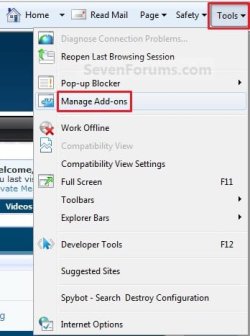
A) Click/tap on the Tools Command Bar icon button, and click/tap on Manage Add-ons. (See screenshot below)
Tool_Button.jpg
B) Go to step 4 or 5.
OR

3. Open the Control Panel (icons view).
A) Click/tap on the Internet Options icon.
NOTE: You can also select Internet Options from steps 1 or 2 instead.

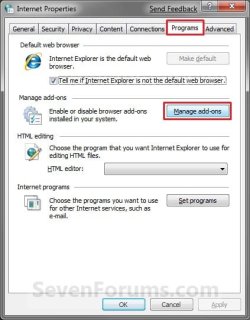
B) Click/tap on the Programs tab and Manage Add-ons button. (See screenshot below)
Internet_Options.jpg
C) Go to step 4 or 5.
4. To Disable a Toolbar and Extension Add-on
A) Select a enabled add-on that you want to disable, and click/tap on the Disable button. (See screenshot below)
NOTE: You can double click on the add-on to see more information about it, or click on the More information link after selecting the add-on.
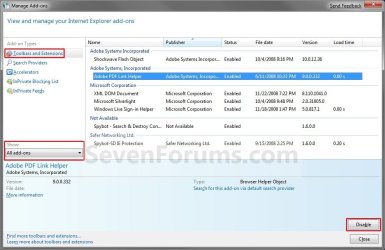
Disable.jpg
B) Go to step 6.
5. To Enable a Toolbar and Extension Add-on
A) Select a disabled add-on that you want to enable, and click/tap on the Enable button. (See screenshot below)
NOTE: You can double click on the add-on to see more information about it, or click on the More information link after selecting the add-on.
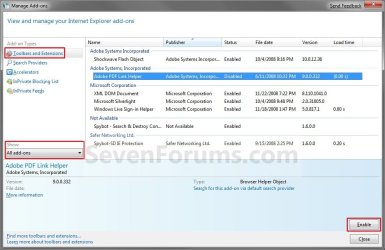
Enable.jpg
6. Click/tap on the Close button. (See screenshot above)

7. If you did step 3, then click/tap on OK. (See screenshot below step 3B)

8. You may need to close and reopen Internet Explorer for this to take affect.
That's it,
Shawn


Last edited:
once they are disable how do you remove them.. ?
 

My Computer My Computer

Computer type
PC/Desktop
Computer Manufacturer/Model Number
Self Built With Help
OS
Windows 7 Ultimate
CPU
Amd Athelon 64x2 Duel core Processor 6000+ 3.10ghz
Motherboard
Asus-MX Se Plus
Memory
4.0 GB
Graphics Card(s)
Radeon HD5450 2.8gb
Sound Card
7.1 Surround
Monitor(s) Displays
Lg Flatron 22inch lcd
Screen Resolution
1680x1050
Hard Drives
western digital 320 gig
PSU
550 w
Case
Standard Atx
Cooling
2 Fans
Keyboard
G15 Gaming keyboard
Mouse
Sky mouse
Internet Speed
ADSL2+ QUAD-1
Hello Coldy,

Check in Programs and Features to see if you may be able to uninstall it from there instead. :)

Hope this helps,
Shawn
 

My Computer My Computer

Computer type
PC/Desktop
Computer Manufacturer/Model Number
Self built custom
OS
64-bit Windows 11 Pro for Workstations
CPU
Intel i7-8700K OC'd to 5 GHz
Motherboard
ASUS ROG Maximus XI Formula Z390
Memory
64 GB (4x16GB) G.SKILL TridentZ RGB DDR4 3600 MHz
Graphics Card(s)
ASUS ROG-STRIX-GTX1080TI-O11G-GAMING
Sound Card
Integrated
Monitor(s) Displays
2 x Samsung Odyssey G7 27"
Screen Resolution
2560x1440
Hard Drives
1TB Samsung 990 PRO M.2,
4TB Samsung 990 PRO PRO M.2,
TerraMaster F8 SSD Plus NAS
PSU
Seasonic Prime Titanium 850W
Case
Thermaltake Core P3
Cooling
Corsair Hydro H115i
Keyboard
Logitech wireless K800
Mouse
Logitech MX Master 4
Internet Speed
2 Gb/s Download and 100 Mb/s Upload
Antivirus
Malwarebyte Anti-Malware Premium
Browser
Google Chrome
Other Info
Logitech Z625 speaker system,
Logitech BRIO 4K Pro webcam,
HP Color LaserJet Pro MFP M477fdn,
APC SMART-UPS RT 1000 XL - SURT1000XLI,
Galaxy S23 Plus phone
Hey Brink the two addons dont show in programs and features.

The two addons are: avast! WebREp and Wincore Mediabar

Also thanks for replying to the first reply of mine..
 

My Computer My Computer

Computer type
PC/Desktop
Computer Manufacturer/Model Number
Self Built With Help
OS
Windows 7 Ultimate
CPU
Amd Athelon 64x2 Duel core Processor 6000+ 3.10ghz
Motherboard
Asus-MX Se Plus
Memory
4.0 GB
Graphics Card(s)
Radeon HD5450 2.8gb
Sound Card
7.1 Surround
Monitor(s) Displays
Lg Flatron 22inch lcd
Screen Resolution
1680x1050
Hard Drives
western digital 320 gig
PSU
550 w
Case
Standard Atx
Cooling
2 Fans
Keyboard
G15 Gaming keyboard
Mouse
Sky mouse
Internet Speed
ADSL2+ QUAD-1
I think those can only be disabled unless you uninstall the main program, or there's an option in the program to remove or turn off the add-on. :(
 

My Computer My Computer

Computer type
PC/Desktop
Computer Manufacturer/Model Number
Self built custom
OS
64-bit Windows 11 Pro for Workstations
CPU
Intel i7-8700K OC'd to 5 GHz
Motherboard
ASUS ROG Maximus XI Formula Z390
Memory
64 GB (4x16GB) G.SKILL TridentZ RGB DDR4 3600 MHz
Graphics Card(s)
ASUS ROG-STRIX-GTX1080TI-O11G-GAMING
Sound Card
Integrated
Monitor(s) Displays
2 x Samsung Odyssey G7 27"
Screen Resolution
2560x1440
Hard Drives
1TB Samsung 990 PRO M.2,
4TB Samsung 990 PRO PRO M.2,
TerraMaster F8 SSD Plus NAS
PSU
Seasonic Prime Titanium 850W
Case
Thermaltake Core P3
Cooling
Corsair Hydro H115i
Keyboard
Logitech wireless K800
Mouse
Logitech MX Master 4
Internet Speed
2 Gb/s Download and 100 Mb/s Upload
Antivirus
Malwarebyte Anti-Malware Premium
Browser
Google Chrome
Other Info
Logitech Z625 speaker system,
Logitech BRIO 4K Pro webcam,
HP Color LaserJet Pro MFP M477fdn,
APC SMART-UPS RT 1000 XL - SURT1000XLI,
Galaxy S23 Plus phone
Toolbars in Internet Explorer

If you try the "traditional" method of enabling or disabling toolbars and extension add-ons and nothing happens, what should you try next. Only the four basic toolbars (menu, favoriites, etc) will attach.

Please advise with suggestions.

Thank you,

Mickey
 

My Computer My Computer

Computer Manufacturer/Model Number
Dell Vostro 1710
OS
Windows 7 Professional 64bit
Monitor(s) Displays
1
Hello Mickey, and welcome to Seven Forums.

What toolbar are you trying to enable? In addition, please post back with a screenshot showing what options you have for it to see if something may stand out. :)
 

My Computer My Computer

Computer type
PC/Desktop
Computer Manufacturer/Model Number
Self built custom
OS
64-bit Windows 11 Pro for Workstations
CPU
Intel i7-8700K OC'd to 5 GHz
Motherboard
ASUS ROG Maximus XI Formula Z390
Memory
64 GB (4x16GB) G.SKILL TridentZ RGB DDR4 3600 MHz
Graphics Card(s)
ASUS ROG-STRIX-GTX1080TI-O11G-GAMING
Sound Card
Integrated
Monitor(s) Displays
2 x Samsung Odyssey G7 27"
Screen Resolution
2560x1440
Hard Drives
1TB Samsung 990 PRO M.2,
4TB Samsung 990 PRO PRO M.2,
TerraMaster F8 SSD Plus NAS
PSU
Seasonic Prime Titanium 850W
Case
Thermaltake Core P3
Cooling
Corsair Hydro H115i
Keyboard
Logitech wireless K800
Mouse
Logitech MX Master 4
Internet Speed
2 Gb/s Download and 100 Mb/s Upload
Antivirus
Malwarebyte Anti-Malware Premium
Browser
Google Chrome
Other Info
Logitech Z625 speaker system,
Logitech BRIO 4K Pro webcam,
HP Color LaserJet Pro MFP M477fdn,
APC SMART-UPS RT 1000 XL - SURT1000XLI,
Galaxy S23 Plus phone
Enable or Disable Toolbars and Extension Add-Ons

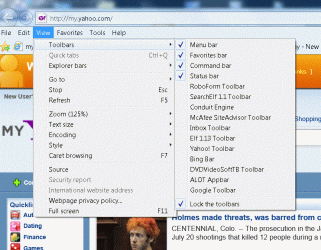
Sorry, can't seem to get screenshot to work. I am trying to enable the Google Toolbar and the RoboForm Toolbar. The only toolbars that will load/attach/enable are the Menu, Favorites, Command and Status toolbars. I have tried all of the options of which I am aware (View>toolbars> select toolbar; Tools>manage add-ons>enable; etc.) ... none of them work. I get no error message, just no toolbar. Don't know whether it is a Registry issue or what.

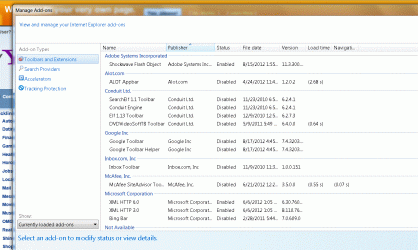
Not sure whether the Screenshot would help. It would simply show a list of the installed toolbars, none of which will enable (except for the four above). If there's anything else you need that you think will help you identify the problem, just let me know.

Thanks,
Mickey
 

My Computer My Computer

Computer Manufacturer/Model Number
Dell Vostro 1710
OS
Windows 7 Professional 64bit
Monitor(s) Displays
1

My Computer My Computer

Computer type
PC/Desktop
Computer Manufacturer/Model Number
Self built custom
OS
64-bit Windows 11 Pro for Workstations
CPU
Intel i7-8700K OC'd to 5 GHz
Motherboard
ASUS ROG Maximus XI Formula Z390
Memory
64 GB (4x16GB) G.SKILL TridentZ RGB DDR4 3600 MHz
Graphics Card(s)
ASUS ROG-STRIX-GTX1080TI-O11G-GAMING
Sound Card
Integrated
Monitor(s) Displays
2 x Samsung Odyssey G7 27"
Screen Resolution
2560x1440
Hard Drives
1TB Samsung 990 PRO M.2,
4TB Samsung 990 PRO PRO M.2,
TerraMaster F8 SSD Plus NAS
PSU
Seasonic Prime Titanium 850W
Case
Thermaltake Core P3
Cooling
Corsair Hydro H115i
Keyboard
Logitech wireless K800
Mouse
Logitech MX Master 4
Internet Speed
2 Gb/s Download and 100 Mb/s Upload
Antivirus
Malwarebyte Anti-Malware Premium
Browser
Google Chrome
Other Info
Logitech Z625 speaker system,
Logitech BRIO 4K Pro webcam,
HP Color LaserJet Pro MFP M477fdn,
APC SMART-UPS RT 1000 XL - SURT1000XLI,
Galaxy S23 Plus phone
Enable or disable toolbars

Yes, I have reinstalled both toolbars several times. Don't know if the attached printscreens will help. And, before you suggest that I uncheck the "Lock Toolbars", it doesn't make a difference ... doesn't work either way.
 

Attachments

  • Toolbars.gif
    Toolbars.gif
    143 KB · Views: 17,430
  • Toolbar2.gif
    Toolbar2.gif
    90.5 KB · Views: 2,981

My Computer My Computer

Computer Manufacturer/Model Number
Dell Vostro 1710
OS
Windows 7 Professional 64bit
Monitor(s) Displays
1
Yes, I have reinstalled both toolbars several times. Don't know if the attached printscreens will help. And, before you suggest that I uncheck the "Lock Toolbars", it doesn't make a difference ... doesn't work either way.

Wow, that's a lot of toolbars you have installed. Could be one or more conflicting with each other. You might go ahead and completely reset Internet Explorer, then enable one toolbar at a time to see if it will and if one may causing this issue after being enabled.
 
Last edited:

My Computer My Computer

Computer type
PC/Desktop
Computer Manufacturer/Model Number
Self built custom
OS
64-bit Windows 11 Pro for Workstations
CPU
Intel i7-8700K OC'd to 5 GHz
Motherboard
ASUS ROG Maximus XI Formula Z390
Memory
64 GB (4x16GB) G.SKILL TridentZ RGB DDR4 3600 MHz
Graphics Card(s)
ASUS ROG-STRIX-GTX1080TI-O11G-GAMING
Sound Card
Integrated
Monitor(s) Displays
2 x Samsung Odyssey G7 27"
Screen Resolution
2560x1440
Hard Drives
1TB Samsung 990 PRO M.2,
4TB Samsung 990 PRO PRO M.2,
TerraMaster F8 SSD Plus NAS
PSU
Seasonic Prime Titanium 850W
Case
Thermaltake Core P3
Cooling
Corsair Hydro H115i
Keyboard
Logitech wireless K800
Mouse
Logitech MX Master 4
Internet Speed
2 Gb/s Download and 100 Mb/s Upload
Antivirus
Malwarebyte Anti-Malware Premium
Browser
Google Chrome
Other Info
Logitech Z625 speaker system,
Logitech BRIO 4K Pro webcam,
HP Color LaserJet Pro MFP M477fdn,
APC SMART-UPS RT 1000 XL - SURT1000XLI,
Galaxy S23 Plus phone
Enable or Disable Toolbars

Don't want to delete/disable/turn them off ... I want to enable the two toolbars (Google and RoboForm) so that they will be present in the IE window at all times. If you're familiar with RoboForm, it used to be displayed on one of the rows at the top of IE and when I opened a website that required an ID/password to access it would recognize the URL and immediately display the symbol for that site. All I had to do was click on the symbol and the ID and password were automatically entered in the correct location at the site. Now I can't even get the RoboForm toolbar the stay at the top (I can select Tools>Show RoboForm Toolbar) and it will place it at the top. I then have to search for the correct symbol for that site and RoboForm will work.

"Something" in IE or Windows is not allowing these toolbars to be enabled. That's what I need to find.
 

My Computer My Computer

Computer Manufacturer/Model Number
Dell Vostro 1710
OS
Windows 7 Professional 64bit
Monitor(s) Displays
1
I understand, but you'll never find it if you don't narrow down if it's a issue in Internet Explorer or another toolbar/add-on by completely resetting IE9, and enabling toolbars/add-ons one by one again to see how it goes.
 

My Computer My Computer

Computer type
PC/Desktop
Computer Manufacturer/Model Number
Self built custom
OS
64-bit Windows 11 Pro for Workstations
CPU
Intel i7-8700K OC'd to 5 GHz
Motherboard
ASUS ROG Maximus XI Formula Z390
Memory
64 GB (4x16GB) G.SKILL TridentZ RGB DDR4 3600 MHz
Graphics Card(s)
ASUS ROG-STRIX-GTX1080TI-O11G-GAMING
Sound Card
Integrated
Monitor(s) Displays
2 x Samsung Odyssey G7 27"
Screen Resolution
2560x1440
Hard Drives
1TB Samsung 990 PRO M.2,
4TB Samsung 990 PRO PRO M.2,
TerraMaster F8 SSD Plus NAS
PSU
Seasonic Prime Titanium 850W
Case
Thermaltake Core P3
Cooling
Corsair Hydro H115i
Keyboard
Logitech wireless K800
Mouse
Logitech MX Master 4
Internet Speed
2 Gb/s Download and 100 Mb/s Upload
Antivirus
Malwarebyte Anti-Malware Premium
Browser
Google Chrome
Other Info
Logitech Z625 speaker system,
Logitech BRIO 4K Pro webcam,
HP Color LaserJet Pro MFP M477fdn,
APC SMART-UPS RT 1000 XL - SURT1000XLI,
Galaxy S23 Plus phone
Back
Top