Internet Explorer Command Bar - Customize

How to Customize the Command Bar in IE9 and IE10

   Information
This tutorial will show you how to customize the Command bar buttons in IE9 and IE10.


Here's How:
1. If you have not already, you will need to turn on the Command bar in IE9 or IE10.

2. Do either step 3, 4, or 5 below for what you would like to do.

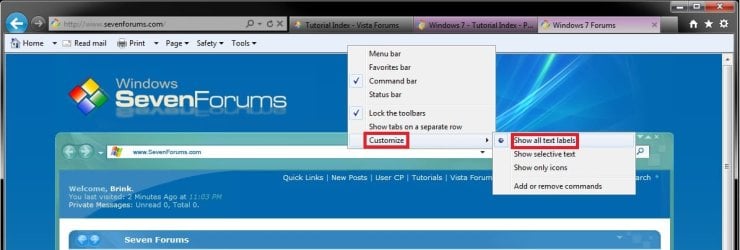
3. To Show Text Labels On All Command Bar Buttons
A) Right click on a empty area on the Command bar, click/tap on Customize, and select (dot) Show all text labels. (see screenshot below)
Text_labels.jpg
B) Go to step 6.
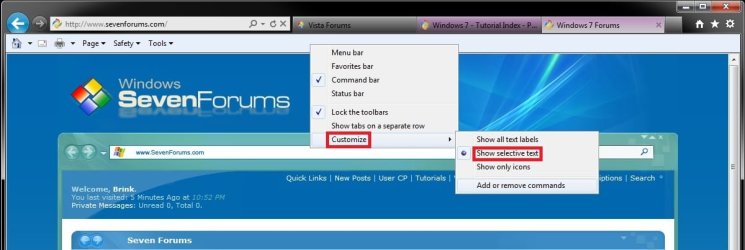
4. To Show Selective Text Labels On Command Bar Buttons
NOTE: This is the default setting.
A) Right click on a empty area on the Command bar, click/tap on Customize, and select (dot) Show selective text. (see screenshot below)
Selective_text.jpg
B) Go to step 6.
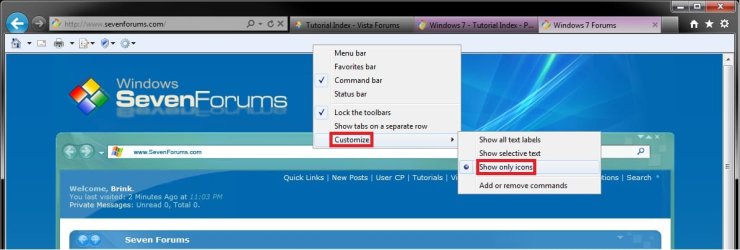
5. To Show Only Icons On Command Bar Buttons
A) Right click on a empty area on the Command bar, click/tap on Customize, and select (dot) Show only icons. (see screenshot below)
Only_icons.jpg
B) Continue on to step 6.
6. To Add, Remove, or Arrange Command Bar Buttons
A) Right click on a empty area on the Command bar, click/tap on Customize, and select (dot) Add or remove commands. (see screenshot below)
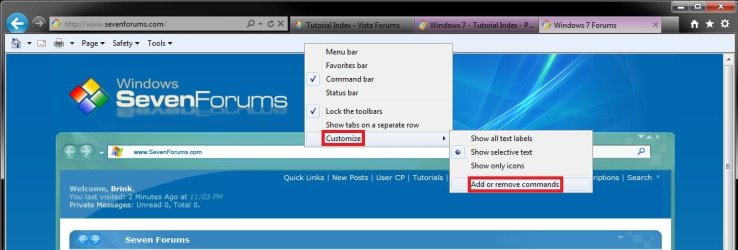
Add-Remove_Commands.jpg

B) To Add Command Bar Buttons
  • In the left pane, select an available toolbar button, then click/tap on the Add button in the middle. (see screenshot below)
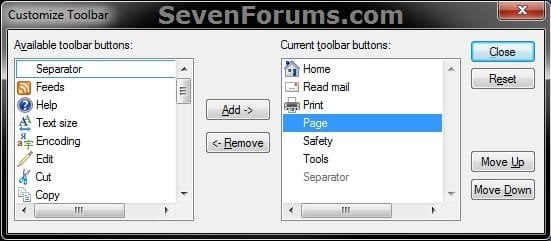
Customize.jpg

C) To Remove Command Bar Buttons
  • In the right pane, select a current toolbar button, then click/tap on the Remove button. (see screenshot below step 6B)
D) To Arrange Current Command Bar Buttons Order
  • In the right pane, select a current toolbar button that you want to move, then click/tap on the Move Up (left on command bar) or Move Down (right on commmand bar button until you have it where you want it. (see screenshot below step 6B)
E) Repeat step 6 for any other command bar button that you would like to add, remove, or arrange the order of.

F) To Reset and Restore Default Command Bar Buttons


NOTE: This will undo all changes made in only step 6 and restore them back to default.
  • Click/tap on the Reset button. (see screenshot below step 6B)
G) When finished, click/tap on the Close button. (see screenshot below step 6B)
That's it,
Shawn


Last edited:
Thank you Shawn ! Great tutorial, I now have my Command bar as I want it :cool: :D

Ciara ... X
 

My Computer

Computer Manufacturer/Model Number
Home Built
OS
Windows 7 Professional 64-bit SP1
CPU
Intel E8400
Motherboard
MSI P35 Neo
Memory
4GB Crucial Ballistix
Graphics Card(s)
ATI ASUS Radeon HD 4830
Sound Card
Realtek ALC888 on Board
Monitor(s) Displays
Asus 22-inch VH226H Widescreen
Screen Resolution
1920 x 1080
Hard Drives
Two Western Digital 500GB
PSU
Hiper HPU-4M 530W
Case
Thermaltake Tsunami Dream Black
Cooling
Air/Fans
Keyboard
Saitek Eclipse
Mouse
Razer
Internet Speed
Sky Broadband
Other Info
USB Hub/Card Reader - 2 Pen Drives, 1 Phone Dock
Great tutorial Shawn, Any idea why I don't have the customize option on mine?
 

Attachments

  • no customize.jpg
    no customize.jpg
    363.9 KB · Views: 2,720
  • Capture.JPG
    Capture.JPG
    32.9 KB · Views: 15,604

My Computer

Computer type
PC/Desktop
Computer Manufacturer/Model Number
Self Built
OS
Win 10 Pro x64
CPU
Intel I5-2500K @3.3GHz
Motherboard
Asrock P67 Extreme4
Memory
16GB G.Skill Ripjaws X (4x4GB)
Graphics Card(s)
EVGA GeForce 750 Ti SC 2GB
Sound Card
ASUS Xonar DG 5.1 Channels 24-bit 96KHz PCI Interface Sound
Monitor(s) Displays
auria eq2367
Screen Resolution
1920 x 1080
Hard Drives
250GB Samsung 850 EVO SSD
1TB WD Blue
1TB Hitachi
PSU
SeaSonic X 650W 80 Plus Gold
Case
Corsair Obsidian 750D
Cooling
Corsair H60, Three 140mm case fans
Keyboard
Logitech Wireless Keyboard K520
Mouse
Logitech Wireless Mouse M310
Internet Speed
Wave Broadband ~ 100 dn 5 up
Antivirus
Windows Defender, Malwarebytes Premium
Browser
Edge, IE11, Chrome
Other Info
Laptop specs: HP g7-1365dx /
CPU: AMD A6-3420M APU with Radeon(tm) HD Graphics /
RAM: Crucial 8Gb (2x4Gb) /
SSD: Crucial M4-CT128M4SSD2 ATA Device/ FW 000F /
GFX: AMD Radeon HD 6520G /
OS: Windows 10 Pro x64
Hi derekimo :), Your right clicking outside the Command Bar ...
 
Last edited by a moderator:

My Computer

Computer Manufacturer/Model Number
Home Built
OS
Windows 7 Professional 64-bit SP1
CPU
Intel E8400
Motherboard
MSI P35 Neo
Memory
4GB Crucial Ballistix
Graphics Card(s)
ATI ASUS Radeon HD 4830
Sound Card
Realtek ALC888 on Board
Monitor(s) Displays
Asus 22-inch VH226H Widescreen
Screen Resolution
1920 x 1080
Hard Drives
Two Western Digital 500GB
PSU
Hiper HPU-4M 530W
Case
Thermaltake Tsunami Dream Black
Cooling
Air/Fans
Keyboard
Saitek Eclipse
Mouse
Razer
Internet Speed
Sky Broadband
Other Info
USB Hub/Card Reader - 2 Pen Drives, 1 Phone Dock
Last edited by a moderator:

My Computer

Computer type
PC/Desktop
Computer Manufacturer/Model Number
Self Built
OS
Win 10 Pro x64
CPU
Intel I5-2500K @3.3GHz
Motherboard
Asrock P67 Extreme4
Memory
16GB G.Skill Ripjaws X (4x4GB)
Graphics Card(s)
EVGA GeForce 750 Ti SC 2GB
Sound Card
ASUS Xonar DG 5.1 Channels 24-bit 96KHz PCI Interface Sound
Monitor(s) Displays
auria eq2367
Screen Resolution
1920 x 1080
Hard Drives
250GB Samsung 850 EVO SSD
1TB WD Blue
1TB Hitachi
PSU
SeaSonic X 650W 80 Plus Gold
Case
Corsair Obsidian 750D
Cooling
Corsair H60, Three 140mm case fans
Keyboard
Logitech Wireless Keyboard K520
Mouse
Logitech Wireless Mouse M310
Internet Speed
Wave Broadband ~ 100 dn 5 up
Antivirus
Windows Defender, Malwarebytes Premium
Browser
Edge, IE11, Chrome
Other Info
Laptop specs: HP g7-1365dx /
CPU: AMD A6-3420M APU with Radeon(tm) HD Graphics /
RAM: Crucial 8Gb (2x4Gb) /
SSD: Crucial M4-CT128M4SSD2 ATA Device/ FW 000F /
GFX: AMD Radeon HD 6520G /
OS: Windows 10 Pro x64
Ooopsy. ;)
 

My Computer

Computer type
PC/Desktop
Computer Manufacturer/Model Number
Self built custom
OS
64-bit Windows 11 Pro for Workstations
CPU
Intel i7-8700K OC'd to 5 GHz
Motherboard
ASUS ROG Maximus XI Formula Z390
Memory
64 GB (4x16GB) G.SKILL TridentZ RGB DDR4 3600 MHz
Graphics Card(s)
ASUS ROG-STRIX-GTX1080TI-O11G-GAMING
Sound Card
Integrated
Monitor(s) Displays
2 x Samsung Odyssey G7 27"
Screen Resolution
2560x1440
Hard Drives
1TB Samsung 990 PRO M.2,
4TB Samsung 990 PRO PRO M.2,
TerraMaster F8 SSD Plus NAS
PSU
Seasonic Prime Titanium 850W
Case
Thermaltake Core P3
Cooling
Corsair Hydro H115i
Keyboard
Logitech wireless K800
Mouse
Logitech MX Master 4
Internet Speed
2 Gb/s Download and 100 Mb/s Upload
Antivirus
Malwarebyte Anti-Malware Premium
Browser
Google Chrome
Other Info
Logitech Z625 speaker system,
Logitech BRIO 4K Pro webcam,
HP Color LaserJet Pro MFP M477fdn,
APC SMART-UPS RT 1000 XL - SURT1000XLI,
Galaxy S23 Plus phone
I realize that Microsoft, in its infinate wisdom, no longer enables you to move the Command toolbar.

Fine. How do we do it?
 

My Computer

Computer Manufacturer/Model Number
Custom
OS
Windows 7 Ultimate SP1 64-Bit
CPU
i7-950 4.140GHz OC'd
Motherboard
P6T Deluxe V2
Memory
12G
Hard Drives
1-3T, 15T total
PSU
Corsair HX850W
Case
Antec P183
Cooling
Noctua NH-D14
Internet Speed
30/30

My Computer

Computer type
PC/Desktop
Computer Manufacturer/Model Number
Self built custom
OS
64-bit Windows 11 Pro for Workstations
CPU
Intel i7-8700K OC'd to 5 GHz
Motherboard
ASUS ROG Maximus XI Formula Z390
Memory
64 GB (4x16GB) G.SKILL TridentZ RGB DDR4 3600 MHz
Graphics Card(s)
ASUS ROG-STRIX-GTX1080TI-O11G-GAMING
Sound Card
Integrated
Monitor(s) Displays
2 x Samsung Odyssey G7 27"
Screen Resolution
2560x1440
Hard Drives
1TB Samsung 990 PRO M.2,
4TB Samsung 990 PRO PRO M.2,
TerraMaster F8 SSD Plus NAS
PSU
Seasonic Prime Titanium 850W
Case
Thermaltake Core P3
Cooling
Corsair Hydro H115i
Keyboard
Logitech wireless K800
Mouse
Logitech MX Master 4
Internet Speed
2 Gb/s Download and 100 Mb/s Upload
Antivirus
Malwarebyte Anti-Malware Premium
Browser
Google Chrome
Other Info
Logitech Z625 speaker system,
Logitech BRIO 4K Pro webcam,
HP Color LaserJet Pro MFP M477fdn,
APC SMART-UPS RT 1000 XL - SURT1000XLI,
Galaxy S23 Plus phone
I realize that Microsoft, in its infinate wisdom, no longer enables you to move the Command toolbar.

Fine. How do we do it?

Hello Mark,

This can help show you how to move the Command bar in IE9. :)

How to Move the "Command Bar" to the Left or Right in Internet Explorer 9 (IE9)
Hi Brink -- thanks for the tip, but I had already discovered the combination with the favorites bar, but have never wanted to use the Favorites bar, so that was out.

After additional problems with IE9, I have chosen to abstain from this beta test round of a released version and have uninstalled it.

The turning point for me was:

1 - It apparently no longer uses the Windows API to display text so my decade’s old sidekick, HyperSnap, became unusable, as it was unable to capture text (it is used throughout each day)

2 - While leaving HyperSnap's author a message, I chose Review (before clicking Send), the appropriate window popped up to display my intended message, but the window was blank!

Feel free to imagine the words coming out of my mouth...

I have other projects more important to me right now than getting IE9 to work, as I need it to, so I did the deed.

There is always another day.
 

My Computer

Computer Manufacturer/Model Number
Custom
OS
Windows 7 Ultimate SP1 64-Bit
CPU
i7-950 4.140GHz OC'd
Motherboard
P6T Deluxe V2
Memory
12G
Hard Drives
1-3T, 15T total
PSU
Corsair HX850W
Case
Antec P183
Cooling
Noctua NH-D14
Internet Speed
30/30
LOL, I can only image. ;)

Yeah, it's unfortunate that the Favorties bar has to be used together with the Command bar on the same toolbar in order to have the Command bar on the right side. :(
 

My Computer

Computer type
PC/Desktop
Computer Manufacturer/Model Number
Self built custom
OS
64-bit Windows 11 Pro for Workstations
CPU
Intel i7-8700K OC'd to 5 GHz
Motherboard
ASUS ROG Maximus XI Formula Z390
Memory
64 GB (4x16GB) G.SKILL TridentZ RGB DDR4 3600 MHz
Graphics Card(s)
ASUS ROG-STRIX-GTX1080TI-O11G-GAMING
Sound Card
Integrated
Monitor(s) Displays
2 x Samsung Odyssey G7 27"
Screen Resolution
2560x1440
Hard Drives
1TB Samsung 990 PRO M.2,
4TB Samsung 990 PRO PRO M.2,
TerraMaster F8 SSD Plus NAS
PSU
Seasonic Prime Titanium 850W
Case
Thermaltake Core P3
Cooling
Corsair Hydro H115i
Keyboard
Logitech wireless K800
Mouse
Logitech MX Master 4
Internet Speed
2 Gb/s Download and 100 Mb/s Upload
Antivirus
Malwarebyte Anti-Malware Premium
Browser
Google Chrome
Other Info
Logitech Z625 speaker system,
Logitech BRIO 4K Pro webcam,
HP Color LaserJet Pro MFP M477fdn,
APC SMART-UPS RT 1000 XL - SURT1000XLI,
Galaxy S23 Plus phone
LOL, I can only image. ;)

Yeah, it's unfortunate that the Favorties bar has to be used together with the Command bar on the same toolbar in order to have the Command bar on the right side. :(
Well, I do have IE10 here if I really want to get stressed out... :eek:
 

My Computer

Computer Manufacturer/Model Number
Custom
OS
Windows 7 Ultimate SP1 64-Bit
CPU
i7-950 4.140GHz OC'd
Motherboard
P6T Deluxe V2
Memory
12G
Hard Drives
1-3T, 15T total
PSU
Corsair HX850W
Case
Antec P183
Cooling
Noctua NH-D14
Internet Speed
30/30
I bet being pre-beta.
 

My Computer

Computer type
PC/Desktop
Computer Manufacturer/Model Number
Self built custom
OS
64-bit Windows 11 Pro for Workstations
CPU
Intel i7-8700K OC'd to 5 GHz
Motherboard
ASUS ROG Maximus XI Formula Z390
Memory
64 GB (4x16GB) G.SKILL TridentZ RGB DDR4 3600 MHz
Graphics Card(s)
ASUS ROG-STRIX-GTX1080TI-O11G-GAMING
Sound Card
Integrated
Monitor(s) Displays
2 x Samsung Odyssey G7 27"
Screen Resolution
2560x1440
Hard Drives
1TB Samsung 990 PRO M.2,
4TB Samsung 990 PRO PRO M.2,
TerraMaster F8 SSD Plus NAS
PSU
Seasonic Prime Titanium 850W
Case
Thermaltake Core P3
Cooling
Corsair Hydro H115i
Keyboard
Logitech wireless K800
Mouse
Logitech MX Master 4
Internet Speed
2 Gb/s Download and 100 Mb/s Upload
Antivirus
Malwarebyte Anti-Malware Premium
Browser
Google Chrome
Other Info
Logitech Z625 speaker system,
Logitech BRIO 4K Pro webcam,
HP Color LaserJet Pro MFP M477fdn,
APC SMART-UPS RT 1000 XL - SURT1000XLI,
Galaxy S23 Plus phone

My Computer

Computer Manufacturer/Model Number
Custom
OS
Windows 7 Ultimate SP1 64-Bit
CPU
i7-950 4.140GHz OC'd
Motherboard
P6T Deluxe V2
Memory
12G
Hard Drives
1-3T, 15T total
PSU
Corsair HX850W
Case
Antec P183
Cooling
Noctua NH-D14
Internet Speed
30/30
Hello Microsvc, and welcome to Seven Forums.

Other than having the tabs to the left of them on a separate row, not that I know of. :(
 

My Computer

Computer type
PC/Desktop
Computer Manufacturer/Model Number
Self built custom
OS
64-bit Windows 11 Pro for Workstations
CPU
Intel i7-8700K OC'd to 5 GHz
Motherboard
ASUS ROG Maximus XI Formula Z390
Memory
64 GB (4x16GB) G.SKILL TridentZ RGB DDR4 3600 MHz
Graphics Card(s)
ASUS ROG-STRIX-GTX1080TI-O11G-GAMING
Sound Card
Integrated
Monitor(s) Displays
2 x Samsung Odyssey G7 27"
Screen Resolution
2560x1440
Hard Drives
1TB Samsung 990 PRO M.2,
4TB Samsung 990 PRO PRO M.2,
TerraMaster F8 SSD Plus NAS
PSU
Seasonic Prime Titanium 850W
Case
Thermaltake Core P3
Cooling
Corsair Hydro H115i
Keyboard
Logitech wireless K800
Mouse
Logitech MX Master 4
Internet Speed
2 Gb/s Download and 100 Mb/s Upload
Antivirus
Malwarebyte Anti-Malware Premium
Browser
Google Chrome
Other Info
Logitech Z625 speaker system,
Logitech BRIO 4K Pro webcam,
HP Color LaserJet Pro MFP M477fdn,
APC SMART-UPS RT 1000 XL - SURT1000XLI,
Galaxy S23 Plus phone
Back
Top