Shutting down... Text Message - Change

How to Change the "Shutting down..." Text Message at Shut Down in Windows 7 and Vista

   Information
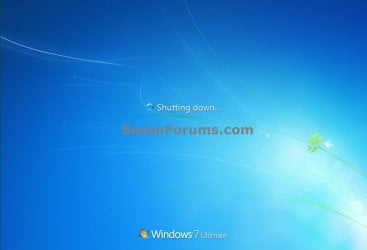
This will show you how to change the Shutting down... text message you get after clicking on Shut Down in Windows 7 and Vista to any text message that you want it to say instead.

You can only do this tutorial while logged on as an administrator.

   Note
If you run a sfc /scannow command, then you will lose all changes made to the system file in the tutorial below since it and all other system files will be restored back to default by the command.

For Windows 7 Only:
   Warning
Making a mistake while modifying system files can render your Windows 7 installation unusable. To be safe, you should create a restore point before doing this tutorial in case you need to do a system restore at boot using the restore point to undo any mistakes that may be made.

EXAMPLE: Default and Changed "Shutting down..." Text Message at Shut Down
NOTE: By default you get a Shutting Down... message right after the Logging off... message when you shut down the computer.Shutting_Down_Example.jpgChanged.jpg


OPTION ONE

Change "Shutting down..." Text Message at Shut Down

1. In Windows Explorer, navigate to C:\Windows\System32\en-US\wininit.exe.mui. (see screenshot below)
   Note
The en-US folder is in English Windows 7 copies. If you have a non-English Windows 7 copy, then this folder will have a different name reflecting your language instead. The table below are a few of the most common ones.

Folder NameLanguage
da-DKDanish
en-GBEnglish-Great Britian
en-USEnglish-U.S.
fi-FIFinnish
fr-FRFrench
de-DEGerman
el-GRGreek
it-ITItalian
no-NONorwegian
es-ESSpanish
sv-SESwedish


Step1.jpg

2. Take ownership of the wininit.exe.mui file with your user account, and set it's permissions to Allow your user account Full Control. Close Windows Explorer when finished.

3. Copy the wininit.exe.mui file to your desktop.

4. If you have not already, then download and install the latest version of Resource Hacker.
5. Right click on the Resource Hacker shortcut in Start Menu - All Programs, then click on Run as administrator. (see screenshot below)Start_Menu.jpg

6. If prompted by UAC, then click on Yes.

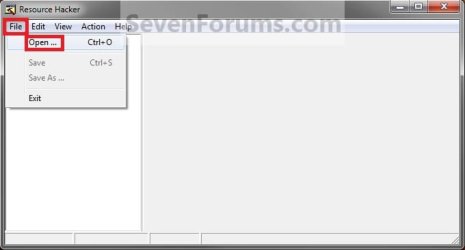
7. In Resource Hacker, click on File and Open. (see screenshot below)Step2.jpg

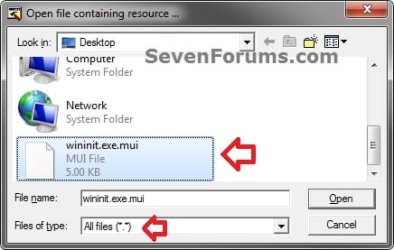
8. Navigate to C:\Windows\System32\en-US, select All Files (*.*) in the Files of type drop down box, select the wininit.exe.mui file, then click on the Open button. (see screenshot below)Step-3.jpg

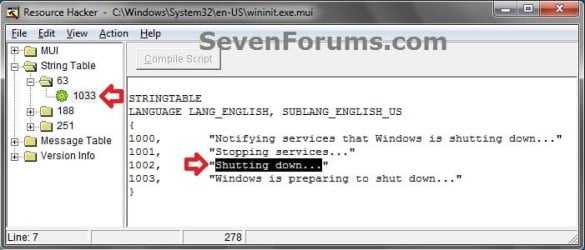
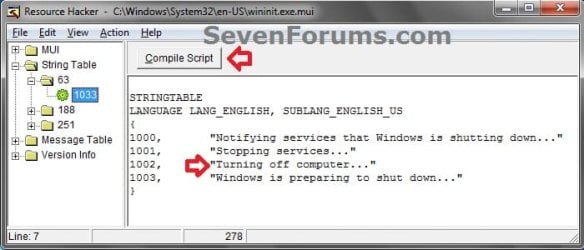
9. In the left pane of Resource Hacker, expand String Table, and 63, to 1033. (see screenshot below)Step4.jpg

10. In the right pane of 1033, replace the Shutting down... text in quotes at the 1002 location with the text you want instead (ex: Turning off computer...) within quotes, then click on the Compile Script button. (see screenshot above and below)Step5.jpg

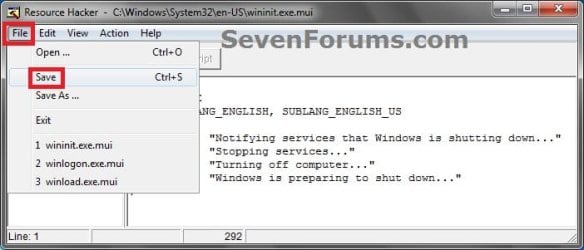
11. Click on File and Save, then close Resource Hacker. (see screenshot below)Step6.jpg

12. Copy the modified wininit.exe.mui file on your Desktop, and Paste it into the C:\Windows\System32\en-US folder from step 1. (see screenshot below step 1)
NOTE: The en-US folder is in English Windows 7 copies. If you have a non-English Windows 7 copy, then this folder will have a different name reflecting your language instead.

13. Click on Copy and Replace. (see screenshot below)
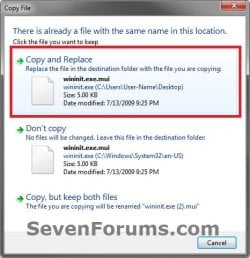
Copy.jpg

14. If prompted, click on Continue (UAC) and Yes to approve.

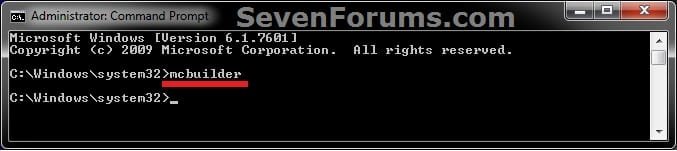
15. Open a elevated command prompt, type mcbuilder, press Enter, then close the command prompt. (see screenshot below)
NOTE: Thanks to Fimble for pointing this out.CMD.jpg

16. Restart the computer.

17. Open the Start Menu and click on Shut Down in the arrow menu to see the changes made.
:warn:WARNING: Be sure to save anything that you have open first.

18. You can delete the wininit.exe_original.mui that ResHacker created if you like since you can easily do OPTION TWO below to restore the default settings, or keep it as a backup.


OPTION TWO

Restore Default "Shutting down..." Text Message at Shut Down

1. Repeat OPTION ONE above, but type Shutting down... in step 10 instead.


That's it,
Shawn Brink


Last edited:
Awesome one tyvm Brink this gave me much amusement lol but I best stop shutting down my pc now or it might blow up hehe :D
 

My Computer

Computer type
PC/Desktop
Computer Manufacturer/Model Number
Custom Build
OS
Windows 7 Ultimate x64 SP1
CPU
AMD Athlon II X4 645 quad core
Memory
6gig DDR3
Graphics Card(s)
Nvidia geforce GT 630
Sound Card
On Board
Monitor(s) Displays
Samsung LED 19"
Screen Resolution
ULTRA HD 1080p 1920 x 1080
Hard Drives
5 x 2tb
ATA Devices x 2
USB x 5
PSU
850 watt something or other forgot name
Case
Custom Build
Cooling
6 fan in out system with cold air blown through the in
Keyboard
Steelseries
Mouse
GM.M6800 optical mouse 5 button model
Internet Speed
80 gig on a good day 60 to 80 on a bad
Antivirus
not disclosed
Browser
not disclosed
Other Info
My Desktop is in a custom built airflow casing over the case. I still have the power button available etc . but the rest is cool controlled cold air going through the in and theoretically hot air out of the out. But it never gets hot enough for hot air to come out :-P
LOL, I smell smoke. ;)
 

My Computer

Computer type
PC/Desktop
Computer Manufacturer/Model Number
Self built custom
OS
64-bit Windows 11 Pro for Workstations
CPU
Intel i7-8700K OC'd to 5 GHz
Motherboard
ASUS ROG Maximus XI Formula Z390
Memory
64 GB (4x16GB) G.SKILL TridentZ RGB DDR4 3600 MHz
Graphics Card(s)
ASUS ROG-STRIX-GTX1080TI-O11G-GAMING
Sound Card
Integrated
Monitor(s) Displays
2 x Samsung Odyssey G7 27"
Screen Resolution
2560x1440
Hard Drives
1TB Samsung 990 PRO M.2,
4TB Samsung 990 PRO PRO M.2,
TerraMaster F8 SSD Plus NAS
PSU
Seasonic Prime Titanium 850W
Case
Thermaltake Core P3
Cooling
Corsair Hydro H115i
Keyboard
Logitech wireless K800
Mouse
Logitech MX Master 4
Internet Speed
2 Gb/s Download and 100 Mb/s Upload
Antivirus
Malwarebyte Anti-Malware Premium
Browser
Google Chrome
Other Info
Logitech Z625 speaker system,
Logitech BRIO 4K Pro webcam,
HP Color LaserJet Pro MFP M477fdn,
APC SMART-UPS RT 1000 XL - SURT1000XLI,
Galaxy S23 Plus phone
i've done everything with no problems, but when it shuts down, or shutdown-restart the message i put in there doesn't show up, except it showed up just once. all the other times, it didn't work, it just had the original message.

i've gone back to the file and checked, yes, it does still show the edit i made.

and what file would i edit to change the logon message?

please and thank you
 

My Computer

OS
windows 7
Hello RyuB,

Double check each step to make sure that you didn't miss any part of them, and please try again. The tiniest mistake is easy to be made to cause it not to work.
 

My Computer

Computer type
PC/Desktop
Computer Manufacturer/Model Number
Self built custom
OS
64-bit Windows 11 Pro for Workstations
CPU
Intel i7-8700K OC'd to 5 GHz
Motherboard
ASUS ROG Maximus XI Formula Z390
Memory
64 GB (4x16GB) G.SKILL TridentZ RGB DDR4 3600 MHz
Graphics Card(s)
ASUS ROG-STRIX-GTX1080TI-O11G-GAMING
Sound Card
Integrated
Monitor(s) Displays
2 x Samsung Odyssey G7 27"
Screen Resolution
2560x1440
Hard Drives
1TB Samsung 990 PRO M.2,
4TB Samsung 990 PRO PRO M.2,
TerraMaster F8 SSD Plus NAS
PSU
Seasonic Prime Titanium 850W
Case
Thermaltake Core P3
Cooling
Corsair Hydro H115i
Keyboard
Logitech wireless K800
Mouse
Logitech MX Master 4
Internet Speed
2 Gb/s Download and 100 Mb/s Upload
Antivirus
Malwarebyte Anti-Malware Premium
Browser
Google Chrome
Other Info
Logitech Z625 speaker system,
Logitech BRIO 4K Pro webcam,
HP Color LaserJet Pro MFP M477fdn,
APC SMART-UPS RT 1000 XL - SURT1000XLI,
Galaxy S23 Plus phone
well duh i didn't think of that. lol while i go make a sign that says "kick me" and stick it on my back. (not being rude, i'm laughing at myself. i guess i was having a "senior moment".

if i have troubles i'll post again. Thank you.
 

My Computer

OS
windows 7
LOL, it's not hard to miss something though. I'll be here if you do. :)
 

My Computer

Computer type
PC/Desktop
Computer Manufacturer/Model Number
Self built custom
OS
64-bit Windows 11 Pro for Workstations
CPU
Intel i7-8700K OC'd to 5 GHz
Motherboard
ASUS ROG Maximus XI Formula Z390
Memory
64 GB (4x16GB) G.SKILL TridentZ RGB DDR4 3600 MHz
Graphics Card(s)
ASUS ROG-STRIX-GTX1080TI-O11G-GAMING
Sound Card
Integrated
Monitor(s) Displays
2 x Samsung Odyssey G7 27"
Screen Resolution
2560x1440
Hard Drives
1TB Samsung 990 PRO M.2,
4TB Samsung 990 PRO PRO M.2,
TerraMaster F8 SSD Plus NAS
PSU
Seasonic Prime Titanium 850W
Case
Thermaltake Core P3
Cooling
Corsair Hydro H115i
Keyboard
Logitech wireless K800
Mouse
Logitech MX Master 4
Internet Speed
2 Gb/s Download and 100 Mb/s Upload
Antivirus
Malwarebyte Anti-Malware Premium
Browser
Google Chrome
Other Info
Logitech Z625 speaker system,
Logitech BRIO 4K Pro webcam,
HP Color LaserJet Pro MFP M477fdn,
APC SMART-UPS RT 1000 XL - SURT1000XLI,
Galaxy S23 Plus phone
1. In Windows Explorer, navigate to C:\Windows\System32\en-US\wininit.exe.mui. (see screenshot below)
NOTE: The en-US folder is in English Windows 7 copies. If you have a non-English Windows 7 copy, then this folder will have a different name reflecting your language instead.
Hi, for Greek copies what should i put???
 

My Computer

OS
Windows 32 bit
CPU
AMD Athlon X3 4GHz
Motherboard
Gigabyte
Memory
Kingston
Graphics Card(s)
On board
Monitor(s) Displays
LG
Screen Resolution
1920X800
Hard Drives
Samsung
PSU
Lamtech
Case
Lamtech
Cooling
Water
Keyboard
Microsoft
Mouse
Microsoft
Internet Speed
24/1 Mbps
Other Info
Nothing more
Hello George,

For Greek, I believe it may be this:

C:\Windows\System32\el-GR

Check in it to make sure that it has the wininit.exe.mui file. If so, then that's the folder.
 

My Computer

Computer type
PC/Desktop
Computer Manufacturer/Model Number
Self built custom
OS
64-bit Windows 11 Pro for Workstations
CPU
Intel i7-8700K OC'd to 5 GHz
Motherboard
ASUS ROG Maximus XI Formula Z390
Memory
64 GB (4x16GB) G.SKILL TridentZ RGB DDR4 3600 MHz
Graphics Card(s)
ASUS ROG-STRIX-GTX1080TI-O11G-GAMING
Sound Card
Integrated
Monitor(s) Displays
2 x Samsung Odyssey G7 27"
Screen Resolution
2560x1440
Hard Drives
1TB Samsung 990 PRO M.2,
4TB Samsung 990 PRO PRO M.2,
TerraMaster F8 SSD Plus NAS
PSU
Seasonic Prime Titanium 850W
Case
Thermaltake Core P3
Cooling
Corsair Hydro H115i
Keyboard
Logitech wireless K800
Mouse
Logitech MX Master 4
Internet Speed
2 Gb/s Download and 100 Mb/s Upload
Antivirus
Malwarebyte Anti-Malware Premium
Browser
Google Chrome
Other Info
Logitech Z625 speaker system,
Logitech BRIO 4K Pro webcam,
HP Color LaserJet Pro MFP M477fdn,
APC SMART-UPS RT 1000 XL - SURT1000XLI,
Galaxy S23 Plus phone
Ok man thnx i will do so.
 

My Computer

OS
Windows 32 bit
CPU
AMD Athlon X3 4GHz
Motherboard
Gigabyte
Memory
Kingston
Graphics Card(s)
On board
Monitor(s) Displays
LG
Screen Resolution
1920X800
Hard Drives
Samsung
PSU
Lamtech
Case
Lamtech
Cooling
Water
Keyboard
Microsoft
Mouse
Microsoft
Internet Speed
24/1 Mbps
Other Info
Nothing more
Ok mate. :)
 

My Computer

Computer type
PC/Desktop
Computer Manufacturer/Model Number
Self built custom
OS
64-bit Windows 11 Pro for Workstations
CPU
Intel i7-8700K OC'd to 5 GHz
Motherboard
ASUS ROG Maximus XI Formula Z390
Memory
64 GB (4x16GB) G.SKILL TridentZ RGB DDR4 3600 MHz
Graphics Card(s)
ASUS ROG-STRIX-GTX1080TI-O11G-GAMING
Sound Card
Integrated
Monitor(s) Displays
2 x Samsung Odyssey G7 27"
Screen Resolution
2560x1440
Hard Drives
1TB Samsung 990 PRO M.2,
4TB Samsung 990 PRO PRO M.2,
TerraMaster F8 SSD Plus NAS
PSU
Seasonic Prime Titanium 850W
Case
Thermaltake Core P3
Cooling
Corsair Hydro H115i
Keyboard
Logitech wireless K800
Mouse
Logitech MX Master 4
Internet Speed
2 Gb/s Download and 100 Mb/s Upload
Antivirus
Malwarebyte Anti-Malware Premium
Browser
Google Chrome
Other Info
Logitech Z625 speaker system,
Logitech BRIO 4K Pro webcam,
HP Color LaserJet Pro MFP M477fdn,
APC SMART-UPS RT 1000 XL - SURT1000XLI,
Galaxy S23 Plus phone
Hi All, a noob here. Thanks for the great info here, I have executed the steps succesfully, however I still see the animated ring "progress indicator" thingy when shutting down. Is there any way to get rid of that?
 

My Computer

OS
Windows 7 Home Premium 64bit
You're most welcome Jaron, and welcome to Seven Forums.

Not that I know how of. :(
 

My Computer

Computer type
PC/Desktop
Computer Manufacturer/Model Number
Self built custom
OS
64-bit Windows 11 Pro for Workstations
CPU
Intel i7-8700K OC'd to 5 GHz
Motherboard
ASUS ROG Maximus XI Formula Z390
Memory
64 GB (4x16GB) G.SKILL TridentZ RGB DDR4 3600 MHz
Graphics Card(s)
ASUS ROG-STRIX-GTX1080TI-O11G-GAMING
Sound Card
Integrated
Monitor(s) Displays
2 x Samsung Odyssey G7 27"
Screen Resolution
2560x1440
Hard Drives
1TB Samsung 990 PRO M.2,
4TB Samsung 990 PRO PRO M.2,
TerraMaster F8 SSD Plus NAS
PSU
Seasonic Prime Titanium 850W
Case
Thermaltake Core P3
Cooling
Corsair Hydro H115i
Keyboard
Logitech wireless K800
Mouse
Logitech MX Master 4
Internet Speed
2 Gb/s Download and 100 Mb/s Upload
Antivirus
Malwarebyte Anti-Malware Premium
Browser
Google Chrome
Other Info
Logitech Z625 speaker system,
Logitech BRIO 4K Pro webcam,
HP Color LaserJet Pro MFP M477fdn,
APC SMART-UPS RT 1000 XL - SURT1000XLI,
Galaxy S23 Plus phone
I found out how to remove those rings (at least for the most part).
- Use resource hacker and open /windows/system32/imageres.dll
- In the PNG and Bitmap folders are images for that ring animation
- remove those and save the new imageres.dll as a new file.
- boot into windows safe mode with command prompt, remove the old imageres.dll and replace with the new one
- reboot.

Enjoy!

ps this is not really my find, I asked around on the this forum and got a good reply, so all credits to whiLd on the Hyperspin forums: HyperSpin HyperBoard - View Single Post - HyperSpin Shelled on Windows 7 Solved and Working!
 

My Computer

OS
Windows 7 Home Premium 64bit
Great find Jaron. Thank you for posting back and sharing it. :)
 

My Computer

Computer type
PC/Desktop
Computer Manufacturer/Model Number
Self built custom
OS
64-bit Windows 11 Pro for Workstations
CPU
Intel i7-8700K OC'd to 5 GHz
Motherboard
ASUS ROG Maximus XI Formula Z390
Memory
64 GB (4x16GB) G.SKILL TridentZ RGB DDR4 3600 MHz
Graphics Card(s)
ASUS ROG-STRIX-GTX1080TI-O11G-GAMING
Sound Card
Integrated
Monitor(s) Displays
2 x Samsung Odyssey G7 27"
Screen Resolution
2560x1440
Hard Drives
1TB Samsung 990 PRO M.2,
4TB Samsung 990 PRO PRO M.2,
TerraMaster F8 SSD Plus NAS
PSU
Seasonic Prime Titanium 850W
Case
Thermaltake Core P3
Cooling
Corsair Hydro H115i
Keyboard
Logitech wireless K800
Mouse
Logitech MX Master 4
Internet Speed
2 Gb/s Download and 100 Mb/s Upload
Antivirus
Malwarebyte Anti-Malware Premium
Browser
Google Chrome
Other Info
Logitech Z625 speaker system,
Logitech BRIO 4K Pro webcam,
HP Color LaserJet Pro MFP M477fdn,
APC SMART-UPS RT 1000 XL - SURT1000XLI,
Galaxy S23 Plus phone
after Language Pack

i understand how, but after language pack either dont know what file or it aint workin,

Org. German/language pack Italian

evedently both are runnin, when i shut down it comes up pretty fast 1 screen in Italian, then 2 screens in german (Abmeldung, Herunterfahren), the same problem with the start up screens, have changed the 1st one (Black with Rings) using Win7BootUpdater, but after that there are 2 screens coming up in German (Bitte Warten, Wilkommen)
Ciao, Wade
 

My Computer

OS
Win7 Ulti 64
Hello American, and welcome to Seven Forums.

Yep, it's the language pack causing that. Go ahead and start over with the tutorial using the correct German and Italian folders in step 1 of OPTION ONE to see if that may be the issue.

Hope this helps,
Shawn
 

My Computer

Computer type
PC/Desktop
Computer Manufacturer/Model Number
Self built custom
OS
64-bit Windows 11 Pro for Workstations
CPU
Intel i7-8700K OC'd to 5 GHz
Motherboard
ASUS ROG Maximus XI Formula Z390
Memory
64 GB (4x16GB) G.SKILL TridentZ RGB DDR4 3600 MHz
Graphics Card(s)
ASUS ROG-STRIX-GTX1080TI-O11G-GAMING
Sound Card
Integrated
Monitor(s) Displays
2 x Samsung Odyssey G7 27"
Screen Resolution
2560x1440
Hard Drives
1TB Samsung 990 PRO M.2,
4TB Samsung 990 PRO PRO M.2,
TerraMaster F8 SSD Plus NAS
PSU
Seasonic Prime Titanium 850W
Case
Thermaltake Core P3
Cooling
Corsair Hydro H115i
Keyboard
Logitech wireless K800
Mouse
Logitech MX Master 4
Internet Speed
2 Gb/s Download and 100 Mb/s Upload
Antivirus
Malwarebyte Anti-Malware Premium
Browser
Google Chrome
Other Info
Logitech Z625 speaker system,
Logitech BRIO 4K Pro webcam,
HP Color LaserJet Pro MFP M477fdn,
APC SMART-UPS RT 1000 XL - SURT1000XLI,
Galaxy S23 Plus phone
wont save, have full pession, and used reg/ownership, but file wont save, i will change, then open to see if it has changed, negative
 

My Computer

OS
Win7 Ulti 64
UWANTED TEXT

I ticked some box I can’t remember in some utility I have or tried and now text messages detail every stage of the shutdown and says, ‘preparing your desktop’ on reboot. Is there any way to stop this since I can’t remember how I caused it?
 

My Computer

Computer Manufacturer/Model Number
H-P Notebook Pavillion dv6t 1200
OS
windows vista home premium 64 bit
CPU
Intel T6500 duo-core
Motherboard
h-p
Memory
4 gigs
Graphics Card(s)
Intel chipset
Sound Card
real tech
Hard Drives
WD 320 gig
Cooling
internal fan external laptop stand fan 105cfm
Back
Top