
User Profile Folder - Change User Account Folder Name

How to Change the User Folder Name of a User Profile in Windows 7


   Information
Normally, you could change your account name in User Accounts from the Control Panel (icons view), but that still would not change your accoun's user profile folder name in C:\Users.

This will show you how to change your account name and change the user profile folder name of any user account, including the built-in Administrator account (if enabled), in Windows 7 without losing anything in that user account. This will affect the user account's name for the C:\Users\(user-name) folder, Start Menu, Log on screen, Welcome screen, security permissions, etc......

You must be logged in as an administrator, and is a different account than the account you are changing the name of to be able to do this tutorial.

   Warning
Since editing a user profile and the registry can mess up Windows 7 if a mistake is made, it is highly advisable to create a restore point before doing this tutorial. This way if you make a mistake, you will be able to simply do a system restore to select and go back to this restore point to undo the mistake.


Here's How:

1. Log on to the user account (ex: Old Name) that you want to change the name of.

2. Save the current theme (ex: Old Name) for this user account. (see screenshot below)
NOTE: This is so that you will be able to change the theme back to this current theme in step 21 below later if you like.
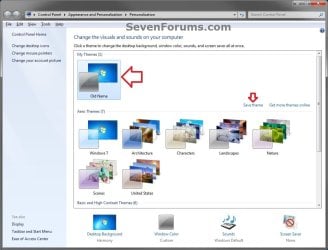
Save_Theme.jpg
3. If you have any files or folders in your C:\Users\(user-name) profile folder that are set to be shared, then you will need to temporarily set them to not be shared for now. After you finish renaming the user profile folder name, you could set them to be shared again in step 23 below.

4. Log off the user account that you want to change the name of. (see screenshot below)
NOTE: If you do not have another administrator account to use, then create a new administrator account first, then log off. When finished with the tutorial, you can delete this newly created account.
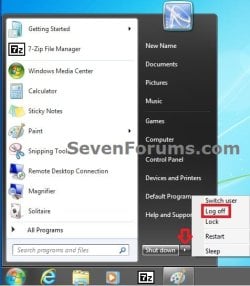
Log_Off.jpg
5. Log on to an administrator account that is not the user account that you want to change the name of.

6. Open Windows Explorer, navigate to C:\Users, open the Users folder, right click on the user profile folder (ex: Old Name) that you want to change the name of, and click on Rename. (see screenshot below)
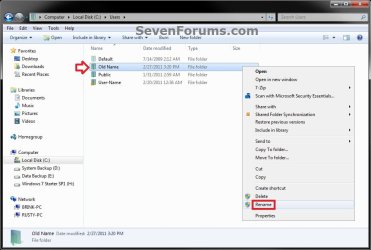
Step1.jpg
7. Type in the name (ex: New Name) that you want this user account's folder to have now and press Enter. Close the Windows Explorer window. (see screenshot below)
NOTE: If you are not able to rename the user folder for some reason (ex: in use), then boot into Safe Mode and try again.
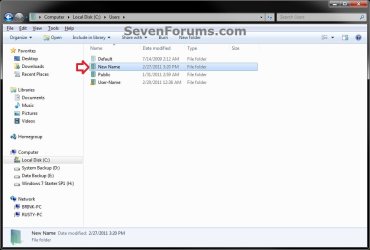
Step2.jpg
8. If prompted, click on Continue and Yes (UAC) to approve renaming the user folder.

9. Open the Start Menu, and type regedit in the search box and press Enter.

10. If prompted by UAC, then click on Yes.

11. In regedit, navigate to the location below. (see screenshot below)

Code:
HKEY_LOCAL_MACHINE\SOFTWARE\Microsoft\Windows NT\CurrentVersion\ProfileList
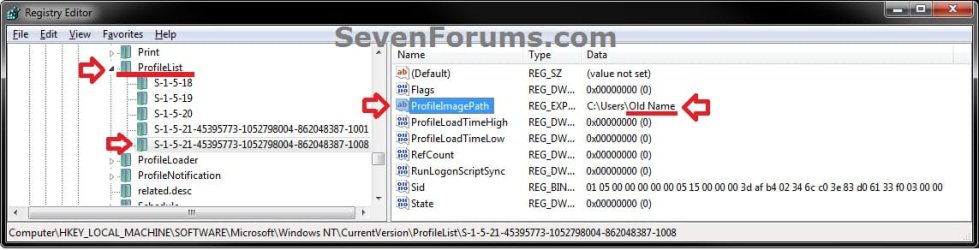
Step3.jpg
12. In the left pane of regedit, expand Profilelist, and select each long number S-1-5-.... key one by one until your see the user account name (ex: Old Name) that you want to change the name of included in the Data column of ProfileImagePath in the right pane. (see screenshot above)

13. In the right pane of the long number S-1-5-.... key for the user account (ex: Old Name) that you want to change the name of, right click on ProfileImagePath, and click on Modify. (see screenshot below.
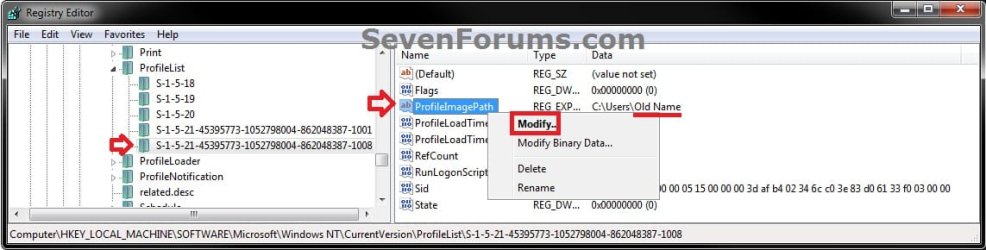
Step6.jpg
14. Change only the name (ex: Old Name) in the full path to the name (ex: New Name) that you want for the user account, and click on OK. (see screenshot below)
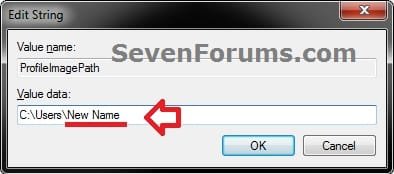
Step5.jpg
15. Close regedit.

16. Press the Windows + R keys to open the Run dialog, type netplwiz, and click on OK. (see screenshot below)
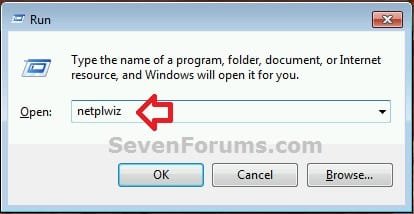
netplwiz-1.jpg
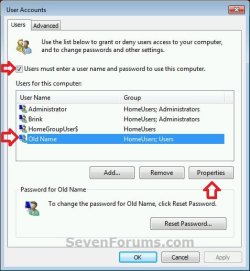
17. Check the Users must enter a user name and password to use this computer box, select the user account's old name (ex: Old Name), and click on the Properties button. (see screenshot below)
netplwiz-2.jpg
18. Change both the User name and Full name to the same new name (ex: New Name) from step 7 above, and click on OK. (see screenshot below)
netplwiz-3.jpg
19. Click on OK, and Restart the computer to apply. (see screenshot below step 17)

20. Log on to the now completely renamed user account (ex: New Name) from step 1 above.

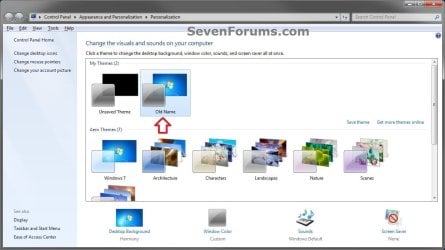
21. When you log on to the renamed user account (ex: New Name) for the first time, you will notice that the desktop background wallpaper is now solid black. This is normal. Change the theme from the black Unsaved Theme to the theme (ex: Old Name) that you saved in step 2 above to restore the saved theme. (see screenshot below)
Theme-2.jpg
22. If you had to create a new administrator account at step 4 above to do this tutorial with, then you can now delete this newly created account if you like. This is not the New Name account.

23. If you had to set files to not be shared in step 3 above, then you can set them to be shared again if you like.

24. If you had Windows set to automatically log on to a user account at startup, then you can set that while logged on to an administrator account again if you like.


That's it,
Shawn


Last edited:
  • Like
Reactions: Arc
Hi,

Thanks for your very detailed description, I used to change my folder name in Windows 10.

I replaced my HP Envy 17 with Toshiba Satellite P70 laptop and as the chipset was Intel's HM86 instead of HM87, was able to put my SSD from HP into P70, driver updates were done automatically, but my folder name was still HP, now it's Toshiba and no loss of data or anything.

Credits to you.

Cheerz :) :D ;)
 

My Computer My Computer

At a glance

Windows 8.1 64 bit
Computer type
Laptop
OS
Windows 8.1 64 bit
Hi Galane

I waited a few weeks to see if you would report any problems.

After that wait I unfortunatley changed the old name to the new name as per your post and assumed that you had had no problems.

Do you have any step by step details of what you did to get out of the problem and make windows update work again?


Regards.
 

My Computer My Computer

At a glance

Windows 7 Home PremiumIntel Core i3 380M @ 2.53GHz Arrandale 32nm T...4.00GB Dual-Channel DDR3 @ 532MHz (7-7-7-20)LCD 1366x768 (1366x768@60Hz) Intel HD Graphic...
Computer type
Laptop
Computer Manufacturer/Model Number
Lenovo
OS
Windows 7 Home Premium
CPU
Intel Core i3 380M @ 2.53GHz Arrandale 32nm Technology
Motherboard
LENOVO 4444CTO (CPU 1)
Memory
4.00GB Dual-Channel DDR3 @ 532MHz (7-7-7-20)
Graphics Card(s)
LCD 1366x768 (1366x768@60Hz) Intel HD Graphics (Lenovo)
Hard Drives
223GB SanDisk SDSSDHII240G ATA Device (SSD)
1GB SD Memory Card (SD)
Antivirus
F-Secure
Browser
FireFox
Hi,

I'm bit of a daredevil when it comes to my laptop, but I'm not stupid.

My Windows 10 Pro C:\ partition is basically a OS partition with my most used and trusted programs. I've been using Symantec Ghost 11.5.1 from DOS for probably 20+ years now and it's never let me down yet.

You see, I create GHOST .GHO image files, a 1:1 identical image of that partition, you can't just copy your files. I have image files coming out of my a$$ at various stages of install, like BARE (after all drivers working), EARLY (100% trusted programs working) and maybe CURRENT (shortcuts to other partitions).

You see, I worked out years ago that all of my documents, pictures, email contacts and messages, DATA files etc. had to be off my C:\ (OS partition) and be on another partition like D:\ drive which I called DATA, that way I don't have to copy all of my docs etc. before using GHOST to restore an image file to C:\, my OS partition.

Anyway, back to this thread.

I followed the instructions in post #1 and I changed my User Profile Folder Name and all was well, but then I thought about changing ALL references to my old name in the registry using Registrar Registry Manager, great program and my laptop wouldn't boot into Win 10 Pro, came up with error.

OK, restored GHOST image file to my SSD C:\ partition and in about 30 minutes, back in my desktop ready to try again.

This time I used Registrar Registry Manager and just searched for DATA MATCHES IN VALUES and changed old name to new user name.

Booted to my desktop but found that many things wouldn't work, couldn't connect to internet + others.

So my suggestion is if you want to change your user name, DO IT but STOP THERE, one wrong change in registry and that's it and you may not be able to get back to desktop.

With the last attempt where I lost internet connection etc., I created a backup of registry entries before I changed the name, I exported that file back into registry, rebooted and all was well.

Cheerz :) :D ;)

I waited a few weeks to see if you would report any problems.

After that wait I unfortunatley changed the old name to the new name as per your post and assumed that you had had no problems.

Do you have any step by step details of what you did to get out of the problem and make windows update work again?


Regards.
 

My Computer My Computer

At a glance

Windows 8.1 64 bit
Computer type
Laptop
OS
Windows 8.1 64 bit
Hi Kenmar,

I think that I am in your stupid category.

I took your post as red and changed all the old username to new username and now I can't get it to find any updates.

I'm normally extremely cautious about messing with the registry, but on this occasion I was too trusting.

OK, after going through the pain of creating a temporary administrator and following the tutorial there were old bits of the old username needing some applications to be reinstalled.

After your mass change in the registry, there were still bits of the old username in there.

My considered solution:-

Re-install Windows 7, a clean install using the correct administrator name. That's what I am doing now.

If you can't do a clean install then you will need to follow the excellent tutorial and put up with the occasional appearance of the old user name in file paths etc.

I should have done a clean install of Windows 7 a month ago.

Hindsight has 20 20 vision.
 

My Computer My Computer

At a glance

Windows 7 Home PremiumIntel Core i3 380M @ 2.53GHz Arrandale 32nm T...4.00GB Dual-Channel DDR3 @ 532MHz (7-7-7-20)LCD 1366x768 (1366x768@60Hz) Intel HD Graphic...
Computer type
Laptop
Computer Manufacturer/Model Number
Lenovo
OS
Windows 7 Home Premium
CPU
Intel Core i3 380M @ 2.53GHz Arrandale 32nm Technology
Motherboard
LENOVO 4444CTO (CPU 1)
Memory
4.00GB Dual-Channel DDR3 @ 532MHz (7-7-7-20)
Graphics Card(s)
LCD 1366x768 (1366x768@60Hz) Intel HD Graphics (Lenovo)
Hard Drives
223GB SanDisk SDSSDHII240G ATA Device (SSD)
1GB SD Memory Card (SD)
Antivirus
F-Secure
Browser
FireFox
Hi,

I don't recommend this mod, it seems OK on the surface but I just found the laptop wasn't running as well as it should, IE crashing, other programs that I've been using for a long time just hang.

There must be numerous times the PC/laptop is referencing the original username, probably in the registry but files aren't in the expected directory.

Cheerz :) :D ;)
 
Last edited:

My Computer My Computer

At a glance

Windows 8.1 64 bit
Computer type
Laptop
OS
Windows 8.1 64 bit
I have a new Lenovo Laptop with Win7 PRO 64bit, as yet unused other than to start the PC and register Windows OS.
- no AV nor any apps/programs other than what came with the new Lenovo,
- it appears to be bare bones other than the Lenovo extras that replace some Windows default services

C:\Users\Owner ... is the default user folder

Q1: Can I safely use this tutorial without an OEM disc ?
I have not made a recovery-disc yet, because it seems I only get one-shot at making a recovery disc, according to comments elsewhere.

I do have an ISO of Win7 Pro x64 -- squirreled away (ex Digital River)
- obviously the ISO does not have the Lenovo extras that might (or not) be required by the Lenovo hardware
- I believe Lenovo have a good battery management "feature" that Greg Rocker recommends be retained.


Q2: If I stuff-up the renaming exercise would I still be able to use the recovery disc (or an image) to get the Lenovo breathing again ?

In spite of my post count I am still a nervous-Nellie when it comes to tinkering with the OS :o

Any help is appreciated :)
 

My Computer My Computer

At a glance

XP Pro (x86) | 7 HP (x86) & (x64) | 7 Pro (x64)
Computer type
PC/Desktop
Computer Manufacturer/Model Number
Toshiba, Lenovo (laptops) + 4 rigs
OS
XP Pro (x86) | 7 HP (x86) & (x64) | 7 Pro (x64)
Hi,

Personally, I'd probably bite the bullet and do a clean install of Windows 10 Pro 64bit with Classic Shell 4.2.5 to give you the Windows 7 look and start menu.

I had a brand new Toshiba Satellite 17.3" and went for a clean Win10P install to get rid of the Toshiba bloatware, but could install specific Toshiba software I wanted by downloading from their site.

Check if your laptop is compatible with Windows 10 and if the software you want is available.

I was impressed with the Win10P install, a couple device drivers weren't initially installed, but when I checked back later that day, windows update had located those drivers and installed automatically.

Cheerz :) :D ;)
 

My Computer My Computer

At a glance

Windows 8.1 64 bit
Computer type
Laptop
OS
Windows 8.1 64 bit
Hello Russell, :)

Q1) You could create a new account with the user name you wanted instead, and delete the old account after moving over any files you wanted to the new account. This way you don't have to worry about anything breaking in the new account. You may have to create new shortcuts for stuff though.

You will still be able to download the OEM software and drivers at Lenovo's support site for your computer's model number.

Q2) If you create a system image before tinkering with this, then you'll be able to do a system image recovery to undo a mistake.
 

My Computer My Computer

At a glance

64-bit Windows 11 Pro for WorkstationsIntel i7-8700K OC'd to 5 GHz64 GB (4x16GB) G.SKILL TridentZ RGB DDR4 3600...ASUS ROG-STRIX-GTX1080TI-O11G-GAMING
Computer type
PC/Desktop
Computer Manufacturer/Model Number
Self built custom
OS
64-bit Windows 11 Pro for Workstations
CPU
Intel i7-8700K OC'd to 5 GHz
Motherboard
ASUS ROG Maximus XI Formula Z390
Memory
64 GB (4x16GB) G.SKILL TridentZ RGB DDR4 3600 MHz
Graphics Card(s)
ASUS ROG-STRIX-GTX1080TI-O11G-GAMING
Sound Card
Integrated
Monitor(s) Displays
2 x Samsung Odyssey G7 27"
Screen Resolution
2560x1440
Hard Drives
1TB Samsung 990 PRO M.2,
4TB Samsung 990 PRO PRO M.2,
TerraMaster F8 SSD Plus NAS
PSU
Seasonic Prime Titanium 850W
Case
Thermaltake Core P3
Cooling
Corsair Hydro H115i
Keyboard
Logitech wireless K800
Mouse
Logitech MX Master 4
Internet Speed
2 Gb/s Download and 100 Mb/s Upload
Antivirus
Malwarebyte Anti-Malware Premium
Browser
Google Chrome
Other Info
Logitech Z625 speaker system,
Logitech BRIO 4K Pro webcam,
HP Color LaserJet Pro MFP M477fdn,
APC SMART-UPS RT 1000 XL - SURT1000XLI,
Galaxy S23 Plus phone
The name account in "Users" is different from the one used to log in, i don't know who this error was created. can this steps help to fix that?. For example i have an app called WinFix and i cannot use the automatic fix it offers for different problems because it says "Could not find file C:\Users\Charlie\AppData\Local\IconCache.db" and when i went to verify there the problem is that the folder name inside Users is called differently.
 

My Computer My Computer

At a glance

Windows 10 Home 64bIntel Core Solo 1.4Ghz 800Mhz FSBSamsung 4GB DDR3Intel GMA 4500MHD
Computer type
Laptop
Computer Manufacturer/Model Number
Acer Aspire 5810T8929
OS
Windows 10 Home 64b
CPU
Intel Core Solo 1.4Ghz 800Mhz FSB
Memory
Samsung 4GB DDR3
Graphics Card(s)
Intel GMA 4500MHD
Screen Resolution
1366x768
Hard Drives
Seagate Momentus XT (Hybrid HD) 750GB
Internet Speed
40 Mbs
Antivirus
Kaspersky Free Antivirus
Browser
Chrome 60.0.3112.113 (Official Build) (64-bit)
Hello LM2008, :)

It won't hurt to try and see. Just be sure to create a restore point before doing so to be able to easily undo if needed.
 

My Computer My Computer

At a glance

64-bit Windows 11 Pro for WorkstationsIntel i7-8700K OC'd to 5 GHz64 GB (4x16GB) G.SKILL TridentZ RGB DDR4 3600...ASUS ROG-STRIX-GTX1080TI-O11G-GAMING
Computer type
PC/Desktop
Computer Manufacturer/Model Number
Self built custom
OS
64-bit Windows 11 Pro for Workstations
CPU
Intel i7-8700K OC'd to 5 GHz
Motherboard
ASUS ROG Maximus XI Formula Z390
Memory
64 GB (4x16GB) G.SKILL TridentZ RGB DDR4 3600 MHz
Graphics Card(s)
ASUS ROG-STRIX-GTX1080TI-O11G-GAMING
Sound Card
Integrated
Monitor(s) Displays
2 x Samsung Odyssey G7 27"
Screen Resolution
2560x1440
Hard Drives
1TB Samsung 990 PRO M.2,
4TB Samsung 990 PRO PRO M.2,
TerraMaster F8 SSD Plus NAS
PSU
Seasonic Prime Titanium 850W
Case
Thermaltake Core P3
Cooling
Corsair Hydro H115i
Keyboard
Logitech wireless K800
Mouse
Logitech MX Master 4
Internet Speed
2 Gb/s Download and 100 Mb/s Upload
Antivirus
Malwarebyte Anti-Malware Premium
Browser
Google Chrome
Other Info
Logitech Z625 speaker system,
Logitech BRIO 4K Pro webcam,
HP Color LaserJet Pro MFP M477fdn,
APC SMART-UPS RT 1000 XL - SURT1000XLI,
Galaxy S23 Plus phone
User profile junctions seem to continue pointing to old folders. For example:
C:\Users\new_name\Application Data -> C:\Users\old_name\AppData\Roaming
 

My Computer My Computer

At a glance

Win 7 Ulti x64
Computer type
PC/Desktop
Computer Manufacturer/Model Number
HP
OS
Win 7 Ulti x64
Hello Ben, and welcome to Seven Forums. :)

Yeah, the only true way to fully rename is to delete the old account, and create a new account with the name you want instead.
 

My Computer My Computer

At a glance

64-bit Windows 11 Pro for WorkstationsIntel i7-8700K OC'd to 5 GHz64 GB (4x16GB) G.SKILL TridentZ RGB DDR4 3600...ASUS ROG-STRIX-GTX1080TI-O11G-GAMING
Computer type
PC/Desktop
Computer Manufacturer/Model Number
Self built custom
OS
64-bit Windows 11 Pro for Workstations
CPU
Intel i7-8700K OC'd to 5 GHz
Motherboard
ASUS ROG Maximus XI Formula Z390
Memory
64 GB (4x16GB) G.SKILL TridentZ RGB DDR4 3600 MHz
Graphics Card(s)
ASUS ROG-STRIX-GTX1080TI-O11G-GAMING
Sound Card
Integrated
Monitor(s) Displays
2 x Samsung Odyssey G7 27"
Screen Resolution
2560x1440
Hard Drives
1TB Samsung 990 PRO M.2,
4TB Samsung 990 PRO PRO M.2,
TerraMaster F8 SSD Plus NAS
PSU
Seasonic Prime Titanium 850W
Case
Thermaltake Core P3
Cooling
Corsair Hydro H115i
Keyboard
Logitech wireless K800
Mouse
Logitech MX Master 4
Internet Speed
2 Gb/s Download and 100 Mb/s Upload
Antivirus
Malwarebyte Anti-Malware Premium
Browser
Google Chrome
Other Info
Logitech Z625 speaker system,
Logitech BRIO 4K Pro webcam,
HP Color LaserJet Pro MFP M477fdn,
APC SMART-UPS RT 1000 XL - SURT1000XLI,
Galaxy S23 Plus phone
Wondering if this tutorial would work to change the name of the C:\Users\(user-name) folder in Windows 10??

Have an error in the User name...

Thanks in advance for the help.
 

My Computer My Computer

At a glance

Windows 7 Home Premium
Computer type
PC/Desktop
Computer Manufacturer/Model Number
An ol' eMachines
OS
Windows 7 Home Premium
Internet Speed
Fine for me...I'm retired!
Hey cottonball, :)

Usually it would be best to create a new account with the user name you want instead.
 

My Computer My Computer

At a glance

64-bit Windows 11 Pro for WorkstationsIntel i7-8700K OC'd to 5 GHz64 GB (4x16GB) G.SKILL TridentZ RGB DDR4 3600...ASUS ROG-STRIX-GTX1080TI-O11G-GAMING
Computer type
PC/Desktop
Computer Manufacturer/Model Number
Self built custom
OS
64-bit Windows 11 Pro for Workstations
CPU
Intel i7-8700K OC'd to 5 GHz
Motherboard
ASUS ROG Maximus XI Formula Z390
Memory
64 GB (4x16GB) G.SKILL TridentZ RGB DDR4 3600 MHz
Graphics Card(s)
ASUS ROG-STRIX-GTX1080TI-O11G-GAMING
Sound Card
Integrated
Monitor(s) Displays
2 x Samsung Odyssey G7 27"
Screen Resolution
2560x1440
Hard Drives
1TB Samsung 990 PRO M.2,
4TB Samsung 990 PRO PRO M.2,
TerraMaster F8 SSD Plus NAS
PSU
Seasonic Prime Titanium 850W
Case
Thermaltake Core P3
Cooling
Corsair Hydro H115i
Keyboard
Logitech wireless K800
Mouse
Logitech MX Master 4
Internet Speed
2 Gb/s Download and 100 Mb/s Upload
Antivirus
Malwarebyte Anti-Malware Premium
Browser
Google Chrome
Other Info
Logitech Z625 speaker system,
Logitech BRIO 4K Pro webcam,
HP Color LaserJet Pro MFP M477fdn,
APC SMART-UPS RT 1000 XL - SURT1000XLI,
Galaxy S23 Plus phone
Thanks, Brink!

...what if you are too lazy to move files and stuff to the new account?
 

My Computer My Computer

At a glance

Windows 7 Home Premium
Computer type
PC/Desktop
Computer Manufacturer/Model Number
An ol' eMachines
OS
Windows 7 Home Premium
Internet Speed
Fine for me...I'm retired!
You could give it a try and see, but I would recommend to back up first.
 

My Computer My Computer

At a glance

64-bit Windows 11 Pro for WorkstationsIntel i7-8700K OC'd to 5 GHz64 GB (4x16GB) G.SKILL TridentZ RGB DDR4 3600...ASUS ROG-STRIX-GTX1080TI-O11G-GAMING
Computer type
PC/Desktop
Computer Manufacturer/Model Number
Self built custom
OS
64-bit Windows 11 Pro for Workstations
CPU
Intel i7-8700K OC'd to 5 GHz
Motherboard
ASUS ROG Maximus XI Formula Z390
Memory
64 GB (4x16GB) G.SKILL TridentZ RGB DDR4 3600 MHz
Graphics Card(s)
ASUS ROG-STRIX-GTX1080TI-O11G-GAMING
Sound Card
Integrated
Monitor(s) Displays
2 x Samsung Odyssey G7 27"
Screen Resolution
2560x1440
Hard Drives
1TB Samsung 990 PRO M.2,
4TB Samsung 990 PRO PRO M.2,
TerraMaster F8 SSD Plus NAS
PSU
Seasonic Prime Titanium 850W
Case
Thermaltake Core P3
Cooling
Corsair Hydro H115i
Keyboard
Logitech wireless K800
Mouse
Logitech MX Master 4
Internet Speed
2 Gb/s Download and 100 Mb/s Upload
Antivirus
Malwarebyte Anti-Malware Premium
Browser
Google Chrome
Other Info
Logitech Z625 speaker system,
Logitech BRIO 4K Pro webcam,
HP Color LaserJet Pro MFP M477fdn,
APC SMART-UPS RT 1000 XL - SURT1000XLI,
Galaxy S23 Plus phone
Thanks again!!

Will check on doing a backup. This is happening on a Tablet/Laptop (2 in 1) where the SSD is only 32GB. Trying to stay as lean as possible...
 

My Computer My Computer

At a glance

Windows 7 Home Premium
Computer type
PC/Desktop
Computer Manufacturer/Model Number
An ol' eMachines
OS
Windows 7 Home Premium
Internet Speed
Fine for me...I'm retired!
Ouch. That is tight.
 

My Computer My Computer

At a glance

64-bit Windows 11 Pro for WorkstationsIntel i7-8700K OC'd to 5 GHz64 GB (4x16GB) G.SKILL TridentZ RGB DDR4 3600...ASUS ROG-STRIX-GTX1080TI-O11G-GAMING
Computer type
PC/Desktop
Computer Manufacturer/Model Number
Self built custom
OS
64-bit Windows 11 Pro for Workstations
CPU
Intel i7-8700K OC'd to 5 GHz
Motherboard
ASUS ROG Maximus XI Formula Z390
Memory
64 GB (4x16GB) G.SKILL TridentZ RGB DDR4 3600 MHz
Graphics Card(s)
ASUS ROG-STRIX-GTX1080TI-O11G-GAMING
Sound Card
Integrated
Monitor(s) Displays
2 x Samsung Odyssey G7 27"
Screen Resolution
2560x1440
Hard Drives
1TB Samsung 990 PRO M.2,
4TB Samsung 990 PRO PRO M.2,
TerraMaster F8 SSD Plus NAS
PSU
Seasonic Prime Titanium 850W
Case
Thermaltake Core P3
Cooling
Corsair Hydro H115i
Keyboard
Logitech wireless K800
Mouse
Logitech MX Master 4
Internet Speed
2 Gb/s Download and 100 Mb/s Upload
Antivirus
Malwarebyte Anti-Malware Premium
Browser
Google Chrome
Other Info
Logitech Z625 speaker system,
Logitech BRIO 4K Pro webcam,
HP Color LaserJet Pro MFP M477fdn,
APC SMART-UPS RT 1000 XL - SURT1000XLI,
Galaxy S23 Plus phone
That's right!

So far, have kept 10-12 GB of the SD filled, and do not wish to go too much beyond that.
Basically, this machine is a tablet that can be used as a laptop. It is fine for what I do.
 

My Computer My Computer

At a glance

Windows 7 Home Premium
Computer type
PC/Desktop
Computer Manufacturer/Model Number
An ol' eMachines
OS
Windows 7 Home Premium
Internet Speed
Fine for me...I'm retired!
Needed to change User Profile Folder Name and followed this tutorial. Ran into a problem at steps 18 & 19. The propertis box of the user name I was trying to change. It showed the OLD NAME in the [User Name] Box and the New Name in the [Full Name Box], typed the NEW NAME in the [User Name] box and clicked OK but got a message that it could not change the name. Closed out restarted in safe mode tried again with same respose, was going to ask for help. Sat there staring at the the properties window trying to figure whats not done, reviewed each step, that I had done all correctly before asking for help. Everything was done just as instructed. Then I noticed in the Properties Window that the user account I was trying to change has square check box for user needs PASSWORD to login and this box had a check in it so I unchecked it. Got spinning circle this will take a min. Waited 5 min still spinning so I did complete shut down not restart and waited a few min then booted back up. It booted right into the user account I was trying to change, went to CMD and now the CMD shows the correct name. So this was a mission completed successfully but you might want to put a note in your steps to make sure the Password Check Box is UNCHECKED before you click OK. Nice tutorial, thank you.
 

My Computer My Computer

At a glance

W7
OS
W7
Back
Top