Internet Explorer - Delete Temporary Files Shortcut

How to Create a Shortcut to Delete Internet Explorer Temporary Files

   Information
This tutorial will show you how to create a shortcut to automatically delete Internet Explorer 8 temporary files by just a single click or delete it automatically.
   Note
This will delete all cookie and temporary files that are stored in Internet explorer.


Here's how:
1. Click Start and in the Start Search box, type notepad and press Enter.

2. Copy and paste the below mentioned code in the notepad.
Code:
cd %homedrive%%homepath%
rd /s/q locals~1\tempor~1
rd /s/q locals~1\temp\tempor~1
rd /s/q cookies
rd /s/q temp\cookies
rd /s/q locals~1\history
rd /s/q locals~1\temp\history
rd /s/q recent
md recent
rd /s/q locals~1\temp
md locals~1\temp "
3. Save the notepad on your desktop and name it as deletetemp.cmd

4. Now you can simply double click the deletetemp icon on your desktop and all the temp files and cookies from the IE browser will be deleted.

5. You can also save this file in the following hidden directory below so that it will delete all temp files automatically on start-up:
Code:
C:\Users\Username\AppData\Roaming\Microsoft\Windows\Start Menu\Programs\Startup
That's it,
Dinesh.


Last edited by a moderator:
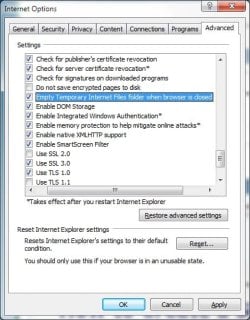
Why not simply select delete Internet Temporary files when you exit IE ?:sarc:
 

Attachments

  • ClearInternet.jpg
    ClearInternet.jpg
    85.7 KB · Views: 7,383

My Computer

Computer Manufacturer/Model Number
Playtech
OS
Windows 7 Ultimate x64
CPU
Core i7 920
Motherboard
ASUS P6T
Memory
6 GB
Graphics Card(s)
ATI Radeon HD 4870
Sound Card
SoundMAX
Monitor(s) Displays
LG 26" and 22"
Screen Resolution
1900x1200 & 1650x1050
Hard Drives
Western Digital VelociRaptor
Why not simply select delete Internet Temporary files when you exit IE ?:sarc:
By your method:
!: You need more than 1 click to do it everytime.
2: You cannot run it automatically at startup.;)
 

My Computer

Computer Manufacturer/Model Number
Samsung NP530U4B-S02IN
OS
Windows® 8 Pro (64-bit)
CPU
Intel® Core™ i5 Processor 2467M (1.60GHz, 3MB L3 Cache)
Motherboard
Samsung Electronics
Memory
6GB DDR3 System Memory at 1,333MHz (on BD 4GB + 2GB x 1)
Graphics Card(s)
AMD Radeon™ HD7550M 1GB DDR3 (Ext. Graphic)
Sound Card
Realtek High Definition Audio
Monitor(s) Displays
35.56cm (14.0) SuperBright 300nit HD LED Display
Screen Resolution
1366x768
Hard Drives
1TB S-ATA II Hard Drive (5400RPM) with ExpressCache 16GB SSD
Internet Speed
sucks
Antivirus
Microsoft Security Essentials
Browser
Google Chrome (Sync enabled)
This method has proven to much easier to use than my old method of format c: /u
 
This method has proven to much easier to use than my old method of format c: /u
Thanks. I m glad that you like it. :D
 

My Computer

Computer Manufacturer/Model Number
Samsung NP530U4B-S02IN
OS
Windows® 8 Pro (64-bit)
CPU
Intel® Core™ i5 Processor 2467M (1.60GHz, 3MB L3 Cache)
Motherboard
Samsung Electronics
Memory
6GB DDR3 System Memory at 1,333MHz (on BD 4GB + 2GB x 1)
Graphics Card(s)
AMD Radeon™ HD7550M 1GB DDR3 (Ext. Graphic)
Sound Card
Realtek High Definition Audio
Monitor(s) Displays
35.56cm (14.0) SuperBright 300nit HD LED Display
Screen Resolution
1366x768
Hard Drives
1TB S-ATA II Hard Drive (5400RPM) with ExpressCache 16GB SSD
Internet Speed
sucks
Antivirus
Microsoft Security Essentials
Browser
Google Chrome (Sync enabled)
By your method:
!: You need more than 1 click to do it everytime.
2: You cannot run it automatically at startup.;)

Set it once and your files are deleted everytime you exit IE.

Also, set your browsing history to 0 days. Set your cookies to accept First-Party Cookies and Block third Party cookies.

And you are done. No more clicks. :D

Never need to worry about it again. Why make it hard when Windows makes it easy for you ?

In addition, if you are really paranoid, you can install ccleaner (freeware) and run it every day on startup to clean your computer.
 

My Computer

Computer Manufacturer/Model Number
Playtech
OS
Windows 7 Ultimate x64
CPU
Core i7 920
Motherboard
ASUS P6T
Memory
6 GB
Graphics Card(s)
ATI Radeon HD 4870
Sound Card
SoundMAX
Monitor(s) Displays
LG 26" and 22"
Screen Resolution
1900x1200 & 1650x1050
Hard Drives
Western Digital VelociRaptor
Hi,

Is there any way I can unhide certain files in the temporary internet files folder (like *.flv and other media files) so that they are more easily accessible?
 

My Computer

OS
win7
Hi,

Is there any way I can unhide certain files in the temporary internet files folder (like *.flv and other media files) so that they are more easily accessible?

Sorry. not that i m aware of.
 

My Computer

Computer Manufacturer/Model Number
Samsung NP530U4B-S02IN
OS
Windows® 8 Pro (64-bit)
CPU
Intel® Core™ i5 Processor 2467M (1.60GHz, 3MB L3 Cache)
Motherboard
Samsung Electronics
Memory
6GB DDR3 System Memory at 1,333MHz (on BD 4GB + 2GB x 1)
Graphics Card(s)
AMD Radeon™ HD7550M 1GB DDR3 (Ext. Graphic)
Sound Card
Realtek High Definition Audio
Monitor(s) Displays
35.56cm (14.0) SuperBright 300nit HD LED Display
Screen Resolution
1366x768
Hard Drives
1TB S-ATA II Hard Drive (5400RPM) with ExpressCache 16GB SSD
Internet Speed
sucks
Antivirus
Microsoft Security Essentials
Browser
Google Chrome (Sync enabled)
Back
Top