
How to Reset and Clear Common Dialog Boxes Dropdown List of Recent Files History
Information
The common open file dialog box is the one that opens when you click on File (menu bar), and say either Open, Save, Import, or Export.
This will show you how to reset and clear the list of most recently used (opened and saved) files from all of your (currently logged in user) common open file dialog boxes drop down list in Vista, Windows 7, and Windows 8.
This does not affect auto suggest and auto complete.
This will show you how to reset and clear the list of most recently used (opened and saved) files from all of your (currently logged in user) common open file dialog boxes drop down list in Vista, Windows 7, and Windows 8.
This does not affect auto suggest and auto complete.
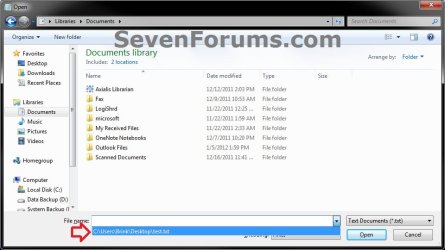
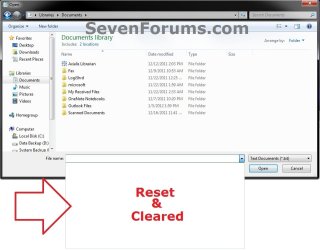
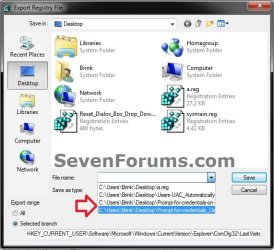
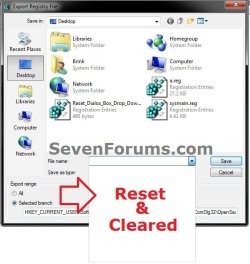
EXAMPLE: Common Open File Dialog Boxes Drop Down List of Recent Files Before and After Reset
Here's How:
1. Click/tap on the Download button below to download the file below.
Reset_Common_Dialog_Boxes_Dropdown_List_of_Recent_Files_History.reg
Download
2. Save the .reg file to your Desktop.
3. Double click/tap on the downloaded .reg file to merge it.
4. Double click/tap on Run, Yes (Windows 7/8) or Continue (Vista), Yes, and OK when prompted.
5. When finished, you can delete the downloaded .reg file if you like.
That's it,
Shawn
Related Tutorials
- How to Enable or Disable Common Dialog Boxes Dropdown List of Recent Files
- How to Customize Default Places Bar in Windows Common File Dialog Boxes
- How to Hide or Show Common Open File Dialog Places Bar in Windows
- How to Delete Typed Paths in Windows Explorer Auto Suggest Drop Down List
- How to Turn AutoComplete On or Off in Windows Explorer
- How to Turn AutoComplete On or Off in Internet Explorer
- How to Turn Auto Suggest On or Off in Windows Explorer
- How to Enable or Disable Search Suggestions in Internet Explorer
- How to Delete Typed URLs in Internet Explorer Auto Suggest Drop Down List
- How to Delete Paint "Recent Pictures" from List in Windows 7 and Windows 8
- How to Delete "Recent documents" from List in Windows 7 WordPad
Attachments
Last edited:

