
Internet Explorer 10 (IE10) Spelling Correction - Enable or Disable

How to Enable or Disable Spelling Correction in Internet Explorer 10 (IE10)

   Information
Internet Explorer 10 (IE10) includes a new spelling correction feature that autocorrects and highlights misspelled words.

In Windows 8, spelling correction is included in both Internet Explorer 10 (IE10) desktop and Windows UI (Metro) versions.

This tutorial will show you how to enable or disable spelling correction in Internet Explorer 10 (IE10) in Windows 7 and Windows 8.

   Note
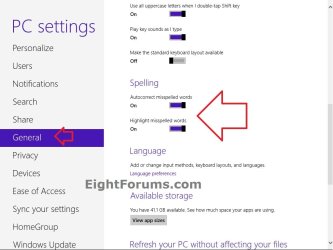
Autocorrect misspelled words - When turned on, will autocorrect the spelling of your typed words on the fly if it is matched with the correct spelling of the word in the dictionary. For example, type squigly and press the space bar after it, and it will be autocorrected to squiggly.

Hightlight misspelled words - When turned on, will highlight the misspelled word by having a red squiggly line under it.


This will not work in IE11. Use this below for IE11 instead.

How to Turn Spelling "Autocorrect" and "Highlight" Misspelled Words On or Off in Windows 8 and 8.1

   Tip
Windows 8 includes IE10 already.

To download IE10 Release Preview for Windows 7 to install, see:

Internet Explorer 10 Release Preview - Microsoft Windows

or

Download Internet Explorer 10 Release Preview


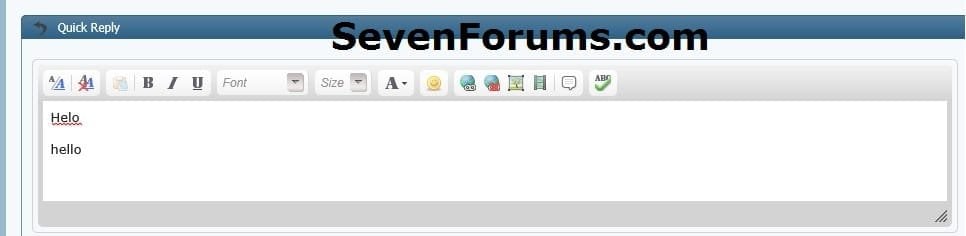
EXAMPLE: "Highlight misspelled word" in IE10
NOTE: This is an example when typing a misspelled word here at SevenForums in IE10.
Highlight-SF.jpg


OPTION ONE

Enable or Disable IE10 Spelling Correction in Windows 7


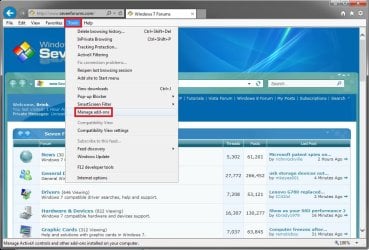
1. In IE10, click/tap on Tools (menu bar), and Manage add-ons. (see screenshot below)
W7_IE10-1.jpg
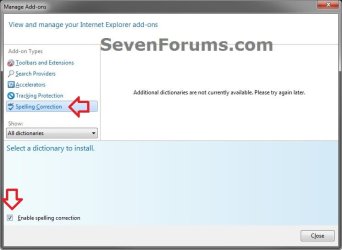
2. In the top left pane, click/tap on Spelling Correction, and do step 3 or 4 below for what you would like to do. (see screenshot below)
W7_IE10-2.jpg
3. To Enable Spelling Correction in IE10
NOTE: This is the default setting.
A) In the bottom pane, check the Enable spelling correction box, click/tap on Close, and go to step 5 below. (see screenshot below step 2)
4. To Disable Spelling Correction in IE10
A) In the bottom pane, uncheck the Enable spelling correction box, click/tap on Close, and go to step 5 below. (see screenshot below step 2)
5. Either reload/refresh the page/tab in IE10, or close and reopen IE10 to apply.


OPTION TWO

Enable or Disable IE10 Spelling Correction in Windows 8


1. For how, see:

How to Turn Spelling "Autocorrect" and "Highlight" Misspelled Words On or Off in Windows 8

PC_settings.jpg


That's it,
Shawn


Last edited:
The spell checker on IE11 has always worked since I installed Windows 7.

No IE11 has always been installed, I've never used IE10.
 

My Computer My Computer

At a glance

Windows 7 Professional 32bit SP1, Windows 10 ...Intel Pentium B970 @ 2.30GHz, DELL DELL Intel...8GBNVIDIA GeForce MX230 (Dell)
Computer type
Laptop
Computer Manufacturer/Model Number
Samsung won't charge Now Dell Inspiron 17 3793
OS
Windows 7 Professional 32bit SP1, Windows 10 Home 64-bit at the moment
CPU
Intel Pentium B970 @ 2.30GHz, DELL DELL Intel 3793 Core i5 1
Motherboard
DELL 0C9WH2
Memory
8GB
Graphics Card(s)
NVIDIA GeForce MX230 (Dell)
Sound Card
Realtek High Definition Audio
Monitor(s) Displays
17.3" HD+ LED Display
Screen Resolution
1920x1040
Hard Drives
99GB (RAID SHIT SSD), Seagate 1TB SATA III DATA

Seagate ST1000LM048-2E7172 (SATA III)
Mouse
USB remote
Antivirus
Avast Free Antivirus 20.10.2442
Browser
Internet Explorer 11, FireFox
Other Info
DELL shit Its the worst laptop design ever made the laptop battery is inbuilt who the hell makes a laptop battery inbuilt DELL shit does, can't wait until the 1TB HDD is replaced and RAID shit is removed
I meant that this tutorial is only for IE10 instead. ;)
 

My Computer My Computer

At a glance

64-bit Windows 11 Pro for WorkstationsIntel i7-8700K OC'd to 5 GHz64 GB (4x16GB) G.SKILL TridentZ RGB DDR4 3600...ASUS ROG-STRIX-GTX1080TI-O11G-GAMING
Computer type
PC/Desktop
Computer Manufacturer/Model Number
Self built custom
OS
64-bit Windows 11 Pro for Workstations
CPU
Intel i7-8700K OC'd to 5 GHz
Motherboard
ASUS ROG Maximus XI Formula Z390
Memory
64 GB (4x16GB) G.SKILL TridentZ RGB DDR4 3600 MHz
Graphics Card(s)
ASUS ROG-STRIX-GTX1080TI-O11G-GAMING
Sound Card
Integrated
Monitor(s) Displays
2 x Samsung Odyssey G7 27"
Screen Resolution
2560x1440
Hard Drives
1TB Samsung 990 PRO M.2,
4TB Samsung 990 PRO PRO M.2,
TerraMaster F8 SSD Plus NAS
PSU
Seasonic Prime Titanium 850W
Case
Thermaltake Core P3
Cooling
Corsair Hydro H115i
Keyboard
Logitech wireless K800
Mouse
Logitech MX Master 4
Internet Speed
2 Gb/s Download and 100 Mb/s Upload
Antivirus
Malwarebyte Anti-Malware Premium
Browser
Google Chrome
Other Info
Logitech Z625 speaker system,
Logitech BRIO 4K Pro webcam,
HP Color LaserJet Pro MFP M477fdn,
APC SMART-UPS RT 1000 XL - SURT1000XLI,
Galaxy S23 Plus phone
Yes I know its for IE10 but as I said I searched the forum and this is the closest thread that talks about enable/disable the spell checker. If there is a better thread then please move my post or move it into a new thread, sorry.
 

My Computer My Computer

At a glance

Windows 7 Professional 32bit SP1, Windows 10 ...Intel Pentium B970 @ 2.30GHz, DELL DELL Intel...8GBNVIDIA GeForce MX230 (Dell)
Computer type
Laptop
Computer Manufacturer/Model Number
Samsung won't charge Now Dell Inspiron 17 3793
OS
Windows 7 Professional 32bit SP1, Windows 10 Home 64-bit at the moment
CPU
Intel Pentium B970 @ 2.30GHz, DELL DELL Intel 3793 Core i5 1
Motherboard
DELL 0C9WH2
Memory
8GB
Graphics Card(s)
NVIDIA GeForce MX230 (Dell)
Sound Card
Realtek High Definition Audio
Monitor(s) Displays
17.3" HD+ LED Display
Screen Resolution
1920x1040
Hard Drives
99GB (RAID SHIT SSD), Seagate 1TB SATA III DATA

Seagate ST1000LM048-2E7172 (SATA III)
Mouse
USB remote
Antivirus
Avast Free Antivirus 20.10.2442
Browser
Internet Explorer 11, FireFox
Other Info
DELL shit Its the worst laptop design ever made the laptop battery is inbuilt who the hell makes a laptop battery inbuilt DELL shit does, can't wait until the 1TB HDD is replaced and RAID shit is removed

My Computer My Computer

At a glance

64-bit Windows 11 Pro for WorkstationsIntel i7-8700K OC'd to 5 GHz64 GB (4x16GB) G.SKILL TridentZ RGB DDR4 3600...ASUS ROG-STRIX-GTX1080TI-O11G-GAMING
Computer type
PC/Desktop
Computer Manufacturer/Model Number
Self built custom
OS
64-bit Windows 11 Pro for Workstations
CPU
Intel i7-8700K OC'd to 5 GHz
Motherboard
ASUS ROG Maximus XI Formula Z390
Memory
64 GB (4x16GB) G.SKILL TridentZ RGB DDR4 3600 MHz
Graphics Card(s)
ASUS ROG-STRIX-GTX1080TI-O11G-GAMING
Sound Card
Integrated
Monitor(s) Displays
2 x Samsung Odyssey G7 27"
Screen Resolution
2560x1440
Hard Drives
1TB Samsung 990 PRO M.2,
4TB Samsung 990 PRO PRO M.2,
TerraMaster F8 SSD Plus NAS
PSU
Seasonic Prime Titanium 850W
Case
Thermaltake Core P3
Cooling
Corsair Hydro H115i
Keyboard
Logitech wireless K800
Mouse
Logitech MX Master 4
Internet Speed
2 Gb/s Download and 100 Mb/s Upload
Antivirus
Malwarebyte Anti-Malware Premium
Browser
Google Chrome
Other Info
Logitech Z625 speaker system,
Logitech BRIO 4K Pro webcam,
HP Color LaserJet Pro MFP M477fdn,
APC SMART-UPS RT 1000 XL - SURT1000XLI,
Galaxy S23 Plus phone
Back
Top