How to Turn On or Off PCIe Link State Power Management in Windows
Information
The Link State Power Management is a part of PCI Express Active State Power Management (ASPM). The link State of a PCIe Device is converted from L0 (on) to L1 (off) when the link is not transferring data. The hardware is automatically converted to L0 again when data is available to transfer across the link.
There are basically 2 levels of power management in the PCI Express options. The difference between these 2 options are the power savings versus the Latency (Time to recover from the Sleep state).
This tutorial will show you how to turn on or off the PCI Express Link State Power Management in Vista, Windows 7, and Windows 8.
There are basically 2 levels of power management in the PCI Express options. The difference between these 2 options are the power savings versus the Latency (Time to recover from the Sleep state).
- If you select Off, there is no power savings, and the current will run regardless of what state the laptop is in. (depending on if your laptop is plugged in or not).
- On battery: Off = PCI Express will communicate even when using battery power.
- Plugged in: Off = PCI Express will communicate when plugged in as well.
- If you select Moderate Power Savings, the power savings are less, but the time to recover from the Sleep state (latency) is much shorter.
- If you select Maximum Power Savings, the power savings are greater, but the time to recover from the Sleep state (latency) is much longer.
This tutorial will show you how to turn on or off the PCI Express Link State Power Management in Vista, Windows 7, and Windows 8.
How to Do it:
1. Open your advanced power plan settings in Vista/Windows 7 or Windows 8.
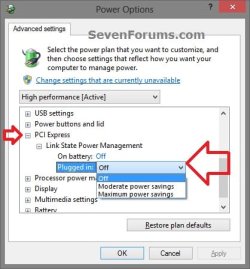
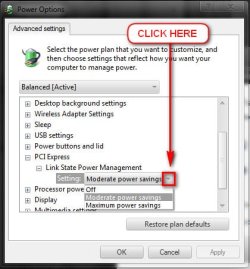
2. Scroll down and expand PCI Express and Link State Power Management. (see screenshots under step 5)
3. Do step 4 or 5 for what you would like to do.
4. To Turn Off PCI Express Link State Power Management
A) Under Setting (no battery) or On battery and Plugged in, open the drop down menu, select Off, and click/tap on OK.
5. To Turn On PCI Express Link State Power Management
A) Under Setting (no battery) or On battery and Plugged in, open the drop down menu, select either Moderate power savings or Maximum power savings for what you want, and click/tap on OK.
Last edited by a moderator: