PCIe Link State Power Management - Turn On or Off in Windows

How to Turn On or Off PCIe Link State Power Management in Windows


   Information
The Link State Power Management is a part of PCI Express Active State Power Management (ASPM). The link State of a PCIe Device is converted from L0 (on) to L1 (off) when the link is not transferring data. The hardware is automatically converted to L0 again when data is available to transfer across the link.

There are basically 2 levels of power management in the PCI Express options. The difference between these 2 options are the power savings versus the Latency (Time to recover from the Sleep state).


  • If you select Off, there is no power savings, and the current will run regardless of what state the laptop is in. (depending on if your laptop is plugged in or not).
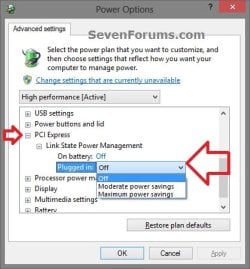
    • On battery: Off = PCI Express will communicate even when using battery power.
    • Plugged in: Off = PCI Express will communicate when plugged in as well.
  • If you select Moderate Power Savings, the power savings are less, but the time to recover from the Sleep state (latency) is much shorter.
  • If you select Maximum Power Savings, the power savings are greater, but the time to recover from the Sleep state (latency) is much longer.
Sometimes this mechanism cause a bit trouble during power transitions, specially during sleep. So it may be wanted to turn the Link State Power Management off, if necessary.


This tutorial will show you how to turn on or off the PCI Express Link State Power Management in Vista, Windows 7, and Windows 8.


How to Do it:


1. Open your advanced power plan settings in Vista/Windows 7 or Windows 8.

2. Scroll down and expand PCI Express and Link State Power Management. (see screenshots under step 5)

3. Do step 4 or 5 for what you would like to do.

4. To Turn Off PCI Express Link State Power Management
A) Under Setting (no battery) or On battery and Plugged in, open the drop down menu, select Off, and click/tap on OK.
5. To Turn On PCI Express Link State Power Management
A) Under Setting (no battery) or On battery and Plugged in, open the drop down menu, select either Moderate power savings or Maximum power savings for what you want, and click/tap on OK.
Advanced_Power_Options.jpg Advanced_Power_Options-2.jpg


Last edited by a moderator:
It's maximum saving (or middle saving) option or I can set it to "off".

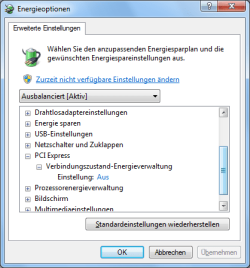
But the thing ist that I don't find the mentioned option:
Link State Power Management
not at all.

In the manual screenshot you see it directly.

Why don't I?
 

My Computer My Computer

At a glance

Win7 64-bit
Computer type
PC/Desktop
OS
Win7 64-bit
Click on the link, and let us see the resulting options by supplying another screenshot.
 

My Computer My Computer

At a glance

Microsoft Windows 10 Pro Insider Preview 64-bitIntel(R) Core(TM) i3-4130 CPU @ 3.40GHzCorsair Vengence 4GB x2 (8.00GB Dual-Channel ...2047MB GeForce GTS 450 (ZOTAC International)
Computer type
PC/Desktop
Computer Manufacturer/Model Number
Self Assembled
OS
Microsoft Windows 10 Pro Insider Preview 64-bit
CPU
Intel(R) Core(TM) i3-4130 CPU @ 3.40GHz
Motherboard
Gigabyte Technology Co., Ltd. B85M-D3H
Memory
Corsair Vengence 4GB x2 (8.00GB Dual-Channel DDR3 @ 798MHz)
Graphics Card(s)
2047MB GeForce GTS 450 (ZOTAC International)
Sound Card
Onboard (Realtek High Definition Audio)
Monitor(s) Displays
LG Flatron E2040T
Screen Resolution
1600x900
Hard Drives
Western Digital 1 TB
Seagate 500 GB
PSU
Corsair VS550
Case
Cooler Master K380
Cooling
Cooler Master Seidon 120V Plus
Keyboard
Logitech MK260r
Mouse
Logitech MK260r
Internet Speed
PMPL Broadband
Antivirus
Windows Defender + MBAM
Browser
Firefox
Other Info
Dell Studio 15" Laptop
New Screenshot

Hi,

I turned it off, see new screenshot.

Now the poercfg returns 3 errors.

Error #1 = Processor at work (no problem for me)

Error #2 = PCI Express-ASPM ist off (it's true, I configured it)

Error #3 = PCI Express-ASPM (Active-State Power Management) is deactived (by the system) because of
incompatiblewurde Computerhardware.


And now?
 

Attachments

  • energy-pci-option.png
    energy-pci-option.png
    13.9 KB · Views: 6,040

My Computer My Computer

At a glance

Win7 64-bit
Computer type
PC/Desktop
OS
Win7 64-bit
Actually what are you wanting to do?
 

My Computer My Computer

At a glance

Microsoft Windows 10 Pro Insider Preview 64-bitIntel(R) Core(TM) i3-4130 CPU @ 3.40GHzCorsair Vengence 4GB x2 (8.00GB Dual-Channel ...2047MB GeForce GTS 450 (ZOTAC International)
Computer type
PC/Desktop
Computer Manufacturer/Model Number
Self Assembled
OS
Microsoft Windows 10 Pro Insider Preview 64-bit
CPU
Intel(R) Core(TM) i3-4130 CPU @ 3.40GHz
Motherboard
Gigabyte Technology Co., Ltd. B85M-D3H
Memory
Corsair Vengence 4GB x2 (8.00GB Dual-Channel DDR3 @ 798MHz)
Graphics Card(s)
2047MB GeForce GTS 450 (ZOTAC International)
Sound Card
Onboard (Realtek High Definition Audio)
Monitor(s) Displays
LG Flatron E2040T
Screen Resolution
1600x900
Hard Drives
Western Digital 1 TB
Seagate 500 GB
PSU
Corsair VS550
Case
Cooler Master K380
Cooling
Cooler Master Seidon 120V Plus
Keyboard
Logitech MK260r
Mouse
Logitech MK260r
Internet Speed
PMPL Broadband
Antivirus
Windows Defender + MBAM
Browser
Firefox
Other Info
Dell Studio 15" Laptop
Hi,

I turned it off, see new screenshot.

Now the poercfg returns 3 errors.

Error #1 = Processor at work (no problem for me)

Error #2 = PCI Express-ASPM ist off (it's true, I configured it)

Error #3 = PCI Express-ASPM (Active-State Power Management) is deactived (by the system) because of
incompatiblewurde Computerhardware.


And now?

When i do use the command "powercfg" same as you, it does returns me exactly the same results (Error #3).

I think the Operating System disable it in a kind of automatic mode and is a normal behavior when launching the "powercfg -energy -output %USERPROFILE%\Desktop\Energy_Report.html" command
 

My Computer My Computer

At a glance

Windows 7 Professional SP1 - x64 [Non-UEFI Boot]Ivy Bridge Core i5 3570K (Delidded)G.Skill "Ares" DDR3 PC3-12800 - 1600MHz (16Gb)Asus Dual-RX480-O4G
Computer type
PC/Desktop
Computer Manufacturer/Model Number
Custom Build
OS
Windows 7 Professional SP1 - x64 [Non-UEFI Boot]
CPU
Ivy Bridge Core i5 3570K (Delidded)
Motherboard
Asus P8Z77-V LE PLUS
Memory
G.Skill "Ares" DDR3 PC3-12800 - 1600MHz (16Gb)
Graphics Card(s)
Asus Dual-RX480-O4G
Sound Card
Creative Sound Blaster Z w/5.1 sound system
Monitor(s) Displays
Asus IPS 23"
Screen Resolution
16/9
Hard Drives
Internal:
500Go Sata 6Gb/s (x2)
500Go Sata 3Gb/s (x2)
SSD 60Go Sata 6Gb/s
PSU
In Win C 900W Series 80+ Platinum
Case
Thermaltake Chaser A71
Cooling
Custom Water Cooling Loop
Keyboard
Cooler Master QuickFire XTi
Mouse
Razer Imperator 2012 (4G)
Antivirus
MSE
Browser
IE 11.0.xxx Rtm
Other Info
"Raid0" with Intel Smart Response Technology (HDD/SSD)
I have a power meter that counts tenths of Watt on my PC.
I see no difference at all between off, moderate and maximum.
When is it supposed to kick in when monitor goes on standby ?
 
Last edited:

My Computer My Computer

At a glance

windows 8.1 64bit
Computer type
PC/Desktop
OS
windows 8.1 64bit
Tested on monitor standby it has 1.5 Watt consumption drop.
Again 100% irrelevant if it's on off,moderate or maximum.
I suggest, unless you have a laptop that may benifit somehow....or not, to put that on Off.
 

My Computer My Computer

At a glance

windows 8.1 64bit
Computer type
PC/Desktop
OS
windows 8.1 64bit

My Computer My Computer

At a glance

64-bit Windows 11 Pro for WorkstationsIntel i7-8700K OC'd to 5 GHz64 GB (4x16GB) G.SKILL TridentZ RGB DDR4 3600...ASUS ROG-STRIX-GTX1080TI-O11G-GAMING
Computer type
PC/Desktop
Computer Manufacturer/Model Number
Self built custom
OS
64-bit Windows 11 Pro for Workstations
CPU
Intel i7-8700K OC'd to 5 GHz
Motherboard
ASUS ROG Maximus XI Formula Z390
Memory
64 GB (4x16GB) G.SKILL TridentZ RGB DDR4 3600 MHz
Graphics Card(s)
ASUS ROG-STRIX-GTX1080TI-O11G-GAMING
Sound Card
Integrated
Monitor(s) Displays
2 x Samsung Odyssey G7 27"
Screen Resolution
2560x1440
Hard Drives
1TB Samsung 990 PRO M.2,
4TB Samsung 990 PRO PRO M.2,
TerraMaster F8 SSD Plus NAS
PSU
Seasonic Prime Titanium 850W
Case
Thermaltake Core P3
Cooling
Corsair Hydro H115i
Keyboard
Logitech wireless K800
Mouse
Logitech MX Master 4
Internet Speed
2 Gb/s Download and 100 Mb/s Upload
Antivirus
Malwarebyte Anti-Malware Premium
Browser
Google Chrome
Other Info
Logitech Z625 speaker system,
Logitech BRIO 4K Pro webcam,
HP Color LaserJet Pro MFP M477fdn,
APC SMART-UPS RT 1000 XL - SURT1000XLI,
Galaxy S23 Plus phone
Back
Top