
How to Use Speccy in Windows to Publish your Complete System Specifications
Note
Speccy from Piriform is one of the best, in my subjective opinion the best program to extract and collect complete system specifications of your Windows PC.
Following these instructions you can publish your complete system specifications without revealing any personal information. The information cannot be used in any way to access your computer or network. Publishing the information Speccy extracts is absolutely 100% safe.
Following these instructions you can publish your complete system specifications without revealing any personal information. The information cannot be used in any way to access your computer or network. Publishing the information Speccy extracts is absolutely 100% safe.
Here's How:
1. If you have not already, you'll need to install Speccy (Free, Professional or Business).
2. While in Speccy, click on File menu and Publish Snapshot.
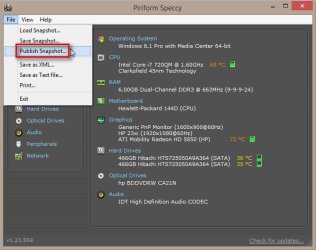
3. Click/tap on Yes to allow publishing.
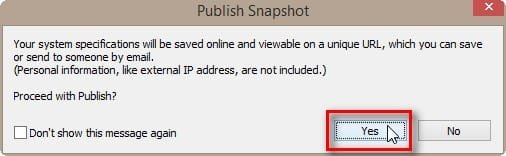 4. Speccy publishes your specs online creating a unique URL. Anyone with this URL can see your specs but as already told, no personal information will be shown
Publishing only takes a second or two. When done, copy the URL given and paste it into your post here:
 That's it. What results is a complete list of all system specifications of your Windows PC, members trying to help you can open the URL to see exactly what kind of hardware and OS you have, in order to be able to better and easier assist you.
Kari
Last edited by a moderator:

 One more well written tutorial by you


