
Lock Icon on Files and Folders - Remove in Windows 7

How to Remove the Lock Icon from Files and Folders in Windows 7


   Information
In Windows 7, the padlock overlay icon on a file or folder indicates that the item is shared with nobody, which is to say, the item can only be accessed by a single user (with exceptions). Consequently, if you can access a folder that has a golden lock, you are likely the only user who may access that item on your PC. A more technical definition follows.

Criteria determining whether an item features a golden lock icon overlay:
  1. The item must have zero or only a single allow Access Control Entry (ACE) specifying any user. Exceptions: allow ACEs that apply to “This folder only” or “Files only”.
  2. The item must not have any group allow ACEs. Exceptions: the ‘Administrators’ group, and allow ACEs that apply to “This folder only” or “Files only”.
  3. The immediate parent folder must have at least one group allow ACE. Exceptions: the ‘Administrators’ group, and allow ACEs that apply to “This folder only” or “Files only”.
  4. Finally, your user account must be the user that satisfies condition 1, OR
  5. you must be the owner of the item, OR
  6. the item must include an ‘Administrators’ ACE with the ‘Read permission’ access right, and Explorer must be running elevated.
In short, the golden padlock denotes a private item that resides in a public folder.

Note that ‘NT Authority\SYSTEM’ and ‘NT Service\TustedInstaller’ should not be confused as users or groups. The former is a special Windows identity while the latter is a service.

This tutorial will show you how to remove or restore the lock icon overlay on files and folders for all users without altering any sharing settings or neutralising any of the conditions above in Windows 7.

You must be logged in as an administrator to be able to do the steps in this tutorial.


EXAMPLE: Lock icon on folder
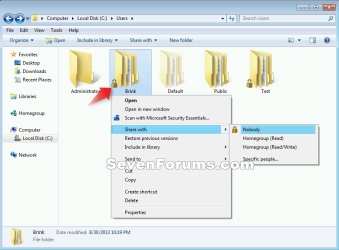
Lock_Icon_on_Folder.png


Here's How:

1. Do step 2, 3, or 4 below for what you would like to do, and if you have a 32-bit or 64-bit Windows 7.


2. To Remove Lock Icon on Files and Folders in 32-bit and 64-bit Windows 7
A) Click on the Download button below to download the .bat file below, and go to step 5 below.

Remove_Lock_Icon_from_Files_Folders.bat


Download


3. To Restore Lock Icon on Files and Folders in 32-bit Windows 7
NOTE: This is the default setting in 32-bit Windows 7.
A) Click on the Download button below to download the .bat file below, and go to step 5 below.

32-bit_Restore_Lock_Icon_on_Files_Folders.bat


Download


4. To Restore Lock Icon on Files and Folders in 64-bit Windows 7
NOTE: This is the default setting in 64-bit Windows 7.
A) Click on the Download button below to download the .bat file below, and go to step 5 below.

64-bit_Restore_Lock_Icon_on_Files_Folders.bat


Download


5. Save the .bat file to your desktop.

6. Right click on the downloaded .bat file, and click on Run as administrator.

7. If prompted, click on Run and Yes to approve.
NOTE: If you like, you can stop getting the Run prompt by unblocking the downloaded .bat file.

8. You will now notice a command prompt quickly flash open and close and your screen flicker as the registry changes are applied and explorer is restarted.


That's it,
Shawn


Attachments

Last edited:
Removing lock feature

I have been researching a solution for months and I just found your post. This was an immediate fix to my ongoing issues of sharing. THANK YOU THANK YOU.
 

My Computer

Computer type
PC/Desktop
Computer Manufacturer/Model Number
Dell
OS
Windows 7 64-bit
i have a lot of files and folder like that Lock Icon
after CHKDSK C: /f my drive
how can i fix this many files????
 

My Computer

Computer type
PC/Desktop
OS
Windows 7 Ultimate 32 bit
CPU
AMD Atholon9tm0 II x2 240 processor 2.80 GHz
Memory
2 GB
Antivirus
ESET Smart security
Browser
google c
Hello Healess, and welcome to Seven Forums.

There's really nothing to fix. The lock icon is just an indicator that the file/folder is shared with nobody. That's all.

If you wanted to share the file/folder with the network, then you could set it's share settings to share with who you like. This would then remove the lock icon since it's shared now.

If you didn't want to share the files/folders, then you could use the tutorial to hide the locks to not see them without affecting the share settings.

Hope this helps, :)
Shawn
 

My Computer

Computer type
PC/Desktop
Computer Manufacturer/Model Number
Self built custom
OS
64-bit Windows 11 Pro for Workstations
CPU
Intel i7-8700K OC'd to 5 GHz
Motherboard
ASUS ROG Maximus XI Formula Z390
Memory
64 GB (4x16GB) G.SKILL TridentZ RGB DDR4 3600 MHz
Graphics Card(s)
ASUS ROG-STRIX-GTX1080TI-O11G-GAMING
Sound Card
Integrated
Monitor(s) Displays
2 x Samsung Odyssey G7 27"
Screen Resolution
2560x1440
Hard Drives
1TB Samsung 990 PRO M.2,
4TB Samsung 990 PRO PRO M.2,
TerraMaster F8 SSD Plus NAS
PSU
Seasonic Prime Titanium 850W
Case
Thermaltake Core P3
Cooling
Corsair Hydro H115i
Keyboard
Logitech wireless K800
Mouse
Logitech MX Master 4
Internet Speed
2 Gb/s Download and 100 Mb/s Upload
Antivirus
Malwarebyte Anti-Malware Premium
Browser
Google Chrome
Other Info
Logitech Z625 speaker system,
Logitech BRIO 4K Pro webcam,
HP Color LaserJet Pro MFP M477fdn,
APC SMART-UPS RT 1000 XL - SURT1000XLI,
Galaxy S23 Plus phone
Allow me to say that this padlock, is not just indicator, and i say that because i noticed that, any file is marked with this padlock, it becomes hidden from any search results.:lock:

I have this padlock on many mp4 or flv files for example, but not on all of them, and i searched through windows search for the corresponding types only... as a result i found only those videos that were NOT marked with padlock, while all the others remained undiscovered! :doh:

When i share this folder, the padlock gets away from the folder but marks every file in it and in subfolders files also, when i stop sharing, the opposite happens and then i can't find any file in this folder but only manually looking!!!

Idk why it works that way, but it's a bit of annoying, u agree? :party:

Any idea to .....restore the order? :geek:

** Solution found in this topic
--> http://www.sevenforums.com/network-sharing/8729-how-remove-lock-icon-over-my-folder.html
 
Last edited:

My Computer

Computer type
PC/Desktop
Computer Manufacturer/Model Number
Custom
OS
win 7 64bit
CPU
AMD FX-6300
Motherboard
Asrock 980DE3/U3S3
Memory
8GB DDR3 1600Mhz
Graphics Card(s)
GTX-650 1GB
Sound Card
Onboard realtek
Monitor(s) Displays
Samsung 2043NWX
Screen Resolution
1680x1050
Hard Drives
1x SSD Kingston 240GB
1X HDD 1TB TOSHIBA 7200
PSU
550W LAMTECH
Antivirus
Avast
Browser
IE 11-Firefox-Chrome
Hello Healess, and welcome to Seven Forums.

There's really nothing to fix. The lock icon is just an indicator that the file/folder is shared with nobody. That's all.

If you wanted to share the file/folder with the network, then you could set it's share settings to share with who you like. This would then remove the lock icon since it's shared now.

If you didn't want to share the files/folders, then you could use the tutorial to hide the locks to not see them without affecting the share settings.

Hope this helps, :)
Shawn

Hi Shawn,

If I remove this lock on my 'User' folder, will it have any affect on me installing any programs at all?
 

My Computer

Computer type
PC/Desktop
Computer Manufacturer/Model Number
Dell Precision Tower 7910 Workstation
OS
Microsoft Windows 7 Professional 64-bit
CPU
Dual Xeon(R) CPU E5-2687W v3 @ 3.10GHz
Motherboard
Dell Inc. 0215PR
Memory
32.00 GB
Graphics Card(s)
NVIDIA Quadro K4200
Sound Card
(1) NVIDIA High Definition Audio (2) High Definition Audio
Hard Drives
(1) SK hynix SC210 2.5 7MM 256GB ATA Device
(2) ATA WDC WD4003FZEX-0 SCSI Disk Device
Antivirus
Avast Free and Malwarebytes Free
Browser
Chrome
Other Info
BIOS: BIOS Date: 04/14/15 18:58:26 Ver: A07.00
Hello RedLad,

No worries. It will not affect anything since it's just a cosmetic setting to remove the lock overlay on the icon. :)
 

My Computer

Computer type
PC/Desktop
Computer Manufacturer/Model Number
Self built custom
OS
64-bit Windows 11 Pro for Workstations
CPU
Intel i7-8700K OC'd to 5 GHz
Motherboard
ASUS ROG Maximus XI Formula Z390
Memory
64 GB (4x16GB) G.SKILL TridentZ RGB DDR4 3600 MHz
Graphics Card(s)
ASUS ROG-STRIX-GTX1080TI-O11G-GAMING
Sound Card
Integrated
Monitor(s) Displays
2 x Samsung Odyssey G7 27"
Screen Resolution
2560x1440
Hard Drives
1TB Samsung 990 PRO M.2,
4TB Samsung 990 PRO PRO M.2,
TerraMaster F8 SSD Plus NAS
PSU
Seasonic Prime Titanium 850W
Case
Thermaltake Core P3
Cooling
Corsair Hydro H115i
Keyboard
Logitech wireless K800
Mouse
Logitech MX Master 4
Internet Speed
2 Gb/s Download and 100 Mb/s Upload
Antivirus
Malwarebyte Anti-Malware Premium
Browser
Google Chrome
Other Info
Logitech Z625 speaker system,
Logitech BRIO 4K Pro webcam,
HP Color LaserJet Pro MFP M477fdn,
APC SMART-UPS RT 1000 XL - SURT1000XLI,
Galaxy S23 Plus phone

My Computer

Computer type
PC/Desktop
Computer Manufacturer/Model Number
Dell Precision Tower 7910 Workstation
OS
Microsoft Windows 7 Professional 64-bit
CPU
Dual Xeon(R) CPU E5-2687W v3 @ 3.10GHz
Motherboard
Dell Inc. 0215PR
Memory
32.00 GB
Graphics Card(s)
NVIDIA Quadro K4200
Sound Card
(1) NVIDIA High Definition Audio (2) High Definition Audio
Hard Drives
(1) SK hynix SC210 2.5 7MM 256GB ATA Device
(2) ATA WDC WD4003FZEX-0 SCSI Disk Device
Antivirus
Avast Free and Malwarebytes Free
Browser
Chrome
Other Info
BIOS: BIOS Date: 04/14/15 18:58:26 Ver: A07.00
You're welcome.

The other question would best be answered in that post instead since it's not on topic with this tutorial.
 

My Computer

Computer type
PC/Desktop
Computer Manufacturer/Model Number
Self built custom
OS
64-bit Windows 11 Pro for Workstations
CPU
Intel i7-8700K OC'd to 5 GHz
Motherboard
ASUS ROG Maximus XI Formula Z390
Memory
64 GB (4x16GB) G.SKILL TridentZ RGB DDR4 3600 MHz
Graphics Card(s)
ASUS ROG-STRIX-GTX1080TI-O11G-GAMING
Sound Card
Integrated
Monitor(s) Displays
2 x Samsung Odyssey G7 27"
Screen Resolution
2560x1440
Hard Drives
1TB Samsung 990 PRO M.2,
4TB Samsung 990 PRO PRO M.2,
TerraMaster F8 SSD Plus NAS
PSU
Seasonic Prime Titanium 850W
Case
Thermaltake Core P3
Cooling
Corsair Hydro H115i
Keyboard
Logitech wireless K800
Mouse
Logitech MX Master 4
Internet Speed
2 Gb/s Download and 100 Mb/s Upload
Antivirus
Malwarebyte Anti-Malware Premium
Browser
Google Chrome
Other Info
Logitech Z625 speaker system,
Logitech BRIO 4K Pro webcam,
HP Color LaserJet Pro MFP M477fdn,
APC SMART-UPS RT 1000 XL - SURT1000XLI,
Galaxy S23 Plus phone
You're welcome.

The other question would best be answered in that post instead since it's not on topic with this tutorial.

Sorry, my bad.
 

My Computer

Computer type
PC/Desktop
Computer Manufacturer/Model Number
Dell Precision Tower 7910 Workstation
OS
Microsoft Windows 7 Professional 64-bit
CPU
Dual Xeon(R) CPU E5-2687W v3 @ 3.10GHz
Motherboard
Dell Inc. 0215PR
Memory
32.00 GB
Graphics Card(s)
NVIDIA Quadro K4200
Sound Card
(1) NVIDIA High Definition Audio (2) High Definition Audio
Hard Drives
(1) SK hynix SC210 2.5 7MM 256GB ATA Device
(2) ATA WDC WD4003FZEX-0 SCSI Disk Device
Antivirus
Avast Free and Malwarebytes Free
Browser
Chrome
Other Info
BIOS: BIOS Date: 04/14/15 18:58:26 Ver: A07.00
One Doubt
How n why on the first place these lock appears?
as earlier all such folders have been shared since long but how did it come up suddenly
 

My Computer

Computer type
PC/Desktop
Computer Manufacturer/Model Number
Custom
OS
windows 7 ultimate 32bit
CPU
core 2 duo, 2.93GHz
Motherboard
Gigabyte, G31M ES2L
Memory
2 GB-DDR2
Hard Drives
WD Green 500GB
Antivirus
QUICK HEAL TOTAL SECURITY
Browser
Firefox & Chrome
Hello honeyhanish,

It usually happens when it's set to be shared by nobody. Usually by accident though. :)
 

My Computer

Computer type
PC/Desktop
Computer Manufacturer/Model Number
Self built custom
OS
64-bit Windows 11 Pro for Workstations
CPU
Intel i7-8700K OC'd to 5 GHz
Motherboard
ASUS ROG Maximus XI Formula Z390
Memory
64 GB (4x16GB) G.SKILL TridentZ RGB DDR4 3600 MHz
Graphics Card(s)
ASUS ROG-STRIX-GTX1080TI-O11G-GAMING
Sound Card
Integrated
Monitor(s) Displays
2 x Samsung Odyssey G7 27"
Screen Resolution
2560x1440
Hard Drives
1TB Samsung 990 PRO M.2,
4TB Samsung 990 PRO PRO M.2,
TerraMaster F8 SSD Plus NAS
PSU
Seasonic Prime Titanium 850W
Case
Thermaltake Core P3
Cooling
Corsair Hydro H115i
Keyboard
Logitech wireless K800
Mouse
Logitech MX Master 4
Internet Speed
2 Gb/s Download and 100 Mb/s Upload
Antivirus
Malwarebyte Anti-Malware Premium
Browser
Google Chrome
Other Info
Logitech Z625 speaker system,
Logitech BRIO 4K Pro webcam,
HP Color LaserJet Pro MFP M477fdn,
APC SMART-UPS RT 1000 XL - SURT1000XLI,
Galaxy S23 Plus phone
:thumbsup:
 

My Computer

Computer type
PC/Desktop
Computer Manufacturer/Model Number
Self built custom
OS
64-bit Windows 11 Pro for Workstations
CPU
Intel i7-8700K OC'd to 5 GHz
Motherboard
ASUS ROG Maximus XI Formula Z390
Memory
64 GB (4x16GB) G.SKILL TridentZ RGB DDR4 3600 MHz
Graphics Card(s)
ASUS ROG-STRIX-GTX1080TI-O11G-GAMING
Sound Card
Integrated
Monitor(s) Displays
2 x Samsung Odyssey G7 27"
Screen Resolution
2560x1440
Hard Drives
1TB Samsung 990 PRO M.2,
4TB Samsung 990 PRO PRO M.2,
TerraMaster F8 SSD Plus NAS
PSU
Seasonic Prime Titanium 850W
Case
Thermaltake Core P3
Cooling
Corsair Hydro H115i
Keyboard
Logitech wireless K800
Mouse
Logitech MX Master 4
Internet Speed
2 Gb/s Download and 100 Mb/s Upload
Antivirus
Malwarebyte Anti-Malware Premium
Browser
Google Chrome
Other Info
Logitech Z625 speaker system,
Logitech BRIO 4K Pro webcam,
HP Color LaserJet Pro MFP M477fdn,
APC SMART-UPS RT 1000 XL - SURT1000XLI,
Galaxy S23 Plus phone
The explanation of what the icon represents is excellent, thanks.

However, it looks to me like the bat files you provide simply remove the icon from files/folders that have the characteristics that qualify them for the icon, but do not change those characteristics. In almost all cases, I want uniform access to files/folders to avoid incomprehensible failures, commonly caused by permission problems. That means I would rather fix the reason the icon is there, as opposed to simply remove the indicator.

So, if I understand correctly what those bat files do, please make it clear that they don't change permissions, just remove the icon indicator of what the permissions are. If I'm wrong, please correct me.

--peter
 

My Computer

Computer type
Laptop
Computer Manufacturer/Model Number
Lenovo T61p
OS
win 7 pro x64
CPU
T7700 Intel
Memory
4GB
Hello Peter [MENTION=278799]apb[/MENTION], :)

That's correct. The tutorial will only cosmetically remove the lock icon. It will not affect the file's share permissions as intended.

If you want to make the file available for everyone, then you could set the permissions to allow so instead.

Permissions - Allow or Deny Users and Groups - Windows 7 Help Forums
 

My Computer

Computer type
PC/Desktop
Computer Manufacturer/Model Number
Self built custom
OS
64-bit Windows 11 Pro for Workstations
CPU
Intel i7-8700K OC'd to 5 GHz
Motherboard
ASUS ROG Maximus XI Formula Z390
Memory
64 GB (4x16GB) G.SKILL TridentZ RGB DDR4 3600 MHz
Graphics Card(s)
ASUS ROG-STRIX-GTX1080TI-O11G-GAMING
Sound Card
Integrated
Monitor(s) Displays
2 x Samsung Odyssey G7 27"
Screen Resolution
2560x1440
Hard Drives
1TB Samsung 990 PRO M.2,
4TB Samsung 990 PRO PRO M.2,
TerraMaster F8 SSD Plus NAS
PSU
Seasonic Prime Titanium 850W
Case
Thermaltake Core P3
Cooling
Corsair Hydro H115i
Keyboard
Logitech wireless K800
Mouse
Logitech MX Master 4
Internet Speed
2 Gb/s Download and 100 Mb/s Upload
Antivirus
Malwarebyte Anti-Malware Premium
Browser
Google Chrome
Other Info
Logitech Z625 speaker system,
Logitech BRIO 4K Pro webcam,
HP Color LaserJet Pro MFP M477fdn,
APC SMART-UPS RT 1000 XL - SURT1000XLI,
Galaxy S23 Plus phone
Hello Peter @apb, :)

That's correct. The tutorial will only cosmetically remove the lock icon. It will not affect the file's share permissions as intended.

If you want to make the file available for everyone, then you could set the permissions to allow so instead.

Permissions - Allow or Deny Users and Groups - Windows 7 Help Forums

Thanks. But, mainly I was suggesting he/you should edit the initial answer to that effect, so people don't think they are fixing the underlying reason for the icon.

--peter
 

My Computer

Computer type
Laptop
Computer Manufacturer/Model Number
Lenovo T61p
OS
win 7 pro x64
CPU
T7700 Intel
Memory
4GB
It does already have "without altering any sharing settings or neutralising any of the conditions above" in the information box at the top of the tutorial if that is what you mean.
 

My Computer

Computer type
PC/Desktop
Computer Manufacturer/Model Number
Self built custom
OS
64-bit Windows 11 Pro for Workstations
CPU
Intel i7-8700K OC'd to 5 GHz
Motherboard
ASUS ROG Maximus XI Formula Z390
Memory
64 GB (4x16GB) G.SKILL TridentZ RGB DDR4 3600 MHz
Graphics Card(s)
ASUS ROG-STRIX-GTX1080TI-O11G-GAMING
Sound Card
Integrated
Monitor(s) Displays
2 x Samsung Odyssey G7 27"
Screen Resolution
2560x1440
Hard Drives
1TB Samsung 990 PRO M.2,
4TB Samsung 990 PRO PRO M.2,
TerraMaster F8 SSD Plus NAS
PSU
Seasonic Prime Titanium 850W
Case
Thermaltake Core P3
Cooling
Corsair Hydro H115i
Keyboard
Logitech wireless K800
Mouse
Logitech MX Master 4
Internet Speed
2 Gb/s Download and 100 Mb/s Upload
Antivirus
Malwarebyte Anti-Malware Premium
Browser
Google Chrome
Other Info
Logitech Z625 speaker system,
Logitech BRIO 4K Pro webcam,
HP Color LaserJet Pro MFP M477fdn,
APC SMART-UPS RT 1000 XL - SURT1000XLI,
Galaxy S23 Plus phone
Thanks. After reading that seven times, yes that is what I mean. I did not notice it initially. Then again, I somehow thought the tutorial was contributed by someone named Sean, not you, so maybe I'm not very observant. Nevertheless it might help if it were put in plainer English that removing the icon will not affect anything other than the existence of the icon, and probably what one really wants to do is fix the permissions.
 

My Computer

Computer type
Laptop
Computer Manufacturer/Model Number
Lenovo T61p
OS
win 7 pro x64
CPU
T7700 Intel
Memory
4GB
I bolded it in red to help. :)
 

My Computer

Computer type
PC/Desktop
Computer Manufacturer/Model Number
Self built custom
OS
64-bit Windows 11 Pro for Workstations
CPU
Intel i7-8700K OC'd to 5 GHz
Motherboard
ASUS ROG Maximus XI Formula Z390
Memory
64 GB (4x16GB) G.SKILL TridentZ RGB DDR4 3600 MHz
Graphics Card(s)
ASUS ROG-STRIX-GTX1080TI-O11G-GAMING
Sound Card
Integrated
Monitor(s) Displays
2 x Samsung Odyssey G7 27"
Screen Resolution
2560x1440
Hard Drives
1TB Samsung 990 PRO M.2,
4TB Samsung 990 PRO PRO M.2,
TerraMaster F8 SSD Plus NAS
PSU
Seasonic Prime Titanium 850W
Case
Thermaltake Core P3
Cooling
Corsair Hydro H115i
Keyboard
Logitech wireless K800
Mouse
Logitech MX Master 4
Internet Speed
2 Gb/s Download and 100 Mb/s Upload
Antivirus
Malwarebyte Anti-Malware Premium
Browser
Google Chrome
Other Info
Logitech Z625 speaker system,
Logitech BRIO 4K Pro webcam,
HP Color LaserJet Pro MFP M477fdn,
APC SMART-UPS RT 1000 XL - SURT1000XLI,
Galaxy S23 Plus phone
Back
Top