
Information
Process Explorer by Sysinternals(Microsoft) is a more advanced alternative to Windows Task Manager
VirusTotal.com is a multi-engined scanner service from Google with more than 50 different anti-virus products including:
AVG, Avast, Avira, BitDefender, ESET, F-Secure, GData, Kaspersky, Malwarebytes, Microsoft, Norman, Panda, SUPERAntiSpyware, Sophos, Symantec, TrendMicro and many more.
The VirusTotal integration in Process Explorer is very fast because it only sends file hashes, a unique content identifier, and not the files itself. It's dependent of previous scans on VirusTotal for every specific file and version, but because VirusTotal is a heavily used worldwide service you often get fresh results for most files.
VirusTotal.com is a multi-engined scanner service from Google with more than 50 different anti-virus products including:
AVG, Avast, Avira, BitDefender, ESET, F-Secure, GData, Kaspersky, Malwarebytes, Microsoft, Norman, Panda, SUPERAntiSpyware, Sophos, Symantec, TrendMicro and many more.
The VirusTotal integration in Process Explorer is very fast because it only sends file hashes, a unique content identifier, and not the files itself. It's dependent of previous scans on VirusTotal for every specific file and version, but because VirusTotal is a heavily used worldwide service you often get fresh results for most files.
1. Download Process Explorer from its homepage: Process Explorer
or use the direct download link
Download
2. Extract the contents from the ZIP file preferably to a new folder. If you don't have a 3rd party Zip program you can use the Windows built-in function: right click the Zip file and select "Extract all..."
3. Double-click the file procexp.exe
4. Enable "Check VirusTotal.com"
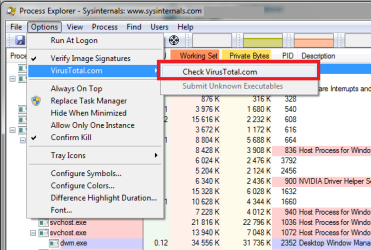
The new column VirusTotal will be added automatically, and initially show "Hash submitted...". After a few seconds it will show the result:
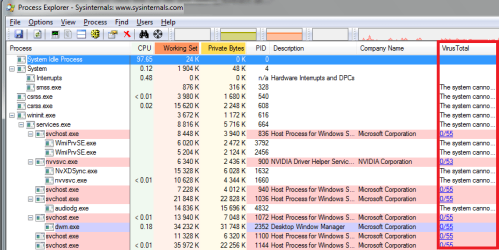
5. Processes that run as System and not as standard user, won't show a VirusTotal result until we restart Process Explorer with elevated permissions:
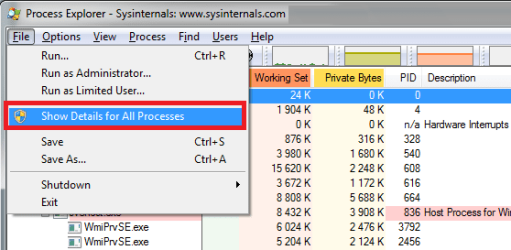
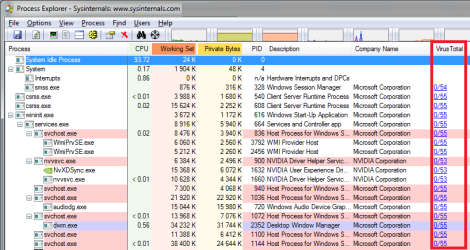
If you get a UAC prompt click Yes. Now, after a few seconds, we will see the VirusTotal result for every process:
Information
A VirusTotal result of 0/55 means that 55 anti-virus products have checked the file and that non of them detected anything!
Click the result/link to open the detailed report in a web browser. There you'll find when the scan was done and other useful information like what anti-virus products detected anything and what type of possible infection/malware.
Click the result/link to open the detailed report in a web browser. There you'll find when the scan was done and other useful information like what anti-virus products detected anything and what type of possible infection/malware.
Example of a VirusTotal detection:

Note
If only one AV detected something chances are that it's a "false positive" (wrongly detected) and that the file is clean. Click the VirusTotal link to get more details about it.
6. If you have processes that show "Unknown" in the VirusTotal column, it means that specific file and version has never been uploaded to VirusTotal. To automatically upload these files to VirusTotal select this option:
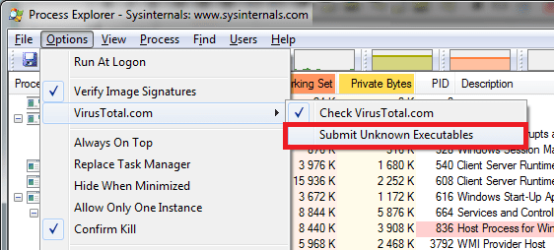
7. To submit a file to VirusTotal manually, any file (not only "Unknown" ones), which means to upload and re-scan the file, double click a process, go to the Image tab and click this button:

You can then exit the Properties window and wait until you see a result in the VirusTotal column for that process. It'll take a few minutes.
8. You can also do a VirusTotal check for all the DLL files a process uses. Select a process and press Ctrl+L to toggle the lower pane. It will submit the file hashes to VirusTotal and show the result after a few seconds:
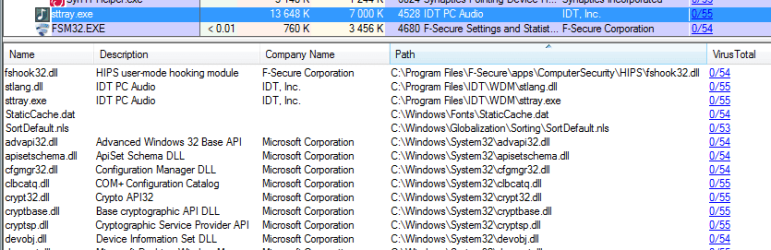
If the VirusTotal column isn't shown in the lower pane, right-click a column header to select columns
If other files than DLL's are shown, go to menu View - Lower Pane View - and select DLLs
9. If you find more than one suspicious process and want to terminate them, it's recommended by Mark Russinovich, the author of Process Explorer, to first suspend(right click option) them. As many malware infections include multiple processes they can easily restart each other when only one is killed, so suspending them first is a safer way.
More info: Managing Risk
10. If you like Process Explorer you can easily replace Task Manager with it:
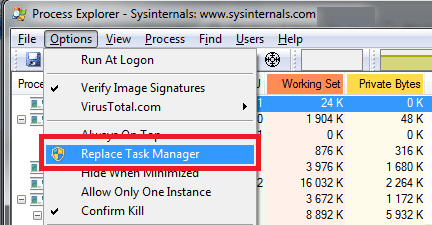
11. If you want you can also verify image signatures. You do this by selecting "Verify Image Signatures" from the Options menu. In the screenshot above you can see how it looks like when that option is checked, the second row in the drop-down Options menu. When you select this option you'll see a new column in the process list: "Verified Signer". Example:
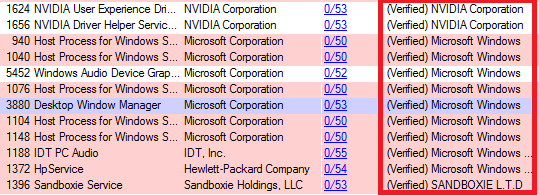
An unsigned software doesn't mean it's bad, but it may be more suspicious. Besides looking for unsigned or revoked signatures, also look out for empty or strange names (also in the columns Description and Company Name)
12. Another useful feature is "Process Timeline". To add it go to menu View - Select Columns... then go to tab "Process Performance" and select "Process Timeline".

The green part indicates how long a process have been running. So in the above example all processes have been running since start except these that have been started in this order:
- iexplore x 3, started just after the start of Windows
- firefox
- procexp, recently started (almost no green visible)
So how can this information be useful?
Example: Let's say you start a browser and end up on a web site that has a drive-by-download that is able to start a new process. You can then check process timeline for any processes that has started after the browser was started.
Note
You won't see details for all processes until Process Explorer is run as Administrator!
Information
The default colors used in Process Explorer are set in the Options menu - Configure colors. Not all colors are used by default, so if you want you can enable the unchecked ones too:
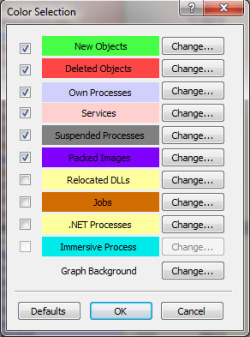
Most programs are not "packed"(purple color) which can mean they are obfuscated or encrypted, so watch out for those as they would probably be more suspicious than other processes!
Most programs are not "packed"(purple color) which can mean they are obfuscated or encrypted, so watch out for those as they would probably be more suspicious than other processes!
This Tutorial has showed you how to check all running processes. If it finds any malware it means it's already running on your system. To try and prevent new malware from infecting your system I recommend my other Tutorial mentioned below. It's an easy way to check downloaded software before running or installing them.
Last edited:


