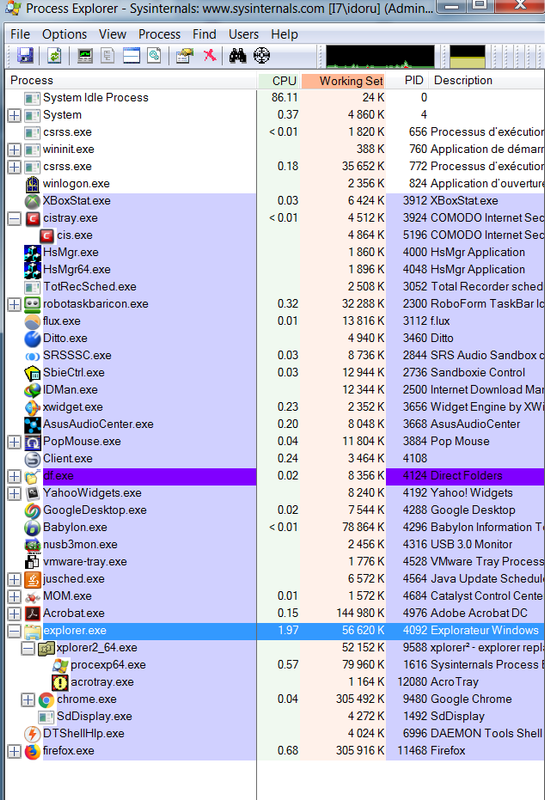
process trees in sysinternals process explorer

idoru

New member
Power User
Local time
8:25 PM
Messages
76
Location
pAris (france)
It's not in task manager but sysinternals process explorer.

Usually and if my memory serves me well, there's :
- system idle process
- then system and it's child processes
- then explorer and it's child processes

Lately I had some explorer crashes resulting in a new and (un) tree like explorer in process explorer. So I did a sfc /scannow that seems to do it's job as the crashes vanished but peeking yesterday in process explorer I noticed that things got screwed a bit...

I still have SYSTEM IDLE PROCESS in the first place, then SYSTEM with some of it's child process BUT with some (previous) explorer processes, then (usually) explorer processes, some with their respective childs as chrome and it's opened tabs, THEN explorer with 4, 5 entries.

Any ideas ?
 

My Computer

OS
7ven ultimate
Can you show a picture of the problem? Preferably the whole process tree including the troublesome processes.
 

My Computer

Computer type
Laptop
Computer Manufacturer/Model Number
Toshiba Sattelite A665-S6092
OS
Windows 7 Ultimate x64
CPU
Intel Core i7-740QM
Memory
8 GB DDR3
Graphics Card(s)
NVIDIA GeForce 330GT
Screen Resolution
1366x768
Hard Drives
Samsung 840 SSD 500GB
1TB USB3 external HD
Cooling
Coolermaster Notepal U3 notebook cooling pad
Internet Speed
3mbps ASDL
Antivirus
ClamWin 0.98.7
Browser
Opera 12.17 x86 (main), Firefox 38 (sec), IE11 (last resort)
Snap164.png


as you can see, there is no usual application hierarchy/tree : all applications launched by explorer should be on it's tree, like roboform, ditto, flux, SRS sandbox, etc... (as should be those launched by system upon startup)

I've tried sorting them by putting 'system idle process ' as it was, the parent of all it didn't work
 
Last edited:

My Computer

OS
7ven ultimate
Ok, now it's clear what's happening. Since Explorer crashed, all its child processes went "orphan" (as their parent isn't running any longer), and therefore shown at the root of the process tree.

You can confirm this by opening the properties of some processes and looking at its parent. For the new processes it'll be the currently running instance, but for the previous ones it'll be flagged as "non existant process" which will make it impossible to put in the tree.

What you're seeing is totally normal and expectable, as a consequence of Explorer crashing.
What's not normal nor epectable nor desirable is having Explorer crashing. That's your real problem and the thing you need to investigate.
 

My Computer

Computer type
Laptop
Computer Manufacturer/Model Number
Toshiba Sattelite A665-S6092
OS
Windows 7 Ultimate x64
CPU
Intel Core i7-740QM
Memory
8 GB DDR3
Graphics Card(s)
NVIDIA GeForce 330GT
Screen Resolution
1366x768
Hard Drives
Samsung 840 SSD 500GB
1TB USB3 external HD
Cooling
Coolermaster Notepal U3 notebook cooling pad
Internet Speed
3mbps ASDL
Antivirus
ClamWin 0.98.7
Browser
Opera 12.17 x86 (main), Firefox 38 (sec), IE11 (last resort)
Back
Top