
Disable Your Windows 7 PC is Out of Support Full Screen Notification

Starting on January 15, 2020 after installing the KB4530692 or KB4530734 update, a full-screen notification will appear that describes the risk of continuing to use Windows 7 Service Pack 1 after it reaches end of support on January 14, 2020. The notification will remain on the screen until you interact with it. This notification will only appear on the following editions of Windows 7 Service Pack 1:

Note The notification will not appear on domain-joined machines or machines in kiosk mode.

The C:\Windows\System32\EOSNotify.exe file is what loads the full screen notifaction, and is launched by two scheduled tasks named EOSNotify and EOSNotify2 located under Microsoft > Windows > Setup in Task Scheduler.

The EOSNotify task is launched any time a user logs into Windows 7 and the EOSNotify2 task is run daily at 12 PM.

This tutorial will show you how to disable the Your Windows 7 PC is Out of Support full screen notification in Windows 7.


CONTENTS:
  • Option One: Disable "Your Windows 7 PC is Out of Support" Full Screen Notification from Notification
  • Option Two: Enable or Disable "Your Windows 7 PC is Out of Support" Full Screen Notification using a REG file

EXAMPLE: "Your Windows 7 PC is Out of Support" full screen notification
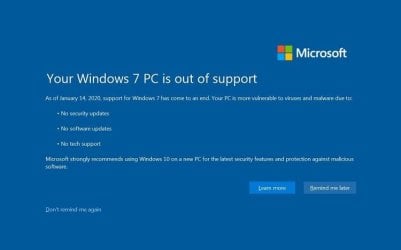
Your Windows 7 PC is out of support

As of January 14, 2020, support for Windows 7 has come to an end. Your PC is more vulnerable to viruses and malware due to:

  • No security updates
  • No software updates
  • No tech support
Microsoft strongly recommends using Windows 10 on a new PC for latest security features and protection against malicious software.
Your_Windows_7_is_out_of_support.jpg


OPTION ONE

Disable "Your Windows 7 PC is Out of Support" Full Screen Notification from Notification


1. Click on the Don't remind me again link in the notification. (see screenshot below)

Disable_Your_Windows_7_is_out_of_support.jpg


OPTION TWO

Enable or Disable "Your Windows 7 PC is Out of Support" Full Screen Notification using a REG file


   Note
You must be logged in as an administrator to do this option.

The downloadable .reg files below will modify the DWORD value in the registry keys below.

HKEY_CURRENT_USER\Software\Microsoft\Windows\CurrentVersion\EOSNotify

HKEY_LOCAL_MACHINE\SOFTWARE\Microsoft\Windows\CurrentVersion\EOSNotify

DiscontinueEOS DWORD

0 = Enable
1 = Disable

1. Do step 2 (enable) or step 3 (disable) below for what you would like to do.

2. To Enable "Your Windows 7 PC is Out of Support" Full Screen Notification
NOTE: This is the default setting.A) Click/tap on the Download button below to download the file below, and go to step 4 below.

Enable_Your_Windows_7_PC_is_out_of_support.reg


Download


3. To Disable "Your Windows 7 PC is Out of Support" Full Screen Notification A) Click/tap on the Download button below to download the file below, and go to step 4 below.

Disable_Your_Windows_7_PC_is_out_of_support.reg


Download


4. Save the .reg file to your desktop.

5. Double click/tap on the downloaded .reg file to merge it.

6. When prompted, click/tap on Run, Yes (UAC), Yes, and OK to approve the merge.

7. You can now delete the downloaded .reg file if you like.


That's it,
Shawn


Attachments

Last edited:
Thanks Brink!
 

My Computer My Computer

At a glance

Windows 7 Professional x64
OS
Windows 7 Professional x64
Thanks for sharing Brink!:thumbsup:
 

My Computer My Computer

At a glance

Win 7 HP SP1 64-bit Vista HB SP2 32-bit Linux...Intel(R) Pentium(R) CPU P6200 @ 2.13GHz4.00 GBIntel(R) Graphics Media Accelerator HD
Computer type
Laptop
Computer Manufacturer/Model Number
Fujitsu LIFEBOOK
OS
Win 7 HP SP1 64-bit Vista HB SP2 32-bit Linux Mint 18.3
CPU
Intel(R) Pentium(R) CPU P6200 @ 2.13GHz
Motherboard
FUJITSU FJNBB06
Memory
4.00 GB
Graphics Card(s)
Intel(R) Graphics Media Accelerator HD
Sound Card
[1] Realtek High Definition Audio [2] Intel(R) Display Audio
Screen Resolution
1366 x 768 x 32 bits (4294967296 colors) @ 59 Hz
Hard Drives
TOSHIBA MK5076GSX
Antivirus
AVG FREE
:thumbsup:
 

My Computer My Computer

At a glance

64-bit Windows 11 Pro for WorkstationsIntel i7-8700K OC'd to 5 GHz64 GB (4x16GB) G.SKILL TridentZ RGB DDR4 3600...ASUS ROG-STRIX-GTX1080TI-O11G-GAMING
Computer type
PC/Desktop
Computer Manufacturer/Model Number
Self built custom
OS
64-bit Windows 11 Pro for Workstations
CPU
Intel i7-8700K OC'd to 5 GHz
Motherboard
ASUS ROG Maximus XI Formula Z390
Memory
64 GB (4x16GB) G.SKILL TridentZ RGB DDR4 3600 MHz
Graphics Card(s)
ASUS ROG-STRIX-GTX1080TI-O11G-GAMING
Sound Card
Integrated
Monitor(s) Displays
2 x Samsung Odyssey G7 27"
Screen Resolution
2560x1440
Hard Drives
1TB Samsung 990 PRO M.2,
4TB Samsung 990 PRO PRO M.2,
TerraMaster F8 SSD Plus NAS
PSU
Seasonic Prime Titanium 850W
Case
Thermaltake Core P3
Cooling
Corsair Hydro H115i
Keyboard
Logitech wireless K800
Mouse
Logitech MX Master 4
Internet Speed
2 Gb/s Download and 100 Mb/s Upload
Antivirus
Malwarebyte Anti-Malware Premium
Browser
Google Chrome
Other Info
Logitech Z625 speaker system,
Logitech BRIO 4K Pro webcam,
HP Color LaserJet Pro MFP M477fdn,
APC SMART-UPS RT 1000 XL - SURT1000XLI,
Galaxy S23 Plus phone
I wonder why the notice doesn't appear in Ultimate, but I'm not complaining.
 

My Computer My Computer

At a glance

Win 7 Ult 64-bitG620 2.6GHZ Pentium R6 GB
Computer type
PC/Desktop
Computer Manufacturer/Model Number
HP p6-2020t
OS
Win 7 Ult 64-bit
CPU
G620 2.6GHZ Pentium R
Memory
6 GB
Monitor(s) Displays
25" HPLV2311
Screen Resolution
1920 x 1200
Hard Drives
1 SATA, 1 exterior SATA
Case
HP
Cooling
PSU
Antivirus
Glasswire
Browser
Waterfox; Firefox; Chrome for work
Other Info
Firewall--Glasswire
Similar specs in Gateway DX4200
Verizon FIOS Wired network

1 other Win7 computer-- has SSD
HAAHA What a joke. I haven't used "updates" since Windows 98se and I have never, -NEVER- got hacked or gotten a virus. Okay, I have like four updates currently due to hardware/'software requirements, but that's it.

I just shake my head on how M$ likes to scare people into thinking if you don't have the almighty "updates" (which can and will cause more problems then they're worth) you'll somehow get hacked or magically get malware.

Nothing could be further from the truth. Truth is you'll get malware whether you use updates or not. Especially polymoprphoic malware like ransomware. The trick to not getting malware is to run your browser and/or OS in a sandboxed environment, and scan ALL downloads including email attachments at VirusTotal. Do this and you won't have any issues to worry about.

To sandbox your browser, check out the now freeware Sandboxie. Configure it so that your browser's profile sticks on browser exit. If not configured right your bookmarks, passwords, etc won't stick on exit.

To sandbox your OS there are many programs. One program I liked was Shadow Defender. But doing this is a broad sword approach. And requires a lot of whitelisting of directory paths and maybe the registry. The trick to using a whole OS sandbox is to just whitelist your downloads folder path, pictures, videos, etc. If you have to install something and after you scanned that download at VirusTotal, turn off Shadow Defender and reboot your computer. Now install the program or what ever you need to do so that data sticks and then reengage Shadow Defender and reboot the PC. This OS sandboxing is more meant for a static system that doesn't require many OS changes or program installs. Maybe to granny proof a computer.

The other solution are periodic disk clones using your favorite cloning software and an external USB hard drive of equal or greater size than the hard dive you have now in your PC. I do this and store my hard drives in a $35 dollar fireproof safe bought on eBay brand new.

Anyway, I see this all over the Internet about this scare tactic that updates somehow protect you. They won't. The criticals do prevent things from going arye, but in large part you're wasting your time and I've seen my fair share of update help threads on scores of tech help forums where an update hosed one's computer. When I see these posts I just keep scrolling. I can't help you other than to use safe mode and try to login and uninstall the nasty update. "Update"... yeah.
 

My Computer My Computer

At a glance

Windows 7 Ultimate x64
Computer type
PC/Desktop
OS
Windows 7 Ultimate x64

My Computer My Computer

At a glance

Windows 7 Ultimate x64
Computer type
PC/Desktop
OS
Windows 7 Ultimate x64
No, I didn't. It's there
 
Last edited:

My Computer My Computer

At a glance

Win 7 Ult 64-bitG620 2.6GHZ Pentium R6 GB
Computer type
PC/Desktop
Computer Manufacturer/Model Number
HP p6-2020t
OS
Win 7 Ult 64-bit
CPU
G620 2.6GHZ Pentium R
Memory
6 GB
Monitor(s) Displays
25" HPLV2311
Screen Resolution
1920 x 1200
Hard Drives
1 SATA, 1 exterior SATA
Case
HP
Cooling
PSU
Antivirus
Glasswire
Browser
Waterfox; Firefox; Chrome for work
Other Info
Firewall--Glasswire
Similar specs in Gateway DX4200
Verizon FIOS Wired network

1 other Win7 computer-- has SSD
Avast and arr matey? LOL
 

My Computer My Computer

At a glance

Windows 7 Ultimate x64
Computer type
PC/Desktop
OS
Windows 7 Ultimate x64
It's beautiful.
 

My Computer My Computer

At a glance

Win 7 Ult 64-bitG620 2.6GHZ Pentium R6 GB
Computer type
PC/Desktop
Computer Manufacturer/Model Number
HP p6-2020t
OS
Win 7 Ult 64-bit
CPU
G620 2.6GHZ Pentium R
Memory
6 GB
Monitor(s) Displays
25" HPLV2311
Screen Resolution
1920 x 1200
Hard Drives
1 SATA, 1 exterior SATA
Case
HP
Cooling
PSU
Antivirus
Glasswire
Browser
Waterfox; Firefox; Chrome for work
Other Info
Firewall--Glasswire
Similar specs in Gateway DX4200
Verizon FIOS Wired network

1 other Win7 computer-- has SSD
Thanks for sharing
 

My Computer My Computer

At a glance

Windows 10 x64
Computer type
PC/Desktop
OS
Windows 10 x64
Thanks Brink!:party:
 

My Computer My Computer

At a glance

Windows 7 Home Premium x64AMD Phenom(tm) II N830 Triple-Core Processor ...4.00 GBAMD M880 w/ATI Mobility Radeon HD 4250
Computer type
Laptop
Computer Manufacturer/Model Number
HP Pavilion dv7-4065dx Entertainment Notebook
OS
Windows 7 Home Premium x64
CPU
AMD Phenom(tm) II N830 Triple-Core Processor 2.10 GHz
Memory
4.00 GB
Graphics Card(s)
AMD M880 w/ATI Mobility Radeon HD 4250
Screen Resolution
1600x900 60Mhz
Keyboard
Keyboard Revision 67.23
Antivirus
TotalAV
Browser
MicroSoft Edge/Internet Explorer 11/Google Chrome
:thumbsup:
 

My Computer My Computer

At a glance

64-bit Windows 11 Pro for WorkstationsIntel i7-8700K OC'd to 5 GHz64 GB (4x16GB) G.SKILL TridentZ RGB DDR4 3600...ASUS ROG-STRIX-GTX1080TI-O11G-GAMING
Computer type
PC/Desktop
Computer Manufacturer/Model Number
Self built custom
OS
64-bit Windows 11 Pro for Workstations
CPU
Intel i7-8700K OC'd to 5 GHz
Motherboard
ASUS ROG Maximus XI Formula Z390
Memory
64 GB (4x16GB) G.SKILL TridentZ RGB DDR4 3600 MHz
Graphics Card(s)
ASUS ROG-STRIX-GTX1080TI-O11G-GAMING
Sound Card
Integrated
Monitor(s) Displays
2 x Samsung Odyssey G7 27"
Screen Resolution
2560x1440
Hard Drives
1TB Samsung 990 PRO M.2,
4TB Samsung 990 PRO PRO M.2,
TerraMaster F8 SSD Plus NAS
PSU
Seasonic Prime Titanium 850W
Case
Thermaltake Core P3
Cooling
Corsair Hydro H115i
Keyboard
Logitech wireless K800
Mouse
Logitech MX Master 4
Internet Speed
2 Gb/s Download and 100 Mb/s Upload
Antivirus
Malwarebyte Anti-Malware Premium
Browser
Google Chrome
Other Info
Logitech Z625 speaker system,
Logitech BRIO 4K Pro webcam,
HP Color LaserJet Pro MFP M477fdn,
APC SMART-UPS RT 1000 XL - SURT1000XLI,
Galaxy S23 Plus phone
Thanks
 

My Computers My Computers

  • At a glance

    Win7 32 biti34 GBR7 240
    Computer type
    PC/Desktop
    Computer Manufacturer/Model Number
    Dell
    OS
    Win7 32 bit
    CPU
    i3
    Motherboard
    Esonic
    Memory
    4 GB
    Graphics Card(s)
    R7 240
    Hard Drives
    80 GB
  • Computer type
    PC/Desktop
Back
Top