Virtual Private Network (VPN) - Enable Incoming VPN Connections

How to Allow Incoming VPN Connections in Windows 7 and Windows 8

   Information
This will show you how to configure your computer to accept VPN connection and router settings to allow Point-to-Point Tunneling Protocol (PPTP) on your Network in Windows 7 and Windows 8.


Here’s How:

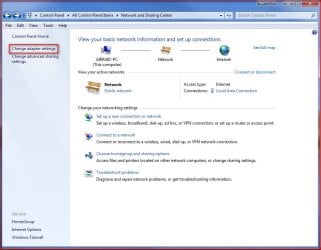
1. Go to Control Panel and open Network and Sharing Center.
1.jpg
2. Click on Change adapter settings.
2.jpg
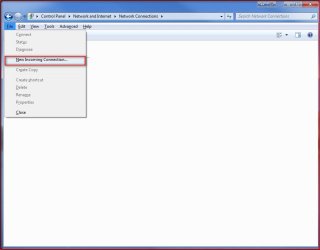
3. Press Alt+F and select New Incoming connection
3.jpg
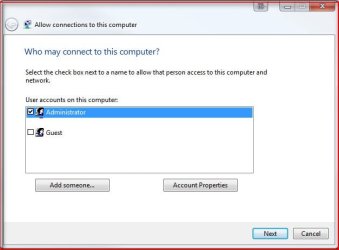
4. Put a check on who you’d like to give access to this computer or you can configure a new account by clicking on Add someone… Click on Next.
4.jpg
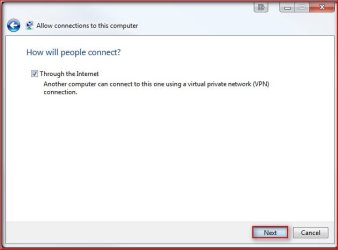
5. Put a check mark on Through the Internet. Click on Next.
5.jpg
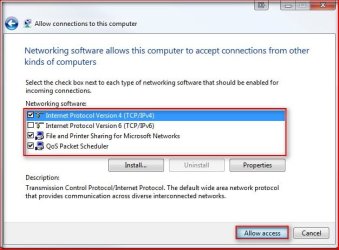
6. Select the protocols you want to enable for this connection. Click on Allow access.
6.jpg
Tip: Default selections (Recommended): Internet Protocol Version 4 (TCP/IPv4), File and Printer Sharing for Microsoft Networks and QoS Packet Scheduler. You should have at least TCP/IPv4 selected to successfully accept connections. Highlight the protocols for their descriptions.
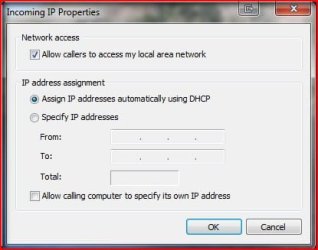
A) To allow the client access your LAN resources, highlight Internet Protocol Version 4 (TCP/IPv4) and click on Properties. Put a check mark on Allow all callers to access my local area network. Here you can have the IP assigned automatically, assign IPs following your LAN segment format or let the client assign its own IP address.
7.jpg
7. Take note of the Computer name as this will be used by the client to connect to this computer. Click on Close.
8.jpg
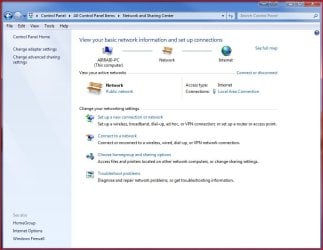
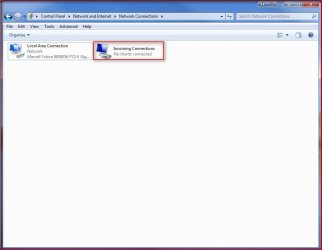
8. You will now have the Incoming Connections icon in Network Connections. Your computer is now ready to accept incoming VPN connections.
9.jpg
Important: Configure your firewall to allow access to TCP port 1723 to allow incoming Point-to-Point Tunneling Protocol (PPTP) connection for VPN.

Router Configuration: Enable PPTP and Generic Route Encapsulation (GRE) on the Router. Depending on the type of router, you need to either enable PPTP or create a port forward to port 1723. If you’re router has an additional setting for PPTP or VPN, make sure it’s enabled. It’s usually called a “pass-through” setting (i.e. PPTP pass-through or VPN pass-through)
You're done,

Nos

 
Last edited by a moderator:
Excellent tutorial, just what i wanted. I've been trying to sort out a VPN to my girlfriends mums Vista machine (long distance) & now i can. Thanks
 

My Computer My Computer

Computer Manufacturer/Model Number
Compaq Desktop
OS
Windows 7 Ultimate x64
CPU
AMD Sempron Dual Core
Memory
3GB
Graphics Card(s)
NVIDIA GeForce 6150SE nForce 430
Screen Resolution
1024x768
Hard Drives
150GB Sata
hi there!

i dont know if this is the right place to put my doubt but there it goes...

i try to configure my win7 network to allow me use the internet of my school, but always i try to acess properties of network the explorer block even im safety mode... can u help me?
 

My Computer My Computer

OS
win7
What exactly is VPN, the dumbed down version?
 

My Computer My Computer

Computer Manufacturer/Model Number
z#k&x%
OS
64 bit Windows 7 Ultimate (Free from Windows 7 Launch Event)
CPU
I7 920 (stinking CO)
Motherboard
Gigabyte GA-EX58-UD4P
Memory
6GB Patriot Viper DDR3 (3 x 2GB) 1333 (PC3 10666) 7-7-7-20
Graphics Card(s)
MSI 4670 1GB
Sound Card
Realtek ALC889A (onboard)
Monitor(s) Displays
Samsung LN52A650
Screen Resolution
1920 X1080
Hard Drives
32GB OCZ Vertex 1VTX30G SSD (OS Boot Drive)

80GB WD Caviar Blue WD800JD (Auxilery Drive for SSD off loading)

500GB Seagate Momentus ST9500325AS (Personal Storage)
PSU
Antec EA750
Case
Antec 180 I got from Craigslist free? Or was it Freecycle
Cooling
Intel OEM, Case side off, PC Duct Taped to Window A/C unit
Keyboard
Piece of Crap I Found Dumpster Diving
Mouse
Logitech Optical Trackman (Tracking Ball)
Internet Speed
Varies, Downloads from 121MB to 12MB Upload from 3MB to 25MB
Other Info
Uber Chronometric Particle Emitter with the Verteron Exovector extrapolated to the sub neutrino level and Hyper Calibrated with a zero gravity tritonium / unobtainium alloy infused Collaborating Meter
What exactly is VPN, the dumbed down version?

VPN is a Virtual Private Network, which means you can setup a network (e.g. 1 computer from 1 house, and 1 from a house miles away) using the internet. This allows for a network to be created 'Virtually Over Internet' even if both machines are not connected to the same router/network.
 

My Computer My Computer

Computer Manufacturer/Model Number
Compaq Desktop
OS
Windows 7 Ultimate x64
CPU
AMD Sempron Dual Core
Memory
3GB
Graphics Card(s)
NVIDIA GeForce 6150SE nForce 430
Screen Resolution
1024x768
Hard Drives
150GB Sata
Was wondering if there was a way to setup l2tp (incoming) on a windows 7 box, not pptp. I need to connect to my windows 7 computer at home using l2tp, I can not use pptp(just to clarify). I know this can be done with windows server 2003, but can't figure out a way to do it on 7, can not find any programs to do it either so for now I am stuck using my mac and IVPN..
 

My Computer My Computer

Computer Manufacturer/Model Number
Custom
OS
Windows 7
CPU
Intel 2 Core Duo
Motherboard
Asus
Memory
3 Gigs
Graphics Card(s)
Geforce 8500
Hard Drives
3 TB
It seems this also uses port 443 for "Secure Socket Tunneling Protocol"??
Which is interfering with my web https service...
Any advice?
 

My Computer My Computer

OS
Windows 7 / Windows XP
I was able to set up the VPN but when I try to connect I get "Error 800". I am going through a Linksys router. I set up the VPN to use my ISP IP address and my computer name. Also How do I set up file sharing on the VPN? I have a Drobo I would like to share.
 

My Computer My Computer

Computer Manufacturer/Model Number
Self Built
OS
Windows 7 Pro x64
CPU
Intel Core 2 Quad Q9550 OC
Motherboard
ASUS P5Q SE PLUS LGA 775 Intel P45 ATX Intel
Memory
8GB (4x2GB) OCZ Platinum DDR2-1066 + G.SKILL DDR2-1200
Graphics Card(s)
EVGA GeForce GTX 480 SuperClocked OC
Sound Card
HT Omega Striker 7.1
Monitor(s) Displays
Samsung SyncMaster 2433BW, TOSHIBA 32" HDTV 32RV525R
Screen Resolution
1920 x 1200 and 1920x1080
Hard Drives
(Internal)
1. Western Digital VelociRaptor 150GB SATA 10000RPM
(External)
2. DroboS 5x2TB
PSU
CORSAIR 650W
Case
Antec Three Hundred Black Steel ATX Mid Tower Computer Case
Cooling
XIGMATEK HDT-S1283 120mm Rifle CPU Cooler
Keyboard
Logitech Illuminated Keyboard
Mouse
Logitech MX518
Internet Speed
25 Up 25 Down
Other Info
Logitech z-5500 Digital Surround Sound Speaker System
Win 7 VPN issue

Hi,

thanks for the very inputs and help in settings, inspite of all these, I am not able to connect the VPN in Win 7. Error says that the GRE is not enabled. I can see that it is enabled !!

Pls suggest the way forward to resolve this.

Reg,

Praveen
 

My Computer My Computer

OS
WIN 7
What exactly is VPN, the dumbed down version?

It's a security tunnel between two points, you can drive stuff up the middle of the tunnel and keep it safe from the outside world.
 

My Computer My Computer

Computer Manufacturer/Model Number
Custom Hack job
OS
Windows 7 Ultimate 64 bit
CPU
Intel(R) Core(TM)2 Quad CPU Q8200 @ 2.33GHz
Motherboard
GigaByte EP45-UD3
Memory
8 GB Kingston
Graphics Card(s)
Nvidia GeForce 9600GT
Sound Card
Soundblaster Audigy
Monitor(s) Displays
AOC x2 22"
Hard Drives
2 x Samsung 500GB (RAID)
2 x Samsung 2TB
1 x WD Green 2TB
1 x Seagate 1TB
1 x Samsung 500GB
PSU
Thermaltake QFan 750W
Case
CM Scout Gaming
Cooling
Coolermaster V10
Keyboard
Microsoft Wireless Keyboard 1000
Mouse
Microsoft Wireless Optical 2000
Internet Speed
320
Other Info
Winfast PVR2000CP
LG DVD-RAM DVD/RW/DL Super Multi
Linksys WMP300Nx2 Wireless Adapter
Questions???

okay I have setup my vpn properly, and gave it an adress. not going to post publicly ;) I can connect from a remote computer, but I cannot acess any network resources, for example: I cant file share, nor can I see my computer that is acepting vpn connections, under network. What am I forgetting? btw I hava alowwed acess through my firewall and router.
 

My Computer My Computer

Computer type
PC/Desktop
Computer Manufacturer/Model Number
HP Pavilion g7-1350dx
OS
Windows 7 Ultimate SP1 x64
CPU
AMD A6-3420M APU
Memory
4.0 Gb DDR3 838 MHz
Graphics Card(s)
AMD Radeon HD 6520G
Sound Card
IDT HD Audio
Screen Resolution
1600x 900
Hard Drives
500GB Hitachi HTS547550A9E384
Okay, I have been struggling with this for about a month now. I believe I have set everything up correctly. I want to connect my fathers and my pc's together; we live in different cities. I have ports 1723 forwarded on the windows firewall and router on both machines. I have updated the router (Netgear WGR614v9) on both machines. We both have windows 7. I have the server set up on my PC, and am trying to get the client to connect on my fathers PC. When I set up the server it told me to remember the name of my pc, I did. I typed that into the "hostname or ip address of destination" text box on my fathers PC. Question, was this a mistake? Was i supposed to put something else there? If so can someone tell me what? I put my pc name into the box, exactly the same case and spelling as it showed, and it shows error 868. Is there something i have done wrong that anyone can help me with? Any help will be much appreciated.

Never mind i figured it out. I only needed the router ip address in the text box. I just need file sharing to work now and i will be done.
 
Last edited:

My Computer My Computer

Computer Manufacturer/Model Number
Home Made
OS
Windows 7
CPU
Core 2 Duo 3.2GH
Motherboard
MSI G33-M
Memory
4GB
Graphics Card(s)
GeForce GTX 470
Sound Card
HTO Striker 7.1
Monitor(s) Displays
LG Flatron
Screen Resolution
1680x1050
Hard Drives
4 HDD's
Case
Smilodon
Cooling
Air
Keyboard
Razer BlackWidow
Mouse
Razer Lachesis
Internet Speed
5 Mb/s
So, now I have the "Incoming Connections" option.
Although, how do people actually connect to me, and how do I connect to them?
 

My Computer My Computer

Computer Manufacturer/Model Number
Toshiba Satellite A210
OS
Windows 7 Ultimate 32-Bit (Build 7600)
Memory
1.87GB Ram
Monitor(s) Displays
Philips 244E1SB 23.6 inch Computer LCD Monitor
Hard Drives
Fujitsu Mobile MHY2250BH 250 GB
So, now I have the "Incoming Connections" option.
Although, how do people actually connect to me, and how do I connect to them?

I had this very same problem because no one would say it plainly. You connect to the server pc with the client pc using the "external" IP address. So on the client pc start a new connection click workplace or VPN, then enter the external ip address of the server pc, then the user name and password of the accounts you allowed access when you set up the incoming connections on the server pc. If you need to find your ip addresses do a google search for "what is my ip address". Also it is important that you forward your ports properly and make sure the exceptions are set in your firewall(s) as well. You must do this for any pc's you wish to connect.
 

My Computer My Computer

Computer Manufacturer/Model Number
Home Made
OS
Windows 7
CPU
Core 2 Duo 3.2GH
Motherboard
MSI G33-M
Memory
4GB
Graphics Card(s)
GeForce GTX 470
Sound Card
HTO Striker 7.1
Monitor(s) Displays
LG Flatron
Screen Resolution
1680x1050
Hard Drives
4 HDD's
Case
Smilodon
Cooling
Air
Keyboard
Razer BlackWidow
Mouse
Razer Lachesis
Internet Speed
5 Mb/s
Remove user account

Hi

In section 4 I created a new user account. Now I want to remove it but how I can do it?!!! :devil:

I have tried everything I can imagine. The account won't show in Control Panel - User Accounts...
 

My Computer My Computer

OS
Windows 7 Home Premiun x64
I'm going to assume you are using windows 7; I believe you must be on an "administrative account" to do this, the steps are: open "control panel". if you are in category view then click "add or remove user accounts". If you are in icon view then go to "user accounts", then click "manage another account". Click the account you want to remove, and click "delete the account" that should do it. If you are using another OS let me know, and I will give you the proper instructions for it.
 

My Computer My Computer

Computer Manufacturer/Model Number
Home Made
OS
Windows 7
CPU
Core 2 Duo 3.2GH
Motherboard
MSI G33-M
Memory
4GB
Graphics Card(s)
GeForce GTX 470
Sound Card
HTO Striker 7.1
Monitor(s) Displays
LG Flatron
Screen Resolution
1680x1050
Hard Drives
4 HDD's
Case
Smilodon
Cooling
Air
Keyboard
Razer BlackWidow
Mouse
Razer Lachesis
Internet Speed
5 Mb/s
I'm going to assume you are using windows 7; I believe you must be on an "administrative account" to do this, the steps are: open "control panel". if you are in category view then click "add or remove user accounts". If you are in icon view then go to "user accounts", then click "manage another account". Click the account you want to remove, and click "delete the account" that should do it. If you are using another OS let me know, and I will give you the proper instructions for it.

Not that simple.

My user account has administrator rights but I also enabled hidden admin account and tried it. The user account I want to remove won't show. And by the way, it hasn't been created using "user accounts". I created it when I was configuring VPN-connection.

It's causing this kind of problem: I have only one account without password and now when my computer starts it won't log in but instead it stays on log in screen. (Because there is that user account that won't show)

Intead the account is visible on Parental Control but that won't help.

I used command "control userpasswords2" but the account isn't neither there.

If I uncheck the "Users must enter a user name and password to use this computer", and click OK, I can enter my normal account and my computer starts normally (logs in). But the damn vpn-account still exists. I even tried to enter that vpn-account instead my normal account and restarted my computer. Windows actually did log in that vpn-account. Then i went to "user accounts" and there the account was listed as "guest". I tried to change it to administrative but it couldn't been done.

On my normal account I tried to create new user account using the same name with vpn-account (zanttu_VPN). Little surprisingly that couldn't been done because the name can't include /\[]":;|<>+=,?* and not because the account already exists.
I can create zanttu_VPN2 so the mark "_" isn't the problem.

And I'm using Windows 7 Home Premium x64.
 

My Computer My Computer

OS
Windows 7 Home Premiun x64
I used command:

net user zanttu_VPN /active:no

and now my computer is acting like there isn't that account. So it's not causing any problems anymore but I'm still wondering how to remove the whole account. :sarc:
 

My Computer My Computer

OS
Windows 7 Home Premiun x64
I've used this technique in Windows Server 2008 R2 and tried to connect remote with Windows 7 to my home LAN. I'm unable to see anything on my home LAN and after I connect, my internet no longer works and the Windows 2008 box shows 0 packets sent and received between it and the connected Win 7 client.
 

My Computer My Computer

Computer Manufacturer/Model Number
Toshiba
OS
Windows 7 Home Premium x64
CPU
i5
Graphics Card(s)
Nvidia gt330m Optimus
Hard Drives
Intel 120gb SSD
Back
Top