Password Reset : Using System Restore in Windows 7

How to Use System Restore to Change your User Account Password
   Information
This will show you how to use System Restore to reset the passwords of users to what they were for the date of the restore point in Windows 7.

This is helpful for the following reasons:


  • You set a new password for the Administrator account and no longer remember it.
  • You enter the correct password but because of system corruption it is not accepted.
  • You delete a protected Administrator account and are no longer able to log on to another account.
  • You change a protected Administrator account to a standard user account and are unable to log on to another Administrator account.
For more information, see: Microsoft Help and Support: KB940765


   Note

  • For this to work there must already be a valid restore point created to use from the last successful log on.
  • If you don't have a proper Windows installation disk, then you can create a System Repair Disk that can be used to reset your user account password in Windows 7.
   Warning
A System Restore will affect all users on the computer, and also uninstall programs and drivers that were installed after the date of the selected restore point.


Let's get Started!


1) The Boot Priority in the BIOS needs to be set to boot first from the optical drive, insert your Windows disk and re-start the PC, when you see "Press any key to boot from CD or DVD" press the space bar.

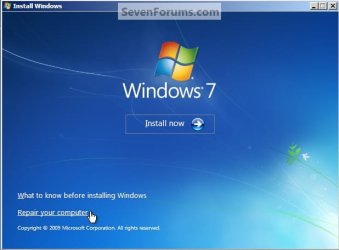
2) After the initial "Windows is loading files" select your language, time and keyboard preferences and click next, then select "Repair your computer", then it'll do some searching then choose "Syetem Restore".
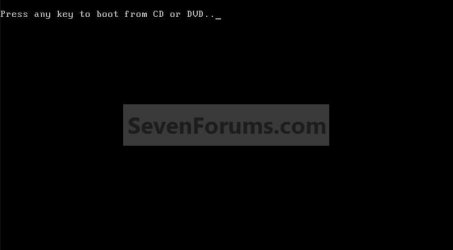
Any Key To Boot.jpg
Repair Computer.jpg
System Restore.jpg
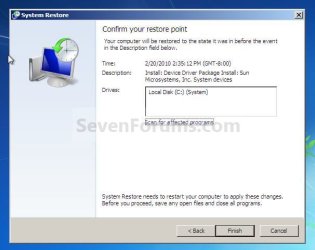
3) Remember you must select the restore point before you started experiencing the issues; once you have selected the correct restore point you'll be presented with one last chance before the restore begins, when you are sure everything is correct click next then finish. S7.jpg
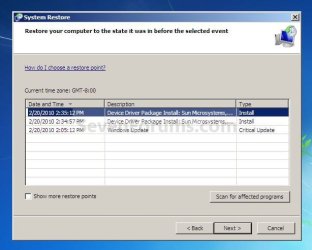
S8.jpg

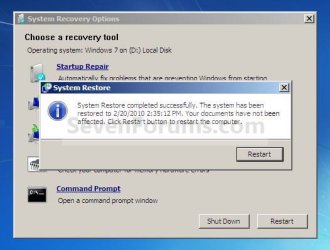
4) When the System Restore "checkup" completes you'll get a "Confirm your Restore Point" window, click finish then yes to the next wimdow, then you will need to restart the machine to complete the process. S9.jpg
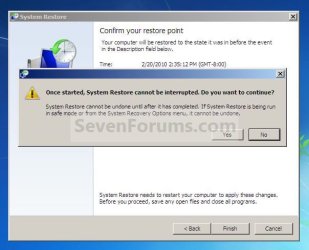
S10.jpg
S11.jpg
5) When the PC restarts remember you MUST use the password that was active for the Restore Point that you went back to. After Windows restarts you'll get a "System Restore Completed Successfully" window, just click close. S12.jpg
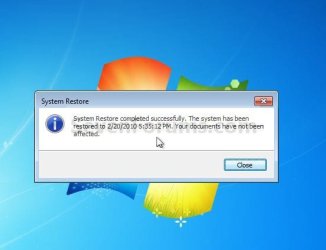
6) You may need to add back any programs and/or any Windows Updates that may have been removed during the restore process, you may also need to reset any personal settings that may have been changed but none of your personal documents or files will have been removed.

Enjoy :)


Attachments

  • S4.jpg
    S4.jpg
    83.2 KB · Views: 57
Last edited by a moderator:
Thank you Robert. :)
 

My Computer

Computer Manufacturer/Model Number
* BFK Customs *
OS
W 7 64-bit Ultimate
CPU
Intel Q9550 Yorkfield
Motherboard
ASUS P5Q Pro
Memory
8GB Dominator 8500C5D
Graphics Card(s)
ATI : XFX 5870
Sound Card
Realtek HD Audio 7-1
Monitor(s) Displays
1x 47" LCD HDMI & 3x 26" LCD HDMI
Screen Resolution
1920x1080P & 1920x1200
Hard Drives
1x 80GB Intel X25-M G2 SSD : 1x 500GB & 1x 640GB WD Caviar Black(s)
PSU
Corsair 620HX
Case
Cooler Master RC-690
Cooling
Tuniq Tower 120, 2x 140mm and 3x 120mm case fans
Keyboard
Microsoft 500
Mouse
Razer Diamondback 3G
Internet Speed
14 Mb/s
Other Info
1x Koutech 3Gb/s SATA HDD Hot Swap Rack
WIN + F1 | Create a password reset disk

Which will also give you the opportunity to view:
Create a password reset disk


I mention this only as references you might want to add to your tutorial.
 

My Computer

Computer Manufacturer/Model Number
Toshiba Satellite S875D-S7239 laptop
OS
MS Windows 7 Ultimate SP1 64-bit
CPU
AMD A10-4600M
Motherboard
AMD Pumori (Socket FT1)
Memory
6.00 GB Dual-Channel DDR3 @ 798MHz (11-11-12-28)
Graphics Card(s)
AMD Radeon HD 7660G
Sound Card
High Definition Audio Device
Monitor(s) Displays
Generic PnP Monitor (1600x900@60Hz)
Screen Resolution
1600x900@60Hz
Hard Drives
SSD 119GB Corsair CSSD-V128GB2 ATA Device
Keyboard
Standard PS/2 Keyboard
Mouse
HP Wireless Optical Mobile Mouse Model FHA-3410
Internet Speed
What the local pub, local coffee shop offers.
Other Info
Optical Drive:MATSHITA BD-CMB UJ160B ATA Device


Also have an Asus ha1002xp netbook with Win 7 Ultimate installed.

My Computer

Computer Manufacturer/Model Number
* BFK Customs *
OS
W 7 64-bit Ultimate
CPU
Intel Q9550 Yorkfield
Motherboard
ASUS P5Q Pro
Memory
8GB Dominator 8500C5D
Graphics Card(s)
ATI : XFX 5870
Sound Card
Realtek HD Audio 7-1
Monitor(s) Displays
1x 47" LCD HDMI & 3x 26" LCD HDMI
Screen Resolution
1920x1080P & 1920x1200
Hard Drives
1x 80GB Intel X25-M G2 SSD : 1x 500GB & 1x 640GB WD Caviar Black(s)
PSU
Corsair 620HX
Case
Cooler Master RC-690
Cooling
Tuniq Tower 120, 2x 140mm and 3x 120mm case fans
Keyboard
Microsoft 500
Mouse
Razer Diamondback 3G
Internet Speed
14 Mb/s
Other Info
1x Koutech 3Gb/s SATA HDD Hot Swap Rack
LOL BFK - did you ever get locked out by forgetting your password?

Just curious as it seems to be an area of interest to you.:)

Nice tut again - good idea which will be helpful to the forgetful types.
 

My Computers

System One System Two

  • Computer type
    PC/Desktop
    OS
    7 X64
    CPU
    i5 8400
    Motherboard
    gigabyte b365m ds3h
    Memory
    2x8gb 3200mhz
    Hard Drives
    various
    PSU
    pure power 11 400w cm
    Case
    Coolermaster
    Cooling
    cryorig m9i
  • Computer type
    PC/Desktop
    OS
    7x64
    CPU
    g5400
    Motherboard
    ga b365m ds3h
    Memory
    8gb ddr4 2400
    PSU
    xfx pro 450w
LOL BFK - did you ever get locked out by forgetting your password?

Just curious as it seems to be an area of interest to you.:)

Nice tut again - good idea which will be helpful to the forgetful types.


Hello SIW2, how've you been mate?


No I never have, just ideas that came to mind; thank you! :)
 

My Computer

Computer Manufacturer/Model Number
* BFK Customs *
OS
W 7 64-bit Ultimate
CPU
Intel Q9550 Yorkfield
Motherboard
ASUS P5Q Pro
Memory
8GB Dominator 8500C5D
Graphics Card(s)
ATI : XFX 5870
Sound Card
Realtek HD Audio 7-1
Monitor(s) Displays
1x 47" LCD HDMI & 3x 26" LCD HDMI
Screen Resolution
1920x1080P & 1920x1200
Hard Drives
1x 80GB Intel X25-M G2 SSD : 1x 500GB & 1x 640GB WD Caviar Black(s)
PSU
Corsair 620HX
Case
Cooler Master RC-690
Cooling
Tuniq Tower 120, 2x 140mm and 3x 120mm case fans
Keyboard
Microsoft 500
Mouse
Razer Diamondback 3G
Internet Speed
14 Mb/s
Other Info
1x Koutech 3Gb/s SATA HDD Hot Swap Rack
Another awesome Tutorial Big Brother. :)
 

My Computer

Computer Manufacturer/Model Number
"WartHog Wonder"
OS
Windows 7 Ultimate x64 SP1
CPU
AMD Phenom II X4, 945, Quad Core, 3.0 GHz
Motherboard
Gigabyte MA785GM-US2H
Memory
8GB G.Skill PI Black PC2 6400 * 4-4-4-12 @1.9v
Graphics Card(s)
NVIDIA 512MB 9600GT
Sound Card
Realtek ALC889A Chipset (onboard)
Monitor(s) Displays
2 x 22" Hans-G LCD
Screen Resolution
1680x1050
Hard Drives
650GB 7200RPM WD Caviar Black
PSU
OCZ 700w GameXstream
Case
Cooler Master CM 690 Midtower
Cooling
Xigmatek Gaia SD1283 CPU Cooler, Assorted 120mm case fans
Keyboard
Dell SK-8115
Mouse
Microsoft Comfort Optical Mouse 3000
Other Info
Liteon iHAS 424-98B 24x DVD/CD Writer
Not having a password reset disk and/or a 2nd administrator account with a password that's easy to remember is about as intelligent as only having one set of keys for your car or house. Seems unnecessary until you need it, but then you really need it.
 
Hello WartHog and madtownidiot, thanks guys!
 

My Computer

Computer Manufacturer/Model Number
* BFK Customs *
OS
W 7 64-bit Ultimate
CPU
Intel Q9550 Yorkfield
Motherboard
ASUS P5Q Pro
Memory
8GB Dominator 8500C5D
Graphics Card(s)
ATI : XFX 5870
Sound Card
Realtek HD Audio 7-1
Monitor(s) Displays
1x 47" LCD HDMI & 3x 26" LCD HDMI
Screen Resolution
1920x1080P & 1920x1200
Hard Drives
1x 80GB Intel X25-M G2 SSD : 1x 500GB & 1x 640GB WD Caviar Black(s)
PSU
Corsair 620HX
Case
Cooler Master RC-690
Cooling
Tuniq Tower 120, 2x 140mm and 3x 120mm case fans
Keyboard
Microsoft 500
Mouse
Razer Diamondback 3G
Internet Speed
14 Mb/s
Other Info
1x Koutech 3Gb/s SATA HDD Hot Swap Rack
Back
Top