SATA Drivers - Slipstream into Windows XP CD

How to slipstream SATA drivers into Windows XP setup CD, on your dual boot PC with Windows 7 or Vista

When you install Win XP, setup can not find your Hard Drive.

1.PNG

2.PNG


1) Download & Install nLite
nLite - Deployment Tool for the bootable Unattended Windows installation

2) Make a new folder for your Windows XP image.
Note: for this example, I am using the name Win XP Sata.

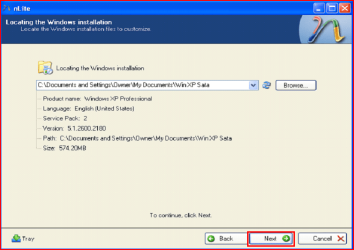
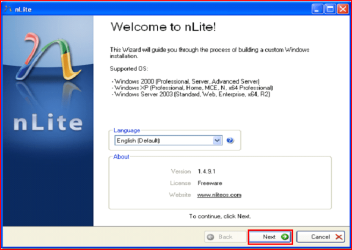
3) Insert XP CD & start nLite

4) Click Next.
3.PNG
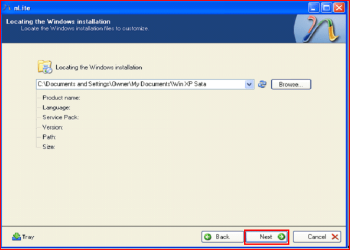
5) Choose your Windows XP image folder, & Click Next, than OK.
Note: nLite will put the image into your folder.
4.PNG

5.PNG
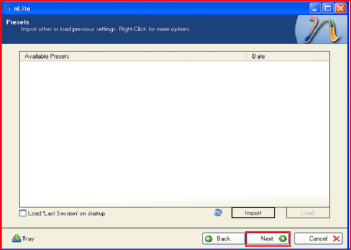
6) Click Next.
6.PNG
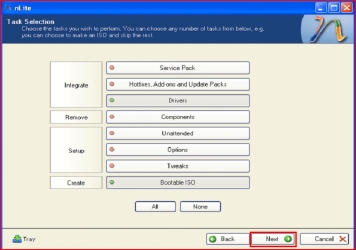
7) Click Next.
7.PNG
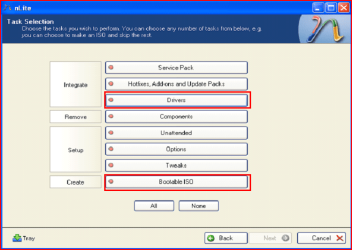
8) Choose Integrate Drivers & Create Bootable ISO
8.PNG
9) Click Next.
9.PNG
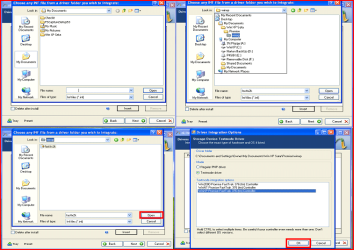
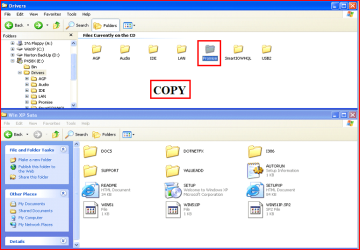
10) Copy & Paste your Sata Driver to your image folder.
Note: for this example, I am using Promise Fastrak 376.
10.PNG

11.PNG
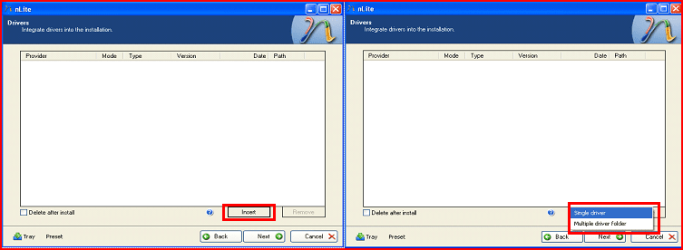
11) Click Insect, than Single Driver.
12.PNG
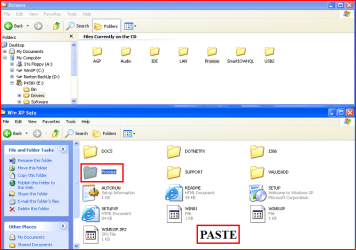
12) Locate your Sata Setup Inf file.
Click Open, than OK.
Note: for this example the file is called fasttx2k.
Note: for this example, I am using Promise Fastrak 376.
13.PNG
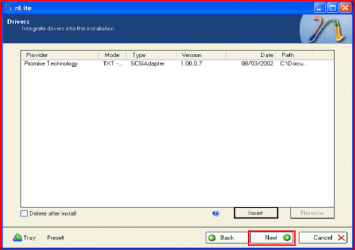
13) Click Next.
14.PNG
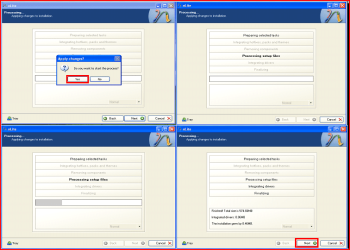
14) Click Yes, than Next.
15.PNG
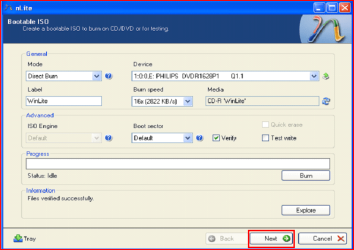
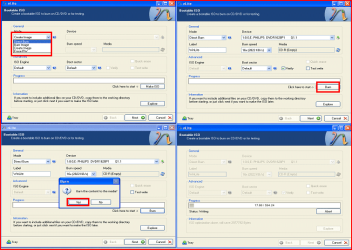
15) Choose Direct Burn.
Click Burn, than Yes.
Note: nLite will now burn your new CD.
16.PNG
16) Click Next.
17.PNG
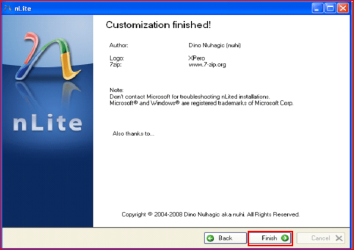
17) Click Finish.
18.PNG
Your Sata drive will now show up in setup.
19.PNG

 
Last edited by a moderator:
I am still really confused! I did manage to find the name & location of the sata drivers, but after spending 3 hours online with Dell, I still cannot get the name and location of the .inf file for sata drives. Any ideas on how to find this information out and am I going about this right or wrong? Appreciate any help, but please talk in simple terms as some terminology goes over my head. *grin*

You can open the driver exe's with winrar, thete you will find the inf(s)
 

My Computer

Computer Manufacturer/Model Number
Lenovo G560
OS
Windows 7 Ultimate x64 SP1 RC | Windows XP x86 SP3 | Ubuntu 10.10 x64
CPU
Intel Core i5-M430
Motherboard
Lenovo
Memory
2 x 2GB DDR3 RAM
Graphics Card(s)
Intel HD Intergrated Graphics
Screen Resolution
1336 x 768
Hard Drives
320GB 2.5" SATA HDD
Keyboard
US International
Mouse
ELAN Smart-Pad
Internet Speed
800 MB/s | 6.5 Mb/s
Am trying to slipstream a sata driver so I can do a dual boot - have new computer with Windows 7, but need to also have XP to run older programs that won't install on 7. :DThis is a great tut, however the pics are so small I cannot makeout any detail:( so am having a difficult time trying to follow directions. I got down to the section on integrating drivers and am stuck. Please help. I checked the hardware on my system to get driver names, then copied them to the install folder on my hard drive. I found them under system32\drivers - one is named disk.sys and one named partmgr.sys Now it says to locate the sata inf folder - could someone tell me where it is located and what it is named? :o:confused: I located an inf folder with same name as one of the driver files, could this be it? Sorry to be so slow on the uptake and appreciate any help you could give.

1) You can enlarge the pictures by clicking on them.

2) You need to download your Sata Controller Drivers, what Sata Controller do you have?

3) First check for all the Win XP drivers for your hardware.
If your Win XP CD, does not support your Sata Controller, you will need to load drivers to uses at F6.
Load Sata Controller drivers with a floppy disk is the best way.

http://www.sevenforums.com/tutorials/66010-sata-drivers-load-windows-xp-setup-dual-boot.html
OR
http://www.sevenforums.com/tutorials/72185-sata-drivers-slipstream-into-windows-xp-cd.html


Can you post your specs.

http://www.sevenforums.com/general-discussion/22550-filling-out-system-specs.html
http://www.sevenforums.com/hardware-devices/6936-dont-know-what-hardware-you-have.html
VistaForums SysInfo Tool - Vista Forums
 

My Computer

OS
ME/XP/Vista/Win7
You can open the driver exe's with winrar, thete you will find the inf(s)


Do you mean to open the .sys file with winrar? Are you saying that the .inf file is located within the .sys file. Sorry but that does not make any sense to me.

In the instructions on slipstreaming it asks you to copy the sata drivers and the .inf file over to the new setup file. In order to do this you have to locate the driver files and the .inf file. I have found the names and location of my 2 sata drivers. I cannot find the actual name or location of the .inf file.

Sorry if I am just slow and not understanding your explanation or if I did not explain my question good enough. I am elderly and having problems trying to install XP as a 2nd boot system. I need it because Win 7 will not run many of my programs as they are older, but they will run fine under XP. Thanks for any and all help and suggestions!
 

My Computer

OS
Windows 7 Home Premium 64 bit
You can open the driver exe's with winrar, thete you will find the inf(s)


Do you mean to open the .sys file with winrar? Are you saying that the .inf file is located within the .sys file. Sorry but that does not make any sense to me.

In the instructions on slipstreaming it asks you to copy the sata drivers and the .inf file over to the new setup file. In order to do this you have to locate the driver files and the .inf file. I have found the names and location of my 2 sata drivers. I cannot find the actual name or location of the .inf file.

Sorry if I am just slow and not understanding your explanation or if I did not explain my question good enough. I am elderly and having problems trying to install XP as a 2nd boot system. I need it because Win 7 will not run many of my programs as they are older, but they will run fine under XP. Thanks for any and all help and suggestions!
No I was reffering to the driver exe (self-extracting)
I am afraid my knowledge is limited here
 

My Computer

Computer Manufacturer/Model Number
Lenovo G560
OS
Windows 7 Ultimate x64 SP1 RC | Windows XP x86 SP3 | Ubuntu 10.10 x64
CPU
Intel Core i5-M430
Motherboard
Lenovo
Memory
2 x 2GB DDR3 RAM
Graphics Card(s)
Intel HD Intergrated Graphics
Screen Resolution
1336 x 768
Hard Drives
320GB 2.5" SATA HDD
Keyboard
US International
Mouse
ELAN Smart-Pad
Internet Speed
800 MB/s | 6.5 Mb/s
Am trying to slipstream a sata driver so I can do a dual boot - have new computer with Windows 7, but need to also have XP to run older programs that won't install on 7. :DThis is a great tut, however the pics are so small I cannot makeout any detail:( so am having a difficult time trying to follow directions. I got down to the section on integrating drivers and am stuck. Please help. I checked the hardware on my system to get driver names, then copied them to the install folder on my hard drive. I found them under system32\drivers - one is named disk.sys and one named partmgr.sys Now it says to locate the sata inf folder - could someone tell me where it is located and what it is named? :o:confused: I located an inf folder with same name as one of the driver files, could this be it? Sorry to be so slow on the uptake and appreciate any help you could give.
1) You can enlarge the pictures by clicking on them.

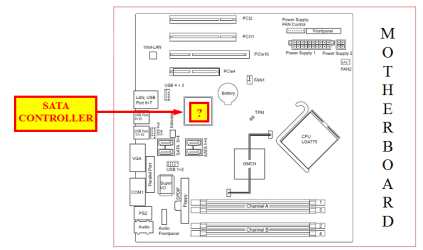
2) You need to download your Sata Controller Drivers, what Sata Controller do you have?

3) First check for all the Win XP drivers for your hardware.
If your Win XP CD, does not support your Sata Controller, you will need to load drivers to uses at F6.
Load Sata Controller drivers with a floppy disk is the best way.

http://www.sevenforums.com/tutorials/66010-sata-drivers-load-windows-xp-setup-dual-boot.html
OR
http://www.sevenforums.com/tutorials/72185-sata-drivers-slipstream-into-windows-xp-cd.html


Can you post your specs.

http://www.sevenforums.com/general-discussion/22550-filling-out-system-specs.html
http://www.sevenforums.com/hardware-devices/6936-dont-know-what-hardware-you-have.html
VistaForums SysInfo Tool - Vista Forums

What Sata Controller do you have?

Sata.PNG
 

My Computer

OS
ME/XP/Vista/Win7
Hi Happy here,
Im sorry if this seems really thick but how do i know which driver to copy/paste?

i know that its in system32, but there are 3 files with driver in the file name, all containing what i believe to be drivers, its slightly frustrating as although this is a very good tutorial, theres little detail for the less IT literate among us
 

My Computer

Computer Manufacturer/Model Number
Dell Inspiron N5030
OS
windows 7 home premium 64bit
Other Info
want to dual boot win7 and winxp.
any ideas?
Hi Happy here,
Im sorry if this seems really thick but how do i know which driver to copy/paste?

i know that its in system32, but there are 3 files with driver in the file name, all containing what i believe to be drivers, its slightly frustrating as although this is a very good tutorial, theres little detail for the less IT literate among us

First check for all the Win XP drivers for your hardware.Check with your tag No:
Dell - Drivers and Downloads
If your Win XP CD, does not support your Sata Controller, you will need to load drivers to uses at F6.

Load Sata Controller drivers with a floppy disk is the best way.
http://www.sevenforums.com/tutorials/66010-sata-drivers-load-windows-xp-setup-dual-boot.html
OR
http://www.sevenforums.com/tutorials/72185-sata-drivers-slipstream-into-windows-xp-cd.html

Your Dell Inspiron 15 has a Intel Sata Controller.
You can download your F6 Sata Controller drivers from here:

Intel Sata Controller Drivers
 

My Computer

OS
ME/XP/Vista/Win7
new partition not displayed, Win7 with dual Xp install

The procedure is straightforward, yet the newly created partition is not displayed at install. Should more be slipstreamed into the Xp install disk besides nvstor32.inf? Warmest regards and thanks for the info!
 

My Computer

Computer Manufacturer/Model Number
Hp TX1410US
OS
win 7 ultimate x86
CPU
AMD TL64
Memory
1 Gb
The procedure is straightforward, yet the newly created partition is not displayed at install. Should more be slipstreamed into the Xp install disk besides nvstor32.inf? Warmest regards and thanks for the info!

Slipsteaming your Sata Controller drivers will not create a new partition.
http://www.sevenforums.com/tutorials/8057-dual-boot-installation-windows-7-xp.html?ltr=D

First check for all the Win XP drivers for your hardware.
HP Support & Drivers

If your Win XP CD, does not support your Sata Controller, you will need to load drivers to uses at F6.

Load Sata Controller drivers with a floppy disk is the best way.
http://www.sevenforums.com/tutorials/66010-sata-drivers-load-windows-xp-setup-dual-boot.html
OR
http://www.sevenforums.com/tutorials/72185-sata-drivers-slipstream-into-windows-xp-cd.html

You can download your F6 Sata Controller drivers from here:
General XP Downgrade Guide for HP Laptops - HP Support Forum
 

My Computer

OS
ME/XP/Vista/Win7
Slipstreaming SATA drivers for Xp dual boot with Win7

Thanks, theog! Truly valuable info and advice. I am eager to continue.
 

My Computer

Computer Manufacturer/Model Number
Hp TX1410US
OS
win 7 ultimate x86
CPU
AMD TL64
Memory
1 Gb
Hi all! First off thanks for all the tips I have read so far. It's as close I have come to solving my problem. But alas I'm still not there. Here's what happened.

A friend of mine who is 70 years old had been using XP for several years and was comfortable with it. He then needed a laptop. Got a new Inspiron 1750 from Dell. It had Win 7 on it. He used it for awhile but hated 7 (he couldn't figure it out, his brain is stuck on XP mode..). So his neighbor tells him he can get XP on it and proceeded to wipe the drive clean using Acronis Disk Director. After which he tried installing Win XP Home. Needless to say it doesn't want to do that so it has since wound up in my lap.

I have Nlite and followed the directions posted on this board but like some others I'm not sure what drivers I need. The Dell site isn't much help and I downloaded what I could find, they are all exe's and tried using Winrar to see the files in them, no luck.

What info I have from the Bios System info is this

Intel Core 2 Duo T6500
4 Gigs DDR2 Ram (2 sticks)
N634N Hard Drive, 320GB, S2, 5.4K, 2.5 SGT-WYATT (Seagate)

Using a floppy on this laptop is not an option so guess I would need to "slipstream" the drivers into the installation disk. I'm just not sure

Seagate offers this tutorial..How to install Windows 2000/XP/Vista on a SATA drive. and links to get drivers but there again, if any of the links would work for the laptop I have no clue!

Thanks in advance if anyone has any suggestions. And I'm also sorry this was a long post!!
 

My Computer

OS
Window 7 Home Premium 64bit
Hi all! First off thanks for all the tips I have read so far. It's as close I have come to solving my problem. But alas I'm still not there. Here's what happened.

A friend of mine who is 70 years old had been using XP for several years and was comfortable with it. He then needed a laptop. Got a new Inspiron 1750 from Dell. It had Win 7 on it. He used it for awhile but hated 7 (he couldn't figure it out, his brain is stuck on XP mode..). So his neighbor tells him he can get XP on it and proceeded to wipe the drive clean using Acronis Disk Director. After which he tried installing Win XP Home. Needless to say it doesn't want to do that so it has since wound up in my lap.

I have Nlite and followed the directions posted on this board but like some others I'm not sure what drivers I need. The Dell site isn't much help and I downloaded what I could find, they are all exe's and tried using Winrar to see the files in them, no luck.

What info I have from the Bios System info is this

Intel Core 2 Duo T6500
4 Gigs DDR2 Ram (2 sticks)
N634N Hard Drive, 320GB, S2, 5.4K, 2.5 SGT-WYATT (Seagate)

Using a floppy on this laptop is not an option so guess I would need to "slipstream" the drivers into the installation disk. I'm just not sure

Seagate offers this tutorial..How to install Windows 2000/XP/Vista on a SATA drive. and links to get drivers but there again, if any of the links would work for the laptop I have no clue!

Thanks in advance if anyone has any suggestions. And I'm also sorry this was a long post!!

First check for all the Win XP drivers for your hardware.
Dell - Drivers and Downloads

If your Win XP CD, does not support your Sata Controller, you will need to load drivers to uses at F6.
Load Sata Controller drivers with a floppy disk is the best way.
http://www.sevenforums.com/tutorials/66010-sata-drivers-load-windows-xp-setup-dual-boot.html
OR
http://www.sevenforums.com/tutorials/72185-sata-drivers-slipstream-into-windows-xp-cd.html

Your Dell Inspiron 1750 has a Intel Sata Controller.
You can download your F6 Sata Controller drivers from here:

Intel Sata Controller Drivers

You may like to have read of this post:
Inspiron 1750 and reinstalling XP - Microsoft OS Forum - Software & Operating Systems - Dell Community
 

My Computer

OS
ME/XP/Vista/Win7
Thank you so much theog! The link you posted from the Dell community is just what I needed. I'll let everyone know how it goes for me, getting started now. Thanks again for your help!:D
 

My Computer

OS
Window 7 Home Premium 64bit
Hi guys,

currenlty most of the users here are using Intel processors, however i am using AMD processor, therefore the webs that is provided is pointless for me right? I am also stuck @ no.10. I do not know of other alternatives to encounter this problem. Mind some help please? :]
 

My Computer

Computer Manufacturer/Model Number
ECS A785GM-M
OS
Windows 7 Ultimate x64
CPU
AMD Athlon(tm) II X4 630 Processor 1MHz
Motherboard
ECS
Memory
4GB
Graphics Card(s)
ATI Radeon HD 5700 Series
Hard Drives
Acer 250GB
PSU
ANDYSON 500W
Case
NZXT
Cooling
Cooler Master
Hi guys,

currenlty most of the users here are using Intel processors, however i am using AMD processor, therefore the webs that is provided is pointless for me right? I am also stuck @ no.10. I do not know of other alternatives to encounter this problem. Mind some help please? :]

First check for all the Win XP drivers for your hardware.
If your Win XP CD, does not support your Sata Controller, you will need to load drivers to uses at F6.
Load Sata Controller drivers with a floppy disk is the best way.
http://www.sevenforums.com/tutorials/66010-sata-drivers-load-windows-xp-setup-dual-boot.html
OR
http://www.sevenforums.com/tutorials/72185-sata-drivers-slipstream-into-windows-xp-cd.html

ECS A785GM-M
You can download your F6 Sata Controller drivers from here:
ECS Web Site

Capture.PNG
 

My Computer

OS
ME/XP/Vista/Win7
Hi guys!

Here's my situation:

I need to install and configure WinXP on a system that already has Win7 Starter 32bit installed. The computer I'm going to install WinXP does not have internet access and is located away from my home so I need to be prepared for the whole process.

I want to slipstream SATAII drivers on my WinXP CD and I need help doing that. Which driver should I install?

Motherboard is: MSI G41M-P23 http://www.msi.com/product/mb/G41M-P23.html#/?div=Overview

Is there anything else I should have to consider prior doing installation? Btw, I don't have Win7 installation disk (it came with the computer, OEM version) ... I guess installation files are located somewhere on the hard disk drive ...

Thanks in advance!
 

My Computer

OS
Windows 7 Ultimate x86
Hi guys!

Here's my situation:

I need to install and configure WinXP on a system that already has Win7 Starter 32bit installed. The computer I'm going to install WinXP does not have internet access and is located away from my home so I need to be prepared for the whole process.

I want to slipstream SATAII drivers on my WinXP CD and I need help doing that. Which driver should I install?

Motherboard is: MSI G41M-P23 http://www.msi.com/product/mb/G41M-P23.html#/?div=Overview

Is there anything else I should have to consider prior doing installation? Btw, I don't have Win7 installation disk (it came with the computer, OEM version) ... I guess installation files are located somewhere on the hard disk drive ...

Thanks in advance!

First check for all the Win XP drivers for your hardware.
If your Win XP CD, does not support your Sata Controller, you will need to load drivers to uses at F6.
Load Sata Controller drivers with a floppy disk is the best way.
http://www.sevenforums.com/tutorials/66010-sata-drivers-load-windows-xp-setup-dual-boot.html
OR
http://www.sevenforums.com/tutorials/72185-sata-drivers-slipstream-into-windows-xp-cd.html

Your G41M-P23 has a Intel Sata Controller.
You can download your F6 Sata Controller drivers from here:

Intel Sata Controller Drivers
 

My Computer

OS
ME/XP/Vista/Win7
Hi guys!

Here's my situation:

I need to install and configure WinXP on a system that already has Win7 Starter 32bit installed. The computer I'm going to install WinXP does not have internet access and is located away from my home so I need to be prepared for the whole process.

I want to slipstream SATAII drivers on my WinXP CD and I need help doing that. Which driver should I install?

Motherboard is: MSI G41M-P23 http://www.msi.com/product/mb/G41M-P23.html#/?div=Overview

Is there anything else I should have to consider prior doing installation? Btw, I don't have Win7 installation disk (it came with the computer, OEM version) ... I guess installation files are located somewhere on the hard disk drive ...

Thanks in advance!

First check for all the Win XP drivers for your hardware.
If your Win XP CD, does not support your Sata Controller, you will need to load drivers to uses at F6.
Load Sata Controller drivers with a floppy disk is the best way.
http://www.sevenforums.com/tutorials/66010-sata-drivers-load-windows-xp-setup-dual-boot.html
OR
http://www.sevenforums.com/tutorials/72185-sata-drivers-slipstream-into-windows-xp-cd.html

Your G41M-P23 has a Intel Sata Controller.
You can download your F6 Sata Controller drivers from here:

Intel Sata Controller Drivers

Thanks! I made it :D
 

My Computer

OS
Windows 7 Ultimate x86
Well since you helped every body else, why not to try..

I am trying to install XP and i can't find the drivers.. i have read 8 pages here and still have no idea what to look for.

I have ASUS p5k and DigitalWestern hard drive but have no idea what model and what to download..
 

My Computer

OS
Windows 7 x64 ultimate
Back
Top