Password Expiration - Change MAX and MIN Password Age

How to Change Maximum and Minimum Password Age in Windows 7 and Windows 8

   Information
This will show you how to change the maximum and minimum password age in days the password for all users can be used before it expires and must be changed by the user in Windows 7 and Windows 8.

By default it is 42 days maximum password age, 0 days minimum password age.

In Windows 8, this only applies to local accounts, and not Microsoft accounts..

   Note

Maximum Password Age -
This security setting determines the period of time (in days) that a password can be used before the system requires the user to change it. You can set passwords to expire after a number of days between 1 and 999, or you can specify that passwords never expire by setting the number of days to 0. If the maximum password age is between 1 and 999 days, the Minimum password age must be less than the maximum password age. If the maximum password age is set to 0, the minimum password age can be any value between 0 and 998 days.

Minimum Password Age -
This security setting determines the period of time (in days) that a password must be used before the user can change it. You can set a value between 1 and 998 days, or you can allow changes immediately by setting the number of days to 0. The minimum password age must be less than the Maximum password age, unless the maximum password age is set to 0, indicating that passwords will never expire. If the maximum password age is set to 0, the minimum password age can be set to any value between 0 and 998.

Configure the minimum password age to be more than 0 if you want Enforce password history to be effective. Without a minimum password age, users can cycle through passwords repeatedly until they get to an old favorite.
   Warning
You can only do this while logged in as an administrator.

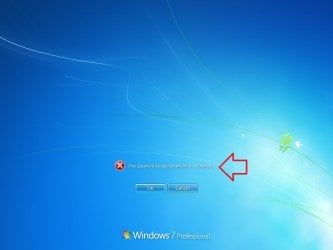
EXAMPLE: Password Expiration
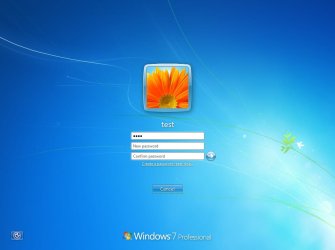
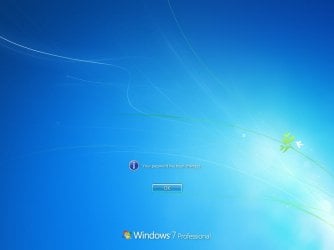
NOTE: This is what a user will see at log on when the maximum password age is reached and they are required to change their password.
Expired1.jpg

Expired2.jpg

Expired3.jpg


OPTION ONE

Through Local Security Policy Manager


NOTE: This option is only available for the Windows 7 Professional, Ultimate, and Enterprise editions.
1. If you have not already, you must enable password expiration for each user account that you want to have their password expire after the maximum password age.

2. Open the Local Security Policy editor.

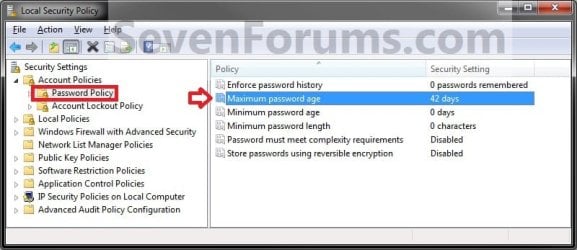
3. In the left pane, expand Account Policies, and click on Password Policy. (see screenshot below)
SECPOL-1.jpg
4. To Change the Maximum Password Age
A) In the right pane, double click on Maximum password age. (see screenshot above)

B) Enter how many days between 0 and 999 that you want passwords can be used before the system require's the user to change it in Windows 7 or Windows 8, then click on OK. (see screenshot below)
NOTE: Setting the maximum password age to 0 will set passwords to never expire for all users. See NOTE box at the top of the tutorial.
SECPOL-2.jpg
5. To Change the Minimum Password Age
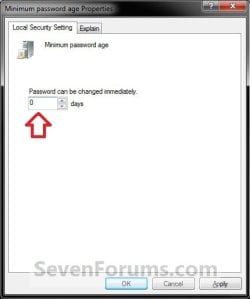
A) In the right pane, double click on Minimum password age. (see screenshot below step 3)

B) Enter how many days between 1 and 998 that you want passwords for all users to be used for before the user is allowed to change it in Windows 7 or Windows 8, then click on OK. (see screenshot below)
NOTE: See NOTE box at the top of the tutorial.
SECPOL-3.jpg
6. Close the Local Security Policy editor.


OPTION TWO

Through an Elevated Command Prompt


NOTE: This option is available for all Windows 7 editions.
1. If you have not already, you must enable password expiration for each user account that you want to have their password expire after the maximum password age.

2. Log in to the user account that you want to change the maximum and minimum password age for.

3. Open an elevated command prompt in Windows 7 or Windows 8.

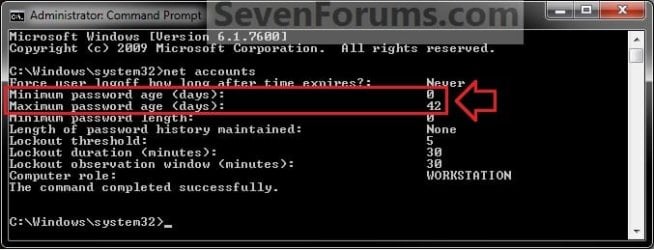
4. To See the Current "MAX and MIN password age" Settings
A) In the elevated command prompt, type net accounts and press Enter. (see screenshot below)
CMD1.jpg
5. To Disable Password Expiration for All Users
A) In the elevated command prompt, type the command below and press Enter. (see screenshot below)

Code:
net accounts /maxpwage:unlimited
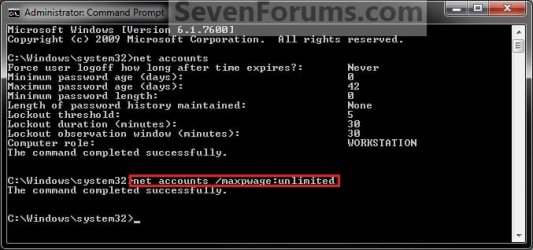
CMD2.jpg
B) Go to step 8.
6. To Change the Maximum Password Age
A) In the elevated command prompt, type the command below and press Enter. (see screenshot below)
NOTE: Substitute (1-999) for how many days between 1 and 999 that you want passwords can be used before the system require's the user to change it in Windows 7 or Windows 8. See NOTE box at the top of the tutorial.

Code:
net accounts /maxpwage:[COLOR=red][B](1-999)[/B][/COLOR]
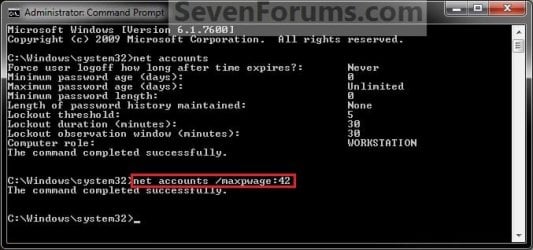
FOR EXAMPLE: I would type in this command exactly for the default of 42 days, and press enter.

Code:
net accounts /maxpwage:42
CMD3.jpg
7. To Change the Minimum Password Age
A) In the elevated command prompt, type the command below and press Enter. (see screenshot below)
NOTE: Substitute (0-998) for how many days between 0 and 998 that you want passwords for all users to be used for before the user is allowed to change it in Windows 7 or Windows 8. See NOTE box at the top of the tutorial.

Code:
net accounts /minpwage:[COLOR=red][B](0-998)[/B][/COLOR]
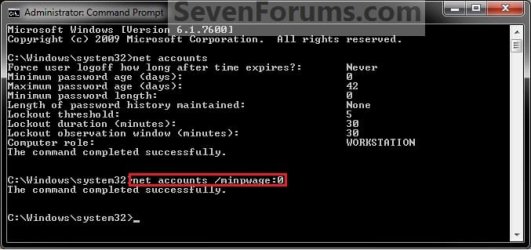
FOR EXAMPLE: I would type in this command exactly for the default of 0 days, and press enter.

Code:
net accounts /minpwage:0
CMD4.jpg
8. Close the elevated command prompt.

That's it,
Shawn


Last edited:
Yet again, great Tutorial.
But I MUST ask - How did you take the screenshots of the Lockscreen?
 

My Computer My Computer

Computer type
PC/Desktop
Computer Manufacturer/Model Number
Multirama PC Expert [Bulgaria]
OS
Windows 7 Home Premium [64-Bit]
CPU
Intel Core 2 Quad CPU Q8200 @ 2.33 GHz
Motherboard
GIGABYTE GA-G31M-S2C
Memory
4094 MB DDR2
Graphics Card(s)
SAPPHIRE Radeon HD 6970 (2 GB VRAM)
Sound Card
Realtek ALC883 @ Intel 82801GB ICH7 - High Definition Audio
Monitor(s) Displays
Samsung SyncMaster BX2235 [21.5" LCD with LED Backlight]
Screen Resolution
1920x1080
Hard Drives
Hitachi HDT721075SLA360 - 750 GB
PSU
Cooler Master GX750 - 750W
Case
Multirama (Black / 2010 Revision)
Cooling
Stock + Cooler Master
Keyboard
Logitech G510 (Gaming Keyboard)
Mouse
Razer Lachesis (4000 DPI, Blue Version)
Internet Speed
Vivacom Optical [100 Mbps]
Browser
Chrome [Windows]
Probably using a VM -virtual machine Windows 7 guest OS.
 

My Computer My Computer

Computer type
PC/Desktop
Computer Manufacturer/Model Number
Airbot 2.0
OS
Windows 7 Ultimate x64 SP1
CPU
Core i7 920 (D0) @ 4Ghz, *26c idle *65c full load on air
Motherboard
Asus P6X58D Premium - Sata 6Gb/s - USB 3.0
Memory
12GB DDR3 Corsair Dominator -CMD12GX3M6A1600C8 at 1600MHz
Graphics Card(s)
Zotac Geforce GTX 770
Sound Card
ASUS Xonar D2X
Monitor(s) Displays
1 LG 24" Flatron W2453V-PF 1 Samsung 24" P2450H both 2ms RT
Screen Resolution
1920x1080@60hz
Hard Drives
1 Samsung 250GB 840 Evo SSD
1 OCZ Vertex2 180GB SSD
1 TB Samsung Spinpoint F1 7200RPM 32MB cache
2 500GB WD Caviar Blacks 7200RPM 32MB cache (WD5001AALS)

Pioneer DVD Burner DVR-S18M
PSU
Corsair HX1000W
Case
Cooler Master HAF 932
Cooling
Case Fans *3 230mm, *1 140mm/CPU - *Tuniq Tower 120 Extreme
Keyboard
Logitech Wireless MK700
Mouse
Logitech Wireless MK700
Internet Speed
DL 15 Mbps UL 0.98 Mbps
Antivirus
None
Browser
Firefox Nightly
Other Info
Processor-7.7 *RAM- 7.9 *Graphics-7.9 *Gaming Graphics- 7.9 *SSD- 7.8 W.E.I final score= 7.7
*Phone- LG Nexus 5
Hello Stefan,

It's as Aaron posted above. I got the screenshots from a VM of Windows 7 in Windows Virtual PC. :)
 

My Computer My Computer

Computer type
PC/Desktop
Computer Manufacturer/Model Number
Self built custom
OS
64-bit Windows 11 Pro for Workstations
CPU
Intel i7-8700K OC'd to 5 GHz
Motherboard
ASUS ROG Maximus XI Formula Z390
Memory
64 GB (4x16GB) G.SKILL TridentZ RGB DDR4 3600 MHz
Graphics Card(s)
ASUS ROG-STRIX-GTX1080TI-O11G-GAMING
Sound Card
Integrated
Monitor(s) Displays
2 x Samsung Odyssey G7 27"
Screen Resolution
2560x1440
Hard Drives
1TB Samsung 990 PRO M.2,
4TB Samsung 990 PRO PRO M.2,
TerraMaster F8 SSD Plus NAS
PSU
Seasonic Prime Titanium 850W
Case
Thermaltake Core P3
Cooling
Corsair Hydro H115i
Keyboard
Logitech wireless K800
Mouse
Logitech MX Master 4
Internet Speed
2 Gb/s Download and 100 Mb/s Upload
Antivirus
Malwarebyte Anti-Malware Premium
Browser
Google Chrome
Other Info
Logitech Z625 speaker system,
Logitech BRIO 4K Pro webcam,
HP Color LaserJet Pro MFP M477fdn,
APC SMART-UPS RT 1000 XL - SURT1000XLI,
Galaxy S23 Plus phone
Yeah, should have thought of that. Thanks for sharing :)
 

My Computer My Computer

Computer type
PC/Desktop
Computer Manufacturer/Model Number
Multirama PC Expert [Bulgaria]
OS
Windows 7 Home Premium [64-Bit]
CPU
Intel Core 2 Quad CPU Q8200 @ 2.33 GHz
Motherboard
GIGABYTE GA-G31M-S2C
Memory
4094 MB DDR2
Graphics Card(s)
SAPPHIRE Radeon HD 6970 (2 GB VRAM)
Sound Card
Realtek ALC883 @ Intel 82801GB ICH7 - High Definition Audio
Monitor(s) Displays
Samsung SyncMaster BX2235 [21.5" LCD with LED Backlight]
Screen Resolution
1920x1080
Hard Drives
Hitachi HDT721075SLA360 - 750 GB
PSU
Cooler Master GX750 - 750W
Case
Multirama (Black / 2010 Revision)
Cooling
Stock + Cooler Master
Keyboard
Logitech G510 (Gaming Keyboard)
Mouse
Razer Lachesis (4000 DPI, Blue Version)
Internet Speed
Vivacom Optical [100 Mbps]
Browser
Chrome [Windows]
Ah, don't worry about it. :)
 

My Computer My Computer

Computer type
PC/Desktop
Computer Manufacturer/Model Number
Self built custom
OS
64-bit Windows 11 Pro for Workstations
CPU
Intel i7-8700K OC'd to 5 GHz
Motherboard
ASUS ROG Maximus XI Formula Z390
Memory
64 GB (4x16GB) G.SKILL TridentZ RGB DDR4 3600 MHz
Graphics Card(s)
ASUS ROG-STRIX-GTX1080TI-O11G-GAMING
Sound Card
Integrated
Monitor(s) Displays
2 x Samsung Odyssey G7 27"
Screen Resolution
2560x1440
Hard Drives
1TB Samsung 990 PRO M.2,
4TB Samsung 990 PRO PRO M.2,
TerraMaster F8 SSD Plus NAS
PSU
Seasonic Prime Titanium 850W
Case
Thermaltake Core P3
Cooling
Corsair Hydro H115i
Keyboard
Logitech wireless K800
Mouse
Logitech MX Master 4
Internet Speed
2 Gb/s Download and 100 Mb/s Upload
Antivirus
Malwarebyte Anti-Malware Premium
Browser
Google Chrome
Other Info
Logitech Z625 speaker system,
Logitech BRIO 4K Pro webcam,
HP Color LaserJet Pro MFP M477fdn,
APC SMART-UPS RT 1000 XL - SURT1000XLI,
Galaxy S23 Plus phone
so if i have a password that never expires is that a security thret or am i more secure with a passowrd that never expires????
 

My Computer My Computer

Computer Manufacturer/Model Number
gigabyte
OS
windows 7 64bit
CPU
intel core 2 duo E8600 @3.33ghz
Motherboard
gigabyte ep45-ds5 (socket 775)
Memory
8.0gb dual-channel DDR2 @400mhz (6-6-6-18
Graphics Card(s)
2X ATI Radeon HD 4800 series (sapphire) crossfire
Sound Card
realtek high definition audio
Monitor(s) Displays
benq E2200w (digital)
Screen Resolution
1680 x 1050
Hard Drives
1 313GB Western digital WDC
Hello Gigabyte, and welcome to Seven Forums.

Technically it's more of a security threat to always use the same password since someone could eventually guess it. It's recommended to change it every so often (up to you when) to be safe in case someone else may be using it without you knowing it.

Hope this helps,
Shawn
 

My Computer My Computer

Computer type
PC/Desktop
Computer Manufacturer/Model Number
Self built custom
OS
64-bit Windows 11 Pro for Workstations
CPU
Intel i7-8700K OC'd to 5 GHz
Motherboard
ASUS ROG Maximus XI Formula Z390
Memory
64 GB (4x16GB) G.SKILL TridentZ RGB DDR4 3600 MHz
Graphics Card(s)
ASUS ROG-STRIX-GTX1080TI-O11G-GAMING
Sound Card
Integrated
Monitor(s) Displays
2 x Samsung Odyssey G7 27"
Screen Resolution
2560x1440
Hard Drives
1TB Samsung 990 PRO M.2,
4TB Samsung 990 PRO PRO M.2,
TerraMaster F8 SSD Plus NAS
PSU
Seasonic Prime Titanium 850W
Case
Thermaltake Core P3
Cooling
Corsair Hydro H115i
Keyboard
Logitech wireless K800
Mouse
Logitech MX Master 4
Internet Speed
2 Gb/s Download and 100 Mb/s Upload
Antivirus
Malwarebyte Anti-Malware Premium
Browser
Google Chrome
Other Info
Logitech Z625 speaker system,
Logitech BRIO 4K Pro webcam,
HP Color LaserJet Pro MFP M477fdn,
APC SMART-UPS RT 1000 XL - SURT1000XLI,
Galaxy S23 Plus phone
hello brink thankyou for the quick reply i love dis forum.
 

My Computer My Computer

Computer Manufacturer/Model Number
gigabyte
OS
windows 7 64bit
CPU
intel core 2 duo E8600 @3.33ghz
Motherboard
gigabyte ep45-ds5 (socket 775)
Memory
8.0gb dual-channel DDR2 @400mhz (6-6-6-18
Graphics Card(s)
2X ATI Radeon HD 4800 series (sapphire) crossfire
Sound Card
realtek high definition audio
Monitor(s) Displays
benq E2200w (digital)
Screen Resolution
1680 x 1050
Hard Drives
1 313GB Western digital WDC
You're welcome Gigabyte. :)
 

My Computer My Computer

Computer type
PC/Desktop
Computer Manufacturer/Model Number
Self built custom
OS
64-bit Windows 11 Pro for Workstations
CPU
Intel i7-8700K OC'd to 5 GHz
Motherboard
ASUS ROG Maximus XI Formula Z390
Memory
64 GB (4x16GB) G.SKILL TridentZ RGB DDR4 3600 MHz
Graphics Card(s)
ASUS ROG-STRIX-GTX1080TI-O11G-GAMING
Sound Card
Integrated
Monitor(s) Displays
2 x Samsung Odyssey G7 27"
Screen Resolution
2560x1440
Hard Drives
1TB Samsung 990 PRO M.2,
4TB Samsung 990 PRO PRO M.2,
TerraMaster F8 SSD Plus NAS
PSU
Seasonic Prime Titanium 850W
Case
Thermaltake Core P3
Cooling
Corsair Hydro H115i
Keyboard
Logitech wireless K800
Mouse
Logitech MX Master 4
Internet Speed
2 Gb/s Download and 100 Mb/s Upload
Antivirus
Malwarebyte Anti-Malware Premium
Browser
Google Chrome
Other Info
Logitech Z625 speaker system,
Logitech BRIO 4K Pro webcam,
HP Color LaserJet Pro MFP M477fdn,
APC SMART-UPS RT 1000 XL - SURT1000XLI,
Galaxy S23 Plus phone
Not being forced to change password

I have used GPO to force users passwords to expire after 90 days.
The GPO also warns users that their password will exipre in N days.
I find that users have to call the help desk if they keep ignoring the warning.
they are never forced to change their password when it expires.
XP Users are forced to change their password when it expires.

Is there a way to force the Windows 7 Users to change thier password once its expired.

Thanks,
Glen
 

My Computer My Computer

Computer Manufacturer/Model Number
Dell Latitude
OS
Windows 7
CPU
Centrino
Hello Glen, and welcome to Seven Forums.

Strange, it should force them to. If you have password expiration enable for the user with the MAX password age set to 90 days, then they should get the error and prompt in the example screenshots at the top of the tutorial when it is expired to change it and not be allowed to log in until they do. Clicking on "Cancel" instead of "OK" to change it should take them back to the log in screen. :confused:
 

My Computer My Computer

Computer type
PC/Desktop
Computer Manufacturer/Model Number
Self built custom
OS
64-bit Windows 11 Pro for Workstations
CPU
Intel i7-8700K OC'd to 5 GHz
Motherboard
ASUS ROG Maximus XI Formula Z390
Memory
64 GB (4x16GB) G.SKILL TridentZ RGB DDR4 3600 MHz
Graphics Card(s)
ASUS ROG-STRIX-GTX1080TI-O11G-GAMING
Sound Card
Integrated
Monitor(s) Displays
2 x Samsung Odyssey G7 27"
Screen Resolution
2560x1440
Hard Drives
1TB Samsung 990 PRO M.2,
4TB Samsung 990 PRO PRO M.2,
TerraMaster F8 SSD Plus NAS
PSU
Seasonic Prime Titanium 850W
Case
Thermaltake Core P3
Cooling
Corsair Hydro H115i
Keyboard
Logitech wireless K800
Mouse
Logitech MX Master 4
Internet Speed
2 Gb/s Download and 100 Mb/s Upload
Antivirus
Malwarebyte Anti-Malware Premium
Browser
Google Chrome
Other Info
Logitech Z625 speaker system,
Logitech BRIO 4K Pro webcam,
HP Color LaserJet Pro MFP M477fdn,
APC SMART-UPS RT 1000 XL - SURT1000XLI,
Galaxy S23 Plus phone
Brink - thanks for sharing how to revise the password reset!~

Oi - this post from 2010 worked GREAT! It is still important. The Win7 password reset was bugging me and because I am the only one using this computer - why force a change every 42 days? Thanks for the easy-to-use instructions! I changed mine to unlimited per your excellent post! However, I did not use your link to the command prompt - I found my own way.....via the control panel - just because it was the first time to your site. After joining your forum, now, I feel more secure about clicking the links, the site seems well monitored. Thanks, again!
 

My Computer My Computer

Computer type
PC/Desktop
Computer Manufacturer/Model Number
Lenovo
OS
Win7 Home Premium 64bit
CPU
Intel Core i3-2120 @3.30GHz
Memory
4GB
You're welcome Nastache, and welcome to Seven Forums. :)
 

My Computer My Computer

Computer type
PC/Desktop
Computer Manufacturer/Model Number
Self built custom
OS
64-bit Windows 11 Pro for Workstations
CPU
Intel i7-8700K OC'd to 5 GHz
Motherboard
ASUS ROG Maximus XI Formula Z390
Memory
64 GB (4x16GB) G.SKILL TridentZ RGB DDR4 3600 MHz
Graphics Card(s)
ASUS ROG-STRIX-GTX1080TI-O11G-GAMING
Sound Card
Integrated
Monitor(s) Displays
2 x Samsung Odyssey G7 27"
Screen Resolution
2560x1440
Hard Drives
1TB Samsung 990 PRO M.2,
4TB Samsung 990 PRO PRO M.2,
TerraMaster F8 SSD Plus NAS
PSU
Seasonic Prime Titanium 850W
Case
Thermaltake Core P3
Cooling
Corsair Hydro H115i
Keyboard
Logitech wireless K800
Mouse
Logitech MX Master 4
Internet Speed
2 Gb/s Download and 100 Mb/s Upload
Antivirus
Malwarebyte Anti-Malware Premium
Browser
Google Chrome
Other Info
Logitech Z625 speaker system,
Logitech BRIO 4K Pro webcam,
HP Color LaserJet Pro MFP M477fdn,
APC SMART-UPS RT 1000 XL - SURT1000XLI,
Galaxy S23 Plus phone
I have to ask. You state that 42 days is the default setting for maximum password age. Yet I have never had a non domain joined Windows 7 machine ever ask me to change my password.

The weird thing is I was helping a remote user today complaining of an inability to log in. Claimed he had been asked to reset his password and a couple of days later(today) he could not login at all. This was a machine we gave him from the corporate office. Usually when we supply a machine that is not going to be in the office with any kind of frequency we disjoin it from the domain(or build it never having joined), to avoid any sort of policy issue like this. I assumed we just forgot to remove this one from the domain. To my surprise, when i got logged in this was not a domain joined Windows 7 box. Just in a standard Workgroup.

So I looked at the local policy and found it was set to 42 days(our domain policy is 90 days). I had no idea how this got on there. Nor why the time was set to a very short 42 days.

Then I found this thread and few others that reference this default 42 days. However I don't ever recall a windows 7(or other) box that was not domain joined that ever asked me for a password change. I don't have a box at the moment that isn't domain joined to check.

Can you explain when you say default, are you referring to a vanilla Windows 7 build? If this is true any thoughts on why I have never seen a request for a password change before? Not trying to be rude, just very curious and wish I had a new Win7 build to check this out for myself.

Thanks,
Mike
 

My Computer My Computer

OS
Win7 Pro x64

My Computer My Computer

Computer type
PC/Desktop
Computer Manufacturer/Model Number
Self built custom
OS
64-bit Windows 11 Pro for Workstations
CPU
Intel i7-8700K OC'd to 5 GHz
Motherboard
ASUS ROG Maximus XI Formula Z390
Memory
64 GB (4x16GB) G.SKILL TridentZ RGB DDR4 3600 MHz
Graphics Card(s)
ASUS ROG-STRIX-GTX1080TI-O11G-GAMING
Sound Card
Integrated
Monitor(s) Displays
2 x Samsung Odyssey G7 27"
Screen Resolution
2560x1440
Hard Drives
1TB Samsung 990 PRO M.2,
4TB Samsung 990 PRO PRO M.2,
TerraMaster F8 SSD Plus NAS
PSU
Seasonic Prime Titanium 850W
Case
Thermaltake Core P3
Cooling
Corsair Hydro H115i
Keyboard
Logitech wireless K800
Mouse
Logitech MX Master 4
Internet Speed
2 Gb/s Download and 100 Mb/s Upload
Antivirus
Malwarebyte Anti-Malware Premium
Browser
Google Chrome
Other Info
Logitech Z625 speaker system,
Logitech BRIO 4K Pro webcam,
HP Color LaserJet Pro MFP M477fdn,
APC SMART-UPS RT 1000 XL - SURT1000XLI,
Galaxy S23 Plus phone
Back
Top