
How to Copy Your Region and Language Settings to New Users and Welcome Screen
Information
This will show you how to apply your currently logged in administrator account's Date and Time formats, location, keyboard input language, and display language "Region and Language" settings to new user accounts, Welcome screen (log on screen), and system accounts (local system, local service, and network service) in Windows 7 and Windows 8.
The other user accounts that this is appied to will still be able to also manually change these settings for their user account though.
You must be logged in as an administrator to be able to do this tutorial.
The other user accounts that this is appied to will still be able to also manually change these settings for their user account though.
You must be logged in as an administrator to be able to do this tutorial.
Here's How:
1. Open the Control Panel (icons view) in Windows 7 or Windows 8, and click on the Region and Language (Windows 7) or Region (Windows 8) icon.
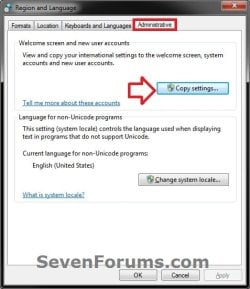
2. Click on the Administrative tab, then click on the Copy settings button. (see screenshot below)
3. If prompted by UAC, click/tap on Yes.
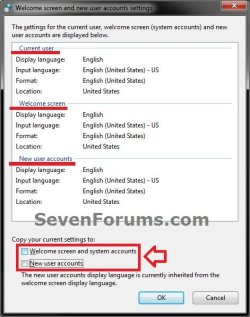
4. To Copy All "Current user" Region and Language Settings to "Welcome screen and system accounts"
A) Check the Welcome screen and system acccounts box. (see screenshot below step 6)
5. To Copy All "Current user" Region and Language Settings to "New user accounts"
A) Check the New user accounts box. (see screenshot below step 6)
NOTE: This will have any new user account created on the computer to have the Current user settings copied to it. Existing user accounts aren't affected.
6. Click/tap on OK. (see screenshot below)
NOTE: The check boxes in steps 4 and 5 will not stay checked after clicking on OK. The check boxes are only to copy the Current user settings to the checked option for this one time. If changes are made to the Current user settings, you can go back and check the boxes again to apply the changes.
7. Click/tap on OK. (see screenshot below step 2)
8. Close the Control Panel.
That's it,
Shawn
Related Tutorials
- How to Create a Region and Language Shortcut in Windows 7
- How to Add or Remove a Keyboard Input Language in Windows 7
- How to Change the Display Language in Vista and Windows 7 Ultimate and Enterprise
- How to Change Your Display Language" in Windows 8 and 8.1
- How to Install and Uninstall Display Languages in Windows 7 Ultimate and Enterprise
- How to Add or Remove Languages in Windows 8 and 8.1
- How to Install and Uninstall Language Packs in Windows 8 and 8.1
- How to Change Date Format in Windows 7 and Windows 8
- How to Change Time Format in Windows 7 and Windows 8
- How to Change the Default Location of your Windows 7 Computer
- How to Overwrite the Display Language of All Users with the System Display Language
- How to Add or Remove the "Administrative" Tab in Region and Language
- How to Change the Language for Non-Unicode Programs in Windows
Last edited:
