Hi,
I have a problem in VirtualBox 4.3.22.I have Windows Vista SP1 in a virtual disk.I have installed Guest Additions,but Aero is still not available.I installed the experimental Direct3D driver and left 256 MB for video memory.What shall I do?
My Computer
At a glance
Windows 7 Ultimate SP1 64 bitIntel Core i3-3110M Ivy Bridge4,00GB Single-Channel DDR3 798 MHzIntel HD Graphics 4000,Nvidia GeForce 610M
Computer type
Laptop
Computer Manufacturer/Model Number
Lenovo G580 20150
OS
Windows 7 Ultimate SP1 64 bit
CPU
Intel Core i3-3110M Ivy Bridge
Motherboard
Lenovo INVALID U3E1 (Ivy Bridge)
Memory
4,00GB Single-Channel DDR3 798 MHz
Graphics Card(s)
Intel HD Graphics 4000,Nvidia GeForce 610M
Sound Card
Conexant HD SmartAudio
Monitor(s) Displays
Generic PnP Monitor, Sony BRAVIA KDL-46D3500 Full HD TV
Screen Resolution
1366x768, 1920x1080
Hard Drives
Seagate ST1000LM024 HN-M101MBB 1TB
Keyboard
AccuType
Internet Speed
72 Mbps
Antivirus
Microsoft Security Essentials
Browser
Internet Explorer 11
Other Info
PLDS DVD-RW DS8ABSH SCSI Device
VMware Workstation 11
Microsoft Office 2007 Enterprise,2010 Professional Plus,2013 Professional Plus
Sony MDR-XD150 Headset
VM's:Windows Vista SP2 x64,Windows Server 2003 Enterprise SP2 x86,Windows Server 2008 x86,Windows XP Professional x64 SP2
I'd switch to VMWARE (VMPLAYER is FREE) as it supports 3D rendering etc.
1) Uninstall Guest additions from VBOX
2) Run VMWARE CONVERTER (also free) to convert the VM to VMware format
3) Power up the Guest VM
4) install VMware tools
5) re-boot the guest -- now it should work perfectly (enable 3d and video hardware acceleration in the vm settings).
I assume you are running on a WINDOWS HOST.
If running on a LINUX Host you have to edit the VM's configuration file as well.
One of these lines might already be in the config file - ensure there's no duplicate line or the VM won't start.
ensure also packages DKMS and libtxc_dxtn (or similar) are installed on your HOST - this will enable 3D etc (S3TC) on the HOST. (LINUX).
Again for Linux Hosts - with VMware player rel 7 (latest one) you might see a message 3D support not available from the Host --- this is actually INCORRECT if you have made the changes listed in this post. 3D rendering works fine as you can use DIRECTX to check it. With VMWARE PLAYER release 6 you won't see the message.
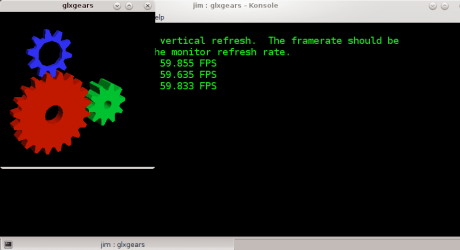
On the Linux host run command glxgears - this will show that your 3D is working on the HOST. (again Linux). Screenshot enc from laptop. CENTOS7 HOST running W10 Guest (X64)
Cheers
jimbo
Attachments
snapshot9.png
11.6 KB
· Views: 1
My Computer
At a glance
Linux CENTOS 7 / various Windows OS'es and se...Intel i7 Intel i58GB, 16GBOn Motherboard
Computer type
PC/Desktop
Computer Manufacturer/Model Number
Custom built, several laptops HP/ASUS
OS
Linux CENTOS 7 / various Windows OS'es and servers
I have VirtualBox AND VMware Player.Vista x64 SP1 VM is installed in a .vmdk virtual disk I created with Player.The problem with Player is performance.What can I do to boost it?I have Tools installed and left 1GB for graphics memory and 1796MB for RAM.:huh:
My Computer
At a glance
Windows 7 Ultimate SP1 64 bitIntel Core i3-3110M Ivy Bridge4,00GB Single-Channel DDR3 798 MHzIntel HD Graphics 4000,Nvidia GeForce 610M
Computer type
Laptop
Computer Manufacturer/Model Number
Lenovo G580 20150
OS
Windows 7 Ultimate SP1 64 bit
CPU
Intel Core i3-3110M Ivy Bridge
Motherboard
Lenovo INVALID U3E1 (Ivy Bridge)
Memory
4,00GB Single-Channel DDR3 798 MHz
Graphics Card(s)
Intel HD Graphics 4000,Nvidia GeForce 610M
Sound Card
Conexant HD SmartAudio
Monitor(s) Displays
Generic PnP Monitor, Sony BRAVIA KDL-46D3500 Full HD TV
Screen Resolution
1366x768, 1920x1080
Hard Drives
Seagate ST1000LM024 HN-M101MBB 1TB
Keyboard
AccuType
Internet Speed
72 Mbps
Antivirus
Microsoft Security Essentials
Browser
Internet Explorer 11
Other Info
PLDS DVD-RW DS8ABSH SCSI Device
VMware Workstation 11
Microsoft Office 2007 Enterprise,2010 Professional Plus,2013 Professional Plus
Sony MDR-XD150 Headset
VM's:Windows Vista SP2 x64,Windows Server 2003 Enterprise SP2 x86,Windows Server 2008 x86,Windows XP Professional x64 SP2
I have VirtualBox AND VMware Player.Vista x64 SP1 VM is installed in a .vmdk virtual disk I created with Player.The problem with Player is performance.What can I do to boost it?I have Tools installed and left 1GB for graphics memory and 1796MB for RAM.:huh:
You could try to update hardware compatibility of the VM (run from the vm settings BEFORE powering up the VM) to switch it to the latest version of VMware.
Assuming you have enough RAM in your HOST the biggest performance problem with VM's is likely to be POOR or VERY SLOW HDD's. (In fact my experiences with computers over the years is that POOR / SLOW HDD's are usually the BIGGEST culprit in poor performance. Not talking about specialized Gaming computers etc but simply standard computers).
Try running the VM from an SSD -- even an external SSD connected via a USB2==>SATA or better a USB3==>SATA if you have USB3 ports on your machine will give far better performance than the average HDD especially if the VM is installed on the same drive (even if it's in another partition) as the Host OS.
Cheers
jimbo
My Computer
At a glance
Linux CENTOS 7 / various Windows OS'es and se...Intel i7 Intel i58GB, 16GBOn Motherboard
Computer type
PC/Desktop
Computer Manufacturer/Model Number
Custom built, several laptops HP/ASUS
OS
Linux CENTOS 7 / various Windows OS'es and servers
I will tell you about my system.As you can see,my HDD is an ST1000LM024 HN-M101MBB.I think its speed is 5400 rpm.My Vista VM is in Windows 8 partition.My computer has two USB 3.0 ports.I will check if I have an SSD.RAM storage is 4GB.How much RAM shall I leave for this Vista VM?:huh:
My Computer
At a glance
Windows 7 Ultimate SP1 64 bitIntel Core i3-3110M Ivy Bridge4,00GB Single-Channel DDR3 798 MHzIntel HD Graphics 4000,Nvidia GeForce 610M
Computer type
Laptop
Computer Manufacturer/Model Number
Lenovo G580 20150
OS
Windows 7 Ultimate SP1 64 bit
CPU
Intel Core i3-3110M Ivy Bridge
Motherboard
Lenovo INVALID U3E1 (Ivy Bridge)
Memory
4,00GB Single-Channel DDR3 798 MHz
Graphics Card(s)
Intel HD Graphics 4000,Nvidia GeForce 610M
Sound Card
Conexant HD SmartAudio
Monitor(s) Displays
Generic PnP Monitor, Sony BRAVIA KDL-46D3500 Full HD TV
Screen Resolution
1366x768, 1920x1080
Hard Drives
Seagate ST1000LM024 HN-M101MBB 1TB
Keyboard
AccuType
Internet Speed
72 Mbps
Antivirus
Microsoft Security Essentials
Browser
Internet Explorer 11
Other Info
PLDS DVD-RW DS8ABSH SCSI Device
VMware Workstation 11
Microsoft Office 2007 Enterprise,2010 Professional Plus,2013 Professional Plus
Sony MDR-XD150 Headset
VM's:Windows Vista SP2 x64,Windows Server 2003 Enterprise SP2 x86,Windows Server 2008 x86,Windows XP Professional x64 SP2
The main bottleneck is the slow (very slow) HDD. Assign 1GB of RAM to your VM - should be enough.
On an SSD with a USB3==>SATA connector the external SSD will give a more than adequate performance for the VM. You don't need to allocate 2GB for the VM. Try it also with default RAM for the graphics.
Cheers
jimbo
My Computer
At a glance
Linux CENTOS 7 / various Windows OS'es and se...Intel i7 Intel i58GB, 16GBOn Motherboard
Computer type
PC/Desktop
Computer Manufacturer/Model Number
Custom built, several laptops HP/ASUS
OS
Linux CENTOS 7 / various Windows OS'es and servers
I have left 1,7GB RAM for Vista x64 SP1 and 1GB for graphics.Is that OK?
I should also say that this HDD gets hot very quickly!
Are my graphics cards good?What would you tell?
1)Intel HD Graphics 4000
2)Nvidia GeForce 610M
My Computer
At a glance
Windows 7 Ultimate SP1 64 bitIntel Core i3-3110M Ivy Bridge4,00GB Single-Channel DDR3 798 MHzIntel HD Graphics 4000,Nvidia GeForce 610M
Computer type
Laptop
Computer Manufacturer/Model Number
Lenovo G580 20150
OS
Windows 7 Ultimate SP1 64 bit
CPU
Intel Core i3-3110M Ivy Bridge
Motherboard
Lenovo INVALID U3E1 (Ivy Bridge)
Memory
4,00GB Single-Channel DDR3 798 MHz
Graphics Card(s)
Intel HD Graphics 4000,Nvidia GeForce 610M
Sound Card
Conexant HD SmartAudio
Monitor(s) Displays
Generic PnP Monitor, Sony BRAVIA KDL-46D3500 Full HD TV
Screen Resolution
1366x768, 1920x1080
Hard Drives
Seagate ST1000LM024 HN-M101MBB 1TB
Keyboard
AccuType
Internet Speed
72 Mbps
Antivirus
Microsoft Security Essentials
Browser
Internet Explorer 11
Other Info
PLDS DVD-RW DS8ABSH SCSI Device
VMware Workstation 11
Microsoft Office 2007 Enterprise,2010 Professional Plus,2013 Professional Plus
Sony MDR-XD150 Headset
VM's:Windows Vista SP2 x64,Windows Server 2003 Enterprise SP2 x86,Windows Server 2008 x86,Windows XP Professional x64 SP2
Well,bad news! I don't have an SSD.
What other choices do I have?
My Computer
At a glance
Windows 7 Ultimate SP1 64 bitIntel Core i3-3110M Ivy Bridge4,00GB Single-Channel DDR3 798 MHzIntel HD Graphics 4000,Nvidia GeForce 610M
Computer type
Laptop
Computer Manufacturer/Model Number
Lenovo G580 20150
OS
Windows 7 Ultimate SP1 64 bit
CPU
Intel Core i3-3110M Ivy Bridge
Motherboard
Lenovo INVALID U3E1 (Ivy Bridge)
Memory
4,00GB Single-Channel DDR3 798 MHz
Graphics Card(s)
Intel HD Graphics 4000,Nvidia GeForce 610M
Sound Card
Conexant HD SmartAudio
Monitor(s) Displays
Generic PnP Monitor, Sony BRAVIA KDL-46D3500 Full HD TV
Screen Resolution
1366x768, 1920x1080
Hard Drives
Seagate ST1000LM024 HN-M101MBB 1TB
Keyboard
AccuType
Internet Speed
72 Mbps
Antivirus
Microsoft Security Essentials
Browser
Internet Explorer 11
Other Info
PLDS DVD-RW DS8ABSH SCSI Device
VMware Workstation 11
Microsoft Office 2007 Enterprise,2010 Professional Plus,2013 Professional Plus
Sony MDR-XD150 Headset
VM's:Windows Vista SP2 x64,Windows Server 2003 Enterprise SP2 x86,Windows Server 2008 x86,Windows XP Professional x64 SP2
Upgraded VBox to 4.3.26 and Aero doesn't work again,even if I install the experimental driver again. I bought VMware Workstation 11 and created some VMs with it (Windows Server 2003 x86,Windows Vista x86 & x64,Windows Server 2008 x64,Windows 7 x64). The problem with Workstation is that sound is distorted. I followed the Knowledge Base about that and it doesn't fix my issue. However,if I turn on Windows Media Player,the sound will be less distorted and Aero effects will work better. Insert a DVD,play it with Media Center (if you have Vista Home Premium or Ultimate) and see that somewhere the sound will crackle,as if you had a blue screen.
My Computer
At a glance
Windows 7 Ultimate SP1 64 bitIntel Core i3-3110M Ivy Bridge4,00GB Single-Channel DDR3 798 MHzIntel HD Graphics 4000,Nvidia GeForce 610M
Computer type
Laptop
Computer Manufacturer/Model Number
Lenovo G580 20150
OS
Windows 7 Ultimate SP1 64 bit
CPU
Intel Core i3-3110M Ivy Bridge
Motherboard
Lenovo INVALID U3E1 (Ivy Bridge)
Memory
4,00GB Single-Channel DDR3 798 MHz
Graphics Card(s)
Intel HD Graphics 4000,Nvidia GeForce 610M
Sound Card
Conexant HD SmartAudio
Monitor(s) Displays
Generic PnP Monitor, Sony BRAVIA KDL-46D3500 Full HD TV
Screen Resolution
1366x768, 1920x1080
Hard Drives
Seagate ST1000LM024 HN-M101MBB 1TB
Keyboard
AccuType
Internet Speed
72 Mbps
Antivirus
Microsoft Security Essentials
Browser
Internet Explorer 11
Other Info
PLDS DVD-RW DS8ABSH SCSI Device
VMware Workstation 11
Microsoft Office 2007 Enterprise,2010 Professional Plus,2013 Professional Plus
Sony MDR-XD150 Headset
VM's:Windows Vista SP2 x64,Windows Server 2003 Enterprise SP2 x86,Windows Server 2008 x86,Windows XP Professional x64 SP2