Cannot update Win7 HP64 or download from microsoft

bugalskiNZ

New member
Local time
7:41 PM
Messages
4
Help! I am completely unable to update Win7 Home Premium 64, or download any content related to or recieved via any Microsoft portal.

Using Windows Update I receive the error code 80072EE2. After searching every forum i could find the only solution offered was deactivate any third party firewalls and retry. I completely shut down all firewalls and anti-virus software including Microsoft Defender. This made no difference. I can't update Windows, Xbox Live, Windows Live or receive content from any of these. Also couldn't activate Win7 online.

The only other thing I can think of is that I'm using a Mobile Broadband connection (Vodafone NZ Vodem - Huawei) running Vodafone Mobile Connect v9.2.1.6545) Could this be part of the problem? Never had any problems with XP.

Can anyone help?
 

My Computer My Computer

OS
Win7 Home Premium 64Bit
CPU
Intel Core2 Quad Q9550 2.83GHz
Motherboard
ASUS P5P43TD
Graphics Card(s)
ATI Radeon HD4890 Overclocker Edition
Monitor(s) Displays
Samsung SyncMaster T220

My Computer My Computer

Computer Manufacturer/Model Number
Custom
OS
Windows 7 Professional x64
CPU
Intel i7 2600K OC'd @ 4620 MHz
Motherboard
Asus P8Z68-V Pro
Memory
16GB GSkill Sniper 2133 Mhz (4x4GB)
Graphics Card(s)
EVGA GeForce GTX 480 SuperClocked+
Sound Card
Realtek High Definition Audio
Monitor(s) Displays
2x Acer S273HLbmii 27"
Screen Resolution
2 x 1920x1080
Hard Drives
64GB Crucial M4 SSD

Storage: Hitachi 1TB 5400RPM, Samsung 1.5TB 5400RPM
PSU
Corsair HW Series 750w (modular)
Case
Cooler Master HAF 932 Advanced Blue Edition
Cooling
CM Hyper 212+ CPU cooler, 3x 230mm + 1x 140mm case fans
Keyboard
Logitech MK320 (wireless)
Mouse
Logitech MK320 (wireless)
Internet Speed
30 Mb/s : 2 Mb/s
Yes it's a genuine copy, got it under the vista-win7 upgrade scheme. Managed to activate it over the phone but have never been able to update. Now noticing that I can't receive content from XBox Live or update Windows Live - anything that comes from a Microsoft server is blocked.

Thanks for the link, but pretty sure WGAN is already installed - also said Win XP required when i tried to run it?

Any other ideas?
 

My Computer My Computer

OS
Win7 Home Premium 64Bit
CPU
Intel Core2 Quad Q9550 2.83GHz
Motherboard
ASUS P5P43TD
Graphics Card(s)
ATI Radeon HD4890 Overclocker Edition
Monitor(s) Displays
Samsung SyncMaster T220
Y
Any other ideas?

1.Reset the router back to factory defaults
2.If point 1 don't help

run cmd.exe with admin previlliges (right click on cmd.exe as admin)

and type

sfc /scannow

next find CBS.log file from C:\Windows\Logs\CBS and WindowsUpdate.log from C:\Windows ,pack both files and attache them to post
 

My Computer My Computer

Computer Manufacturer/Model Number
Custom made
OS
Windows 7 Professional x64 PL
CPU
AMD Athlon 4450e
Motherboard
Giga-Byte GA-MA69G-S3H
Memory
GoodRam DDR2 2x2048MB (FSB 800MHz)
Graphics Card(s)
nVidia GeForce 9600GT (G94-300) 1024 MB
Monitor(s) Displays
SAMSUNG SyncMaster HS2P301688
Hard Drives
Seagate ST3750330AS 750GB
PSU
Corsair 550W
Cooling
AeroCool ExtremeEngine 3T
CBS.log

Thanks Flavius, here you go.
Had a lot of trouble getting access to these files, kept telling me Access Denied. Even when I tried the 'takeown /f' command, it told me access was denied. Could this be part of the problem? I've got full Admin priveleges.

EDIT: Oh, any I don't have a router as such, I'm using a USB mobile broadband device. Could that be another source of grief?
 

My Computer My Computer

OS
Win7 Home Premium 64Bit
CPU
Intel Core2 Quad Q9550 2.83GHz
Motherboard
ASUS P5P43TD
Graphics Card(s)
ATI Radeon HD4890 Overclocker Edition
Monitor(s) Displays
Samsung SyncMaster T220
Fixed it!

Alriiiiiiiight! Found this little gem and it's working like a charm:

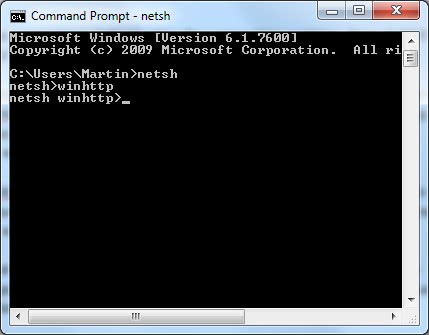
Enter [netsh], then [winhttp] in the command line so that the screen looks like this afterwards.
windows_update_error_0x80072ee2.jpg

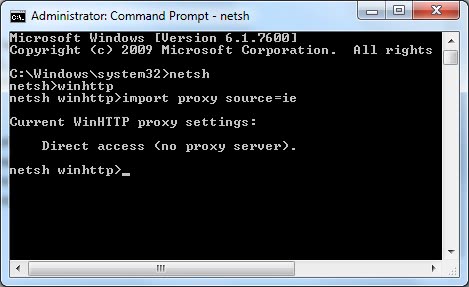
Now enter the command [import proxy source=ie]. This will import the proxy settings of Internet Explorer which means either direct access to the Internet without proxy if no server is configured or the proxy server that is used to connect to the Internet.
windows_update_proxy.jpg

This should have resolved the connection problems to Windows Update if a proxy server was the problem. Winhttp can also be used to set a specific proxy server by using the [set proxy address] command. A restart of the computer might be needed before the changes are taken into account (or killing the explorer.exe process and reloading it).

**

Thanks for your help guys, and I hope this might help others having the same issues.
 

My Computer My Computer

OS
Win7 Home Premium 64Bit
CPU
Intel Core2 Quad Q9550 2.83GHz
Motherboard
ASUS P5P43TD
Graphics Card(s)
ATI Radeon HD4890 Overclocker Edition
Monitor(s) Displays
Samsung SyncMaster T220
Had a lot of trouble getting access to these files, kept telling me Access Denied. Even when I tried the 'takeown /f' command, it told me access was denied. Could this be part of the problem? I've got full Admin priveleges.
Sometimes it may happen.Many people complain about it.I glad you've already solved problem and posted solution :).For other which have the same problem -more details about this error:Fixing Windows Update Error 0×80072ee2
 

My Computer My Computer

Computer Manufacturer/Model Number
Custom made
OS
Windows 7 Professional x64 PL
CPU
AMD Athlon 4450e
Motherboard
Giga-Byte GA-MA69G-S3H
Memory
GoodRam DDR2 2x2048MB (FSB 800MHz)
Graphics Card(s)
nVidia GeForce 9600GT (G94-300) 1024 MB
Monitor(s) Displays
SAMSUNG SyncMaster HS2P301688
Hard Drives
Seagate ST3750330AS 750GB
PSU
Corsair 550W
Cooling
AeroCool ExtremeEngine 3T
Back
Top