
Solved Windows update runs for ever.Also svchost consume 50% of cpu

theobserver

New member
Member
Local time
8:27 AM
Messages
42
Hi all ,

windows update is running for ever without finishing.

I am not lazy (or so i think) so i search,found and tried the below steps:

1.http://www.sevenforums.com/tutorials/91738-windows-update-reset.html

2.https://support.microsoft.com/en-us/kb/971058

The problem still persists.

Also svchosts.exe is consuming 50% of the cpu.
I checked the related services of this svchost.exe and when i stop wuauserv windows update the cpu returns to 0% utilization .I believe although i am a newbie that this shows a problem with windows update.

Now doing what this thread says and then i will post the results.
Do not know what else to do.
Any ideas are most wellcome.

Thank you for your time reading this.

Regards,
the_observer.
 

My Computer My Computer

At a glance

Microsoft Windows 7 Ultimate 64-bit 7601 Mult...Intel(R) Core(TM)2 Duo CPU E8400 @ 3.00GHz4,00 GB(1) ATI Radeon HD 3800 Series (2) Windows Liv...
Computer type
PC/Desktop
Computer Manufacturer/Model Number
GenuineIntel/Intel(r)Core(TM)2 Duo CPU E8400 @ 3.00GHz
OS
Microsoft Windows 7 Ultimate 64-bit 7601 Multiprocessor Free Service Pack 1
CPU
Intel(R) Core(TM)2 Duo CPU E8400 @ 3.00GHz
Motherboard
ASUSTeK Computer INC. Maximus Formula
Memory
4,00 GB
Graphics Card(s)
(1) ATI Radeon HD 3800 Series (2) Windows Live Display Dri
Sound Card
(1) AMD High Definition Audio Device (2) SoundMAX Integrat
Screen Resolution
1280 x 1024 x 32 bits (4294967296 colors) @ 60 Hz
Hard Drives
(1) KINGSTON SV300S37A120G (2) SAMSUNG SP2504C (3) WDC WD10EADS-00M2B0 (4) Generic STORAGE DEVICE USB Device (5) ST350041 3AS USB Device
Hi again,

the System Update Readiness Tool ,found an update and installed it.

The SFC scan did not find any errors.

Windows update still is checking for updates forever and Cpu utilization is at 50% due to scvhost i wrote above (even if i stop the windows update from searching)

I have no other errors.

And here i attach the logs to this link because forum will not let me to attach the .zip file due to size.

If someone experienced can help ,i will be much obliged.

Thank you for your time reading this,

Regards,
theobserver.
 
Last edited:

My Computer My Computer

At a glance

Microsoft Windows 7 Ultimate 64-bit 7601 Mult...Intel(R) Core(TM)2 Duo CPU E8400 @ 3.00GHz4,00 GB(1) ATI Radeon HD 3800 Series (2) Windows Liv...
Computer type
PC/Desktop
Computer Manufacturer/Model Number
GenuineIntel/Intel(r)Core(TM)2 Duo CPU E8400 @ 3.00GHz
OS
Microsoft Windows 7 Ultimate 64-bit 7601 Multiprocessor Free Service Pack 1
CPU
Intel(R) Core(TM)2 Duo CPU E8400 @ 3.00GHz
Motherboard
ASUSTeK Computer INC. Maximus Formula
Memory
4,00 GB
Graphics Card(s)
(1) ATI Radeon HD 3800 Series (2) Windows Live Display Dri
Sound Card
(1) AMD High Definition Audio Device (2) SoundMAX Integrat
Screen Resolution
1280 x 1024 x 32 bits (4294967296 colors) @ 60 Hz
Hard Drives
(1) KINGSTON SV300S37A120G (2) SAMSUNG SP2504C (3) WDC WD10EADS-00M2B0 (4) Generic STORAGE DEVICE USB Device (5) ST350041 3AS USB Device
Hi theobserver:


Although on my PC Windows Update Service works and will offer updates
it runs for at least half an hour after booting and consumes at least 25% of my
core 3.7 Ghz Core i3 and outrageously over 1,700,000 kb of memory!!!!!:confused:

this shows under svchost.exe (netsvcs) in both CPU and memory usage in the task manager.

I disabled Windows Services in services and immediately the excessive usages disappeared.
I googled around for a clear fix but don't see one, and surprisingly I don't see a MS hotfix that
specifically addresses this as plenty of folks are suffering from this problem....
 

My Computer My Computer

At a glance

win 7 home premium 64 bitcore i5 7606 gbati 5450
Computer Manufacturer/Model Number
hp pavilion 6680t
OS
win 7 home premium 64 bit
CPU
core i5 760
Motherboard
iona (from MSI)
Memory
6 gb
Graphics Card(s)
ati 5450
Sound Card
real tek 888

My Computer My Computer

At a glance

W7 Pro SP1 64biti78GBIntel HD Graphics
Computer type
Laptop
Computer Manufacturer/Model Number
Employer provided Dell Latitude
OS
W7 Pro SP1 64bit
CPU
i7
Memory
8GB
Graphics Card(s)
Intel HD Graphics
Hard Drives
crappy SSD
Antivirus
Employer mandated Symantec Endpoint Protection
Browser
Pale Moon 64bit, IE11 64bit & Chrome 64bit
Hi again.

Sorry for my late response but family obligations kept me away (fathers will understand).

UsernameIssues i tried what you suggested but the problem is not solved.

Are there any other suggestions?

I will be much much obliged

Regards,
theobserver.
 

My Computer My Computer

At a glance

Microsoft Windows 7 Ultimate 64-bit 7601 Mult...Intel(R) Core(TM)2 Duo CPU E8400 @ 3.00GHz4,00 GB(1) ATI Radeon HD 3800 Series (2) Windows Liv...
Computer type
PC/Desktop
Computer Manufacturer/Model Number
GenuineIntel/Intel(r)Core(TM)2 Duo CPU E8400 @ 3.00GHz
OS
Microsoft Windows 7 Ultimate 64-bit 7601 Multiprocessor Free Service Pack 1
CPU
Intel(R) Core(TM)2 Duo CPU E8400 @ 3.00GHz
Motherboard
ASUSTeK Computer INC. Maximus Formula
Memory
4,00 GB
Graphics Card(s)
(1) ATI Radeon HD 3800 Series (2) Windows Live Display Dri
Sound Card
(1) AMD High Definition Audio Device (2) SoundMAX Integrat
Screen Resolution
1280 x 1024 x 32 bits (4294967296 colors) @ 60 Hz
Hard Drives
(1) KINGSTON SV300S37A120G (2) SAMSUNG SP2504C (3) WDC WD10EADS-00M2B0 (4) Generic STORAGE DEVICE USB Device (5) ST350041 3AS USB Device
Did you try option three in that reset tutorial?

To Reset and Re-register Windows Update Components AND Reset Update History in One Easy Click

A new Windows Update Client has been released since this thread started. You can manually install KB3135445 to see if it helps with the CPU/RAM issues.
 

My Computer My Computer

At a glance

W7 Pro SP1 64biti78GBIntel HD Graphics
Computer type
Laptop
Computer Manufacturer/Model Number
Employer provided Dell Latitude
OS
W7 Pro SP1 64bit
CPU
i7
Memory
8GB
Graphics Card(s)
Intel HD Graphics
Hard Drives
crappy SSD
Antivirus
Employer mandated Symantec Endpoint Protection
Browser
Pale Moon 64bit, IE11 64bit & Chrome 64bit
Did you try option three in that reset tutorial?

I did tried option three in the reset tutorial.

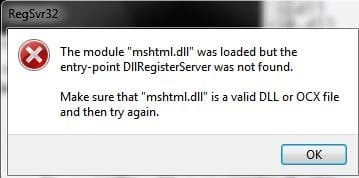
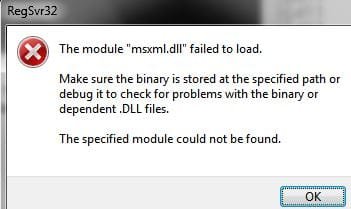
The only ting i want to mention (without wanting to mislead you from the solution is that when registering some of the DLL's i get error messages of two kinds (either the one or the other for some of the DLL's) which are in the attachments.

I also tried the newer Windows update client but in vain.
Windows update persists to run for ever without downloading any updates.

Also (since i read it in various posts regarding this problem) i checked pc with mbam and spybot search and destroy utils which did not find something .

Thank you for your time trying to help me.

Regards,
theobserver.
 

Attachments

  • 01.JPG
    01.JPG
    17.2 KB · Views: 42
  • 04.JPG
    04.JPG
    18.5 KB · Views: 42

My Computer My Computer

At a glance

Microsoft Windows 7 Ultimate 64-bit 7601 Mult...Intel(R) Core(TM)2 Duo CPU E8400 @ 3.00GHz4,00 GB(1) ATI Radeon HD 3800 Series (2) Windows Liv...
Computer type
PC/Desktop
Computer Manufacturer/Model Number
GenuineIntel/Intel(r)Core(TM)2 Duo CPU E8400 @ 3.00GHz
OS
Microsoft Windows 7 Ultimate 64-bit 7601 Multiprocessor Free Service Pack 1
CPU
Intel(R) Core(TM)2 Duo CPU E8400 @ 3.00GHz
Motherboard
ASUSTeK Computer INC. Maximus Formula
Memory
4,00 GB
Graphics Card(s)
(1) ATI Radeon HD 3800 Series (2) Windows Live Display Dri
Sound Card
(1) AMD High Definition Audio Device (2) SoundMAX Integrat
Screen Resolution
1280 x 1024 x 32 bits (4294967296 colors) @ 60 Hz
Hard Drives
(1) KINGSTON SV300S37A120G (2) SAMSUNG SP2504C (3) WDC WD10EADS-00M2B0 (4) Generic STORAGE DEVICE USB Device (5) ST350041 3AS USB Device
Yesterday during my usual checking of updates, I too had similar symptoms (long wait and 50% SVC) on one of my machines. Took about two hours to check what updates were available. It took another couple of hours to finally download and install the 16 security updates.

Not sure how long you waited but try letting it run overnight. Sometimes the servers that you connect to are just very slow, which was the case for this particular machine that took forever to finish updating. My other W7 machine took some time but finished in about two hours total from checking updates to installing the to restart. My W8 machines didn't have any problems and were done in 30 minutes, give or take.
 

My Computer My Computer

At a glance

Windows 7 Home 64-bit
Computer type
PC/Desktop
OS
Windows 7 Home 64-bit

My Computer My Computer

At a glance

W7 Pro SP1 64biti78GBIntel HD Graphics
Computer type
Laptop
Computer Manufacturer/Model Number
Employer provided Dell Latitude
OS
W7 Pro SP1 64bit
CPU
i7
Memory
8GB
Graphics Card(s)
Intel HD Graphics
Hard Drives
crappy SSD
Antivirus
Employer mandated Symantec Endpoint Protection
Browser
Pale Moon 64bit, IE11 64bit & Chrome 64bit
sfc says :

Windows Resource Protection did not find any integrity violations.

i will also do what HelloItsMeAgain suggests but i do not think so this is the problem...
 

My Computer My Computer

At a glance

Microsoft Windows 7 Ultimate 64-bit 7601 Mult...Intel(R) Core(TM)2 Duo CPU E8400 @ 3.00GHz4,00 GB(1) ATI Radeon HD 3800 Series (2) Windows Liv...
Computer type
PC/Desktop
Computer Manufacturer/Model Number
GenuineIntel/Intel(r)Core(TM)2 Duo CPU E8400 @ 3.00GHz
OS
Microsoft Windows 7 Ultimate 64-bit 7601 Multiprocessor Free Service Pack 1
CPU
Intel(R) Core(TM)2 Duo CPU E8400 @ 3.00GHz
Motherboard
ASUSTeK Computer INC. Maximus Formula
Memory
4,00 GB
Graphics Card(s)
(1) ATI Radeon HD 3800 Series (2) Windows Live Display Dri
Sound Card
(1) AMD High Definition Audio Device (2) SoundMAX Integrat
Screen Resolution
1280 x 1024 x 32 bits (4294967296 colors) @ 60 Hz
Hard Drives
(1) KINGSTON SV300S37A120G (2) SAMSUNG SP2504C (3) WDC WD10EADS-00M2B0 (4) Generic STORAGE DEVICE USB Device (5) ST350041 3AS USB Device
It appears that the DLL errors that you got are not a problem. Those errors should not show up when using the batch file from the tutorial...since the DLL registration commands in that batch file use the "/S" switch to silence such errors (hide them from the user). The errors might appear when using the MS Fixit tool.


Many months back, the Windows update process changed. Lots of people were seeing long search times (20+ hrs) to get a list of updates to be applied. Also, RAM and CPU usage was high. I have a Virtual Machine (VM) running W7 pro 64bit with only SP1 installed. I have brought that VM up to date with all patches many times. When I exit the VM, I have it set to revert to the unpatched state. In the past, the long list of about 200 updates could be created within an hour. Then something changed and that list took much longer to create.

I found that if I manually installed this update...
https://support.microsoft.com/en-us/kb/3102810
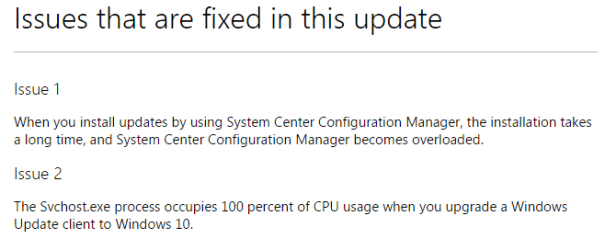
Installing and searching for updates is slow and high CPU usage occurs in Windows 7 and Windows Server 2008 R2
...the time that it took to build the list of about 200 updates only took about 10 minutes. This was a bit puzzling to me because since the issues that the KB supposedly fixed do not exist in that VM:
issues.PNG
SCCM nor W10 was installed in that VM.

KB3102810 has been replaced by later versions of the Windows Update Client. My testing of each replacement seems to indicate that they include the fix for the long search time too (as expected).

There must be other reasons why the Windows Update process can take so long and consume so much RAM & CPU - since updating to the latest version of the Windows Update Client is not correcting these issues for every user. You might want to see if MS's support staff will fix this issue for you. I'm not sure what else to try.
 

My Computer My Computer

At a glance

W7 Pro SP1 64biti78GBIntel HD Graphics
Computer type
Laptop
Computer Manufacturer/Model Number
Employer provided Dell Latitude
OS
W7 Pro SP1 64bit
CPU
i7
Memory
8GB
Graphics Card(s)
Intel HD Graphics
Hard Drives
crappy SSD
Antivirus
Employer mandated Symantec Endpoint Protection
Browser
Pale Moon 64bit, IE11 64bit & Chrome 64bit
So ,

it seems that everything is ok now.

The pc managed to locate all windows updates (41) and right now they r being installed.

I do not know how much time it needed because i let it overnight while i used to let it search for updates 15 minutes max.

I would like to thank much UsernameIssues for his excellent technical advisory and HelloItsMeAgain for his resolution suggestion.

Hope this thread will help others too.

Regards,
theobserver.

P.S. In the morning the windows update was there suggesting me to install windows 10. I think that i had seen once more this screen again before through all this process but i closed the window.This time (probably because i had just woke up) i noticed the small letters link below that windows 10 suggestion, which revealed me the windows 7 updates.
 

My Computer My Computer

At a glance

Microsoft Windows 7 Ultimate 64-bit 7601 Mult...Intel(R) Core(TM)2 Duo CPU E8400 @ 3.00GHz4,00 GB(1) ATI Radeon HD 3800 Series (2) Windows Liv...
Computer type
PC/Desktop
Computer Manufacturer/Model Number
GenuineIntel/Intel(r)Core(TM)2 Duo CPU E8400 @ 3.00GHz
OS
Microsoft Windows 7 Ultimate 64-bit 7601 Multiprocessor Free Service Pack 1
CPU
Intel(R) Core(TM)2 Duo CPU E8400 @ 3.00GHz
Motherboard
ASUSTeK Computer INC. Maximus Formula
Memory
4,00 GB
Graphics Card(s)
(1) ATI Radeon HD 3800 Series (2) Windows Live Display Dri
Sound Card
(1) AMD High Definition Audio Device (2) SoundMAX Integrat
Screen Resolution
1280 x 1024 x 32 bits (4294967296 colors) @ 60 Hz
Hard Drives
(1) KINGSTON SV300S37A120G (2) SAMSUNG SP2504C (3) WDC WD10EADS-00M2B0 (4) Generic STORAGE DEVICE USB Device (5) ST350041 3AS USB Device
You are welcome.

If you were offered W10, then you might have the W10 installation files on your computer (~3GB to 6GB). If you want W10, then keep those files. If you don't plan on installing W10, then check out this tool.
 

My Computer My Computer

At a glance

W7 Pro SP1 64biti78GBIntel HD Graphics
Computer type
Laptop
Computer Manufacturer/Model Number
Employer provided Dell Latitude
OS
W7 Pro SP1 64bit
CPU
i7
Memory
8GB
Graphics Card(s)
Intel HD Graphics
Hard Drives
crappy SSD
Antivirus
Employer mandated Symantec Endpoint Protection
Browser
Pale Moon 64bit, IE11 64bit & Chrome 64bit
Back
Top