W7 X64 Windows update turned itself on for all products.

Petero

New member
Local time
4:18 PM
Messages
9
This computer is a new build as of mid december. I installed W7 x64 sp1 on it with no further patches except for one needed for solidworks to run.

As I always do the first thing I did was turned off auto updates. I also ran a utility "Kill w10 upgrade nag"

The computer has been heavily used since and constantly online. Everything appeared fine with no nags or associated traffic until today.

The only strange thing I noticed on the network for the last 2 or 3 days was an almost constant low bw (average 2.5kb) flow to this computer. I spent some time trying to identify it's source and purpose. The addresses involved were ipv6 around ff02::1:3. The purpose is supposedly to do with the replacement of ipv4 DHCP server and provides an automatic version of DCHP for ipv6. No changes were made to the network or software installed on this machine at the time this started to appear.

When I started up my computer this morning shortly after booting I got a popup message that windows needed to restart in order to install updates.

I went and had a look at the updates on this machine and it now showed dozens up KB's all with today's date Feb 9. This is probably everything since SP1. It included

KB 3035583 - According to Microsoft, this update enables "additional capabilities for Windows Update notifications when new updates are available".

I have backups of every 3 hours for the previous month and daily before that so I decided out of curiosity to let windows update itself. I first uninstalledKB 3035583.

The computer re-booted successfully. The first thing I check was the update settings which were all on. I turned them off and again rebooted the computer to assure update settings weren't still turned on in memory.

I watched internet bound traffic using the avast firewall and also wireshark. After a few minutes I noticed a new svchost thread start to 13.107.28.43 which turns out to be a microsoft update server. I blocked that IP in the computer's firewall, not the router's and again restarted the computer. The router is a commercial grade one through which I provide wifi internet to my remote community through 2 ganged satellite links.

I had a look in \window\SoftwareDistribution\Download\ and deleted all the files there.

After a few minutes the low bw traffic started up again. It was now from an akami server.

I should have checked where that process # was initiated from but didn't. I then manually disabled the WindowsUpdate service which was listed but not running.

I had to go out for about half an hour.

When I got back I checked the download directory again and there were 394 new directories in with most being empty. There were 14 directories with a total of 940mb of data in them.

The router I use is a Peplink Balance 20 which does an excellent job of logging internet bw. I can identify by hour/day/month each users bw individually. During the period I was gone the total bw down was 86mb. Where did the 950mb of data come from?

I was suspicious of the ipv6 traffic and suspecting possibly MS was doing something on ipv6 networks to multicast w10 upgrade files across a local network if there were multiple computers that had been upgraded or had upgrade files downloaded to them. I know some of the computers on this network are now W10 and at least 1 is currently being upgraded.

I renamed the \download\ directory \download.delete\ to see if \download\ was automatically recreated. I disabled ipv6 on the router and also on my W7 computer. So far after about 2 hours there is no sign of update downloading.

Is there anything else I can do to stop the updating?


My Computer My Computer

At a glance

W7 x64Intel i7 582064gbmsi r9 390
Computer type
PC/Desktop
Computer Manufacturer/Model Number
Custom build
OS
W7 x64
CPU
Intel i7 5820
Motherboard
msi x99a xpowerac
Memory
64gb
Graphics Card(s)
msi r9 390
Hard Drives
Multiple
System on Samsung 500gb m.2 ssd
Antivirus
avast internet security pro
Browser
firefox 28
...I decided out of curiosity to let windows update itself.
Since KB3035583 specifically and notoriously installs W10 I wonder why you would do this. But since the problems only started yesterday I would restore to a Monday backup of my system, or perhaps last Friday or something as you suspect you've had something unusual going-on for a few days.
 

My Computer My Computer

At a glance

Windows 7 Professional 64bitIntel Core i7 4600M @ 2.90GHz16.0GB Dual-Channel DDR3 @ 797MHz (11-11-11-28)Intel HD Graphics 4600 (Dell) 2048MB ATI AMD ...
Computer type
Laptop
Computer Manufacturer/Model Number
Dell Latitude E6540 Laptop
OS
Windows 7 Professional 64bit
CPU
Intel Core i7 4600M @ 2.90GHz
Motherboard
Dell Inc. 0CYT5F (SOCKET 0)
Memory
16.0GB Dual-Channel DDR3 @ 797MHz (11-11-11-28)
Graphics Card(s)
Intel HD Graphics 4600 (Dell) 2048MB ATI AMD Radeon HD 8790M
Sound Card
Realtek High Definition Audio
Monitor(s) Displays
HP ZR30w (2560x1600@60Hz)
Hard Drives
256GB LITEONIT LMT-256M6M-41 mm SATA (SSD)
1TB Samsung SSD 860 EVO mSATA SATA (SSD)
2TB USB 3.0 USB Device
115GB SanDisk Ultra Fit USB
Other Info
Multiple Dell E-Port Plus II Port Replicator/Docking Stations 0Y72NH USB 3.0 + 130W AC Adapters
Thanks for responding max7...

There are several reasons I didn't simply restore the system to a previous backup.

There are some events of concern surrounding this timeframe. At the time the low bw stream started I was about 4 days into doing a frame by frame analysis of the video released by the FBI of Lavoy Finicum's shooting which I am currently about half way through. At the time the first 2 segments of my analysis had just been released publicly although still at a very low level.

I have previously done similar analysis and during that period my computer which is religiously maintained managed to seriously crash scrambling drives on an average of twice a day after running flawlessly for several years. At the time not just the system drive was trashed but also online data drives. Because of my on/offline backup procedures I was able to recover quickly and proceed on.

This new computer is much better protected and also lets me keep a closer eye on what is going on.

This time I figured that simply doing a restore left me wide open for the same thing just happening again.

I had just turned on the computer to start working for the day and KB3035583 and the other KBs had put their code in place but had not yet been executed. Although I wasn't sure I could uninstall KB3035583 before a reboot I gave it a try and was able to.

KB3035583 was the obvious culprit to be wary of but I suspected there was probably more going on so decided to proceed to see what happened with one possible source ruled out. Sure enough the data stream continued and began replacing the material associated with security backups I had just deleted even though all normally used settings for controlling updates were turned off. Even after the WindowsUpdate service was manually disabled the stream continued.

It was only after disabling ipv6 functionality on the network, and on the computer, that the stream stopped.

I mentioned all this here out of privacy concerns not just for myself but also for everyone else using windows. I have no illusions about our computers being private; this situation suggests that those with intent to spy can and do so without regard for the law.

I was a programmer many years ago but have had other interests and am no longer fully conversant on all aspects of the windows OS.

I appear to have stopped the problem for now. Another area of concern I have which I'm not familiar with is the code in windows enabling remote access. I have manually turned off remote access and quarantined some obviously associated services but have no idea where to look in more detail. Perhaps the experts here might have some suggestions?

File and printer sharing is also turned off. Broadcasting of the computer's resources on the network is also turned off.

Thanks,

Peter
 

My Computer My Computer

At a glance

W7 x64Intel i7 582064gbmsi r9 390
Computer type
PC/Desktop
Computer Manufacturer/Model Number
Custom build
OS
W7 x64
CPU
Intel i7 5820
Motherboard
msi x99a xpowerac
Memory
64gb
Graphics Card(s)
msi r9 390
Hard Drives
Multiple
System on Samsung 500gb m.2 ssd
Antivirus
avast internet security pro
Browser
firefox 28
I had just turned on the computer to start working for the day and KB3035583 and the other KBs had put their code in place but had not yet been executed.
There is obviously much more than meets the eye re your PC. All I can suggest is that I don't know how you knew "their code...had not yet been executed" i.e. while there are many updates which require reboots, not all do and so I imagine many of them will "start executing" immediately.
 

My Computer My Computer

At a glance

Windows 7 Professional 64bitIntel Core i7 4600M @ 2.90GHz16.0GB Dual-Channel DDR3 @ 797MHz (11-11-11-28)Intel HD Graphics 4600 (Dell) 2048MB ATI AMD ...
Computer type
Laptop
Computer Manufacturer/Model Number
Dell Latitude E6540 Laptop
OS
Windows 7 Professional 64bit
CPU
Intel Core i7 4600M @ 2.90GHz
Motherboard
Dell Inc. 0CYT5F (SOCKET 0)
Memory
16.0GB Dual-Channel DDR3 @ 797MHz (11-11-11-28)
Graphics Card(s)
Intel HD Graphics 4600 (Dell) 2048MB ATI AMD Radeon HD 8790M
Sound Card
Realtek High Definition Audio
Monitor(s) Displays
HP ZR30w (2560x1600@60Hz)
Hard Drives
256GB LITEONIT LMT-256M6M-41 mm SATA (SSD)
1TB Samsung SSD 860 EVO mSATA SATA (SSD)
2TB USB 3.0 USB Device
115GB SanDisk Ultra Fit USB
Other Info
Multiple Dell E-Port Plus II Port Replicator/Docking Stations 0Y72NH USB 3.0 + 130W AC Adapters
I stand corrected, I assumed that the reboot was always the case as many of the KB's need the reboot in order to kill currently executing code in memory which locks the associated files. From the windows dialog at such times it appears the new files to be put in place are pre-staged to replace the original code during shutdown and restart while the original files are unlocked.

Do you have a list of the KBs that introduce the same surveillance/update? routines of W10 into W7 & W8? I'm still in the thick of the current project and do not have the time to find them myself and would like to remove them as they are now on my machine.

If I feel it is safe I would like to proceed with most of the 346 KBs since SP1 in place. There are likely some new backdoors since then but hopefully I will spot them if used.

In the 346 kbs there are probably some compatibility ones that will improve the reliability of the computer. I have a full month to change my mind if things go badly. My new system substantially has all the software I need in place and all data is segregated onto different drives so a system restore a month from now will hopefully be relatively painless.

I wanted a fresh install of windows on the new machine after keeping the last install running since xp. There were countless manual fixes over the years that I wanted to remove as it was getting more difficult to keep the old version of windows running.
 

My Computer My Computer

At a glance

W7 x64Intel i7 582064gbmsi r9 390
Computer type
PC/Desktop
Computer Manufacturer/Model Number
Custom build
OS
W7 x64
CPU
Intel i7 5820
Motherboard
msi x99a xpowerac
Memory
64gb
Graphics Card(s)
msi r9 390
Hard Drives
Multiple
System on Samsung 500gb m.2 ssd
Antivirus
avast internet security pro
Browser
firefox 28
There are many threads here already about "avoiding the dreaded W10 updates" and while 3035583 is a key one I do not know all. You can also surf on GWX Control Panel which may help.

Good luck in getting the updates installed. Hopefully some of the things you've done like deleting the files in \window\SoftwareDistribution\Download\ have not made successful updating impossible.
 

My Computer My Computer

At a glance

Windows 7 Professional 64bitIntel Core i7 4600M @ 2.90GHz16.0GB Dual-Channel DDR3 @ 797MHz (11-11-11-28)Intel HD Graphics 4600 (Dell) 2048MB ATI AMD ...
Computer type
Laptop
Computer Manufacturer/Model Number
Dell Latitude E6540 Laptop
OS
Windows 7 Professional 64bit
CPU
Intel Core i7 4600M @ 2.90GHz
Motherboard
Dell Inc. 0CYT5F (SOCKET 0)
Memory
16.0GB Dual-Channel DDR3 @ 797MHz (11-11-11-28)
Graphics Card(s)
Intel HD Graphics 4600 (Dell) 2048MB ATI AMD Radeon HD 8790M
Sound Card
Realtek High Definition Audio
Monitor(s) Displays
HP ZR30w (2560x1600@60Hz)
Hard Drives
256GB LITEONIT LMT-256M6M-41 mm SATA (SSD)
1TB Samsung SSD 860 EVO mSATA SATA (SSD)
2TB USB 3.0 USB Device
115GB SanDisk Ultra Fit USB
Other Info
Multiple Dell E-Port Plus II Port Replicator/Docking Stations 0Y72NH USB 3.0 + 130W AC Adapters

My Computer My Computer

At a glance

W7 home premium 32bit/W7HP 64bit/w10 tp insid...E5300 dual core3gbNvidia Geforce 7100 Nforce 630i
Computer type
PC/Desktop
Computer Manufacturer/Model Number
medionl/Aspire 6930G/acer x55a
OS
W7 home premium 32bit/W7HP 64bit/w10 tp insider ring
CPU
E5300 dual core
Motherboard
medion MS7366
Memory
3gb
Graphics Card(s)
Nvidia Geforce 7100 Nforce 630i
Monitor(s) Displays
avixc
Internet Speed
n (isp resticted to 72)
Antivirus
mse/pands
Browser
palemoon
Other Info
Belkin Fd7050 n USB using Railink RT2870 drivers, more upto date
Since all the changes introduced in W10 I have no interest in getting anymore updates from MS ever. I am currently still debating leaving the 346 recently installed KBs in place.

Unfortunately I need some of the capabilities only available in windows to efficiently utilize the memory, cores, and high end graphics that I need for software I use regularly. Virtual machines I have tried so far do poorly relying on generic drivers. Dual boot is a pain in the butt if you regularly need to go back and forth.

What I'm going to try next, once I have the time to set it up, is boot into windows which will be blocked for outside access and run Linux inside it in a VM for communications purposes only. I have enough oomph to do this side by side acceptably. I use VMs regularly but so far the windows shell has been my main platform.

Running windows in a VM from inside Linux creates the problem of poor hardware utilization. Apple is not an option as it is even more opaque than windows.

Thanks for your insight.
 

My Computer My Computer

At a glance

W7 x64Intel i7 582064gbmsi r9 390
Computer type
PC/Desktop
Computer Manufacturer/Model Number
Custom build
OS
W7 x64
CPU
Intel i7 5820
Motherboard
msi x99a xpowerac
Memory
64gb
Graphics Card(s)
msi r9 390
Hard Drives
Multiple
System on Samsung 500gb m.2 ssd
Antivirus
avast internet security pro
Browser
firefox 28

Thanks for that it is interesting.

It loads it's executables somewhere unexpected

Files installed by Akamai NetSession Interface

Program executable:netsession_win.exe Name:Akamai NetSession Client Signed by:Akamai Technologies Path:C:\users\user\appdata\Local\Akamai\netsession_win.exe MD5:aab979089e192acc0fe1e3c018f8b591
Akamai NetSession Client is part of the Akamai Download Manager, a computer program dedicated to the task of downloading (and sometimes uploading) possibly unrelated stand-alone files from (and sometimes to) the Internet for storage....

Probably without notifying the user.

No mention of it in my registry and none of the associated files installed.

It really boils down to the fact that we have no idea of what is going on in our computer's these days. Most consumer routers have horrid BW monitoring abilities. Using software utilities depend on a computer being on in order to record bw data.

Using a good router I know for a fact that one machine I manage downloaded the W10 upgrades while shutdown, not just asleep, but still plugged into power. I guess for security we need to unplug computers from power when not needed not just turn them off.
 

My Computer My Computer

At a glance

W7 x64Intel i7 582064gbmsi r9 390
Computer type
PC/Desktop
Computer Manufacturer/Model Number
Custom build
OS
W7 x64
CPU
Intel i7 5820
Motherboard
msi x99a xpowerac
Memory
64gb
Graphics Card(s)
msi r9 390
Hard Drives
Multiple
System on Samsung 500gb m.2 ssd
Antivirus
avast internet security pro
Browser
firefox 28
Graphics

You dont have to have WU on to update drivers.

If your specs are correct then all you need for your graphics is the Intel update utility.
Mind you i know little about Linux kernal operations/VM and if this option is viable on your set-up.

PS firefox is way above 28.

Roy
 

My Computer My Computer

At a glance

W7 home premium 32bit/W7HP 64bit/w10 tp insid...E5300 dual core3gbNvidia Geforce 7100 Nforce 630i
Computer type
PC/Desktop
Computer Manufacturer/Model Number
medionl/Aspire 6930G/acer x55a
OS
W7 home premium 32bit/W7HP 64bit/w10 tp insider ring
CPU
E5300 dual core
Motherboard
medion MS7366
Memory
3gb
Graphics Card(s)
Nvidia Geforce 7100 Nforce 630i
Monitor(s) Displays
avixc
Internet Speed
n (isp resticted to 72)
Antivirus
mse/pands
Browser
palemoon
Other Info
Belkin Fd7050 n USB using Railink RT2870 drivers, more upto date
You dont have to have WU on to update drivers.

If your specs are correct then all you need for your graphics is the Intel update utility.
Mind you i know little about Linux kernal operations/VM and if this option is viable on your set-up.

PS firefox is way above 28.

Roy

Yes the specs are correct and I regularly use the MSI update utility manually to keep the motherboard, bios, intel and video card drivers current.

I mostly use VMWare 12.1 (current version) for VMs, I won't touch anything from Oracle (VirtualBox). Unfortunately vmware in particular and other VM's I've tried briefly currently do not utilize the logic and gpus built into external graphic cards, they only emulate them in software using the main CPU. I think older motherboards that have video logic on them fare better because the VMs use them instead software emulation. Newer motherboards like the MSI x99a xpowerac I have do not appear to include video on the MB.

One of my biggest disappointments in building this new machine with a state of the art overclocked mb with 64gb of DDR4 ram & overclocked video card with 8gb of ram is it performs far worse in a VM than my older much slower computer.

After spending about 2 weeks trying to find a solution, the best I have come up with inside the vm is something like 22 fps for about 30 seconds and then stalling unless moving the mouse around on the screen. The video performance is near the highest specs in the windows shell. Running most video performance tests averages about 60fps when pushed hard with 2560x1440 dual monitors.

The i7 5820 has six cores but vmware, even when set to use 6 cores, only uses 4 of them if you watch it with monitoring software. I test this with autopano running which utilizes all cores when stitching together many images. In the main shell it uses all 6, in the vm it uses 4.
 

My Computer My Computer

At a glance

W7 x64Intel i7 582064gbmsi r9 390
Computer type
PC/Desktop
Computer Manufacturer/Model Number
Custom build
OS
W7 x64
CPU
Intel i7 5820
Motherboard
msi x99a xpowerac
Memory
64gb
Graphics Card(s)
msi r9 390
Hard Drives
Multiple
System on Samsung 500gb m.2 ssd
Antivirus
avast internet security pro
Browser
firefox 28
PS firefox is way above 28.

Roy

Yes I know and it is difficult to keep 28 installed. Firefox keeps trying to replace it. There is functionality in 28 not available in the newer versions which I prefer. I trust my security / backup procedures enough to risk not having current versions of the browser or windows updates.
 

My Computer My Computer

At a glance

W7 x64Intel i7 582064gbmsi r9 390
Computer type
PC/Desktop
Computer Manufacturer/Model Number
Custom build
OS
W7 x64
CPU
Intel i7 5820
Motherboard
msi x99a xpowerac
Memory
64gb
Graphics Card(s)
msi r9 390
Hard Drives
Multiple
System on Samsung 500gb m.2 ssd
Antivirus
avast internet security pro
Browser
firefox 28
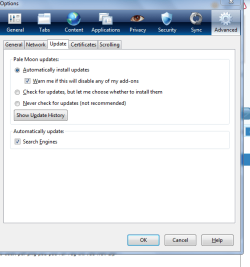
firefox

Change the options here

Roy.
 

Attachments

  • ffup.PNG
    ffup.PNG
    20.1 KB · Views: 16

My Computer My Computer

At a glance

W7 home premium 32bit/W7HP 64bit/w10 tp insid...E5300 dual core3gbNvidia Geforce 7100 Nforce 630i
Computer type
PC/Desktop
Computer Manufacturer/Model Number
medionl/Aspire 6930G/acer x55a
OS
W7 home premium 32bit/W7HP 64bit/w10 tp insider ring
CPU
E5300 dual core
Motherboard
medion MS7366
Memory
3gb
Graphics Card(s)
Nvidia Geforce 7100 Nforce 630i
Monitor(s) Displays
avixc
Internet Speed
n (isp resticted to 72)
Antivirus
mse/pands
Browser
palemoon
Other Info
Belkin Fd7050 n USB using Railink RT2870 drivers, more upto date
Change the options here

Roy.

Yes I've done that and it works unless firefox crashes. Sometimes when firefox crashes it loses all such settings and downloads and installs the newer version without prior notice. (Defaults back to auto update)

I found a setting in about:config, can't remember exactly what it was, something to do with the update download path, that has worked for about the last 6 months. Changed from 1 to 0.
 

My Computer My Computer

At a glance

W7 x64Intel i7 582064gbmsi r9 390
Computer type
PC/Desktop
Computer Manufacturer/Model Number
Custom build
OS
W7 x64
CPU
Intel i7 5820
Motherboard
msi x99a xpowerac
Memory
64gb
Graphics Card(s)
msi r9 390
Hard Drives
Multiple
System on Samsung 500gb m.2 ssd
Antivirus
avast internet security pro
Browser
firefox 28
Here's a fun article I came across today that confirms what I saw happening on my computer.
4 Awful Secrets No One Is Telling You About Windows 10 | Cracked.com

Of note: The only way I was able to stop this was by disabling ipv6 on the network and on my computer.

Ipv6 connections are far better hidden than ipv4 ones. By default in windows there are a whole lot of commands and software that will allow any computer illiterate user to get a list of the ipv4 ip addresses of all the devices on their network.

ie... You can go to almost any consumer grade router interface and quickly get a list of Ipv4 connected devices.

Ipv6 devices do not show up in such lists.

The update process I finally managed to stop yesterday managed to put 950mb of updates onto my machine (with all update settings set to off) while only generating 82mb of internet traffic on the network. This 82mb was not related to the update so the 950mb had to come from another machine on the local network.

I can't say for certain because I currently don't monitor local network traffic but will take a somewhat educated guess that most current consumer grade network monitoring software won't show you ipv6 traffic.

***************************************************************
Added to correct an error in the statement above. Besides the monitoring functionality of my router I use a utility called "DU meter" to realtime monitor traffic to and from my computer graphically in a small window on my monitors. DUM can be, and is set on my computer, to monitor internet and local traffic separately. The way I spotted what was happening was by seeing a barely visible, at the bottom of the graph, stream of constant downloading. To display this Du Meter had to be seeing the traffic.

All the computers on my network have an ipv4 connection so the data could possibly have been transferred through that address space.

At the time I confirmed there was Ipv6 traffic going on that conformed with the volume of traffic I was seeing. The data stream didn't stop until I turned off ipv6 functionality which to me suggests that ipv6 is active in the background even while ipv4 is being used in the foreground and ipv6 has functionality built into it capable of initiating and sustaining data streams that are far less likely to be spotted than ipv4 traffic.
************************************************


From what I've read up on and experienced about ipv6 so far I assume Ipv6 functionality is another step towards obscuring what is going on on people's computers to the point that the general public has no idea about the state of their privacy.
 
Last edited:

My Computer My Computer

At a glance

W7 x64Intel i7 582064gbmsi r9 390
Computer type
PC/Desktop
Computer Manufacturer/Model Number
Custom build
OS
W7 x64
CPU
Intel i7 5820
Motherboard
msi x99a xpowerac
Memory
64gb
Graphics Card(s)
msi r9 390
Hard Drives
Multiple
System on Samsung 500gb m.2 ssd
Antivirus
avast internet security pro
Browser
firefox 28
Back
Top