
Hi all,
As the title says, I am not able to preform Windows Update.
So a little bit of background. Over the week I purchased a new 500GB SSD as my old 120GB SSD had reached it's capacity.
I threw in the new SSD and installed Windows 7 SP1 64bit via a legit DVD + key I purchased last year. Installation went smoothly, and I followed with install my mobo drivers, graphics card drivers, and Google Chrome.
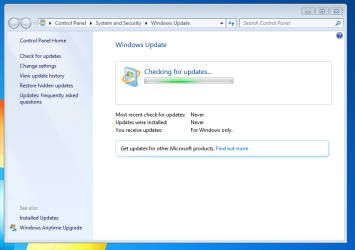
Next step was to update Windows, so I launched Windows Updater and clicked check for updates. From there it never stopped checking. I left it alone for 20 min and nothing.
So I decided to consult with the internet. I tried Microsoft's own Fix It tool, and the results told me that there was an error code 0x8024402c.
I did more googling, and found a fix that was working for some people that involved the LAN settings in IE and running the net stop/start wuauserv command. Still nothing.
Eventually my computer told me there were some updates ready to be installed. I was a bit confused, but I shut of my computer to allow the install to start. It took almost an hour to shut down. Then I powered back on and the configuration of the updates started. It stayed at 0% for a long time and then finally failed and reverted back, which also took a ton of time. I gave up and went to bed.
Today I formatted the SSD and started over. Installed W7, drivers, chrome, went to start updates, and still nothing.
I actually just got a message from the action center now saying I have updates ready to install, just like yesterday, so I'm not even going to bother.
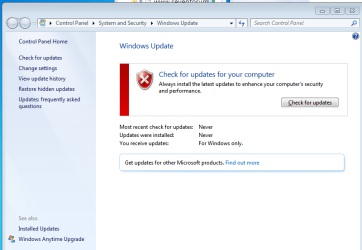
Any help would be appropriated! Here's my system specs and a screen shot of my windows update.
Specs:
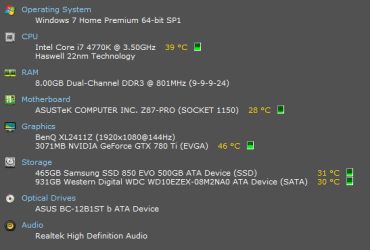
Windows Update:
Windows Update taking it's sweet time:
I'm having issues uploading the CBS file. I think it has to do with the file being 10MB. Any tips on what to do?
I split the CBS folder into two folders to allow for uploading:
View attachment 376694
View attachment 376695
Thanks!
Here's the MGADIAG report:
As the title says, I am not able to preform Windows Update.
So a little bit of background. Over the week I purchased a new 500GB SSD as my old 120GB SSD had reached it's capacity.
I threw in the new SSD and installed Windows 7 SP1 64bit via a legit DVD + key I purchased last year. Installation went smoothly, and I followed with install my mobo drivers, graphics card drivers, and Google Chrome.
Next step was to update Windows, so I launched Windows Updater and clicked check for updates. From there it never stopped checking. I left it alone for 20 min and nothing.
So I decided to consult with the internet. I tried Microsoft's own Fix It tool, and the results told me that there was an error code 0x8024402c.
I did more googling, and found a fix that was working for some people that involved the LAN settings in IE and running the net stop/start wuauserv command. Still nothing.
Eventually my computer told me there were some updates ready to be installed. I was a bit confused, but I shut of my computer to allow the install to start. It took almost an hour to shut down. Then I powered back on and the configuration of the updates started. It stayed at 0% for a long time and then finally failed and reverted back, which also took a ton of time. I gave up and went to bed.
Today I formatted the SSD and started over. Installed W7, drivers, chrome, went to start updates, and still nothing.
I actually just got a message from the action center now saying I have updates ready to install, just like yesterday, so I'm not even going to bother.
Any help would be appropriated! Here's my system specs and a screen shot of my windows update.
Specs:
Windows Update:
Windows Update taking it's sweet time:
I split the CBS folder into two folders to allow for uploading:
View attachment 376694
View attachment 376695
Thanks!
Here's the MGADIAG report:
Code:
Diagnostic Report (1.9.0027.0):
-----------------------------------------
Windows Validation Data-->

Validation Code: 0
Cached Online Validation Code: N/A, hr = 0xc004f012
Windows Product Key: *****-*****-6B2TJ-VPGDX-PYQTF
Windows Product Key Hash: CWJHxd4bTCtuBiJAzpntY+5afWw=
Windows Product ID: 00359-892-2365606-85803
Windows Product ID Type: 5
Windows License Type: Retail
Windows OS version: 6.1.7601.2.00010300.1.0.003
ID: {CAAB9526-6648-4677-80C2-15635501BF59}(1)
Is Admin: Yes
TestCab: 0x0
LegitcheckControl ActiveX: N/A, hr = 0x80070002
Signed By: N/A, hr = 0x80070002
Product Name: Windows 7 Home Premium
Architecture: 0x00000009
Build lab: 7601.win7sp1_rtm.101119-1850
TTS Error:
Validation Diagnostic:
Resolution Status: N/A

Vista WgaER Data-->
ThreatID(s): N/A, hr = 0x80070002
Version: N/A, hr = 0x80070002

Windows XP Notifications Data-->
Cached Result: N/A, hr = 0x80070002
File Exists: No
Version: N/A, hr = 0x80070002
WgaTray.exe Signed By: N/A, hr = 0x80070002
WgaLogon.dll Signed By: N/A, hr = 0x80070002

OGA Notifications Data-->
Cached Result: N/A, hr = 0x80070002
Version: N/A, hr = 0x80070002
OGAExec.exe Signed By: N/A, hr = 0x80070002
OGAAddin.dll Signed By: N/A, hr = 0x80070002

OGA Data-->
Office Status: 109 N/A
OGA Version: N/A, 0x80070002
Signed By: N/A, hr = 0x80070002
Office Diagnostics: 025D1FF3-364-80041010_025D1FF3-229-80041010_025D1FF3-230-1_025D1FF3-517-80040154_025D1FF3-237-80040154_025D1FF3-238-2_025D1FF3-244-80070002_025D1FF3-258-3

Browser Data-->
Proxy settings: N/A
User Agent: Mozilla/4.0 (compatible; MSIE 8.0; Win32)
Default Browser: C:\Program Files (x86)\Google\Chrome\Application\chrome.exe
Download signed ActiveX controls: Prompt
Download unsigned ActiveX controls: Disabled
Run ActiveX controls and plug-ins: Allowed
Initialize and script ActiveX controls not marked as safe: Disabled
Allow scripting of Internet Explorer Webbrowser control: Disabled
Active scripting: Allowed
Script ActiveX controls marked as safe for scripting: Allowed

File Scan Data-->
File Mismatch: C:\Windows\system32\wat\watadminsvc.exe[Hr = 0x80070003]
File Mismatch: C:\Windows\system32\wat\npwatweb.dll[Hr = 0x80070003]
File Mismatch: C:\Windows\system32\wat\watux.exe[Hr = 0x80070003]
File Mismatch: C:\Windows\system32\wat\watweb.dll[Hr = 0x80070003]

Other data-->
Office Details: <GenuineResults><MachineData><UGUID>{CAAB9526-6648-4677-80C2-15635501BF59}</UGUID><Version>1.9.0027.0</Version><OS>6.1.7601.2.00010300.1.0.003</OS><Architecture>x64</Architecture><PKey>*****-*****-*****-*****-PYQTF</PKey><PID>00359-892-2365606-85803</PID><PIDType>5</PIDType><SID>S-1-5-21-3574657376-820430976-874773081</SID><SYSTEM><Manufacturer>ASUS</Manufacturer><Model>All Series</Model></SYSTEM><BIOS><Manufacturer>American Megatrends Inc.</Manufacturer><Version>1602</Version><SMBIOSVersion major="2" minor="7"/><Date>20131029000000.000000+000</Date></BIOS><HWID>6FD73107018400F4</HWID><UserLCID>0409</UserLCID><SystemLCID>0409</SystemLCID><TimeZone>Central Standard Time(GMT-06:00)</TimeZone><iJoin>0</iJoin><SBID><stat>3</stat><msppid></msppid><name></name><model></model></SBID><OEM/><GANotification/></MachineData><Software><Office><Result>109</Result><Products/><Applications/></Office></Software></GenuineResults>

Spsys.log Content: 0x80070002

Licensing Data-->
Software licensing service version: 6.1.7601.17514

Name: Windows(R) 7, HomePremium edition
Description: Windows Operating System - Windows(R) 7, RETAIL channel
Activation ID: 2e7d060d-4714-40f2-9896-1e4f15b612ad
Application ID: 55c92734-d682-4d71-983e-d6ec3f16059f
Extended PID: 00359-00170-892-236560-00-1033-7601.0000-3282015
Installation ID: 021075621650593651287752540914393703994842862184217912
Processor Certificate URL: http://go.microsoft.com/fwlink/?LinkID=88338
Machine Certificate URL: http://go.microsoft.com/fwlink/?LinkID=88339
Use License URL: http://go.microsoft.com/fwlink/?LinkID=88341
Product Key Certificate URL: http://go.microsoft.com/fwlink/?LinkID=88340
Partial Product Key: PYQTF
License Status: Licensed
Remaining Windows rearm count: 3
Trusted time: 11/24/2015 2:44:23 PM

Windows Activation Technologies-->
HrOffline: 0x00000000
HrOnline: N/A
HealthStatus: 0x0000000000000000
Event Time Stamp: N/A
ActiveX: Not Registered - 0x80040154
Admin Service: Not Registered - 0x80040154
HealthStatus Bitmask Output:


HWID Data-->
HWID Hash Current: NgAAAAEABAABAAEAAAACAAAAAwABAAEAln2iBdxadMTassIb3BiEnUStrIKchAbXgl0gZsj2

OEM Activation 1.0 Data-->
N/A

OEM Activation 2.0 Data-->
BIOS valid for OA 2.0: yes, but no SLIC table
Windows marker version: N/A
OEMID and OEMTableID Consistent: N/A
BIOS Information:
  ACPI Table Name	OEMID Value	OEMTableID Value
  APIC			ALASKA		A M I
  FACP			ALASKA		A M I
  HPET			ALASKA		A M I
  MCFG			ALASKA		A M I
  FPDT			ALASKA		A M I
  LPIT			ALASKA		A M I
  SSDT			PmRef		Cpu0Ist
  SSDT			PmRef		Cpu0Ist
  SSDT			PmRef		Cpu0Ist
  SSDT			PmRef		Cpu0Ist
  BGRT			ALASKA		A M I
Last edited:
My Computer
At a glance
Windows 7 Home Premium 64-bit SP1Intel Core i7 4770K @ 3.50GHz8.00GB Dual-Channel DDR3 @ 801MHz (9-9-9-24)3071MB NVIDIA GeForce GTX 780 Ti (EVGA)
- Computer type
- PC/Desktop
- Computer Manufacturer/Model Number
- Custom
- OS
- Windows 7 Home Premium 64-bit SP1
- CPU
- Intel Core i7 4770K @ 3.50GHz
- Motherboard
- ASUSTeK COMPUTER INC. Z87-PRO (SOCKET 1150)
- Memory
- 8.00GB Dual-Channel DDR3 @ 801MHz (9-9-9-24)
- Graphics Card(s)
- 3071MB NVIDIA GeForce GTX 780 Ti (EVGA)
- Hard Drives
- 465GB Samsung SSD 850 EVO 500GB ATA Device (SSD) 31 °C
931GB Western Digital WDC WD10EZEX-08M2NA0 ATA Device (SATA) 31
- Antivirus
- AVG Free
- Browser
- Google Chrome


