|
|
|
|||||||||||||||||||||||||||||||||||||||||||||||||||||||||||||||||||||||||||||||||||||||||||||||||||||
| 16 Sep 2016 | #1 |
|
|
Win 7 Updates Stuck on Downloading % For Three Days!!
Hi Everyone....
I have been struggling thru this Win 7 update hassle on my two Dell PCs both running Win 7 , 64 bit, SP1, Windows firewall, and Avast Free. In the past, updates just took a while, but eventually, they went thru OK. Suddenly, after this week's updates, one of my PCs got stuck at 0% downloading 5 selected updates since Tuesday. The other PC updated properly with no problem. I have left the system on for hours on end, but it is still 0%. Any help or advise would be greatly appreciated. Thanks! |
| My System Specs |
| . |
|
|
| 17 Sep 2016 | #2 |
|
|
Hi Everyone....
I have been struggling thru this Win 7 update hassle on my two Dell PCs both running Win 7 , 64 bit, SP1, Windows firewall, and Avast Free. In the past, updates just took a while, but eventually, they went thru OK. Suddenly, after this week's updates, one of my PCs got stuck at 0% downloading 5 selected updates since Tuesday. The other PC updated properly with no problem. I have left the system on for hours on end, but it is still 0%. Any help or advise would be greatly appreciated. Thanks! |
| My System Specs |
| 17 Sep 2016 | #3 |
|
|
Thanks, Guys.
|
| My System Specs |
| . |
|
|
| 18 Sep 2016 | #4 |
|
|
I have exactly the same problem with 13 of the recent updates. I have trawled the net and tried a fix for update problems that I found somewhere but it didn't work and I really can't waste any more time on this.
|
| My System Specs |
| 18 Sep 2016 | #5 |
|
|
Thank you Judesman for being the only one on this forum to acknowledge and reply to my post.
I did the same as you, and just as you, have no more time to waste on this. |
| My System Specs |
| 18 Sep 2016 | #6 |
|
Windows 7 Pro 64-Bit, Windows 7 Ultimate 64-Bit, Windows 8.1 Pro 64-Bit
|
Sniggler, this has worked on all my systems and every VM I've tested over the last couple of months:
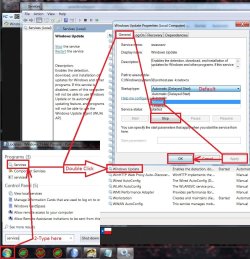
Try this: Download the April 2015 servicing stack update https://support.microsoft.com/en-gb/kb/3020369 Also download the July 2016 update rollup https://support.microsoft.com/en-gb/kb/3172605 Disconnect your internet connection. Open Windows Update, select 'Change settings' and change it to "Never check for updates". Click 'OK' to exit out of Control Panel. Open the start menu and type services.msc in the search bar. Scroll down to the Windows Update service -> right click -> select Properties. Change startup type to 'manual' and stop the service. Click 'OK'. Reboot the PC. Install the April 2015 servicing stack update (KB3020369). Install the July 2016 update rollup (KB3172605). Reboot the PC again once installed. Go back into Services and change Windows Update service back to 'Automatic (delayed start)' and then restart the service. Reconnect your internet. Open Windows Update and select 'Check for updates but let me choose'. Click 'OK'. Check for updates and it should hopefully pick them up within 5 - 10 minutes (depending on your connection). |
| My System Specs |
| 18 Sep 2016 | #7 |
|
|
Thank you for this. I will have to wait until I have a bit of time to go through all of this, I am not much of a techy but I am sure it will be pretty straightforward once I get into it.
|
| My System Specs |
| 18 Sep 2016 | #8 |
|
|
Sniggler, this has worked on all my systems and every VM I've tested over the last couple of months:
Try this: Download the April 2015 servicing stack update https://support.microsoft.com/en-gb/kb/3020369 Also download the July 2016 update rollup https://support.microsoft.com/en-gb/kb/3172605 Disconnect your internet connection. Open Windows Update, select 'Change settings' and change it to "Never check for updates". Click 'OK' to exit out of Control Panel. Open the start menu and type services.msc in the search bar. Scroll down to the Windows Update service -> right click -> select Properties. Change startup type to 'manual' and stop the service. Click 'OK'. Reboot the PC. Install the April 2015 servicing stack update (KB3020369). Install the July 2016 update rollup (KB3172605). Reboot the PC again once installed. Go back into Services and change Windows Update service back to 'Automatic (delayed start)' and then restart the service. Reconnect your internet. Open Windows Update and select 'Check for updates but let me choose'. Click 'OK'. Check for updates and it should hopefully pick them up within 5 - 10 minutes (depending on your connection). Your instructions are (I think) the only, step-by-step, foolproof method. I've seen countless mentions of 3020369 and 3172605, but somehow managed to miss a critical step getting them properly installed. I just ran your fix on my Win7/64 laptop (after waiting nearly 3 hours for "checking for updates" yesterday). Start to finish, including the 12 available patches, just now: about 20 minutes. Bless You! I now have to implement this procedure on my Win7/64 desktop. I did manage to get the September patches in yesterday, but it took > 2 hours, when it might have taken a few minutes. So, for the OP and @Judesman, each computer is unique and YMMV, but this procedure worked like a charm for me. Cheers, MM |
| My System Specs |
| 18 Sep 2016 | #9 |
|
Windows 7 Pro 64-Bit, Windows 7 Ultimate 64-Bit, Windows 8.1 Pro 64-Bit
|
No problem MM. My manual update checks only take between 20-60 seconds to complete now. Haven't had any update issues since installing those updates. And that's running 3 systems and 4 different VM's.
|
| My System Specs |
| 18 Sep 2016 | #10 |
|
|
Sniggler, this has worked on all my systems and every VM I've tested over the last couple of months:
Try this: Download the April 2015 servicing stack update https://support.microsoft.com/en-gb/kb/3020369 Also download the July 2016 update rollup https://support.microsoft.com/en-gb/kb/3172605 Disconnect your internet connection. Open Windows Update, select 'Change settings' and change it to "Never check for updates". Click 'OK' to exit out of Control Panel. Open the start menu and type services.msc in the search bar. Scroll down to the Windows Update service -> right click -> select Properties. Change startup type to 'manual' and stop the service. Click 'OK'. Reboot the PC. Install the April 2015 servicing stack update (KB3020369). Install the July 2016 update rollup (KB3172605). Reboot the PC again once installed. Go back into Services and change Windows Update service back to 'Automatic (delayed start)' and then restart the service. Reconnect your internet. Open Windows Update and select 'Check for updates but let me choose'. Click 'OK'. Check for updates and it should hopefully pick them up within 5 - 10 minutes (depending on your connection). I now have some friends who are casual users - not techies - experiencing the same thing. Endless checking. I can only think that MS will have to do something about this soon since so many people are affected. |
| My System Specs |
| Similar help and support threads | ||||
| Thread | Forum | |||
|
Windows updates stuck checking for updates for hours I installed windows 7 yesterday but windows update is now stuck on checking for updates all the time. Doesn't download or install any updates That said i looked up and tried a lot of solutions/fixes online but no luck, nothing worked. Any help is much appreciated. I don't wanna upgrade to... |
Windows Updates & Activation | |||
|
Downloading updates stuck at 0% Hey So had to format my system yesterday,it usually takes around 2-3 hours for WU on"Checking for Updates" but this time it toke more than 12 hours to find them,when checked to start downloading them it wont download,it's been an hour now just " Downloading 246 updates(0 KB total,0% Complete)"... |
Windows Updates & Activation | |||
|
Latest windows updates stuck on downloading at 0% This has never happened before but I can't download the latest batch of updates! I've tried downloading one at a time but it makes no difference, just stuck on downloading 0%. I've tried to go into services.msc to switch off windows updates but it says 'stopping' with the options to... |
Windows Updates & Activation | |||
|
Another thread about Windows Update stuck at Downloading 0% I have spent many days trying to get a handle about what is the behavior of Windows Update process when it hangs Downloading at 0%. I have looked through many of the threads on this problem to see if there is a pattern to the failures or a solution that works for many people. Even though it is... |
Windows Updates & Activation | |||
|
Windows 7 Updates-Checking and Downloading stuck at 0% This issue started this past Saturday (Dec 12, 2015) Per Windows Update Posting instructions: 1. Downloaded SURT. When first tried to download SURT on Saturday, it would not download. But, when tried again yesterday (Sun, Dec 13) - it was successful. However, although it said the installation of... |
Windows Updates & Activation | |||
|
Randomly BSOD while downloading. (6 BSODs in 2 days) hello, I've MSI GT70-20D originally comes with windows 8 x64, I've upgraded to windows 8.1 and had the same random BSOD's. I went to MSI site to see how to install windows 7 x64 & I did find the official drivers for windows 7 x64. installed windows 7 x64 with no problems, games run much better on... |
BSOD Help and Support | |||
| Our Sites |
Site Links |
About Us |
Find Us |
|
Windows 7 Forums is an independent web site and has not been authorized,
sponsored, or otherwise approved by Microsoft Corporation.
"Windows 7" and related materials are trademarks of Microsoft Corp.
© Designer Media Ltd All times are GMT -5. The time now is 19:14. |
|