Solved Cannot get these four updates to install from frsh install

Alloneword

New member
Member
Local time
4:57 PM
Messages
80
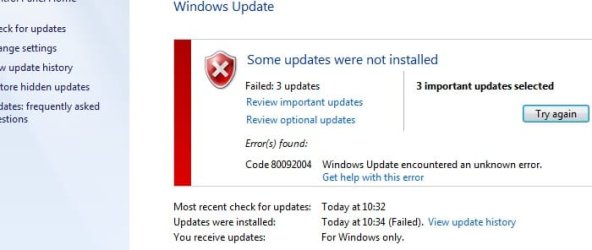
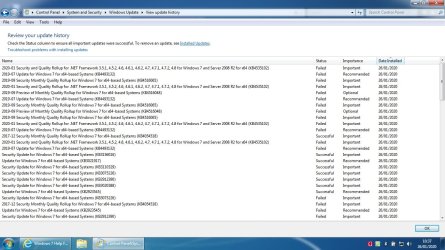
It's a fresh install of well hopefully all updates but these 4 will not install no matter what, I have tried doing them one at a time but everyone fails even on its own


It comes up with error message as you can see below, any advice is welcome apart from move to win 10


All1
 

Attachments

  • Important.jpg
    Important.jpg
    47 KB · Views: 1
  • Not so.jpg
    Not so.jpg
    30.8 KB · Views: 0
  • Error.jpg
    Error.jpg
    55.8 KB · Views: 21
  • History.jpg
    History.jpg
    350.8 KB · Views: 2

My Computer

Computer Manufacturer/Model Number
Home Brew
OS
Windows 7 64bit Ultimate (Retail)
CPU
Intel Core 2 Duo 8400 @ 3Ghz
Motherboard
Asus P5E3 Premium
Memory
8GB DDR3 @ 1333
Graphics Card(s)
ATI 1GB 4350 (Passive)
Sound Card
Creative Audigy 2 ZS
Monitor(s) Displays
BenQ G2420HDBL (Digital) [24" LCD]
Screen Resolution
1920x1080
Hard Drives
Floppy Drive (Still come in handy sometimes)
WDC WD6400AAKS-22A7B0 (596 GB)
WDC WD7501AALS-00J7B0 (698 GB)
WDC WD1002FAEX-00Y9A0 (931 GB)
SAMSUNG HD204UI (2000 GB)
SAMSUNG HD204UI (
PSU
Corsair HX 750W ATX Modular
Case
Antec SX-1030
Cooling
Can't remember
Keyboard
Airkey Wireless
Mouse
MS Intellimouse Explorer 2.0
Internet Speed
about 5 mbits
Well for some weird reason i was doing some digging and ended up HERE so i thought i'd give this Simplix updatepack a go and low and behold it worked, so i went all the way back via an image to the "convenience rollup for windows 7 sp1" and then used this Simplix updatepack and then tried windows update again and this time i loaded everything fine, so now idea what the issue was but it's resolved with the help of Simplix updatepack and of course SIW2 for suggesting it.


All1

https://www.sevenforums.com/windows-updates-activation/422162-there-easier-way-install-win-7-a.html
 

My Computer

Computer Manufacturer/Model Number
Home Brew
OS
Windows 7 64bit Ultimate (Retail)
CPU
Intel Core 2 Duo 8400 @ 3Ghz
Motherboard
Asus P5E3 Premium
Memory
8GB DDR3 @ 1333
Graphics Card(s)
ATI 1GB 4350 (Passive)
Sound Card
Creative Audigy 2 ZS
Monitor(s) Displays
BenQ G2420HDBL (Digital) [24" LCD]
Screen Resolution
1920x1080
Hard Drives
Floppy Drive (Still come in handy sometimes)
WDC WD6400AAKS-22A7B0 (596 GB)
WDC WD7501AALS-00J7B0 (698 GB)
WDC WD1002FAEX-00Y9A0 (931 GB)
SAMSUNG HD204UI (2000 GB)
SAMSUNG HD204UI (
PSU
Corsair HX 750W ATX Modular
Case
Antec SX-1030
Cooling
Can't remember
Keyboard
Airkey Wireless
Mouse
MS Intellimouse Explorer 2.0
Internet Speed
about 5 mbits

My Computer

Computer type
Laptop
Computer Manufacturer/Model Number
Compaq Presario V2615
OS
Windows 7 Professional x86
Graphics Card(s)
ATI Radeon Xpress 200
Thank you, I was having an identical problem with the same updates and after installing KB4490628 everything worked perfectly!

you must also install KB4474419 as well (but KB4490628 should be the very first update to be installed before anything else)
 

My Computer

Computer type
PC/Desktop
Computer Manufacturer/Model Number
Dell Inspiron 620
OS
Windows 7 SP1 Home Premium 64bit [x64]
CPU
Intel(R) Core(TM) i5-2310 CPU @ 2.90GHz
Memory
6 GB
Graphics Card(s)
Intel HD Graphics 2000
Sound Card
Conexant CX20641 HD Audio
Hard Drives
Western Digital 1TB (1024GB) WD10EALX-759BA1
Internet Speed
Spectrum Cable Internet up to 100Mbps
Back
Top